Contents
- What is Google’s Universal Cart?
- How Google Universal Cart works
- Why Google Universal Cart matters for marketers
- Product data may become more important to shopping visibility
- Product pages may become proof points, not always starting points
- Reviews and third-party mentions may support product trust
- Performance reporting may get harder to explain
- How marketers can prepare for zero-click commerce
- 1. Audit your product feed quality
- 2. Keep pricing and inventory data synced
- 3. Strengthen product schema and product page content
- 4. Make product comparisons easier
- 5. Build trust beyond your own site
- 6. Review your checkout experience
- 7. Build customer relationships after the first purchase
- 8. Monitor performance before making major changes
- What marketers shouldn’t do yet
- FAQs about Google Universal Cart
- Get your marketing ready for AI-assisted shopping

At a glance: Google Universal Cart
- Google Universal Cart is an AI-powered shopping cart that will let shoppers save, compare, monitor, and buy products across Google Search, Gemini, YouTube, and Gmail.
- For marketers, the biggest implication is that more product comparison and research may happen inside Google before a customer reaches your website.
- To prepare for Universal Cart’s rollout, strengthen the shopping signals you already control: product feeds, pricing, inventory, schema markup, reviews, and checkout.
- Don’t overreact yet. Build a baseline now so you can measure how Universal Cart affects your visibility, conversions, and revenue as rollout expands.
Universal Cart is Google’s new AI-powered shopping cart announced at Google I/O 2026. It will let shoppers add products to their cart while using Google Search, Gemini, YouTube, or Gmail.
From there, the cart can track price drops, notify shoppers of offers, and, when items come back in stock, flag compatibility issues and help users move toward checkout.
For shoppers, the benefit is convenience. They can research, compare, save, and move closer to checkout from one cart.
For marketers, it means your customers may compare and move closer to purchase through Universal Cart before visiting your website. To prepare for this zero-click commerce scenario, ensure your product details are accurate, complete, and consistent wherever Google and your prospects may see them.
Learn more about Google’s Universal Cart, why it matters, and what you should do to prepare for its rollout:
- What is Google Universal Cart?
- How Google Universal Cart works
- Why Google Universal Cart matters for marketers
- How marketers can prepare for zero-click commerce
- What marketers shouldn’t do yet
- FAQs about Google’s Universal Cart
What is Google’s Universal Cart?
Google’s Universal Cart is an AI-powered shopping cart that will let users add products while using Google Search, Gemini, YouTube, and Gmail. Once a shopper adds a product, Universal Cart can:
- Track price drops and price history
- Alert shoppers when an item comes back in stock
- Notify users of merchant offers or payment perks
- Use Gemini to flag compatibility issues or suggest alternatives
Google announced Universal Cart at Google I/O 2026 as part of its push into agentic AI experiences. It will roll out across Search and Gemini this summer, with YouTube and Gmail to follow.
How Google Universal Cart works
Google describes Universal Cart as an intelligent shopping cart that works across merchants and Google services. In simpler terms, it works like a shopping assistant with a cart, helping users compare options, watch for better prices, and decide how to check out.
Universal Cart runs on Google’s Gemini models, so it can get better as new models emerge. According to Google, it can reason through shopping details in the background, such as whether products work together or whether another option better fits the user’s needs.
It also connects to Google Wallet, so it can compare payment perks, loyalty information, and merchant offers, and alert users before they buy.
For checkout, Google uses Universal Commerce Protocol (UCP). UCP is an open standard that helps turn AI shopping interactions into direct purchases across Google AI Mode and Gemini.
Why Google Universal Cart matters for marketers
Universal Cart matters because Google may influence your customers’ buying process before they even visit your website. Today, Google already plays a role in how shoppers find products through various search engine results page (SERP) features.
With Universal Cart, Google may also help shoppers:
- Compare products
- Track deals and price changes
- Check whether an item is back in stock
- Review merchant offers and payment perks
- Move closer to checkout
For marketers, that means zero-click commerce is on the horizon. Your prospects may evaluate your products inside Google before they click through to your site.
To prepare for this scenario, your product details must be accurate, complete, and consistent across product pages, reviews, and checkout paths.
Universal Cart may also change how you measure your website’s conversion and ecommerce performance. If shoppers compare products, review offers, and move toward checkout inside Google, you may see changes in:
- Organic ecommerce traffic
- Product page visits
- Shopping traffic
- Merchant Center performance
- Assisted conversions
- Branded search
- Checkout behavior
- Post-purchase customer engagement
Marketers don’t need to panic. Universal Cart hasn’t fully rolled out yet, and adoption will likely vary by industry, merchant, and shopper behavior.
But it’s worth watching now because Universal Cart could affect four areas marketers already manage:
Let’s go through each one.
Product data may become more important to shopping visibility
Universal Cart gives Google another reason to rely on clear product details. If Google helps shoppers compare items, track offers, and move toward checkout, it needs accurate information about what you sell.
Important information can include:
- Product titles
- Descriptions
- Categories
- Images
- Pricing
- Availability
- Shipping details
- Return policies
- Reviews
- Product attributes, such as size, color, material, model number, or compatibility
For example, a product with complete sizing, color, availability, shipping, and return information gives Google and shoppers more useful details than a vague product listing. A product with outdated prices, missing identifiers, or thin descriptions may create friction in comparison-style shopping experiences.
Pro tip: Keep your product details complete and consistent wherever they appear.
Product pages may become proof points, not always starting points
Product pages still matter, even when users start their shopping journey in Universal Cart. Instead of serving only as the first place shoppers learn about a product, product pages may become validation points that help users confirm whether a product fits their needs.
They also matter when Google sends the shopper to the retailer’s site to complete a purchase.
A strong product page can include:
- Product specs
- Photos and videos
- Customer reviews
- Ratings
- Product comparisons
- FAQs
- Shipping details
- Return policies
- Warranty information
- Compatibility notes
- Use cases
Your website may become less of a first stop and more of a proof point.
For example, a heavy equipment company may not process a $200,000 purchase through a simple online cart, but its product pages still need to explain several details, such as model specs, service areas, or warranty terms. AI-assisted shopping may help buyers compare options earlier, but buyers need to check those details on a vendor’s product page, making them even more important.
Pro tip: Treat your product pages as proof points that help customers confirm, compare, and convert.
Reviews and third-party mentions may support product trust
Reviews and third-party mentions support product trust. That matters because Universal Cart may help prospects compare products before they visit your website.
If your product appears next to your competitors’, buyers need quick reasons to trust yours. Reviews, ratings, product demos, expert mentions, YouTube videos, marketplace feedback, and customer Q&As can convince them to choose your product.
This doesn’t mean Google has confirmed these as Universal Cart ranking factors. It means marketers should treat trust-building as part of product visibility, not just a website conversion tactic.
For example, a prospect comparing running shoes may look at ratings, customer reviews, product videos, and Q&As before clicking through to a brand’s site. Strong third-party proof can help your product stay in the running earlier in the journey.
Pro tip: Build trust where shoppers already compare products. Encourage authentic reviews, keep product claims accurate, and make sure your product videos, listings, and third-party profiles match what buyers see on your website.
Performance reporting may get harder to explain
Universal Cart could make ecommerce reporting less straightforward.
If more shopping activity happens inside Google before a user reaches your website, you may need to explain to management why traffic, product page visits, and conversion paths changed.
Your customer may discover your product through Search, save it in Universal Cart, receive a price-drop alert, watch a YouTube review, and complete checkout later. That path may not look like a simple organic visit that turned into a purchase.
Pro tip: Don’t judge Universal Cart’s impact by one metric. Track whether traffic, product visibility, assisted conversions, checkout behavior, and revenue shift together after rollout.
Meet RevenueCloudFX:
One platform tracking countless metrics and driving stellar results.
How marketers can prepare for zero-click commerce
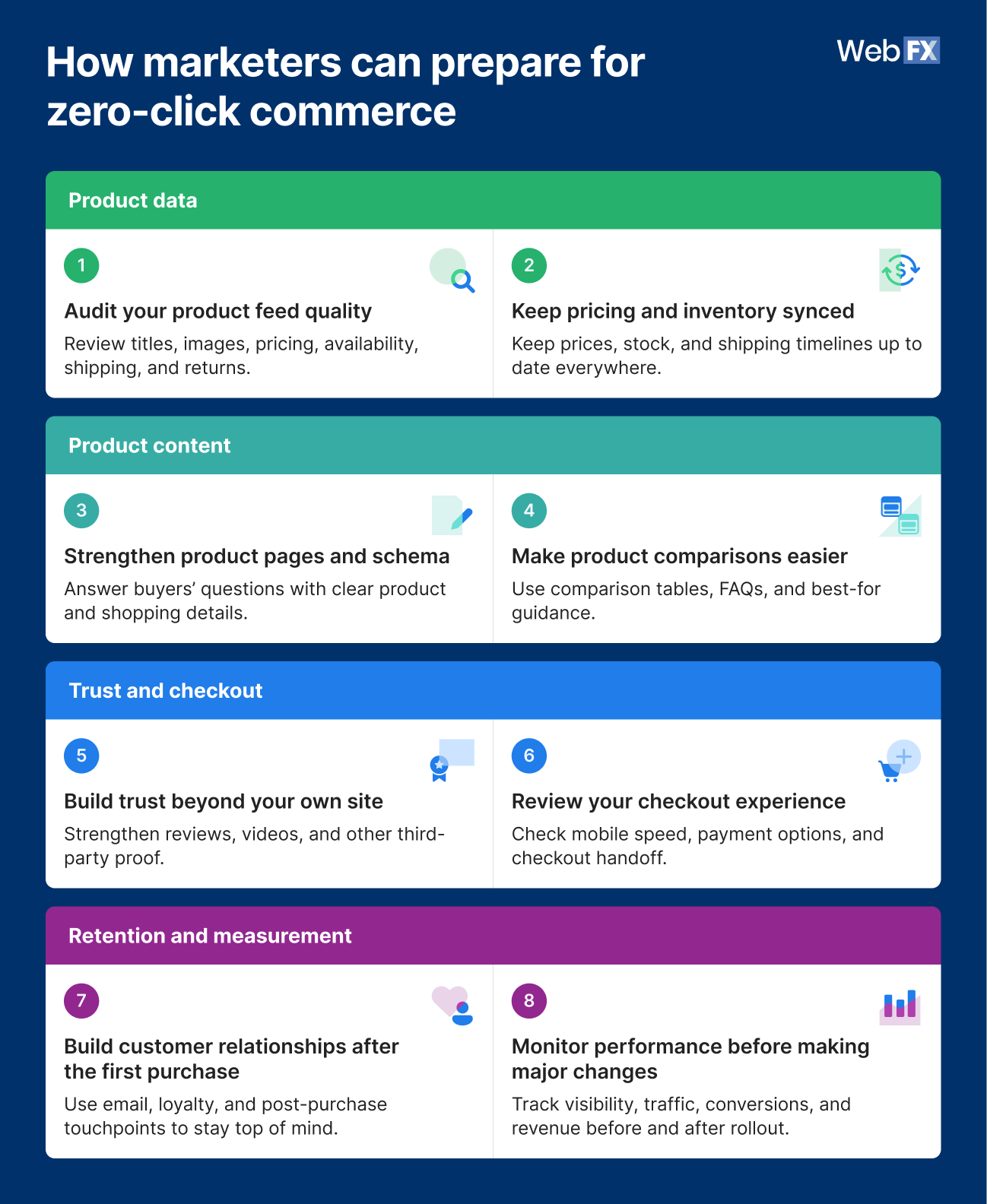
The best way to prepare for Universal Cart is to audit the product and purchase information you already control. Look at the details buyers use to compare your products, the proof they use to trust your brand, the checkout steps they take to buy, and the reporting you use to measure performance.
For now, you don’t need a new “Universal Cart strategy” yet. You just need to make sure Google and your buyers can find accurate, complete, and consistent information wherever they compare your products.
Start with these eight areas:
- Product feeds
- Pricing and inventory
- Product pages
- Product comparisons
- Trust signals
- Checkout experience
- Customer retention
- Performance reporting
Let’s go through each one:
1. Audit your product feed quality
Start with your Google Merchant Center data if your business sells products online, runs Shopping campaigns, or lists products in Google. Your product feed is the file or data source that sends product details to Google.
Review the basics first, such as your:
- Product titles
- Descriptions
- Categories
- Images
- Pricing
- Availability
- Shipping
- Return details
Because Universal Cart can only use the product details Google can access, your product feed and product page must show consistent information. That way, Universal Cart will list the right information.
For businesses without a traditional ecommerce setup, the same idea still applies: Make sure your product details are complete and consistent on your website, in Google listings, and anywhere buyers compare your products.
2. Keep pricing and inventory data synced
Universal Cart can monitor price drops and restocks, so keep your pricing and inventory data up to date. When that information is up to date, shoppers get a smoother path from interest to purchase.
If Google alerts a shopper that a product came back in stock, the product should actually be available when the shopper moves toward checkout. If Universal Cart detects a price drop, the price should match what the shopper sees on your site or checkout path.
Sync product data across Merchant Center, your ecommerce platform, product pages, and ads, paying close attention to:
- Sale pricing
- Inventory status
- Shipping timelines
- Store pickup availability
- Product variants
- Discontinued products
- Out-of-stock items
Accurate pricing and inventory help shoppers act when they’re ready to buy. They also reduce friction at one of the most important points in the purchase journey.
3. Strengthen product schema and product page content
Review product schema where it applies. Product schema is structured data that helps search engines understand product details like price, availability, ratings, and product attributes.
Then, review your product page. Your product page should have the answers to your interested buyers’ questions:
- How much is your product or service?
- What are the inclusions in your service packages?
- How does it compare to similar products or models?
- What do other customers think of your product?
- How can they request a quote or contact your sales team?
For a traditional ecommerce product, your product pages should have clear pricing, availability, reviews, shipping details, and return information.
For service providers or B2B businesses, it may mean service specs, compatibility requirements, service areas, financing options, and quote-request options.
Universal Cart may help buyers compare products before they visit your website. When they do arrive, your product page should confirm the details, answer the next question, and make the next step easy.
4. Make product comparisons easier
Buyers want to know which option fits their needs. Universal Cart may make that comparison process easier inside Google, so your product content should give buyers the details they need to compare quickly.
You can add:
- Comparison tables
- Buying guides
- “Best for” use cases
- Compatibility notes
- FAQs where they help
The goal is simple: Explain who each product is for, what makes your product different, and when a buyer should choose it.
For example, an outdoor equipment brand could add a comparison table for three generators showing wattage, runtime, fuel type, noise level, warranty, and best use case.
This content type helps buyers make a faster, better-informed decision. It also gives Google clearer information to use when comparing your products with similar ones.
5. Build trust beyond your own site
Buyers evaluate brands not only when they visit your website. They also look for social proof elsewhere: on review sites, videos, marketplaces, forums, and other third-party sources.
Reviews, product demos, YouTube videos, press mentions, marketplace ratings, and customer Q&As can help buyers feel more comfortable choosing your product. Keep review collection steady and make sure product claims match the real customer experience.
Trust signals help your brand stand out before buyers reach your website. In a zero-click commerce scenario, that early trust can keep your product in the running while buyers compare options.
6. Review your checkout experience
Universal Cart connects to Google Wallet and Google Pay, and UCP supports direct buying through Google AI experiences. Ensure your checkout experience is seamless.
Look at the steps that affect whether someone can complete a purchase smoothly:
- Google Pay support
- Mobile checkout speed
- Guest checkout options
- Shipping and return information
- Cart handoff from Google to your website
- Error handling
- Payment method options
- Loyalty program visibility
If UCP becomes relevant for your business, watch Google’s documentation and implementation options.
A helpful checkout experience turns product interest into action. If Universal Cart brings buyers closer to purchase before they reach your site, the handoff to checkout should feel fast, clear, and reliable.
7. Build customer relationships after the first purchase
Zero-click commerce may help more shoppers discover more brands and buy through Google-assisted experiences. The challenge is to make your business memorable after your customer’s first purchase, even if it was done off-site.
Think beyond the first transaction. Nurture your relationships with your customers with these ideas:
- Use post-purchase emails or loyalty programs
- Add packaging inserts
- Have account creation flows
- Send reorder reminders
- Provide excellent customer service
- Encourage them to leave a review of your business or product
Your goal is to become the brand customers remember when they need to reorder, compare another option, or buy a related product. They may still use Universal Cart for research, but your brand should already be top of mind.
As a result, you get repeat purchases, reviews, referrals, and customer loyalty, the parts of business growth that don’t depend entirely on a shopping interface.
8. Monitor performance before making major changes
Universal Cart may affect industries differently. Products with frequent price comparisons may see different changes from complex products that require sales support, demos, quotes, or consultations.
Before making major strategy changes, build a baseline. Track the metrics that show how buyers currently find, compare, and purchase your products, such as:
- Merchant Center diagnostics
- Product visibility
- Shopping traffic
- Organic product page traffic
- Branded search
- Conversion rate
- Checkout completion rate
- Revenue by channel
- Assisted conversion patterns
- Returning customer rate
Compare traffic and transaction patterns before and after Universal Cart reaches more Google experiences. Measurement can help you separate actual performance changes from industry noise.
What marketers shouldn’t do yet
Universal Cart deserves attention, but it shouldn’t trigger a budget panic. The feature was announced just recently, and marketers don’t yet have enough data to know how shoppers will use it across categories.
The best response is to prepare your ecommerce foundation while avoiding speculative tactics.
Here’s what marketers should avoid doing:
- Don’t rebuild your ecommerce strategy around a feature that has not fully rolled out. Start with auditing your product feed and pages before making major investments.
- Don’t abandon product-page SEO. Product pages still support organic visibility, AI understanding, shopper trust, and conversion.
- Don’t chase “Universal Cart hacks.” Focus on accurate product data, useful product pages, strong reviews, and a seamless checkout process.
- Don’t separate feed optimization from customer experience. Product data should match what shoppers see on your website and during checkout.
- Don’t ignore the announcement because adoption may take time. Universal Cart signals where AI-assisted shopping may be heading.
FAQs about Google Universal Cart
What is Google Universal Cart?
Google Universal Cart is an AI-powered shopping cart that helps users save, compare, monitor, and buy products across Google products.
With Universal Cart, shoppers can add products while using Search, Gemini, YouTube, and Gmail, and get support for price drops, restocks, compatibility, payment perks, and checkout options.
When will Google Universal Cart roll out?
Google says Universal Cart will roll out across Search and the Gemini app in the summer of 2026, with YouTube and Gmail to follow.
What could Universal Cart change for ecommerce SEO?
Universal Cart could make product feeds, structured product information, inventory accuracy, reviews, and checkout experience more important to ecommerce visibility.
Product pages will still matter, but they may need to support AI-assisted comparison and checkout experiences, not just traditional organic visits.
How should retailers prepare for Universal Cart?
Retailers should start with the controllable basics: Merchant Center, product feeds, product schema, product page quality, reviews, inventory accuracy, pricing accuracy, checkout speed, and measurement.
These steps can support ecommerce performance today while preparing the business for AI-assisted shopping experiences.
Should marketers optimize for Universal Cart now?
Marketers should prepare for Universal Cart, but avoid overinvesting before rollout data becomes clearer.
The safest first step is improving the product data, trust signals, and checkout paths that already support ecommerce performance.
We’re masters of our craft.


300+

9,000+

4,000+

200+

100+
Get your marketing ready for AI-assisted shopping
Google Universal Cart is another sign that AI-assisted shopping is moving from product discovery into product comparison and checkout.
Marketers don’t need to respond with panic. If you need help with staying up to date on the latest Universal Cart updates and creating strategies for your business, consider teaming up with WebFX.
We’ve been helping businesses grow their bottom line as they adapt to industry changes and new channels for over 30 years. When you partner with us, you’ll have a dedicated team that will update you on the latest on Universal Cart and other industry changes, and craft a custom strategy for your business.
Contact us online or call us at 888-601-5359 to speak with a strategist about our AI brand visibility audit services!
-
 Maria is a Lead Content Specialist at WebFX. With nearly two decades of experience in B2B and B2C publishing, marketing, and PR, she has authored hundreds of articles on digital marketing, AI, and SEO to help SMB marketers make informed strategic decisions. Maria has a degree in B.S. Development Communication major in Science Communication, and certifications in inbound marketing, content marketing, Google Analytics, and PR. When she’s not writing, you’ll find her playing with her dogs, running, swimming, or trying to love burpee broad jumps. View full profile
 -

WebFX is a full-service digital marketing agency delivering revenue-driving strategies across online advertising, SEO and AI search optimization, and digital marketing. Backed by 1,100+ client reviews, a 4.9-star rating on Clutch, and proprietary revenue-tracking technology, our team helps businesses grow visibility and revenue across platforms, from Google to ChatGPT to LinkedIn. Discover how our expert team and revenue-accelerating tech can drive results for you. Learn more

Try our free Marketing Calculator
Craft a tailored online marketing strategy! Utilize our free Internet marketing calculator for a custom plan based on your location, reach, timeframe, and budget.
Contents
- What is Google’s Universal Cart?
- How Google Universal Cart works
- Why Google Universal Cart matters for marketers
- Product data may become more important to shopping visibility
- Product pages may become proof points, not always starting points
- Reviews and third-party mentions may support product trust
- Performance reporting may get harder to explain
- How marketers can prepare for zero-click commerce
- 1. Audit your product feed quality
- 2. Keep pricing and inventory data synced
- 3. Strengthen product schema and product page content
- 4. Make product comparisons easier
- 5. Build trust beyond your own site
- 6. Review your checkout experience
- 7. Build customer relationships after the first purchase
- 8. Monitor performance before making major changes
- What marketers shouldn’t do yet
- FAQs about Google Universal Cart
- Get your marketing ready for AI-assisted shopping
Share this article


See AI Marketing in Action
Explore how WebFX helped a regional brand get discovered in AI search experiences — proving what’s possible with today’s AI-driven marketing!

Try our free Marketing Calculator
Craft a tailored online marketing strategy! Utilize our free Internet marketing calculator for a custom plan based on your location, reach, timeframe, and budget.