


Contents
- How to get ROI from Yelp ads
- What does Yelp actually measure?
- How to calculate ROI from Yelp ads
- The five things Yelp’s lead count cannot tell you
- What tracking revealed for one HVAC advertiser
- Where is your Yelp ROI breaking down?
- How to improve ROI from advertising on Yelp
- FAQs about Yelp advertising ROI
- Make Yelp prove what it contributes to revenue
-
How do you get ROI from Yelp ads?
Track every Yelp lead through to a booked customer, calculate what those customers contributed, find the stage where value drops, and fix that stage before increasing spend. Cheaper clicks do not improve Yelp advertising ROI, and more profitable booked jobs do. -
What does Yelp’s dashboard actually measure?
Yelp measures campaign activity on your page rather than booked customers. Its customer leads metric counts nine actions, including mobile calls, messages, website clicks, directions and map views, check-ins, uploaded photos, bookmarks, reservations, and call to action clicks. Yelp is also direct about the limit: “Once a customer logs off, we can’t follow their actions.” -
How do you calculate ROI from Yelp ads?
Two formulas answer different questions. ROAS is attributed Yelp revenue divided by Yelp ad spend. ROI is gross profit attributable to Yelp minus total campaign cost, divided by total campaign cost, times 100, where total campaign cost includes ad spend, paid Yelp upgrades, and any management fees. -
What tracking do you need beyond Yelp’s dashboard?
Closing the gap between platform activity and revenue takes four things:- Call tracking that connects Yelp calls to booked jobs and their value
- Campaign-level URL tagging so website visits and forms report as Yelp
- Campaign spend included in your reporting
- Lead outcomes recorded as qualified or not, booked or not, and job value
-
How do you improve ROI from advertising on Yelp?
Fix attribution first, since you cannot optimize toward revenue you cannot trace. From there, target the services with the best gross profit per job, tighten geographic targeting to where you can serve and close profitably, improve the page people land on after the click, address lead handling, and reallocate budget by cost per booked job rather than lead volume.

TL;DR: How to get ROI from Yelp ads?
- Track every Yelp lead through to a booked customer, then find the stage where value drops
- Yelp’s customer leads metric counts nine actions, including bookmarks, photo uploads, and check-ins
- Yelp cannot follow a customer once they leave the platform, so downstream tracking has to come from you
- Use revenue against ad spend for ROAS, and gross profit against total campaign cost for ROI
- Cost per booked job tells you more than cost per lead ever will
How to get ROI from Yelp ads comes down to tracking what happens after the click. Yelp reports the clicks, calls, and directions your page generates, and your own attribution has to show which of those became paying customers and whether the profit covered what you spent.
That gap is why Yelp advertising ROI is harder to pin down than it looks. Yelp reports substantial lifts in customer leads among advertisers, and it counts bookmarks, photo uploads, and check-ins as customer leads alongside calls and messages.
Let’s break down what Yelp’s dashboard actually measures, how to calculate return on both revenue and profit, and where to look when your lead count looks healthy but your revenue does not.
- How to get ROI from Yelp ads
- What does Yelp actually measure?
- How to calculate ROI from Yelp ads
- The five things Yelp’s lead count cannot tell you
- What tracking revealed for one HVAC advertiser
- Where is your Yelp ROI breaking down?
- How to improve ROI from advertising on Yelp
- FAQs about Yelp advertising ROI
Your Revenue Growth Starts Here
Tell us about your business, and we’ll create a custom plan to grow your traffic, leads, and predictable revenue.
How to get ROI from Yelp ads
Track every Yelp lead through to a booked customer, calculate what those customers contributed, find the stage where value drops, and fix that stage before increasing spend.
That sequence matters because Yelp advertising works through a chain, and each link can break independently:
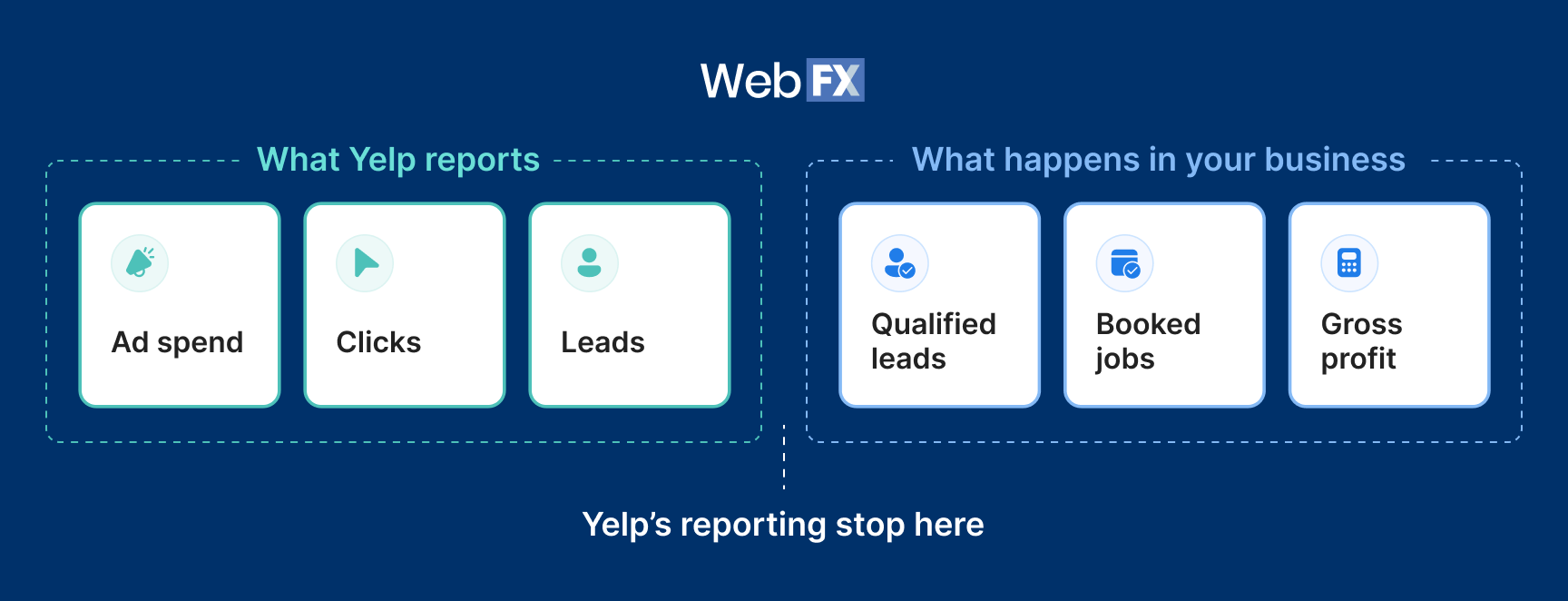
If you measure only the first three links, you have to guess at the rest. Yelp’s dashboard covers spend, clicks, and its own count of leads, which leaves the three stages where money is actually made or lost outside the reporting entirely.
Cheaper clicks do not improve Yelp advertising ROI. More profitable booked jobs do, and you cannot optimize toward those without seeing them.
What does Yelp actually measure?
Yelp measures campaign activity on your page, and that activity is not the same as booked customers.
Start with what Yelp publishes about advertiser performance. The average advertiser sees a 168% monthly lift in customer leads after 12 months of advertising, based on 29,836 US advertisers. Across that study, mobile calls increased 152% and website clicks 113%. Home services advertisers saw a 219% lift in customer leads.
Those are real increases in activity. What they are not is a measure of booked business, and the reason sits in how Yelp defines the metric.
What counts as a customer lead
as customer leads:
- Mobile check-ins
- Mobile calls
- User-uploaded photos
- Call to action clicks
- Directions and map views
- Clicks to your website
- Yelp bookmarks
- Reservations made on Yelp
- Messages from users to your business
Bookmarks and photo uploads contribute to the same total as calls and messages. Someone saving your page for later counts, and so does someone who called and booked a $6,000 install.
Yelp is direct about where its visibility ends. “Once a customer logs off, we can’t follow their actions,” which means every stage between the click and the closed job has to be measured on your side.
What Yelp shows vs. what you need
Yelp’s dashboard answers questions about reach and engagement. An ROI calculation asks questions about money, and those two sets of questions rarely overlap.
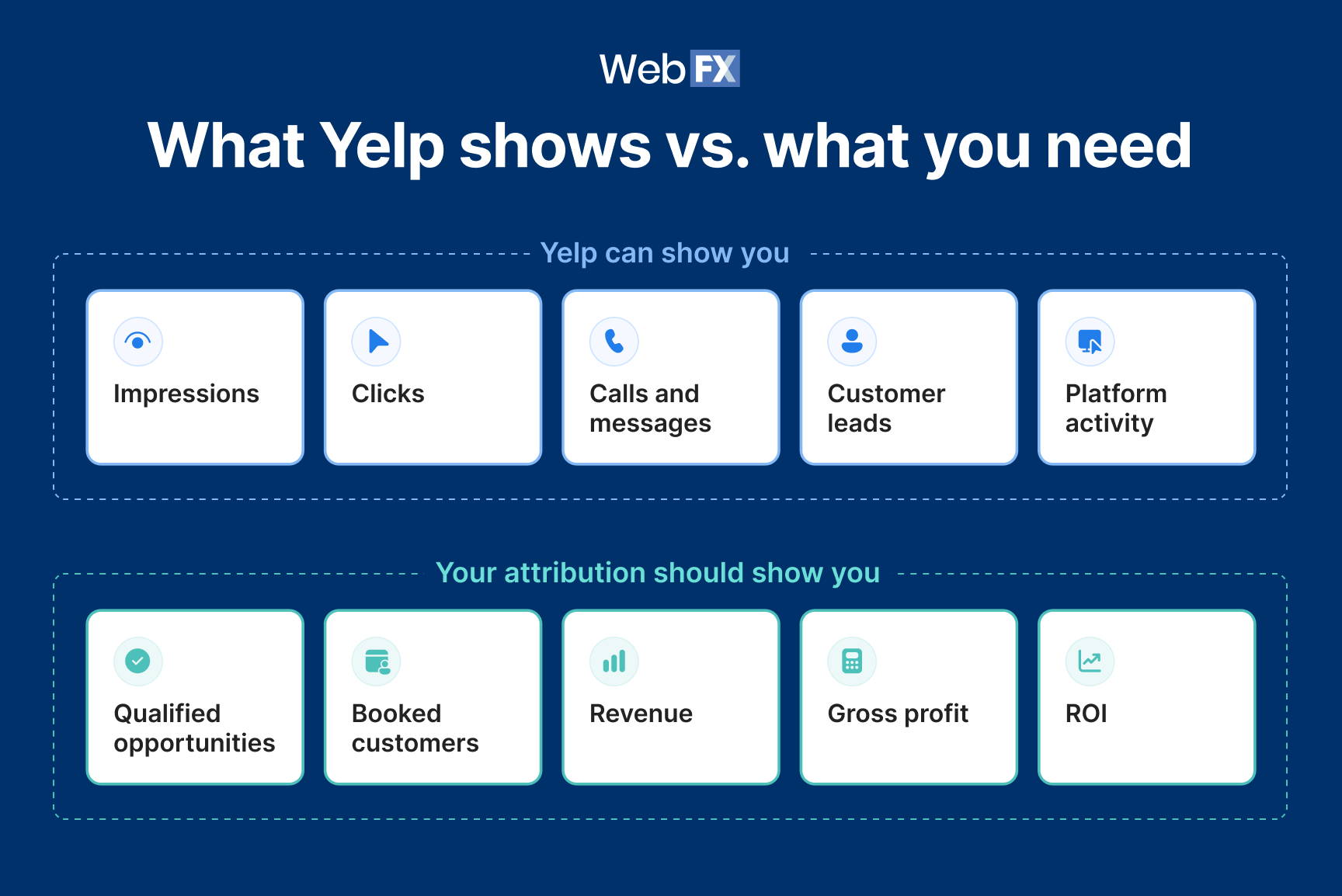
Table view
What Yelp shows vs. what you need
| Yelp can show you | Your attribution should show you |
| Impressions | Qualified opportunities |
| Clicks | Booked customers |
| Calls and messages | Revenue |
| Customer leads | Gross profit |
| Platform activity | ROI |
How to calculate ROI from Yelp ads
Two formulas answer different questions, and mixing them up is why so many Yelp ROI numbers look impressive and mean nothing.
Return on ad spend (ROAS) tells you how much revenue came back for every advertising dollar:
Yelp ROAS = Attributed Yelp revenue ÷ Yelp ad spend
Return on investment (ROI)
tells you whether the campaign made money after the cost of delivering the work:
Yelp ROI = (Gross profit attributable to Yelp – total campaign cost) ÷ total campaign cost × 100
The second one is stricter for two reasons. It uses gross profit instead of revenue, so it accounts for what those jobs cost you to complete. And total campaign cost includes more than ad spend, since a campaign also carries any paid Yelp upgrades it uses and whatever you pay someone to manage it.
A campaign returning $4 in revenue for every $1 of ad spend sounds strong. If those jobs run at a 25% gross margin, the campaign is already at break-even on ad spend alone. Add a management fee, and the true ROI turns negative.
The five numbers worth tracking
Each of these answers a different question, and running all five tells you where in the chain your money is working.
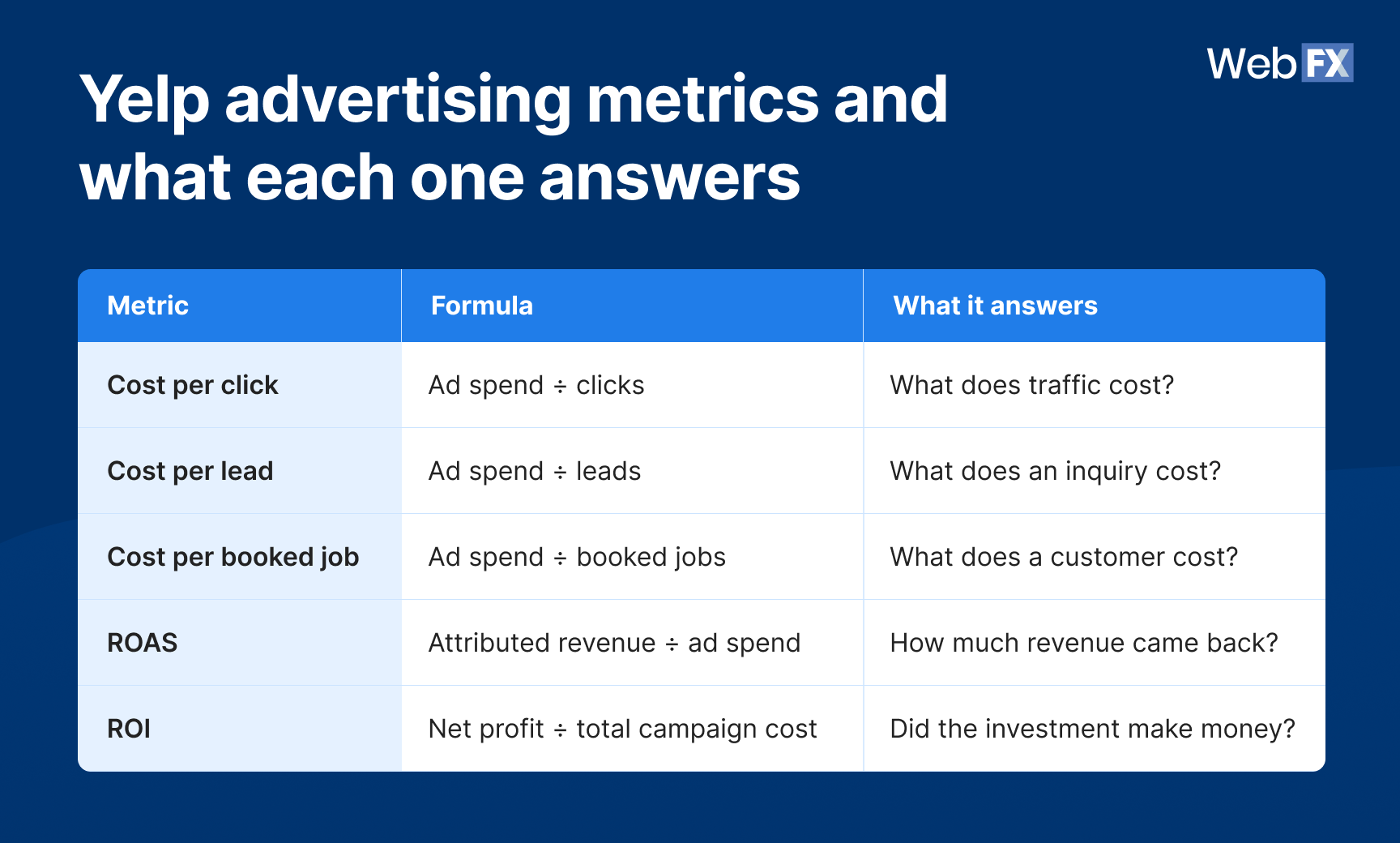
Table view
Yelp advertising metrics and what each one answers
| Metric | Formula | What it answers |
| Cost per click | Ad spend ÷ clicks | What does traffic cost? |
| Cost per lead | Ad spend ÷ leads | What does an inquiry cost? |
| Cost per booked job | Ad spend ÷ booked jobs | What does a customer cost? |
| ROAS | Attributed revenue ÷ ad spend | How much revenue came back? |
| ROI | Net profit ÷ total campaign cost | Did the investment make money? |
Work down that list, and each metric gets closer to the question you actually care about. Cost per click tells you about the auction. Cost per booked job tells you about your business.
The five things Yelp’s lead count cannot tell you
Yelp’s dashboard reports what happened on your page. These five gaps sit between that report and an ROI figure you can act on.
- Whether the activity represented real buying intent: Yelp’s customer leads metric includes bookmarks, photo uploads, and check-ins alongside calls and messages. A month with 60 leads might contain 40 people trying to reach you or 15, and the number alone will not tell you which.
- Which paid and organic Yelp leads produced revenue: Yelp separates ad leads from organic leads, so you can see which came through your campaign. What it cannot show is which of those became customers, or what each source returned once the work closed.
- Whether the lead was qualified: An inquiry only counts if it matches the services you sell, the area you cover, and the kind of customer you want. A call asking about work you do not do still lands in your lead count.
- Whether the lead became a booked customer: The gap between someone calling and someone booking is where most campaign performance is actually decided, and none of it appears in Yelp’s reporting.
- What the customer was worth: Two campaigns can produce the same number of booked jobs and very different revenue. Job value and gross margin live in your books.
What to put in place
Closing these gaps takes four things, and Yelp supplies part of it.
- Call tracking that connects to revenue. Yelp offers free call reporting to advertisers, showing the date, a partial phone number, and the duration of each call. That covers call volume. Connecting a specific call to a booked job and the revenue behind it takes tracking that reaches into your own systems.
- Campaign-level URL tagging. Yelp’s native link tracking feature attributes website actions back to your Yelp Ads campaigns and is available to advertisers with 10 or more locations. If that feature is not available to your business, use your own campaign-level tracking and analytics to connect Yelp website traffic and leads back to the campaign.
- Campaign spend included in your reporting, so you can calculate cost per qualified lead, cost per booked job, ROAS, and ROI against actual Yelp spend.
- Lead outcomes recorded. Qualified or not, booked or not, and what the job was worth. Without this last piece, the other three produce a well-labeled lead count and nothing more.
handles the connection between those pieces, tying call tracking and campaign tagging to the jobs and revenue they produced.
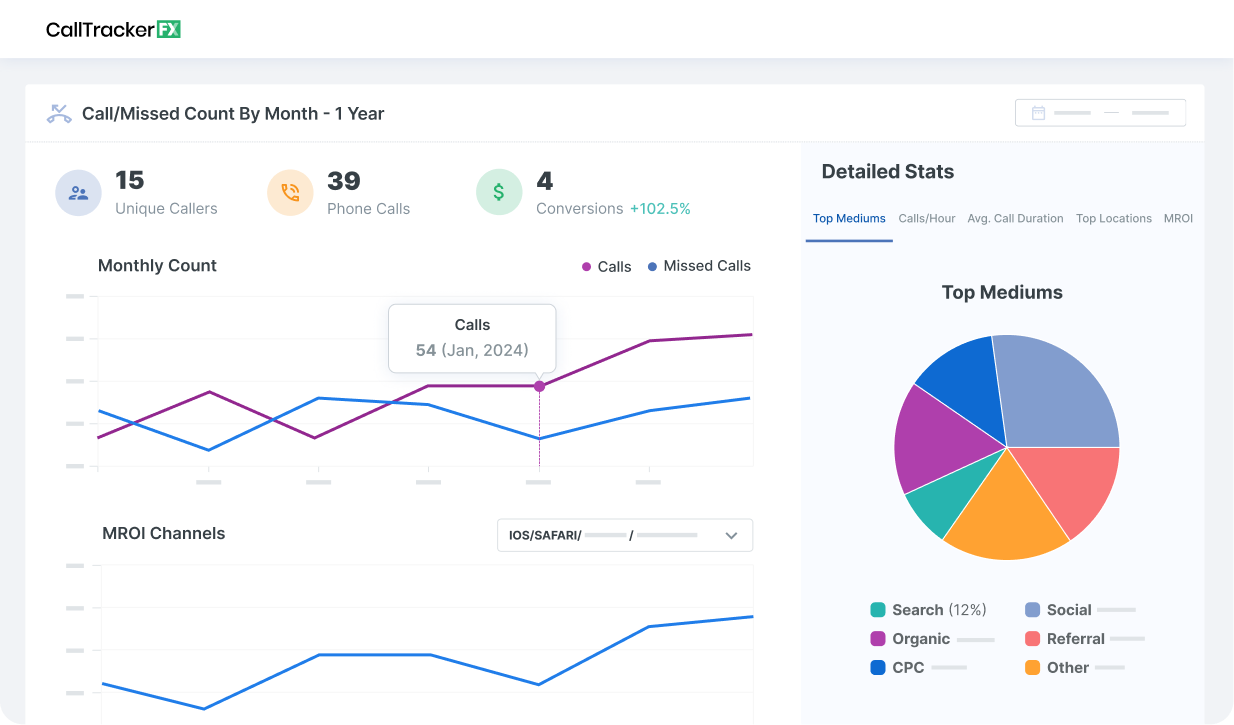
Measuring the metrics that affect your bottom line.
Are you interested in custom reporting that is specific to your unique business needs? Powered by RevenueCloudFX, WebFX creates custom reports based on the metrics that matter most to your company.
- Leads
- Transactions
- Calls
- Revenue

What tracking revealed for one HVAC advertiser
Here is what the full chain looks like when someone measures all six stages instead of the first three.
An HVAC company running Yelp ads through WebFX tracked Yelp-attributed revenue equal to more than 10 times its Yelp Ads spend across the first half of 2026. Yelp Ads directly drove 90% of the jobs attributed to Yelp during that period, with the remainder coming from the company’s organic Yelp listing.
Yelp’s platform metrics alone would not have surfaced that outcome. The dashboard reports activity on the page, and the job attribution and revenue figures come from tracking built outside it.
Keep in mind that the revenue total combines paid and organic Yelp activity, and it reflects one client, one market, and one six-month stretch, which makes it an example of what the measurement produces rather than a benchmark for your category.
Where is your Yelp ROI breaking down?
When the numbers disappoint, the useful question is which stage of the chain leaked. Match what you are seeing against the pattern below.
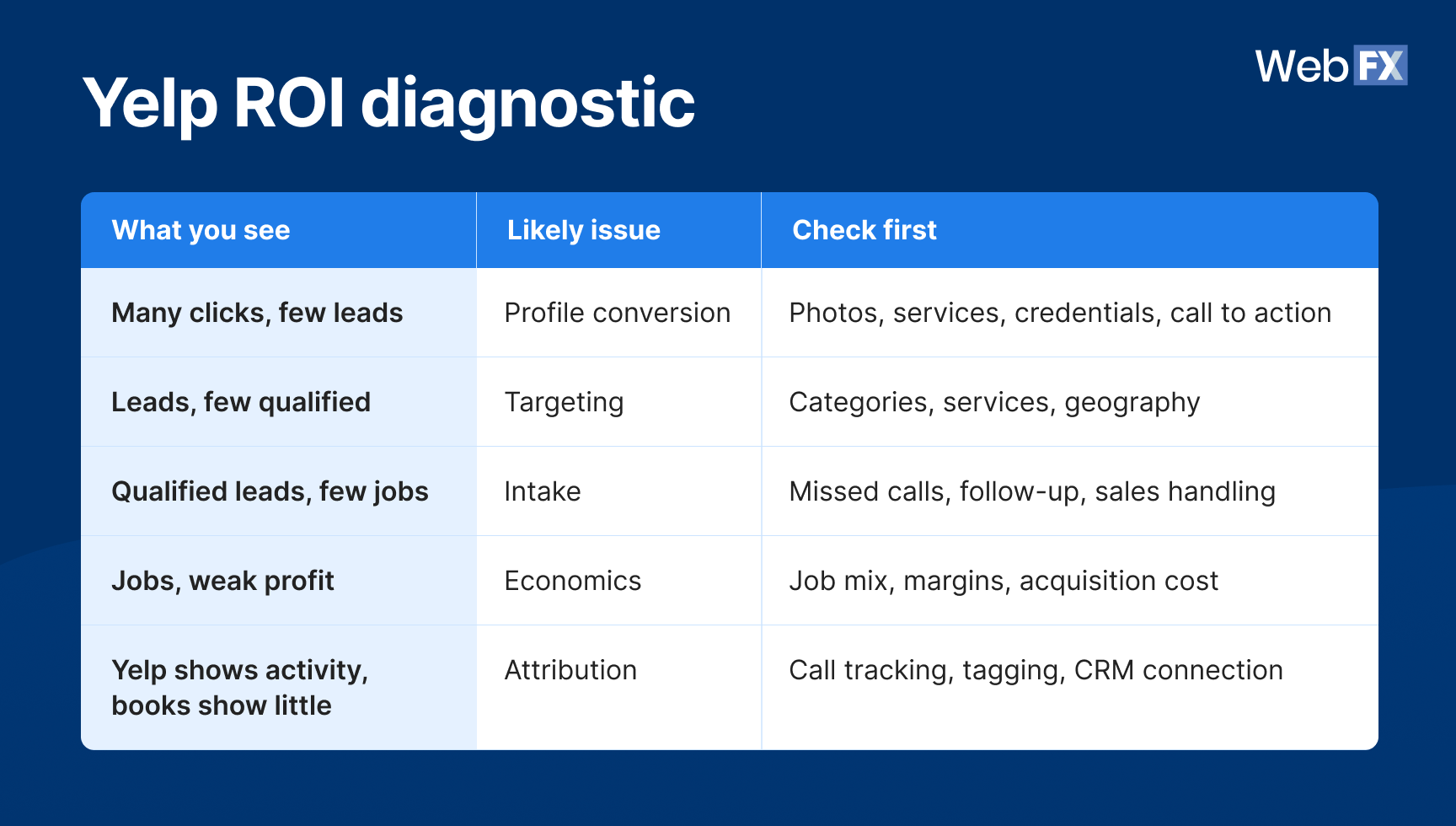
Table view
Yelp ROI diagnostic
| What you see | Likely issue | Check first |
| Many clicks, few leads | Profile conversion | Photos, services, credentials, call to action |
| Leads, few qualified | Targeting | Categories, services, geography |
| Qualified leads, few jobs | Intake | Missed calls, follow-up, sales handling |
| Jobs, weak profit | Economics | Job mix, margins, acquisition cost |
| Yelp shows activity, books show little | Attribution | Call tracking, tagging, CRM connection |
Diagnose the broken stage before increasing budget. More spend magnifies whatever performance you already have, which means a targeting problem funded at twice the level produces twice the unqualified leads.
How to improve ROI from advertising on Yelp
Once you know which stage is leaking, six levers move the number. They run roughly in order of impact.
- Fix attribution first. Everything below depends on seeing which spend produced which jobs, and you cannot optimize toward revenue you cannot trace. This is the one item worth doing before you touch the campaign itself.
- Target the services with the best economics. Yelp serves your ads based on the categories on your account, and selecting every category you technically qualify for exposes your budget to work you did not want. Cutting the ones that produce low-margin work raises your average gross profit per job without changing your budget.
- Tighten geographic targeting. Every click from outside your realistic service area is spend you cannot convert. Narrow the radius to where your crews actually go and where you can close profitably.
- Improve the page people land on after the click. Photos of completed work, current service details, and credentials all affect whether a paid visitor calls. Same clicks, more leads, better cost per lead.
- Look at lead handling. Response speed matters on Yelp, particularly for quote requests where people contact several businesses at once. It is also one bottleneck among several, so check it against the diagnostic above rather than assuming it caused the problem.
- Reallocate by cost per booked job. Lead volume is the wrong basis for a budget decision. Shift spend toward the services and areas producing customers at an acquisition cost your margins can absorb.
How to optimize Yelp ads for better results
Improve Yelp advertising ROI by optimizing your business profile, limiting competitor ads, and responding quickly to customer inquiries. Watch this video for practical tips to improve lead quality and turn more Yelp inquiries into customers.
FAQs about Yelp advertising ROI
What is a good ROI for Yelp advertising?
No universal benchmark applies because the answer depends on your gross margin, your job values, and what a customer is worth over time. A business earning $1,500 per job needs very different numbers than one earning $300.
Work out your own break-even instead. Multiply gross profit per customer by your close rate on qualified leads to get your break-even cost per lead. Aim below that number, since management fees and overhead come out of the same margin.
Does Yelp’s 168% increase in customer leads mean a 168% ROI?
No. That figure measures lift in Yelp’s customer leads metric after 12 months of advertising, and Yelp defines customer leads to include actions like bookmarks, photo uploads, and check-ins alongside calls and messages. Financial ROI requires attributable profit against total campaign cost. The two measure different things.
Should you use revenue or gross profit when measuring Yelp ROI?
Use revenue for ROAS and gross profit for ROI. Revenue tells you what came back for every advertising dollar, and gross profit tells you what was left after delivering the work. Businesses with thin margins often find a healthy-looking ROAS produces very little actual return.
Why is my Yelp cost per lead low but my revenue flat?
Usually one of two things. Either the leads are not qualified, meaning they want services you do not sell or sit outside your service area, or they are qualified and not converting, which points at intake rather than the campaign. The diagnostic table above separates those two cases, and they need opposite fixes.
Can you compare Yelp ROI with Google Ads ROI?
Yes, as long as you compare equivalent stages. Cost per booked customer against cost per booked customer is a fair comparison. Yelp’s lead count against Google’s conversion count is not, since the two platforms define those terms differently.
WebFX has thousands of reviews praising our transparency, communication, and results.
WebFX Agency Rating

4.9/5
based on over 550 third-party reviews

Make Yelp prove what it contributes to revenue
Yelp deserves more budget when it produces profitable customers at an acquisition cost your business can carry. Anything short of that is a lead count with a dollar sign attached.
Follow the chain from spend through to gross profit, find the stage where value drops, and fix that before you increase anything. The measurement setup is what turns a Yelp campaign from a monthly expense into a decision you can defend.
As a Yelp Advertising Partner, WebFX builds that measurement into the campaign from the start. RevenueCloudFX, our ROI tracking platform, connects your Yelp calls and form fills to the jobs they produced, so you see booked revenue rather than the platform’s lead count.
Want help connecting your Yelp spend to booked revenue? Contact us online or call 888-601-5359 to talk with a strategist about our Yelp ad management services.
-
 Albert Dandy Velasquez blends SEO strategy with compelling storytelling to help businesses boost their visibility and revenue online. With a B.A. in English and certifications from HubSpot, Semrush, and Google Analytics, he has written and optimized hundreds of articles on organic SEO, content strategy, and user experience. He regularly contributes to the WebFX blog and SEO.com, creating content that helps readers turn marketing goals into measurable results. When he’s off the clock, he’s usually exploring new neighborhoods on two wheels, filming travel content, or chasing golden hour with a coffee in hand. View full profile
 -

WebFX is a full-service digital marketing agency delivering revenue-driving strategies across online advertising, SEO and AI search optimization, and digital marketing. Backed by 1,100+ client reviews, a 4.9-star rating on Clutch, and proprietary revenue-tracking technology, our team helps businesses grow visibility and revenue across platforms, from Google to ChatGPT to LinkedIn. Discover how our expert team and revenue-accelerating tech can drive results for you. Learn more
Cost Per Click (CPC) Calculator
Do you advertise on platforms that charge per click? Use our calculator and figure out exactly how many clicks will fit within your budget.
Calculate Your CPC
Contents
- How to get ROI from Yelp ads
- What does Yelp actually measure?
- How to calculate ROI from Yelp ads
- The five things Yelp’s lead count cannot tell you
- What tracking revealed for one HVAC advertiser
- Where is your Yelp ROI breaking down?
- How to improve ROI from advertising on Yelp
- FAQs about Yelp advertising ROI
- Make Yelp prove what it contributes to revenue
Share this article


Cost Per Click (CPC) Calculator
Do you advertise on platforms that charge per click? Use our calculator and figure out exactly how many clicks will fit within your budget.
Calculate Your CPC