


Contents
- What is the Google Analytics AI assistant traffic channel?
- Why the GA4 AI assistant traffic update matters for marketing teams
- The visibility trap: AI traffic is not the same as AI ROI
- Use the AI Traffic Quality Ladder to measure what matters
- Step 1: Presence
- Step 2: Engagement
- Step 3: Conversion influence
- Step 4: Revenue connection
- What marketers should do next in GA4
- What the GA4 update means for SEO and GEO
- FAQs about Google Analytics AI assistant traffic
- Turn AI assistant traffic into a clearer growth signal

What to know about the GA4 AI assistant traffic channel
- GA4 now separates supported AI assistant visits from broader referral traffic.
- The channel helps marketers track traffic from tools like ChatGPT, Gemini, and Claude.
- AI assistant traffic shows visibility, but it does not prove ROI on its own.
- Marketers should measure presence, engagement, conversion influence, and revenue connection.
GA4 can now spot AI assistant traffic. The next question is whether those visits move pipeline.
Google Analytics AI assistant traffic is website traffic that GA4 identifies as coming from supported AI assistants like ChatGPT, Gemini, and Claude. Google released the new AI assistant traffic measurement update on May 13, 2026, giving marketers a dedicated way to see how users discover their sites through AI assistants in Default Channel Group reports.
This update gives marketing teams a clearer signal, but it does not answer every reporting question. If you manage SEO, content, reporting, or digital strategy, this article will help you understand what changed, what the new channel can and cannot tell you, and how to use our proprietary AI Traffic Quality Ladder to measure what happens after the click.
- What is the Google Analytics AI assistant traffic channel?
- Why the GA4 AI assistant traffic update matters for marketing teams
- The visibility trap: AI traffic is not the same as AI ROI
- Use the AI Traffic Quality Ladder to measure what matters
- What marketers should do next in GA4
- What the GA4 update means for SEO and GEO
- FAQs about Google Analytics AI assistant traffic
What is the Google Analytics AI assistant traffic channel?
The Google Analytics AI assistant traffic channel is a new GA4 channel that groups visits from recognized AI assistant referrers under “AI Assistant.” It helps marketers separate supported AI assistant visits from broader referral traffic, so they can understand how tools like ChatGPT, Gemini, and Claude contribute to site visits.
Google’s update introduces three traffic source changes that make AI assistant visits easier to identify in GA4:
- Medium: GA4 can assign the AI-assistant medium when traffic comes from a recognized AI assistant referrer.
- Channel: GA4 can group those visits under the “AI Assistant” channel in Default Channel Group reports.
- Campaign: GA4 can identify those visits with the “(ai-assistant)” campaign name.
Together, these updates give marketers a cleaner way to analyze AI assistant visits without relying only on custom channel rules or manual referral reviews. Google’s announcement frames the update as a dedicated way to measure traffic from AI assistants like ChatGPT, Gemini, and Claude.
For example, say someone asks ChatGPT for recommendations on healthcare technology and clicks a link to your website. Instead of blending that visit into a generic referral bucket, GA4 may classify it as AI Assistant traffic if it recognizes the referrer.
To find AI assistant traffic in GA4, go to:
Reports → Life cycle → Acquisition → Traffic acquisition
From there, use the table dimension dropdown and select:
Traffic source → Session source / medium
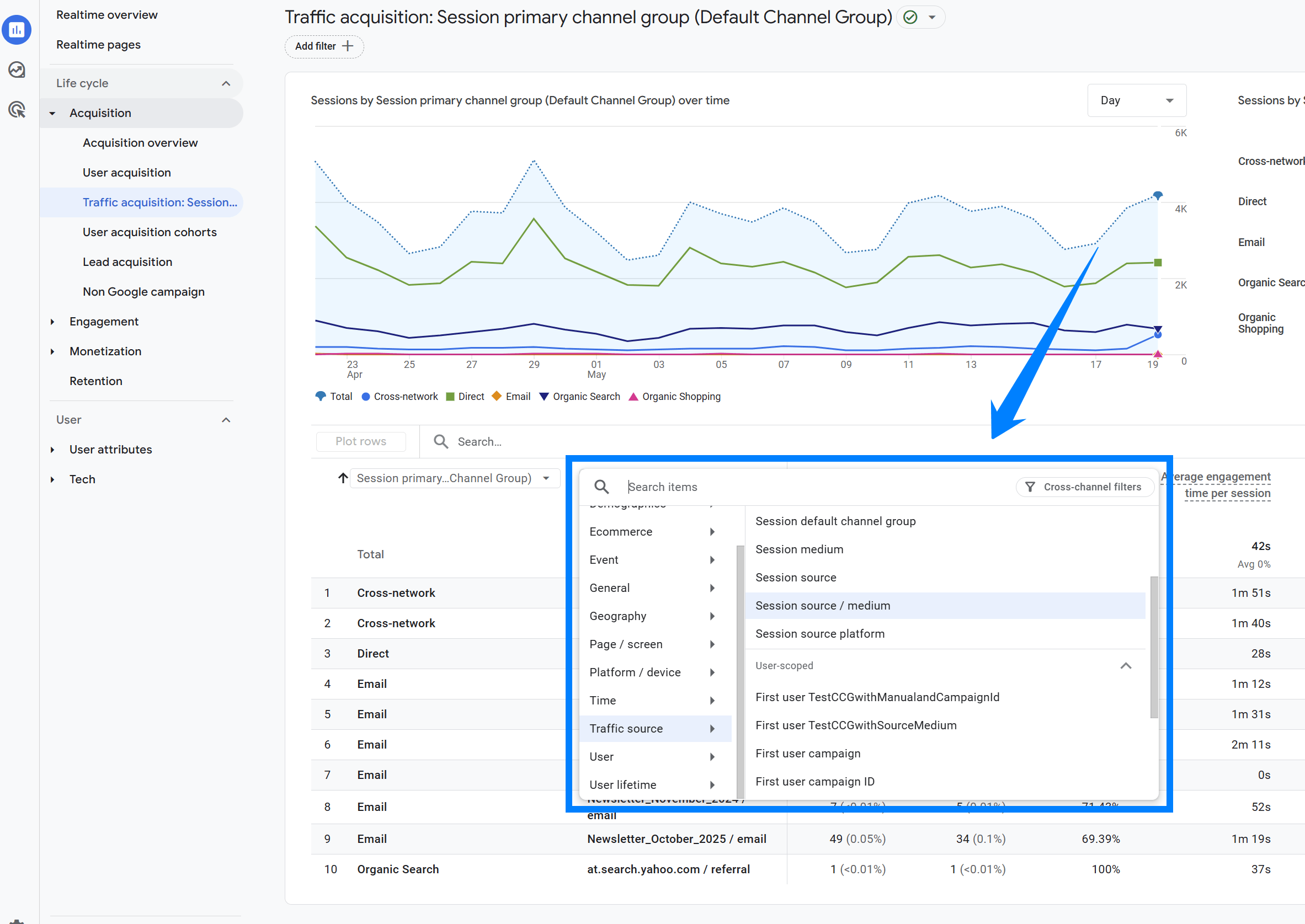
This view can help you spot AI assistant traffic sources like claude.ai / referral, chatgpt.com / referral, or other AI assistant referrers. You can also review the Session primary channel group or Session default channel group to see whether GA4 classifies supported visits under the new AI Assistant channel.
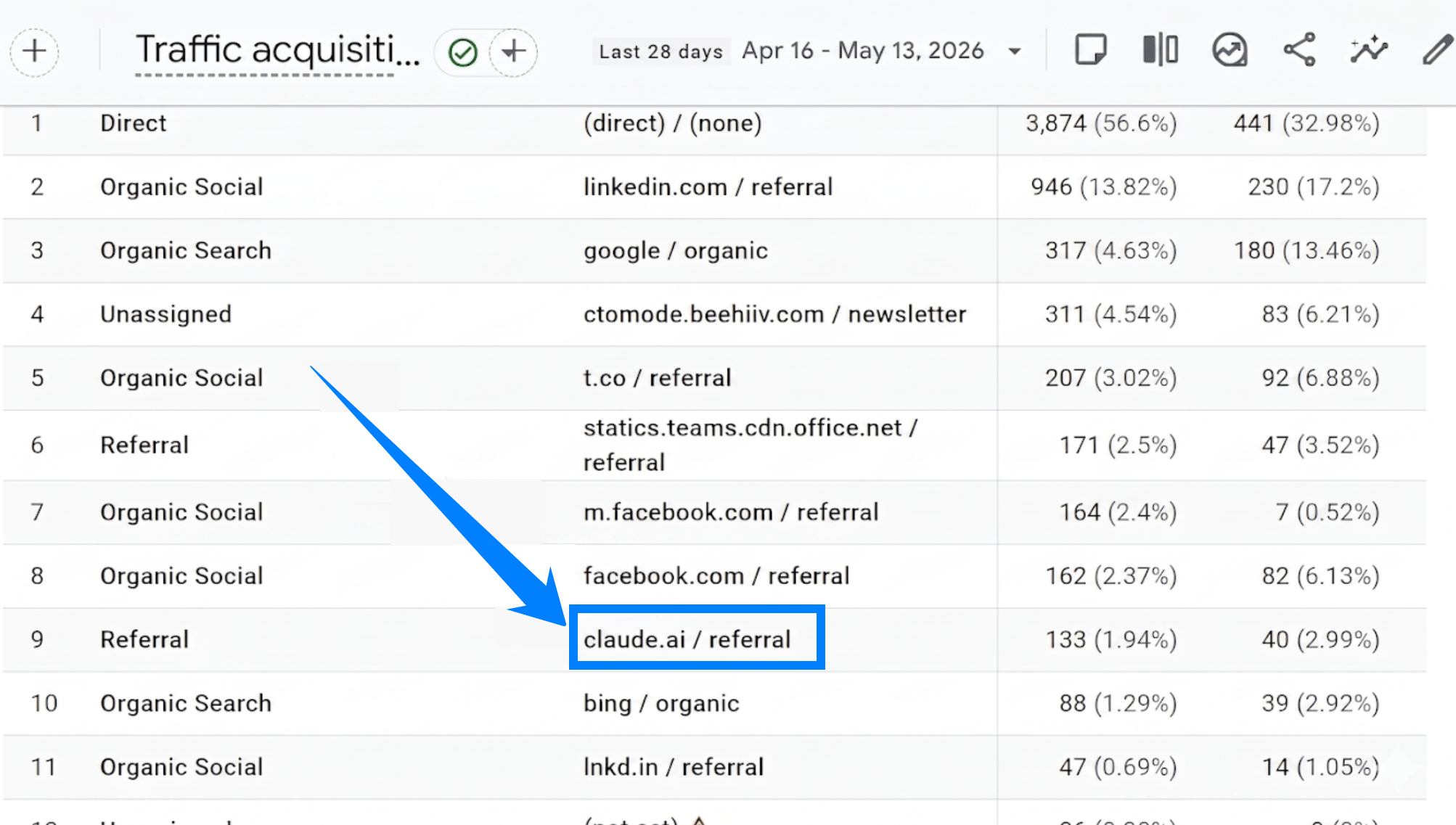
For example, if someone clicks to your site from Claude, you may see “claude.ai / referral” in your traffic acquisition report. As GA4’s new AI Assistant channel rolls out, supported AI assistant visits should become easier to separate from broader referral traffic.
Previously, AI-driven discovery has been difficult to isolate in standard reporting. Fortunately, this update helps marketers measure visits from AI assistants without using custom filters or workarounds.
Why the GA4 AI assistant traffic update matters for marketing teams
The GA4 AI assistant traffic update matters because it gives marketing teams a clearer starting point for measuring how AI platforms contribute to website traffic. For marketers already investing in search engine optimization (SEO), generative engine optimization (GEO), and AI visibility, this creates a more practical way to bring AI search activity into regular reporting.
Before this update, teams often needed custom channel groups, referral analysis, or manual tracking rules to isolate AI assistant traffic. GA4 property owners no longer need to build custom channel groups with regex patterns to separate recognized AI assistant visits from referrals.
That creates a useful reporting shift. A marketing manager can now compare AI assistant traffic against organic search, paid search, referral, and direct traffic to see how AI-driven visitors behave after landing on the site.
This does not mean every AI-influenced visit will appear perfectly in GA4. AI assistant traffic without a referrer header can still land in Direct, such as traffic from some in-app browsers, mobile apps, or copied and pasted links.
That limitation makes interpretation important. The new GA4 AI assistant channel gives marketers a stronger signal, not a complete picture of every AI-assisted discovery path.
The visibility trap: AI traffic is not the same as AI ROI
Seeing AI assistant traffic in Google Analytics is useful, but traffic volume alone does not prove business impact. GA4 can show that a recognized AI assistant sent a visit, but marketers still need to evaluate whether that visit contributed to qualified engagement, conversions, pipeline, or revenue.
This is an important distinction because AI assistant traffic may start small for many sites. If you only review sessions, you might undervalue a channel that sends fewer but more qualified visitors.
The opposite can also happen. A site may see AI assistant traffic grow, but if those visitors bounce quickly, avoid key pages, or never trigger conversion events, the channel may need better landing pages, stronger content fit, or clearer next steps.
For example, a B2B company might see only 40 AI assistant sessions in a month. On the surface, that looks small. But if several of those visitors land on service pages, view pricing content, and start quote forms, that traffic deserves more attention than the session count suggests.
The better question is not just, “How much AI traffic did we get?” but instead, “What did those visitors do next?”
Use the AI Traffic Quality Ladder to measure what matters
Our purpose-built AI Traffic Quality Ladder helps marketers move from basic visibility to business impact. Use it to evaluate AI assistant traffic in stages instead of judging the channel by sessions alone.
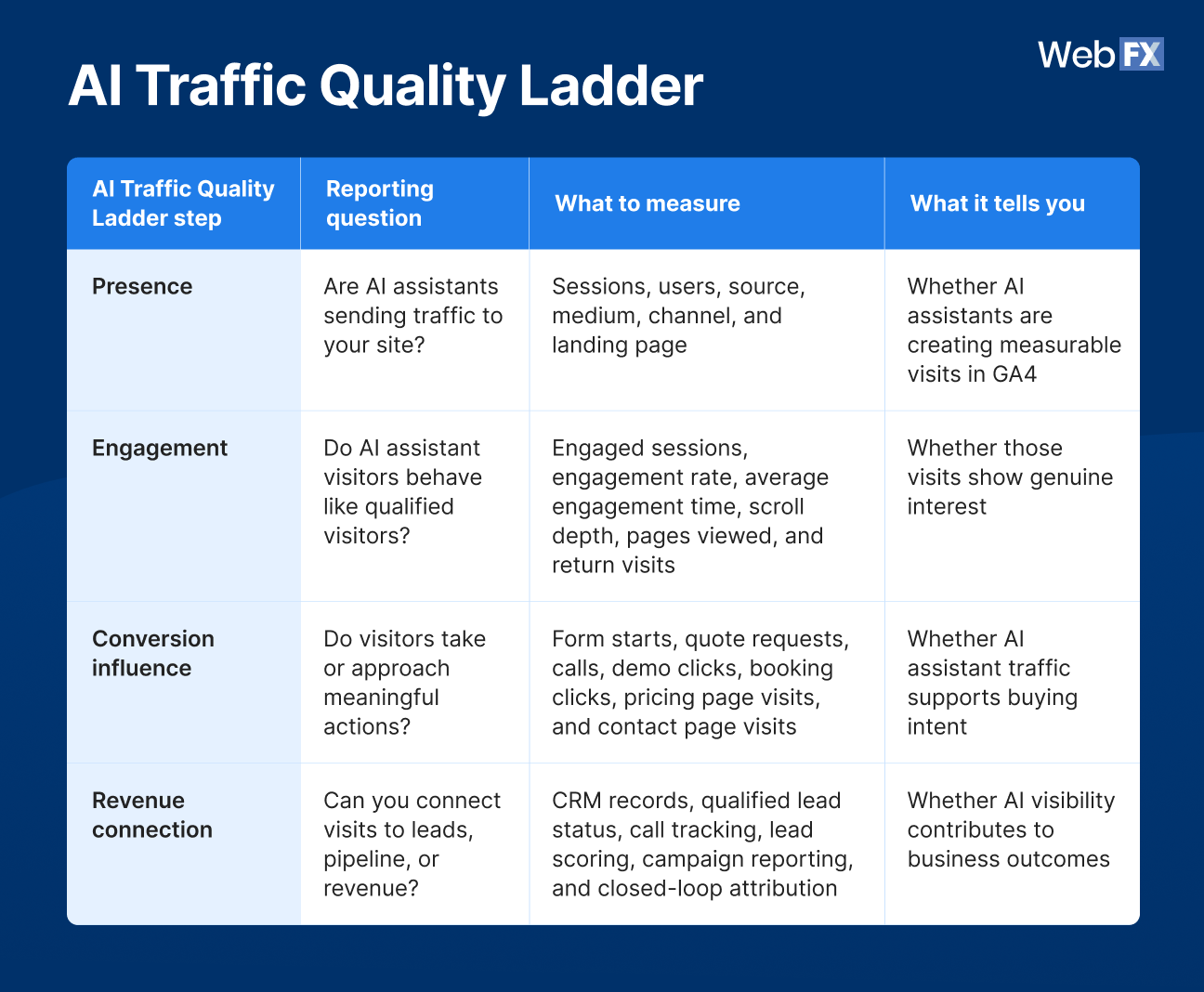
Table view
| AI Traffic Quality Ladder step | Reporting question | What to measure | What it tells you |
| Presence | Are AI assistants sending traffic to your site? | Sessions, users, source, medium, channel, and landing page | Whether AI assistants are creating measurable visits in GA4 |
| Engagement | Do AI assistant visitors behave like qualified visitors? | Engaged sessions, engagement rate, average engagement time, scroll depth, pages viewed, and return visits | Whether those visits show genuine interest |
| Conversion influence | Do visitors take or approach meaningful actions? | Form starts, quote requests, calls, demo clicks, booking clicks, pricing page visits, and contact page visits | Whether AI assistant traffic supports buying intent |
| Revenue connection | Can you connect visits to leads, pipeline, or revenue? | CRM records, qualified lead status, call tracking, lead scoring, campaign reporting, and closed-loop attribution | Whether AI visibility contributes to business outcomes |
Step 1: Presence
Presence answers the first question: Are AI assistants sending traffic to your site?
Start by checking whether the GA4 AI assistant channel appears in your reports. Then create a baseline using the following:
- Sessions
- Users
- Source
- Medium
- Channel
- Landing page
This baseline gives you a starting point for month-over-month comparisons. It can also help you identify which AI assistants send traffic and which pages receive those visits.
Keep this stage in perspective. Presence tells you that AI assistants are sending traffic, but it does not tell you whether that traffic has meaningful value yet.
What to do if you are not getting enough presence
If AI assistants are not sending much traffic yet, use these steps to improve the pages you want AI tools to surface:
- Check whether your priority pages are easy to understand. Make sure each page clearly explains what you offer, who it helps, and what question it answers.
- Prioritize high-intent questions. Build or refresh content that answers the questions buyers ask before they compare vendors, request pricing, or contact your team.
- Strengthen trust signals. Add proof points like case studies, expert insights, reviews, FAQs, and clear service details to make your content easier to evaluate.
- Compare organic landing pages to AI visibility priorities. If your strongest organic pages are not the pages you want AI assistants to reference, create supporting content that connects those questions to the next logical action.
Step 2: Engagement
Engagement answers the next question: Do AI assistant visitors behave like qualified visitors?
Once you confirm that AI assistants are sending traffic, review how those visitors interact with your site. Look at:
- Engaged sessions
- Engagement rate
- Average engagement time
- Pages viewed
- Scroll depth
- Return visits
Engagement matters because AI assistant traffic may come from users who have already asked a specific question. If they click through, they may have stronger context or clearer intent than someone casually browsing.
For example, an AI assistant visitor who lands on a service page, views a pricing page, and spends time on a case study shows stronger evaluation behavior than a visitor who leaves after one short blog visit. That difference helps you separate curiosity clicks from qualified demand.
What to do if your pages are lacking engagement
If AI assistant visitors land on your site but leave quickly, review the landing page against the question that likely brought them there:
- Improve the above-the-fold answer. Make the page’s main answer clear right away so visitors know they found the right resource.
- Add stronger internal links. Guide readers to related service pages, comparison resources, downloadable guides, or contact paths when the topic suggests buying intent.
- Match the CTA to the visitor’s next step. A blog post may need a “learn more” or “compare solutions” CTA before a quote request makes sense.
- Add proof that supports continued evaluation. Use case studies, testimonials, stats, FAQs, or expert commentary to give visitors a reason to keep exploring your brand.
Step 3: Conversion influence
Conversion influence answers the question: Do AI assistant visitors take or approach meaningful actions?
For this stage, look beyond final conversions. Measure actions like:
- Review form starts
- Form submissions
- Quote requests
- Calls
- Demo clicks
- Booking clicks
- Pricing page visits
- Contact page visits
This is especially important for B2B and high-consideration purchases. An AI assistant visitor may not convert on the first session, but they might view comparison content, return later through organic search, and then request a quote.
That path still matters. If your reporting only values the final click, you may miss how AI assistant traffic starts or supports the buyer journey.
The best practice here is to track both macro-conversions and micro-conversions. Macro-conversions show completed actions, while micro-conversions show whether the visitor moved closer to a decision.
What to do if AI assistant visitors do not take meaningful actions
If AI assistant visitors engage with your content but do not take meaningful actions, review the steps between page visit and conversion:
- Review your micro-conversions first. Look at pricing page visits, contact page views, quote form starts, demo clicks, return visits, and other actions that show buying intent before a final conversion.
- Check whether your CTA matches the visitor’s stage. Someone coming from an AI assistant answer may need a comparison guide, service explanation, or proof point before they request a quote.
- Make the next action specific. Instead of relying only on a broad contact CTA, point visitors toward the most relevant next step based on the page topic.
- Reduce friction around high-intent actions. Make quote forms, phone numbers, demo buttons, booking links, and contact options easy to find and complete.
Step 4: Revenue connection
Revenue connection answers the most important business question: Can you connect AI assistant traffic to leads, pipeline, or closed revenue?
GA4 alone may not show the full revenue story. To understand whether AI assistant traffic contributes to growth, you may need:
- CRM data
- Call tracking
- Lead scoring
- Campaign reporting
- Closed-loop attribution
For example, your team could connect an AI assistant session to a form submission, then match that submission to a CRM record. From there, you can evaluate whether the contact became a qualified lead, booked a sales conversation, entered pipeline, or closed as revenue.
This is where reporting maturity matters. Tools like RevenueCloudFX help marketers connect marketing activity to business outcomes, which becomes more important as discovery spreads across search engines, AI assistants, and other digital channels.
How to improve revenue connection
If you cannot connect AI assistant traffic to revenue, focus on improving how your tracking systems work together:
- Check your GA4 conversion events. Make sure key actions like form submissions, calls, demo clicks, quote requests, and booking clicks are tracked correctly.
- Connect forms and lead sources to your CRM. Your team needs a way to follow a visitor from AI assistant traffic to lead creation, sales qualification, pipeline, and closed revenue.
- Review phone tracking and offline conversion paths. If calls or offline sales matter to your business, make sure those actions can be tied back to marketing sources.
- Use closed-loop reporting where possible. When your analytics, CRM, and call tracking connect, you can evaluate whether AI assistant traffic produces qualified leads instead of stopping at session-level reporting.
What marketers should do next in GA4
The new GA4 AI assistant traffic channel gives you a starting point. To turn that starting point into useful reporting, review the channel with a clear action plan.
Start with these steps:
- Confirm whether the AI Assistant channel appears in your GA4 reports. This tells you whether GA4 has started classifying recognized AI assistant visits in your property.
- Create or review a report for AI assistant traffic. Use this report as your baseline for sessions, users, sources, landing pages, engagement, and conversions from AI-driven visits.
- Compare AI assistant traffic to organic search, referral, paid search, and direct traffic. This helps you see whether AI assistant visitors behave differently from users coming through traditional discovery channels.
- Review the top landing pages receiving AI assistant traffic. These pages show where AI assistants are sending users and whether those entry points support the next step in the buyer journey.
- Check engagement and conversion events for those sessions. Look for signals like engaged sessions, form starts, pricing page visits, calls, demo clicks, and quote requests to understand whether the traffic has meaningful intent.
- Add reporting notes so leadership understands when the new channel appeared. If referral traffic changes as AI assistant traffic appears, your team needs context before interpreting the shift as a performance gain or loss.
- Connect AI traffic data to CRM, call tracking, or revenue reporting where possible. This helps you move from channel visibility to business impact by tying AI assistant sessions to lead quality, pipeline, and revenue.
What the GA4 update means for SEO and GEO
The GA4 AI assistant traffic update gives SEO and GEO teams a better feedback loop. AI visibility can now connect more clearly to website traffic, but teams still need to optimize for the full journey from discovery to conversion.
That means your strategy should not stop at “Did an AI assistant mention us?” You also need to know which pages AI assistants send users to, whether those pages answer the next question, and whether they guide visitors toward a logical next action.
For example, if AI assistant traffic lands mostly on blog posts, review whether those posts connect readers to service pages, comparison content, demos, quote requests, or supporting resources. If traffic lands on service pages, review proof points, FAQs, calls to action, and conversion paths.
The new Google Analytics AI assistant traffic channel helps you see when supported AI assistants send visitors to your site. AI visibility tracking tools like OmniSEO® can add context around that traffic by showing how your brand appears across AI-powered discovery experiences before and after the click.
That context matters because AI traffic does not always begin on the landing page. A user may see your brand in an AI answer, compare your business against competitors, click through to a blog post, return through organic search, and convert later. Use GA4 to identify AI assistant traffic, then use tools like OmniSEO® to review the discovery path behind that traffic, strengthen the pages AI assistants send users to, and connect AI visibility to conversions wherever possible.
Show up in AI Search and Beyond
See how WebFX can help your brand increase visibility everywhere your audience is searching- from ChatGPT to Google and beyond.
FAQs about Google Analytics AI assistant traffic
What is Google Analytics AI assistant traffic?
Google Analytics AI assistant traffic is website traffic that GA4 identifies as coming from supported AI assistants like ChatGPT, Gemini, and Claude. Google Analytics now groups recognized visits from AI assistants under a new AI Assistant channel in Default Channel Group reports.
How do you track AI assistant traffic in GA4?
You can track AI assistant traffic in GA4 by reviewing the new AI Assistant channel in Default Channel Group reports. Use that view to analyze sessions, sources, landing pages, engagement, and conversions from recognized AI assistant referrers.
Does GA4 AI assistant traffic prove AI search ROI?
No. GA4 AI assistant traffic shows visits from supported AI assistants, but it does not prove ROI by itself. To evaluate ROI, marketers still need conversion tracking, CRM data, call tracking, lead quality data, and revenue reporting.
Which AI assistants does Google Analytics track?
Google names ChatGPT, Gemini, and Claude as examples in its update. At this time, Google has not published the full recognized referrer list, so marketers should avoid treating those examples as a complete or permanent list.
Turn AI assistant traffic into a clearer growth signal
Google Analytics AI assistant traffic helps you see more of the AI-driven visits that may have been harder to isolate before, but the real value comes from what you do next. Use our AI Traffic Quality Ladder to measure presence, engagement, conversion influence, and revenue connection instead of judging the channel by sessions alone.
At WebFX, we help marketers connect visibility, traffic, leads, calls, and revenue through advanced reporting and proprietary technology. Our team has driven $10 billion in revenue and 24 million leads for clients, and we use that performance-focused mindset to help businesses turn emerging search trends into measurable growth opportunities.
OmniSEO® helps your business strengthen visibility across traditional search, AI search, and the channels your customers use to find answers. Learn more about WebFX’s OmniSEO® technology and how it can help your business earn more visibility across search, AI assistants, and the channels your customers use to find answers.
-
 Thaakirah Abrahams is a Lead Editor at WebFX, where she leverages her 5+ years of experience to craft compelling website content. With a background in Journalism and Media studies and certifications in inbound marketing, she holds a keen eye for detail and a talent for breaking down complex topics for numerous sectors, including the legal and finance industries. When she’s not writing or optimizing content, Thaakirah enjoys the simple pleasures of reading in her garden and spending quality time with her family during game nights. View full profile
 -

WebFX is a full-service digital marketing agency delivering revenue-driving strategies across online advertising, SEO and AI search optimization, and digital marketing. Backed by 1,100+ client reviews, a 4.9-star rating on Clutch, and proprietary revenue-tracking technology, our team helps businesses grow visibility and revenue across platforms, from Google to ChatGPT to LinkedIn. Discover how our expert team and revenue-accelerating tech can drive results for you. Learn more

Try our free Marketing Calculator
Craft a tailored online marketing strategy! Utilize our free Internet marketing calculator for a custom plan based on your location, reach, timeframe, and budget.
Contents
- What is the Google Analytics AI assistant traffic channel?
- Why the GA4 AI assistant traffic update matters for marketing teams
- The visibility trap: AI traffic is not the same as AI ROI
- Use the AI Traffic Quality Ladder to measure what matters
- Step 1: Presence
- Step 2: Engagement
- Step 3: Conversion influence
- Step 4: Revenue connection
- What marketers should do next in GA4
- What the GA4 update means for SEO and GEO
- FAQs about Google Analytics AI assistant traffic
- Turn AI assistant traffic into a clearer growth signal
Share this article


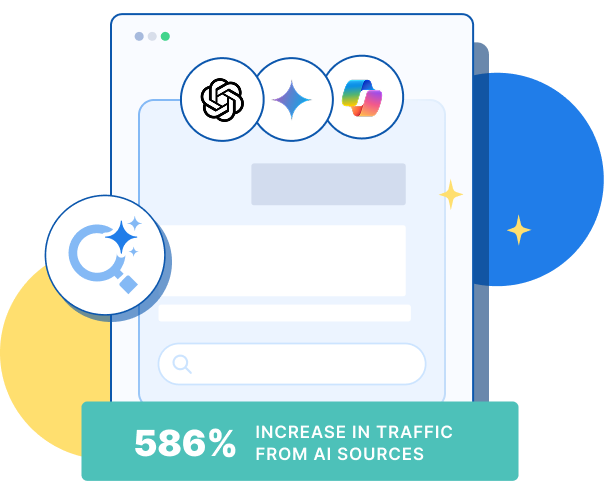
See AI Marketing in Action
Explore how WebFX helped a regional brand get discovered in AI search experiences — proving what’s possible with today’s AI-driven marketing!

Try our free Marketing Calculator
Craft a tailored online marketing strategy! Utilize our free Internet marketing calculator for a custom plan based on your location, reach, timeframe, and budget.
What to read next