What are Apple Maps ads? Apple Maps ads are sponsored business listings that appear in two places: Suggested Places when a customer taps the search bar, and at the top of search results when Apple matches an ad to a relevant search. They launched in the U.S. and Canada in late August 2026, and each one carries a blue “Ad” badge.
Can you turn off Apple Maps ads? No. Apple Maps has no setting to disable ads, and iCloud+ or Apple One subscriptions do not remove them. Ads stay confined to the search experience and never appear during turn-by-turn navigation.
Which businesses can advertise on Apple Maps? Only businesses with a physical location customers visit, including restaurants, retail, hotels, auto businesses with customer-facing locations, entertainment venues, and multilocation brands. Apple advertising policy prohibits home services, bail bonds, and cryptocurrency ATM ads outright, and reviews medical service ads case by case.
How do businesses start running ads on Apple Maps? Set up and verify an Apple Business organization, claim your locations, then manage campaigns through either Apple Business for an automated experience or Apple Ads for keyword targeting, scheduling, placement selection, and bid strategy control.
Is Apple Maps advertising worth testing? Benchmarks are still forming, so compare it against your Google Business Profile and Local Services Ads performance, and check GA4 for how much of your traffic already comes from Apple devices. Apple is currently running a Grand Opening Promo that returns 15% of monthly spend as credits for campaigns starting on or before October 11, 2026.
TL;DR: Apple Maps ads
Apple Maps ads are live in the U.S. and Canada, ramping to all users over the coming weeks
Two placements: Suggested Places before you type, and search results after
Ads appear in the search experience only, never during turn-by-turn navigation
No setting turns them off
Targeting runs on contextual signals rather than your Apple Account
Businesses need Apple Business and claimed locations to advertise
Home services, bail bonds, and cryptocurrency ATM ads are prohibited
Apple Maps ads went live across the United States and Canada in late August 2026. They appear in two places: Suggested Places when you tap the search bar, and at the top of search results when Apple matches an ad to a relevant search. Every ad carries a blue “Ad” badge, and Apple shows one per section.
Let’s break down what changed for anyone using Maps, including whether you can switch the ads off, and what the launch means for businesses deciding whether to advertise.
Tell us about your business, and we’ll create a custom plan to grow your traffic, leads, and predictable revenue.
How do Apple Maps ads work?
Ads on Apple Maps work by matching a sponsored business listing to what you are doing in the app right then. Apple’s own in-app disclosure explains the signals: Ads appear based on your approximate location, your current search terms, or your view of the map while you search.
That means no cross-app tracking and no profile built from your history. The business supplies its own listing details, including category, address, and hours, and Apple matches those against the immediate context.
Advertisers bid for the placement through a dynamic auction that weighs relevance alongside the bid, so the highest bidder does not automatically win the slot.
What do Apple Maps ads look like?
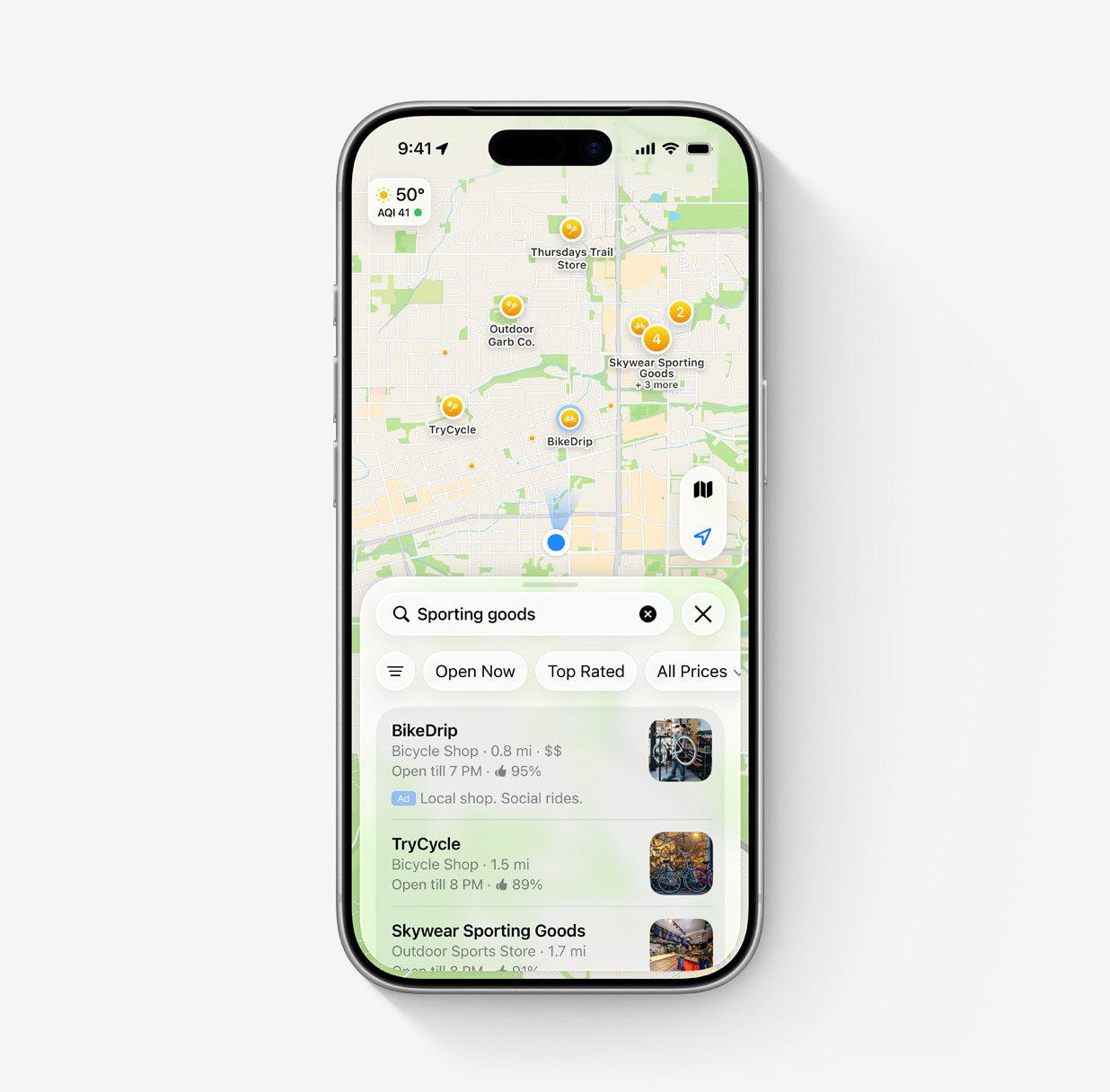
Apple Maps ads look like a standard place card with a small blue “Ad” badge and a subtle blue background behind the listing. Nothing expands, nothing autoplays, and nothing covers the map.
The format shifts with the query. Depending on what you searched, an ad appears as a single image, a three-image layout, or text only.
You will see one ad at a time. Suggested Places carries one, and a set of search results carries one at the top.
From the ad, you can do the same things you can do from any place card: Get directions, call the business, visit its website, browse photos, share the listing, or use a custom action like scheduling an appointment.
Apple Maps search results for sporting goods, with a sponsored bicycle shop listing labeled by a blue Ad badge above two organic results.
Which iOS version do Apple Maps ads require?
iOS 26.5 added support for Apple Maps ads and introduced the Suggested Places feature in May 2026, along with a disclosure screen telling users that local ads were coming. The ads themselves stayed dormant for months.
Apple activated the live rollout separately in late August 2026, which is why ads appeared without anyone updating anything. Apple has not publicly clarified whether older iOS versions support the new placements.
Can you turn off Apple Maps ads?
No. Apple Maps has no setting to disable ads, and there is no paid tier that removes them. Subscribing to iCloud+ or Apple One will not change what you see.
Three things soften that more than the coverage suggests:
Ads live in the search experience only. Tapping the search bar surfaces one in Suggested Places, and a relevant query surfaces one at the top of results. Turn-by-turn navigation and ordinary map browsing stay clear.
You see one at a time, clearly marked. Apple caps it at a single ad per section, each carrying a blue “Ad” badge.
Your data stays put. Apple says the ads you see and interact with in Maps are not associated with your Apple Account. Personal data stays on your device, Apple does not collect or store it, and none of it goes to advertisers or other third parties.
Apple’s Personalized Ads setting does not apply to Maps at all, so the ads you see come only from in-session context rather than a profile. For context, Maps now joins the App Store, Apple News, and Stocks. None of those apps offer an ad opt-out either.
Expert insights from
Kayla J.PPC Analyst at WebFX
“While consumers might (justifiably) feel frustrated about ads coming to another platform, the reality is that Apple Maps is a powerful place for local businesses to appear. If your competitors are going to show up in sponsored placements, you’ll want to ensure you do, too. The benefits of being visible right as users are searching for businesses like yours, while they might actively be planning an immediate visit, are difficult to overstate.”
Why Apple Maps matters for local discovery
Apple Maps carries more than a billion relevant business searches every month across the United States and Canada, and one in two of those searches ends with the customer taking an action on the place card they found.
That action rate is the number that matters for advertisers. Directions, calls, and website visits are how a local search becomes a customer, and half of Maps business searches produce one.
The audience skews toward people with money to spend. Apple’s own agency materials, sourced to GWI Core across U.S. and Canadian adults through 2025, describe Maps users as more likely to have a household income above $200,000, at 42% in the U.S. and 40% in Canada.
Which businesses can advertise on Apple Maps?
Only businesses with a physical location customers visit. Apple built Maps advertising around claimed locations, so the ad has to point somewhere a person can actually go.
That restriction shapes the eligible list:
Restaurants and coffee shops
Retail stores
Hotels and hospitality
Auto businesses with customer-facing locations
Entertainment and recreation venues
Multilocation and franchise brands
Apple advertising policy prohibits home services outright, naming plumbing, electrical, locksmith, HVAC, pest control, roofing, and general contracting. Bail bond services and cryptocurrency ATM ads are also banned. Medical and dental practices sit in a middle category, where Apple reviews the ad content case by case instead of approving it automatically.
That exclusion marks a real difference between the two platforms. Google Maps allows service-area businesses to advertise, so a search for a plumbing supply store can return contractors offering to come to your house. Apple’s policy keeps that inventory off Maps entirely.
How can businesses advertise on Apple Maps?
Running ads on Apple Maps starts with an Apple Business organization. You verify it, claim your locations, and then manage campaigns through either Apple Business or the Apple Ads platform.
1. Claim and complete your locations in Apple Business
Your listing is the destination, so it decides whether a tap turns into a visit. Get these right before you spend anything:
Business name and details
Every location you operate
Hours of operation
Categories and services
Contact information
Photos
Apple pulls from this listing to power how your business appears across Maps, Siri, and other Apple services, which means the work pays off whether or not you advertise.
2. Audit your local SEO before you pay for placement
Apple Maps leans on location accuracy and data consistency, so inconsistencies undercut a paid campaign the same way they undercut organic visibility.
Review your name, address, and phone consistency across directories, your local citations, your reviews, your local landing pages, and your location schema.
3. Choose Apple Business or Apple Ads
Apple offers two paths, and they suit different situations.
Apple Business gives you a fully automated experience. You set a budget and Apple handles the rest.
Apple Ads gives you campaign-level control, including keyword and phrase targeting, negative terms, ad scheduling, placement selection, geographic targeting, and location groups. Agencies work through this path, verifying with Apple Business and then receiving delegated access from the client.
4. Set your budget and bid strategy
You choose your own budget and can start or stop campaigns at any time, and the price comes from Apple’s auction.
Two bid strategies are available. Maximize Engagements runs on cost-per-tap. Manage Bids lets you choose cost-per-tap or cost-per-thousand-impressions. Your billing follows the pricing model, so cost-per-tap campaigns charge for taps and cost-per-thousand-impressions campaigns charge per 1,000 impressions.
5. What you can track in Apple Maps ads reporting
Apple reports impressions, taps on your ad, and taps on each individual place card action, including directions, calls, website visits, photos, shares, and app downloads. You can download reports grouped by location and by campaign.
That last detail matters for multilocation brands. Location-level reporting tells you which storefronts the channel actually moves, which is the difference between a channel test you can act on and a number you cannot explain.
Apple is running a Grand Opening Promo for the Maps launch. Eligible brands earn 15% of monthly ad spend back in promotional credits for one year from their first campaign, capped at $1,000 per month and $12,000 total. Campaigns have to start on or before October 11, 2026, and unused credits expire December 31, 2027. Terms and eligibility limitations apply.
Apple Business or Apple Ads: Which one do you need?
Apple Business suits single-location businesses that want ads running without much setup. Apple Ads suits anyone who needs to control targeting, scheduling, or bidding, or who is running Apple alongside other paid channels. Here is how the two compare.
Apple Business
Apple Ads
Setup
Sign up, verify, claim locations
Apple Business setup first, then an Apple Ads account
Campaign management
Automated
Manual control
Keyword targeting
Not available
Keywords and phrases
Negative keywords
Not available
Available
Ad scheduling
Not available
Choose when ads run
Placement selection
Automatic
Search home, search results, or both
Geographic targeting
Automatic
ZIP code, city, state, or radius from your location
Location groups
Not available
Group locations to promote together
Bid strategy
Automatic
Maximize Engagements or Manage Bids
API access
Not available
Apple Ads Platform API
Best for
Single-location businesses that want ads running with minimal setup
Multilocation brands, franchises, and anyone running Apple alongside other paid channels
If you have one location and no other paid campaigns to coordinate with, Apple Business gets you live quickly. If you have several locations, competitive terms you need to control, or existing campaigns Apple has to be measured against, the control in Apple Ads is worth the extra setup.
Is Apple Maps advertising worth testing?
Apple Maps advertising is new enough that benchmarks are still forming, so the answer depends on how it performs against the local channels you already run.
Expert insights from
Colton W.Sr. PPC Consultant at WebFX
“Apple Maps Ads are a no-brainer for any brick-and-mortar business serving customers who use iPhones at their storefront – that obviously applies to a lot of businesses and a lot of customers which means that the opportunity headroom here is quite large. My recommendation would be to compare Apple Maps Ads performance metrics against comparable metrics that you likely already track with local service ads, location extension data if you have that set up in Google Ads, and your Google Business Profile performance. You can also look in GA4 device and OS segmentations to see how many of your website visitors are coming from an iPhone or iOS device — if it’s at all a significant portion of your visitors, I would expect that your Apple Maps Ads may be in a strong position to perform at or above the level of the aforementioned Google counterparts.”
Run that comparison before you set a budget. If your Google Business Profile and Local Services Ads numbers are healthy and a meaningful share of your traffic already comes from Apple devices, Apple Maps is worth a test. If your local-channel performance is weak, fix those fundamentals first. If Apple device share is low, Apple Maps may simply be a lower-priority test.
What should businesses do now?
Start with eligibility and listing accuracy, then build a baseline before you spend anything. These six steps get you from where you are now to a test you can actually read.
Confirm your category is eligible under Apple advertising policy before you invest prep time
Claim and clean up every location in Apple Business
Get hours, categories, photos, and contact details accurate, since the place card converts the tap
Establish baselines from your existing local channels so you have something to compare Apple against
Start with a controlled test budget rather than reallocating spend from campaigns that already work
Review Apple alongside the rest of your local paid media before deciding whether to scale
Set expectations before you launch. A new channel needs enough time and volume to produce a readable signal, and the first few weeks tell you more about setup quality than about the channel itself.
Apple Maps ads launched in late August 2026 in the United States and Canada. Apple triggered the rollout server-side and confirmed it would keep ramping to all users over the following weeks, so some people saw ads days before others.
Apple Maps ads appear in two places. Suggested Places shows one when you tap the search bar, before you type anything. Search results show one at the top when Apple matches an ad to your search.
Apple Maps ads look like a place card with a blue “Ad” badge and a subtle blue background. Depending on the search, the ad appears as a single image, a three-image layout, or text only.
No. Apple Maps includes no setting to disable ads, and paid subscriptions like iCloud+ and Apple One do not remove them. Ads stay confined to the search experience and never appear during turn-by-turn navigation.
iOS 26.5 introduced Suggested Places and the groundwork for Apple Maps ads in May 2026. Apple activated the ads later in August, but it has not publicly clarified whether older iOS versions support the new placements.
Suggested Places is a Maps feature that recommends nearby businesses and trending locations based on signals like your recent searches and activity around you. It appears when you tap the search bar, and one of the recommendations can be a paid placement.
Apple delivers Maps ads using contextual signals such as your approximate location, current search terms, and map view. The ads you see and interact with are not associated with your Apple Account, your personal data stays on your device, and Apple does not share it with advertisers or third parties.
Yes. Running ads on Apple Maps requires an Apple Business organization with verified, claimed locations. Businesses working with an agency complete that step themselves, then delegate ad management to the agency’s organization.
No. Apple advertising policy prohibits ads promoting home services on Maps, including plumbing, electrical, locksmith, HVAC, pest control, roofing, and general contracting. The same policy bans bail bond services and cryptocurrency ATM ads, and evaluates medical service ads case by case.
You set your own budget and can start or stop campaigns at any time, and the price comes from an auction weighing relevance, bids, and other factors. Maximize Engagements uses cost-per-tap. Manage Bids offers cost-per-tap or cost-per-thousand-impressions, so you are charged either per tap or per 1,000 impressions depending on the model you choose.
Apple reports impressions, taps on your ad, and taps on each place card action, including directions, calls, website visits, photos, shares, and app downloads. You can download reports grouped by location and campaign.
Two offers are live. The Grand Opening Promo returns 15% of monthly ad spend as credits for a year, capped at $1,000 per month and $12,000 total, for brands starting a campaign on or before October 11, 2026. New Maps advertisers can also receive a one-time $150 sign-up credit, though agencies are not eligible for that one. Terms and eligibility limitations apply to both.
Businesses customers travel to, since Maps ads route people to a claimed location. Restaurants, retail, hotels, auto businesses with customer-facing locations, and entertainment venues fit best. Multilocation brands benefit as well, because Apple Ads lets you group locations and promote them together.
No. The two platforms cover different ground, and Google Maps accepts advertisers Apple excludes, including service-area businesses. Apple adds a second local surface worth testing rather than a replacement, and it reaches an audience your Google campaigns may be underserving.
Learn how WebFX grew a client’s conversions from paid ads by 670% and cut their cost per lead by 321%.
Find out whether Apple Maps ads earn a spot in your budget
Apple Maps ads are live, so the question is no longer whether this is coming. It is whether the channel produces customers at a cost that beats what you already run.
Start with a clean Apple Business presence, a test budget you can afford to learn from, and a baseline from your existing channels. Then let the numbers decide how much Apple gets next quarter.
Want help running that evaluation? WebFX is an Apple Ads agency partner, which means we can build and manage your Maps campaigns and plan them alongside the rest of your paid media. Request a free proposal or call 888-601-5359 to talk through our Apple Ads services with a strategist today.
Cost Per Click (CPC) Calculator
Do you advertise on platforms that charge per click? Use our calculator and figure out exactly how many clicks will fit within your budget.








 Emily Carter is the Sr. Content Team Lead at WebFX, where she leads the creative team behind the company’s content. With an M.S. in Digital Marketing and 10+ years of experience, she’s written and reviewed hundreds of articles on marketing, SEO, and tech. These days, her focus is on content strategy and operations, with a special interest in the systems, processes, and people that help great content come to life. Her work appears across WebFX and its brands, including SEO.com, Nutshell, and TeamAI, and has been featured by Social Media Today, HuffPost, and more. Outside the office, she’s usually road-tripping, hiking, or planning her next national park adventure. View full profile@emcarter16
 Kayla Johansen is a PPC Analyst at WebFX, where she manages the advertising campaigns for WebFX.com and Nutshell across various channels, including search, video, display, social media, audio, and connected TV. Since joining the WebFX team, she’s driven millions in revenue and consistently increased sales from PPC year over year. With a B.S. in Marketing and certifications in Google Ads and Google Analytics, she’s dedicated to generating qualified leads. When not driving revenue, she enjoys reading, creative writing, playing cozy video games, and hanging out with her dogs. View full profile


 Sr. Content Team Lead