



Contents
- What the Microsoft AI Performance dashboard tracks
- How grounding queries work (and why they matter more than keywords)
- Why most marketers will misread this data
- The G.R.O.U.N.D. framework for AI search visibility
- What marketers should do now
- FAQs about the Microsoft AI Performance dashboard
- Your competitors are already showing up in AI answers. Are you?
-
What is the Microsoft AI Performance dashboard?
The Microsoft AI Performance dashboard is a free tool in Bing Webmaster Tools that shows when and where your content gets cited in AI-generated answers across Microsoft Copilot, Bing AI summaries, and select partner integrations, allowing you to track AI trust and visibility. -
What are grounding queries and why do they matter?
Grounding queries are the phrases AI systems use internally to retrieve content before generating answers, showing what topics AI associates with your brand. They differ from traditional keywords because they reveal what AI searches for rather than what humans type, creating new optimization opportunities. -
What metrics does the dashboard track?
The dashboard tracks core citation metrics like total citations, grounding queries, and page-level citation activity, plus newer additions like Intents, Topics, Citation Share, and Compare for deeper analysis. -
What common mistakes do marketers make with this data?
Most marketers treat citation counts as vanity metrics, assume citations equal traffic (the dashboard doesn’t track clicks), ignore grounding queries entirely, and apply traditional SEO thinking to AI metrics without understanding that citations measure AI trust rather than user engagement.
The Microsoft AI Performance dashboard is the first free tool from a major search platform that shows you exactly when and where your content gets cited in AI-generated answers. That means you can now see which of your pages AI trusts enough to reference, which grounding queries trigger those citations, and how your AI search visibility changes over time.
But measurement alone won’t help you. Most marketers will open this dashboard, see their citation counts, and have no idea what to do next. Let’s break down what each metric means, how to set it up, and a framework for turning AI citation data into a visibility strategy that drives measurable impact.
- What the Microsoft AI Performance dashboard tracks
- How grounding queries work (and why they matter more than keywords)
- Why most marketers will misread this data
- The G.R.O.U.N.D. framework for AI search visibility
- What marketers should do now
- FAQs about the Microsoft AI Performance dashboard
Show up in AI Search and Beyond
See how WebFX can help your brand increase visibility everywhere your audience is searching- from ChatGPT to Google and beyond.
What the Microsoft AI Performance dashboard tracks
The Microsoft AI Performance dashboard tracks how often your content appears as a cited source in AI-generated answers. It covers Microsoft Copilot, AI-generated summaries in Bing, newer AI visibility features, and select partner integrations. The dashboard sits inside Bing Webmaster Tools, and any verified site owner can access it for free.
Nine core metrics make up the AI Performance dashboard. Each one measures a different dimension of how AI interacts with your content.
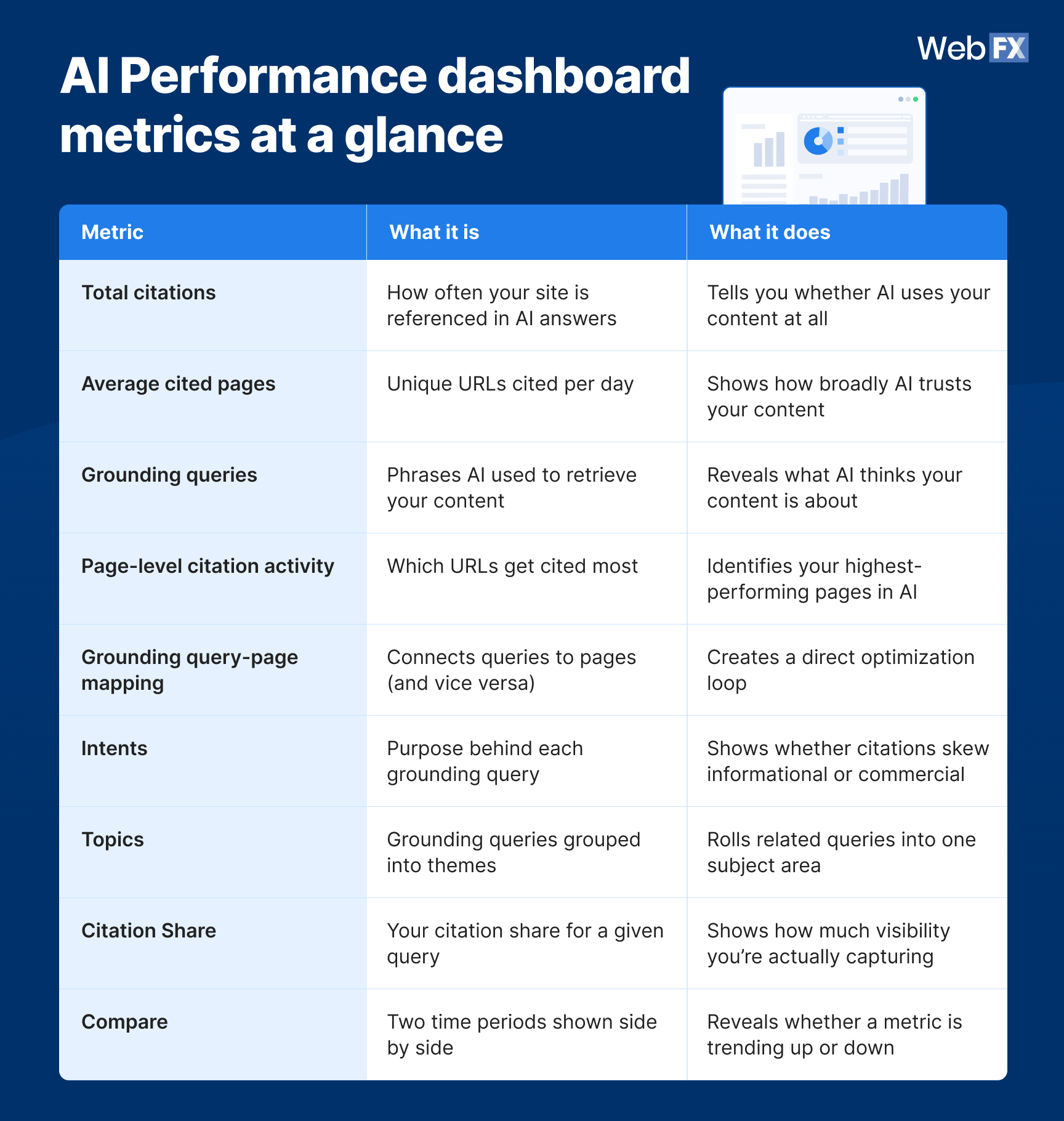
Table view
AI Performance dashboard metrics at a glance
| Metric | What it is | What it does |
| Total citations | How often your site is referenced in AI answers | Tells you whether AI uses your content at all |
| Average cited pages | Unique URLs cited per day | Shows how broadly AI trusts your content |
| Grounding queries | Phrases AI used to retrieve your content | Reveals what AI thinks your content is about |
| Page-level citation activity | Which URLs get cited most | Identifies your highest-performing pages in AI |
| Grounding query-page mapping | Connects queries to pages (and vice versa) | Creates a direct optimization loop |
| Intents | Purpose behind each grounding query | Shows whether citations skew informational or commercial |
| Topics | Grounding queries grouped into themes | Rolls related queries into one subject area |
| Citation Share | Your citation share for a given query | Shows how much visibility you’re actually capturing |
| Compare | Two time periods shown side by side | Reveals whether a metric is trending up or down |
1. Total citations
Total citations show how many times your site was visibly referenced as a source in AI-generated answers during a selected time range. This tells you whether AI is using your content at all. It does not indicate ranking, authority, or how prominently your content appeared within a specific answer.
2. Average cited pages
Average cited pages show the daily average of unique URLs from your site that get cited. A high number means AI pulls from a broad range of your content. A low number means AI relies on one or two pages, which creates a concentration risk.
3. Grounding queries
Grounding queries reveal the key phrases AI used when retrieving content that was cited. These are grouped phrases summarizing citation activity across multiple AI answers, not exact user prompts. You can think of them as the AI’s version of search queries. (More on these in the next section.)
4. Page-level citation activity
Page-level citation activity shows which specific URLs from your site get cited most often. This helps you identify your “citation magnets” and understand how citation activity distributes across your site.
5. Grounding query-page mapping (newest feature)
This feature connects grounding queries to cited pages in both directions. Click a grounding query to see which pages were cited for it. Click a page to see which grounding queries drive its citations.
This creates a direct optimization loop between queries and pages that didn’t exist before. One grounding query can map to multiple pages, and one page can appear across multiple grounding queries.
6. Intents
Intents classify each grounding query by purpose, such as informational, commercial, navigational, or local. This shows whether your citations skew toward research-stage questions or buying-stage ones.
7. Topics
Topics group related grounding queries into broader thematic clusters instead of listing them one by one. This gets you closer to how content planning actually works, since teams build around subject areas rather than individual query strings.
8. Citation Share
Citation Share shows what percentage of citations for a grounding query went to your site versus every other site cited for that same query. This tells you how much of the available visibility you’re actually capturing, not just whether you show up at all.
It does not name which other sites make up the remaining share, so it isn’t a competitor benchmarking tool. For that level of detail, OmniSEO® shows which competitors are being cited alongside or instead of you for the same queries, across Microsoft’s ecosystem and beyond.
9. Compare
Compare lets you set a second time period side by side with your current one. This shows whether a metric is trending up or down instead of leaving you to read a single snapshot.
What the dashboard won’t tell you
A few important caveats before you start making decisions based on this data:
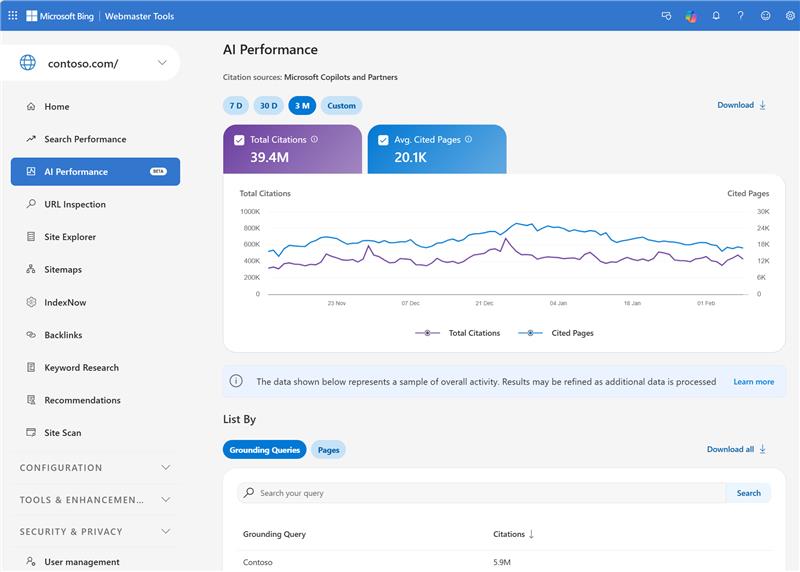
- The data represents a sample of overall citation activity as opposed to a complete log.
- Citation counts may differ across views (grounding queries vs. pages vs. timeline).
- Data refreshes daily with a short processing delay.
- The dashboard does not include click-through data. You can see citations, but not whether they drove traffic.
- It only covers Microsoft’s AI ecosystem. ChatGPT, Gemini, Perplexity, and Google AI Overviews are not included.
- Very low or infrequent citation activity may not surface in the dashboard at all.
- The dashboard only reflects content eligible for indexing. If your robots.txt blocks Bingbot or GPTBot, your data will be empty.
How grounding queries work (and why they matter more than keywords)
Grounding queries are the phrases AI systems use internally to find content before generating an answer. They show up in the AI Performance dashboard as short, grouped phrases with citation counts next to each one. And they’re the most actionable data points in the entire report.
Here’s how the retrieval process works when someone asks AI a question:
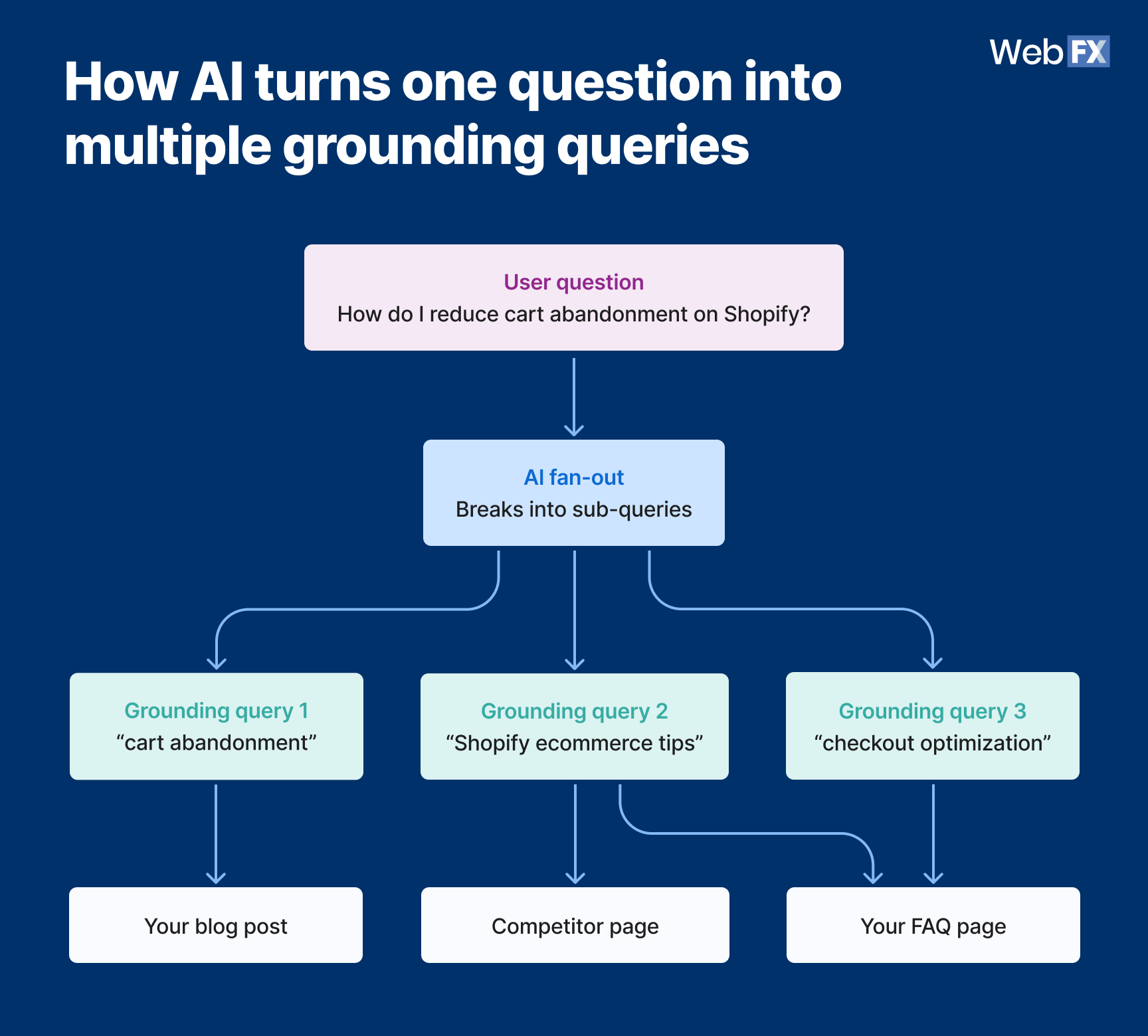
- A user asks Copilot something like “What’s the best way to reduce cart abandonment for my Shopify store?”
- The AI breaks that question into smaller sub-queries (a process called query fan-out)
- The AI searches for sources that match each sub-query
- The AI retrieves, evaluates, and cites the most relevant pages
- Those sub-queries become the grounding queries you see in your AI Performance dashboard, showing up as phrases like “cart abandonment reduction strategies ecommerce”
The gap between what the user asked and what the AI searched for is where the optimization opportunity lives. Your keyword strategy targets what humans type into Google. Grounding queries show what AI searches for when building its answers. Those are different inputs, and they favor different content structures.
How grounding queries differ from keywords:
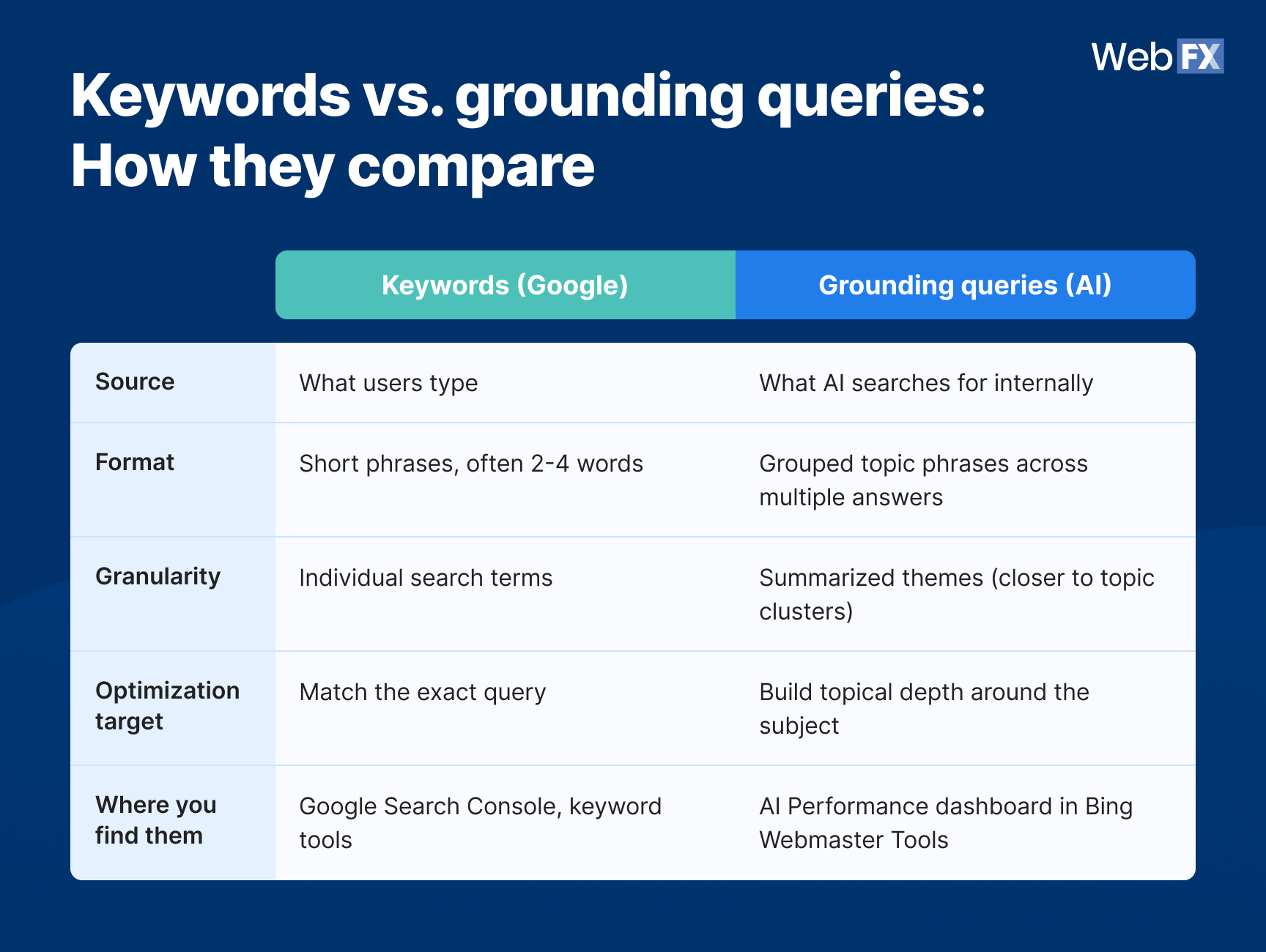
Table view
Keywords vs. grounding queries: How they compare
| Factor | Keywords (Google) | Grounding queries (AI) |
| Source | What users type | What AI searches for internally |
| Format | Short phrases, often 2-4 words | Grouped topic phrases across multiple answers |
| Granularity | Individual search terms | Summarized themes (closer to topic clusters) |
| Optimization target | Match the exact query | Build topical depth around the subject |
| Where you find them | Google Search Console, keyword tools | AI Performance dashboard in Bing Webmaster Tools |
Why most marketers will misread this data
The biggest mistake marketers will make with the Microsoft AI Performance dashboard is treating citation counts like traffic metrics. Citations measure AI trust, not user engagement. That distinction changes how you should act on the data.
Here’s what most marketers will get wrong:
- Chasing total citations as a vanity metric: A high citation count feels good, but it means nothing without context. Which pages drive those citations? Which grounding queries trigger them? A single blog post generating 80% of your citations may look impressive on the surface, but it signals a fragile AI presence that could drop overnight if that page goes stale.
- Assuming citations equal traffic: The dashboard explicitly does not track clicks. A citation means AI referenced your page in an answer, and it does not necessarily mean a user visited your site. Those are two different outcomes, and confusing them leads to bad prioritization.
- Ignoring grounding queries entirely: Most marketers will go straight to the pages view because it feels familiar, like checking which pages rank in Google Search Console. But the grounding queries tab is where the real insight lives. It tells you what topics AI associates with your brand, and more importantly, which topics it doesn’t.
- Treating this like Google Search Console data: AI Performance metrics and traditional search metrics measure fundamentally different things. Comparing them side by side without understanding the difference leads to wrong conclusions.
- Mistaking Citation Share for competitor benchmarking: Citation Share shows your slice of citations for a query, not who else picked up the rest. Confusing the two can lead you to over- or underestimate how exposed you actually are to competitors within Microsoft’s ecosystem.
To see the difference clearly, look at how traditional SEO metrics compare to AI search visibility metrics:
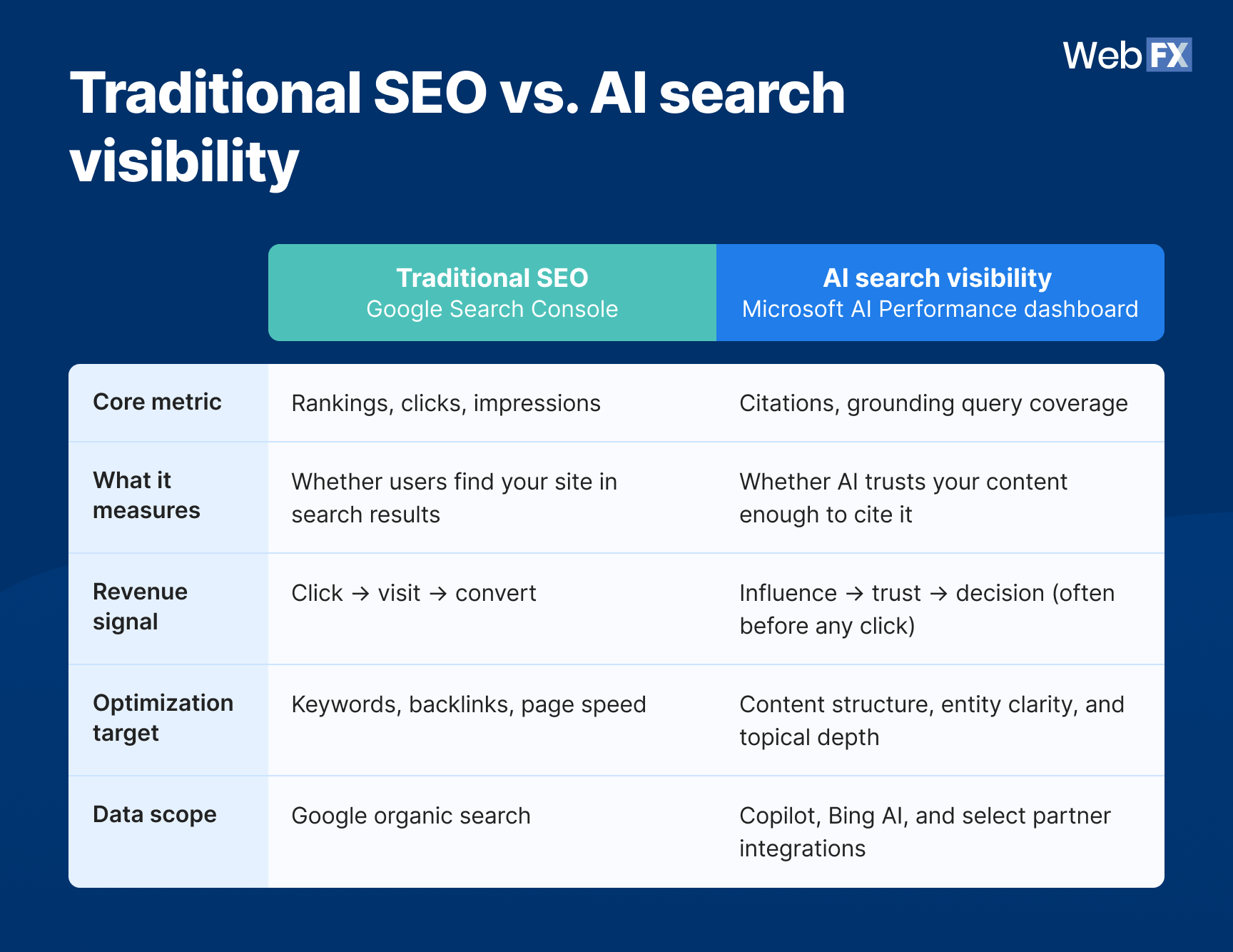
Table view
Traditional SEO vs. AI search visibility
| Factor | Traditional SEO (Google Search Console) | AI search visibility (Microsoft AI Performance dashboard) |
| Core metric | Rankings, clicks, impressions | Citations, grounding query coverage |
| What it measures | Whether users find your site in search results | Whether AI trusts your content enough to cite it |
| Revenue signal | Click → visit → convert | Influence → trust → decision (often before any click) |
| Optimization target | Keywords, backlinks, page speed | Content structure, entity clarity, and topical depth |
| Data scope | Google organic search | Copilot, Bing AI, and select partner integrations |
The real value of this dashboard is understanding how AI interprets your content compared to how many times it cites you. Grounding query data tells you what topics AI connects to your brand, and page-level data tells you which content AI trusts most. The combination tells you where you’re strong, where you’re invisible, and where to invest next.
The G.R.O.U.N.D. framework for AI search visibility
So you have the data. Now what do you do with it?
We’ve put together a framework for turning AI Performance dashboard data into an optimization strategy. Each letter maps to a specific action you can take with the data the dashboard gives you.
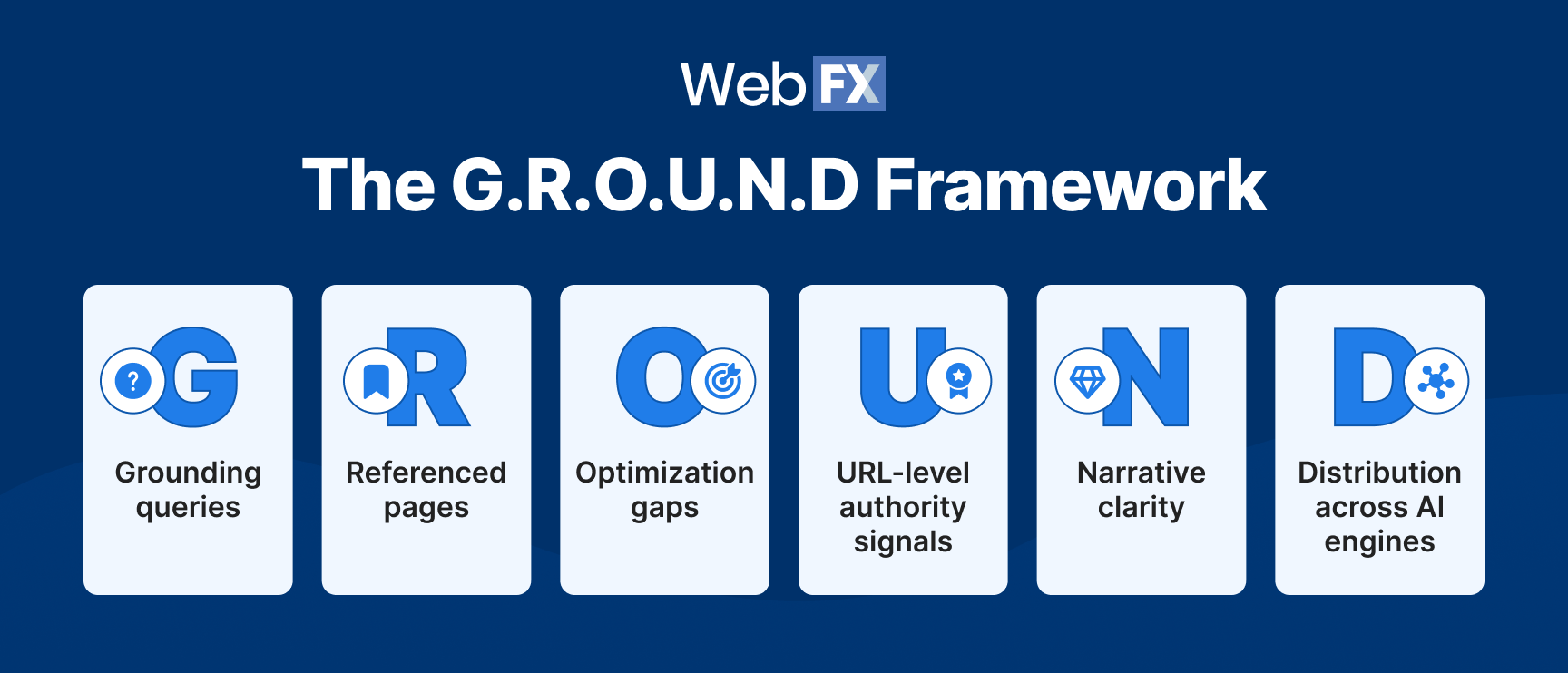
G = Grounding queries
Review your grounding queries weekly and compare them against your target keyword list. Where they overlap, your content already serves both human search and AI retrieval. Where they diverge, you’ve found content gaps that keyword research alone would never surface.
Pay attention to grounding queries with high citation counts that don’t match any page you intentionally optimized. That’s AI telling you what it thinks your site is about.
The new Topics view speeds this up. Instead of manually grouping similar grounding queries into themes yourself, Topics rolls them up for you, so you’re comparing subject areas against your keyword clusters instead of query by query.
R = Referenced pages
Identify your most-cited URLs and protect them by keeping them updated with fresh data, strengthening their entity clarity (use specific names, brands, and tools instead of generic references), and adding structured data (JSON-LD schema) to reinforce what the page covers. If your top three pages drive the majority of your citations, that’s a sign to diversify.
O = Optimization gaps
Find pages that are indexed but rarely or never cited. Intents can sharpen this audit. A page that’s cited occasionally but never on commercial-intent queries specifically is a more precise gap than a page with no citations at all. It points to a different fix: the content may need a clearer path to a buying decision, not just more depth.
According to Bing’s documentation, pages may not surface in AI answers if they lack relevance to common user questions, lack clarity or depth, are outdated, or are outperformed by other sources.
Audit these pages: Do you answer questions directly in the first sentence? Do you use definitive language (“X is Y”) instead of vague hedging? Research shows cited content is nearly 2x more likely to contain definitive language.
U = URL-level authority signals
AI systems cross-reference signals when deciding what to cite. Pages with strong backlink profiles, consistent entity naming, and clean structured data tend to earn more citations.
Make sure AI can actually crawl your content. Review your robots.txt, check that Bingbot and GPTBot aren’t blocked, and verify your site is indexed in Bing.
N = Narrative clarity
Write for extraction, not just readability. To improve visibility in AI results, use question-based H2s that mirror how users ask AI questions, and answer immediately in the first sentence after each heading.
Keep paragraphs short, and name specific entities (brands, tools, platforms, people) instead of generic references. AI systems prefer content with high entity density because named entities reduce the model’s uncertainty when generating an answer.
D = Distribution across AI engines
The AI Performance dashboard only covers Copilot and Bing. Your content also appears (or doesn’t) in ChatGPT, Gemini, Perplexity, and Google AI Overviews.
Test your brand manually across each platform monthly. Ask questions your customers would ask and note where you show up, where competitors show up instead, and where nobody shows up at all. According to McKinsey, $750 billion in U.S. revenue will flow through AI-powered search by 2028, and that spend won’t concentrate on a single platform.
What marketers should do now
Microsoft has kept adding to the AI Performance dashboard: grounding query-page mapping, then Intents, Topics, Citation Share, and Compare. Most marketers haven’t opened any of it yet. That’s your early-mover window.
Set up the dashboard today
Go to bing.com/webmasters, verify your site, and click ‘AI Performance’ in the left nav. The dashboard loads with 30 days of data by default. If it looks empty on first login, give it a day or two. Export your grounding queries and page-level citation data (CSV or Excel) as your baseline.
Audit your top pages for citability
Pull your top 20 revenue-driving pages. Check if they appear in the page-level citation view. If they don’t, review their structure: Clear headings, direct answers in the first sentence, specific entity names, and fresh data points.
Compare grounding queries against your keyword strategy
Your SEO keyword list targets what humans search, while grounding queries show what AI retrieves. Where they overlap, you’re covered. Where they diverge, you have content gaps worth closing.
Pull up the Topics view before you start this comparison. Grounding queries that would’ve taken several rows to review individually now show up pre-grouped by subject, which makes it easier to spot an entire theme missing from your keyword plan instead of catching it one query at a time.
Build a citation tracking baseline
Record your current citation counts, top grounding queries, and cited pages today. You need a starting point to measure whether future changes move the numbers. Check in weekly to catch sudden shifts, and run a monthly review to assess whether your optimization efforts are working.
With Citation Share and Compare now available, add your current share percentage to that baseline, too. From here, use Compare to check the trend over time instead of manually re-exporting and comparing spreadsheets yourself.
Go beyond Bing for full AI visibility
The AI Performance dashboard only covers Microsoft’s AI ecosystem. For full coverage across ChatGPT, Gemini, Perplexity, and Google AI Overviews, you need additional tracking.
OmniSEO® tracks your brand’s visibility across every major AI search engine from one platform, with competitor benchmarking and full-funnel attribution. You can also supplement with tools like Semrush’s AI Visibility Toolkit or Ahrefs Brand Radar.
FAQs about the Microsoft AI Performance dashboard
What is the Microsoft AI Performance dashboard?
The Microsoft AI Performance dashboard is a free report inside Bing Webmaster Tools that tracks how often your content is cited in AI-generated answers across Microsoft Copilot, Bing AI summaries, and select partner integrations. Microsoft launched it in public preview on February 10, 2026, and added grounding query-page mapping in March 2026.
What are grounding queries?
Grounding queries are the grouped phrases AI systems use when retrieving content to cite in AI-generated answers. They summarize recurring themes across multiple AI answers and function like topic clusters rather than individual search queries. You can view them in the AI Performance dashboard inside Bing Webmaster Tools.
Do AI citations mean traffic?
No. A citation means your content was visibly referenced in an AI-generated answer. It does not represent clicks, visits, or engagement. The AI Performance dashboard tracks citations only and does not include click-through data.
Does the dashboard track ChatGPT or Google AI Overviews?
No. The AI Performance dashboard only covers Microsoft’s AI ecosystem: Copilot, Bing AI summaries, and select partner integrations. For ChatGPT, Gemini, Perplexity, and Google AI Overviews, use manual testing or third-party tools like OmniSEO® to track your brand’s visibility across every major AI search engine from one platform.
Does Citation Share show me how I compare to competitors?
No. Citation Share shows what percentage of citations for a grounding query went to your site, but it doesn’t name which sites made up the rest, and Microsoft has said it isn’t designed as a competitive scoreboard.
For named competitor comparisons within Microsoft’s ecosystem, see Microsoft Clarity’s Topic Insights feature. That’s a separate tool from the AI Performance dashboard, and it still only covers Microsoft’s AI ecosystem.
If you want named competitor tracking that extends beyond Microsoft to platforms like ChatGPT, Gemini, and Perplexity, that’s the kind of cross-platform view OmniSEO® is built for.
How often does the data refresh?
Data refreshes daily with a short processing delay. Historical data is available within the time ranges shown in the dashboard.
Why are some of my pages never cited?
Pages may not appear in AI answers if they lack relevance to common user questions, lack clarity or depth, are outdated, or are outperformed by other sources on the same topic. Reviewing grounding queries can help identify which topics AI associates with your site and where gaps exist.
Your competitors are already showing up in AI answers. Are you?
The Microsoft AI Performance dashboard gives you the data to find out. And with the G.R.O.U.N.D. framework, you have a playbook for acting on what you find. But Bing only shows part of the picture.
With 30+ years of experience and a team of 750+ digital experts, WebFX helps businesses like yours stay ahead of search shifts like this. Our proprietary OmniSEO® platform tracks your brand’s visibility across ChatGPT, Gemini, Perplexity, Google AI Overviews, and more — providing real-time insights, citation tracking, competitor benchmarking, and full-funnel attribution across every major search and AI platform.
Start turning AI visibility into measurable growth today. Contact us online or call 888-601-5359 to speak with a strategist about OmniSEO® and our AI search optimization services.
-
 Albert Dandy Velasquez blends SEO strategy with compelling storytelling to help businesses boost their visibility and revenue online. With a B.A. in English and certifications from HubSpot, Semrush, and Google Analytics, he has written and optimized hundreds of articles on organic SEO, content strategy, and user experience. He regularly contributes to the WebFX blog and SEO.com, creating content that helps readers turn marketing goals into measurable results. When he’s off the clock, he’s usually exploring new neighborhoods on two wheels, filming travel content, or chasing golden hour with a coffee in hand. View full profile
 -

WebFX is a full-service digital marketing agency delivering revenue-driving strategies across online advertising, SEO and AI search optimization, and digital marketing. Backed by 1,100+ client reviews, a 4.9-star rating on Clutch, and proprietary revenue-tracking technology, our team helps businesses grow visibility and revenue across platforms, from Google to ChatGPT to LinkedIn. Discover how our expert team and revenue-accelerating tech can drive results for you. Learn more

Try our free Marketing Calculator
Craft a tailored online marketing strategy! Utilize our free Internet marketing calculator for a custom plan based on your location, reach, timeframe, and budget.
Contents
- What the Microsoft AI Performance dashboard tracks
- How grounding queries work (and why they matter more than keywords)
- Why most marketers will misread this data
- The G.R.O.U.N.D. framework for AI search visibility
- What marketers should do now
- FAQs about the Microsoft AI Performance dashboard
- Your competitors are already showing up in AI answers. Are you?
Share this article


See AI Marketing in Action
Explore how WebFX helped a regional brand get discovered in AI search experiences — proving what’s possible with today’s AI-driven marketing!
Try our free Marketing Calculator
Craft a tailored online marketing strategy! Utilize our free Internet marketing calculator for a custom plan based on your location, reach, timeframe, and budget.





Show up in AI Search and Beyond
See how WebFX can help your brand increase visibility everywhere your audience is searching- from ChatGPT to Google and beyond.