


Contents
- Claude AI review: Is it worth using in 2026?
- What is Claude AI?
- Claude AI pros and cons
- How useful is Claude AI for marketing?
- What marketing tasks does Claude handle best?
- How much does Claude cost, and is it worth paying for?
- When should you use Claude instead of ChatGPT or Gemini?
- FAQs about Claude AI
- My final verdict on Claude AI

TL;DR: Claude AI review 2026
- Verdict: Claude is the most valuable AI tool in my daily stack, mostly because it connects to the tools I already use and grounds its answers in my own documentation.
- Best for: Private or deeply technical work, data analysis, coding, and documentation review.
- Watch-outs: It’s slower than Gemini or ChatGPT for quick answers, decks come back text-heavy, and it doesn’t generate photos or illustrations.
- Pricing: A free tier, Pro from $17/month, Max from $100/month, plus Team and Enterprise plans for businesses.
- Bottom line: Use Claude where it’s strongest, pick another tool where it isn’t, and keep an eye on usage costs.
Claude is the AI tool I reach for most, and after two years of testing nearly every option on the market, it’s the one I’d tell other marketers to start with. This Claude AI review is a firsthand take from my seat as Head of Innovation for DataTech at WebFX, where I’ve spent close to a decade as a data architect and marketer. My days run across software development, product and client support, digital advertising, and teaching teams how our data architecture works, so I need tools that handle more than one slice of the job.
Claude isn’t perfect, and I’ll get to the downsides. But it’s the most useful AI tool in my day-to-day, and this review walks through Claude AI pros and cons, the features that matter for marketing work, pricing, and whether it’s worth paying for in 2026.
One disclosure before we start: WebFX is a certified partner in the Claude Partner Network, and we use Claude internally every day. That gives me a lot of hands-on time with the product, but the opinions here are my own, based on real use rather than any partnership. Here’s the full review from a digital marketer and MarTech pro’s perspective:
Your Revenue Growth Starts Here
Tell us about your business, and we’ll create a custom plan to grow your traffic, leads, and predictable revenue.
Claude AI review: Is it worth using in 2026?
Yes, Claude is worth using in 2026 if your work involves private data, technical questions, coding, or research, and you want answers grounded in your own documentation rather than generic responses. It’s less compelling if you mainly need fast, throwaway answers to public questions or native image generation, where other tools are quicker or stronger.
The short version of this Claude AI review 2026: The connectors and grounding are the reason I stay, the speed and the text-heavy decks are the reasons I keep other tools around, and the value depends heavily on how much you use it. The rest of the review breaks each of those down.
What is Claude AI?
Claude is an AI assistant built by Anthropic. You chat with it the way you would any other AI tool, asking questions, drafting content, analyzing data, or writing code, but what sets it apart for working professionals is everything built around that chat.
Claude connects to the apps you already use, organizes work into Projects, builds shareable Artifacts, writes and tests code, and runs inside your Chrome browser. It also handles larger, multi-step tasks like research, reports, and presentations, then hands them back as finished files you can edit. Think of it less as a chatbot and more as a work partner that can see your tools.
Claude AI pros and cons
Every Claude AI review eventually comes down to the tradeoffs, so here are the Claude AI pros and cons from my own use. Claude’s biggest strengths are its connectors, grounding, and sourcing; its biggest weaknesses are speed, text-heavy presentations, and the lack of native image generation. Here’s the summary at a glance, then the detail behind each point:
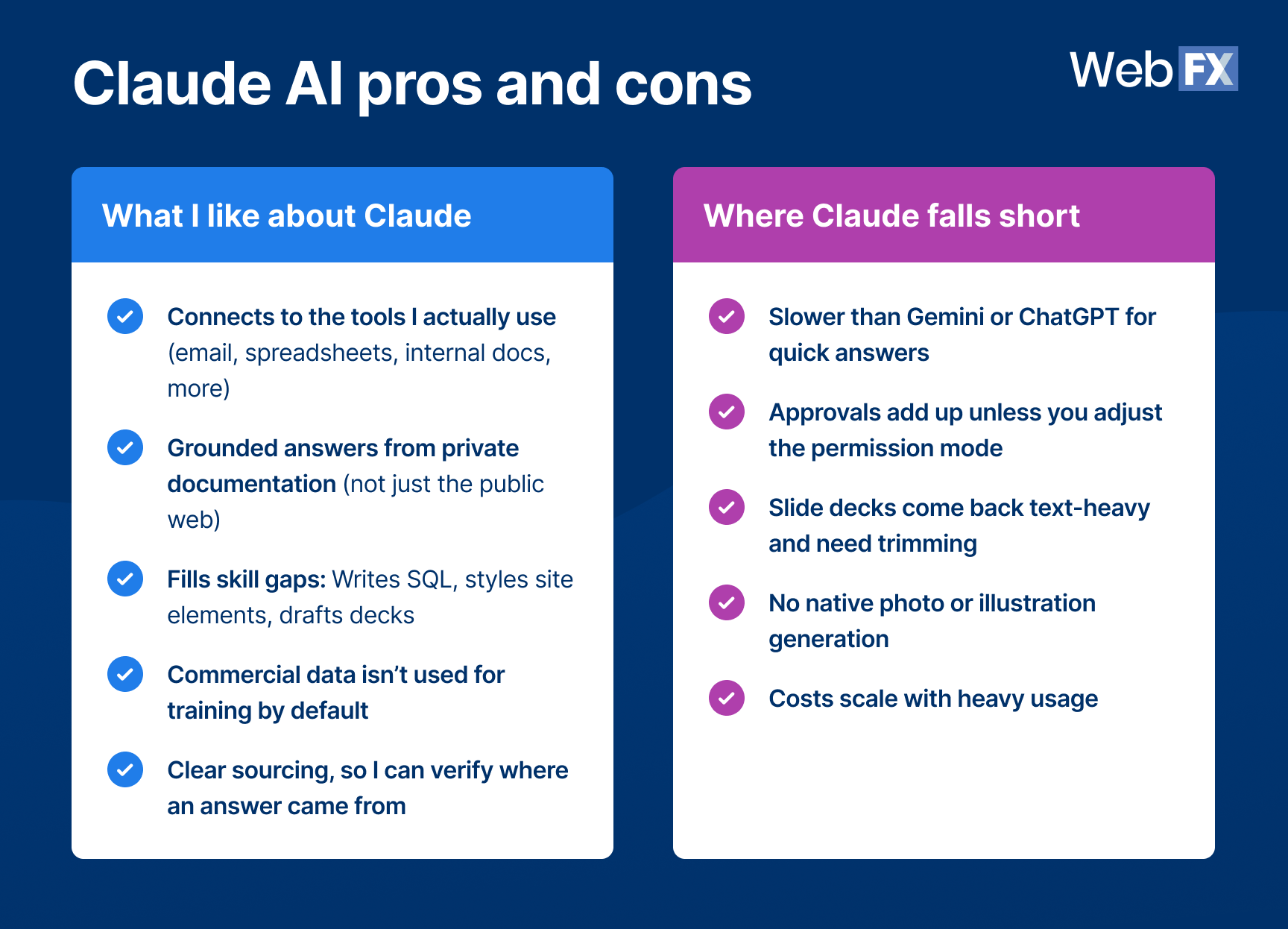
Table view:
| What I like about Claude | Where Claude falls short |
| Connects to the tools I actually use (email, spreadsheets, internal docs, more) | Slower than Gemini or ChatGPT for quick answers |
| Grounded answers from private documentation (not just the public web) | Approvals add up unless you adjust the permission mode |
| Fills skill gaps: Writes SQL, styles site elements, drafts decks | Slide decks come back text-heavy and need trimming |
| Commercial data isn’t used for training by default | No native photo or illustration generation |
| Clear sourcing, so I can verify where an answer came from | Costs scale with heavy usage |
What I like about Claude
It connects to the tech I actually use. I can connect Claude to my email, spreadsheets, API and other documentation, release notes, industry resources, and our internal software. In the early days of AI adoption at WebFX, this was my biggest pain point.
Every tool we tested connected to some of what I needed, never all of it, usually around 75% of my must-haves, which left me wishing for more and killed adoption. The missing piece was always one I couldn’t work without. Claude is the first tool where I could check off every must-have connector I need.
Grounding that makes answers trustworthy. Because Claude can read private documentation (not just what’s on the public web), its answers to role-specific questions are accurate. The material I work with, like internal docs, product specs, and API references, isn’t available to any public AI tool. Connect it to Claude and technical questions get reliable, specific answers, including the clear yes or no where other tools would hedge.
It fills skill gaps. I’d consider myself a strong technical marketer, but I’ve never been a strong designer or coder. Claude helps with both. It writes SQL for our BigQuery instance, specific to how my team’s data is set up, and it helps me style website elements. That alone has cut out a lot of back and forth with developers. It also helps me organize my thoughts into structured slide decks for trainings and team announcements.
Data privacy. With our Claude Enterprise account at WebFX, we have an agreement in place that our data can’t be used for model training. That lets me work with sensitive data I’d never paste into a free tool. Free AI tools have different data-handling policies, so check how each platform uses your information before sharing sensitive business data.
Sourcing. Claude shows me exactly where it looked to produce an answer. That’s valuable for judging whether a response is accurate and pulled from reliable, up-to-date sources.
Where Claude falls short
It’s slow. Claude does some of the deepest thinking of any AI tool I use. It can dig up documentation that’s months old and find answers buried in technical docs. But it isn’t fast. There are quicker models, and overall it’s one of the slower tools in my rotation. For some tasks it still beats doing the work manually, but it lags the quick answers you’d get from Gemini or ChatGPT.
Approvals add up. If your settings require you to approve every step, a simple task can stretch to minutes or longer. Turn on auto-approve once you’re comfortable.
Presentations are text-heavy. Claude tends to produce dense slide decks. I prefer quick, to-the-point decks, so I usually trim what it gives me.
Image generation is limited. Claude doesn’t generate photos or illustrations the way dedicated image tools do. It can build diagrams, charts, and interactive visuals in the conversation using HTML and SVG, but for quick image creation I use Google Gemini, which gives me better results.
It can get expensive. Depending on your usage, Claude can carry a real price tag. I break down where it’s worth it in the value section below.
How useful is Claude AI for marketing?
Claude AI for marketing is most useful when you connect it to your data and set up grounding, so it answers as someone who knows your role, company, and industry rather than giving generic output. These are the features I lean on most as a marketer:
Handling whole tasks
You can hand Claude a full task and let it work through the steps on its own, searching the web, reading your files, running code, and assembling the result. It has native connections to your apps, and once grounding is set up in the settings, answers come back tailored to you.
You can also schedule tasks. Several people on my team have Claude pull the easy-to-grab KPIs for their role on a weekly cadence, so the reporting is waiting for them. That scheduling feature alone saves my team real time each week. For a closer look at the newer capabilities built for this kind of work, see WebFX’s guide to recent Claude updates for marketers.
Code
I use Claude for coding more than I expected: Building WordPress plugins, styling a specific element, writing the CSS to round off a button. Marketers who can ship small pieces of tech without waiting on a developer move faster, and Claude makes that realistic.
Projects
Projects are how I stay organized. I create a Project for each thing I’m working on, load in the resources, and end up with a mini agent that can answer questions from all of that material. I share these with my team, too. For anything development-related, they can start in the Project and get answers before pinging me.
Artifacts
Artifacts turn data and documentation into something people can actually use: A clean, shareable page instead of a wall of chat text. They’re great for organizing data and sharing documentation with a team.
Claude in Chrome
This isn’t a typical Chrome extension. You prompt it, and it works in your browser, completing the task while you watch. For example, logged into WordPress, you can say, “Add this blog post with this URL,” and in my testing it does that accurately. Follow up with “Create a title tag” or “Write a meta description,” and it handles those too. I’ve used it for more advanced work as well, like custom reporting and figuring out which filters I needed. You can see where it’s clicking and what it’s thinking as it goes, a bit like a how-to video that does the task for you.
Automation and integrations
Beyond the native connectors, Claude works with automation platforms. Zapier has a Claude connector, and that changes what automation can do. Basic if-then triggers treat every run the same. With Claude in the workflow, each run adapts: Messaging and outcomes respond to that run’s data instead of firing the same canned output every time. Combine that with scheduling and connected data, and a lot of recurring busywork stops needing a human.
What marketing tasks does Claude handle best?
Claude handles data analysis, documentation review, and complex-system questions best, especially when you’ve grounded it in your own data. These are the tasks where it consistently saves me time:
- Data analysis: Ask questions of your data in plain language, and write SQL for your own BigQuery or data warehouse setup.
- Presentation prep: Dump your raw thoughts and get back the flow of a deck, white paper, or team-ready doc. Designing slides isn’t my strength, so this produces a strong starting point and cuts the time I spend there.
- Documentation review: Point it at long technical docs and get answers fast.
- Q&A for complex systems: With the right grounding, it answers questions about systems the public internet knows nothing about.
- Mockups, design, coding, and testing: Good for betas and prototypes of things you’re building.
- Reporting: Pull KPIs on a schedule and build quick, readable reports.
- Organizing and automating files: Cleanup, restructuring, and repetitive spreadsheet work.
Can Claude replace traditional BI tools?
In some workflows, yes. I’ve seen thousands of tech stacks as a data architect, and many of our enterprise clients run BI tools like Power BI or Tableau in fairly basic setups, answering day-to-day marketing questions with tools that are complex relative to the value they get back.
In many of those cases, I’ve used Claude to build do-it-for-me systems that stand in for the dashboard. I feed the right data in, or connect it, and get insights on a one-off or recurring basis, with no new tool to learn and no dashboard to maintain.
The real advantage shows up when the question changes. In a traditional BI tool, a new question usually means reworking filters, charts, or dashboards. With Claude, I just ask the follow-up. As long as the grounding is concise and accurate, and mine is, since it’s built on the data I use every day, the answers have been accurate in the large majority of cases.
How much does Claude cost, and is it worth paying for?
Claude offers a free tier, with paid plans starting at $17 per month for Pro, and higher tiers for heavy users and businesses. Here’s the current U.S. pricing at the time of this review:
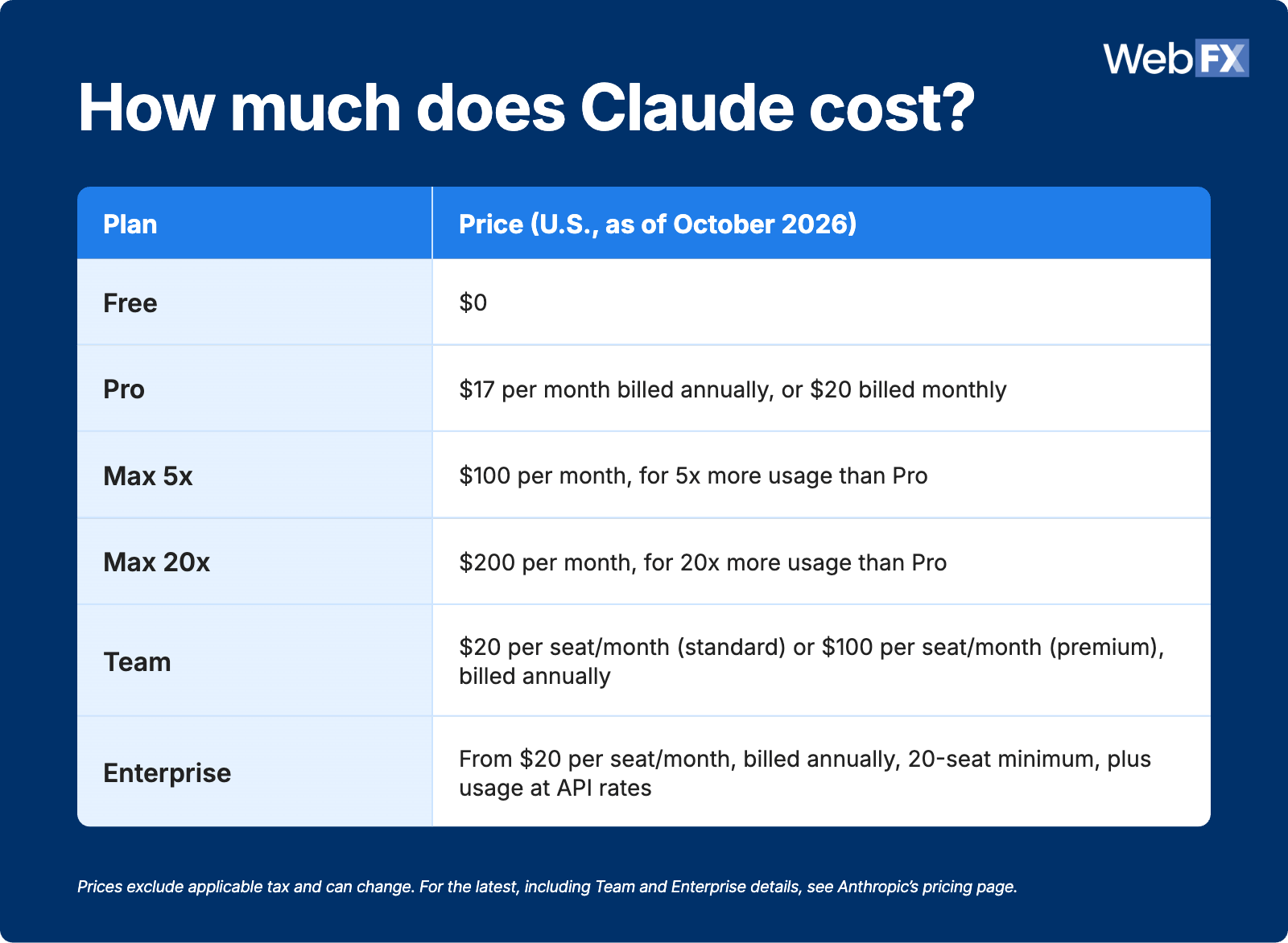
Table view:
| Plan | Price (U.S., as of October 2026) |
| Free | $0 |
| Pro | $17 per month billed annually, or $20 billed monthly |
| Max 5x | $100 per month, for 5x more usage than Pro |
| Max 20x | $200 per month, for 20x more usage than Pro |
| Team | $20 per seat/month (standard) or $100 per seat/month (premium), billed annually |
| Enterprise | From $20 per seat/month, billed annually, 20-seat minimum, plus usage at API rates |
Prices exclude applicable tax and can change. For the latest, including Team and Enterprise details, see Anthropic’s pricing page.
For me, the value is a clear yes, but it depends on your usage and how much your role leans on it. Claude turns tasks that took days into minutes or hours. My work is heavy on automation, Q&A, and building WordPress plugins, and my usage has never been more than a few hundred dollars a month. Given the time saved and the projects my team shipped without pulling in developers, that’s an easy call.
If the same use case ran into the thousands per month, I’d weigh it more carefully. It would still be useful, but I’d want to see the return justify it. If your usage is costing that much, check whether the output is worth the spend for your work.
When should you use Claude instead of ChatGPT or Gemini?
Use Claude for private, sensitive, or deeply technical work; use Gemini for quick image generation; and use Google’s AI Mode or AI Overviews for fast answers to public questions. Here’s how I split the work across tools:
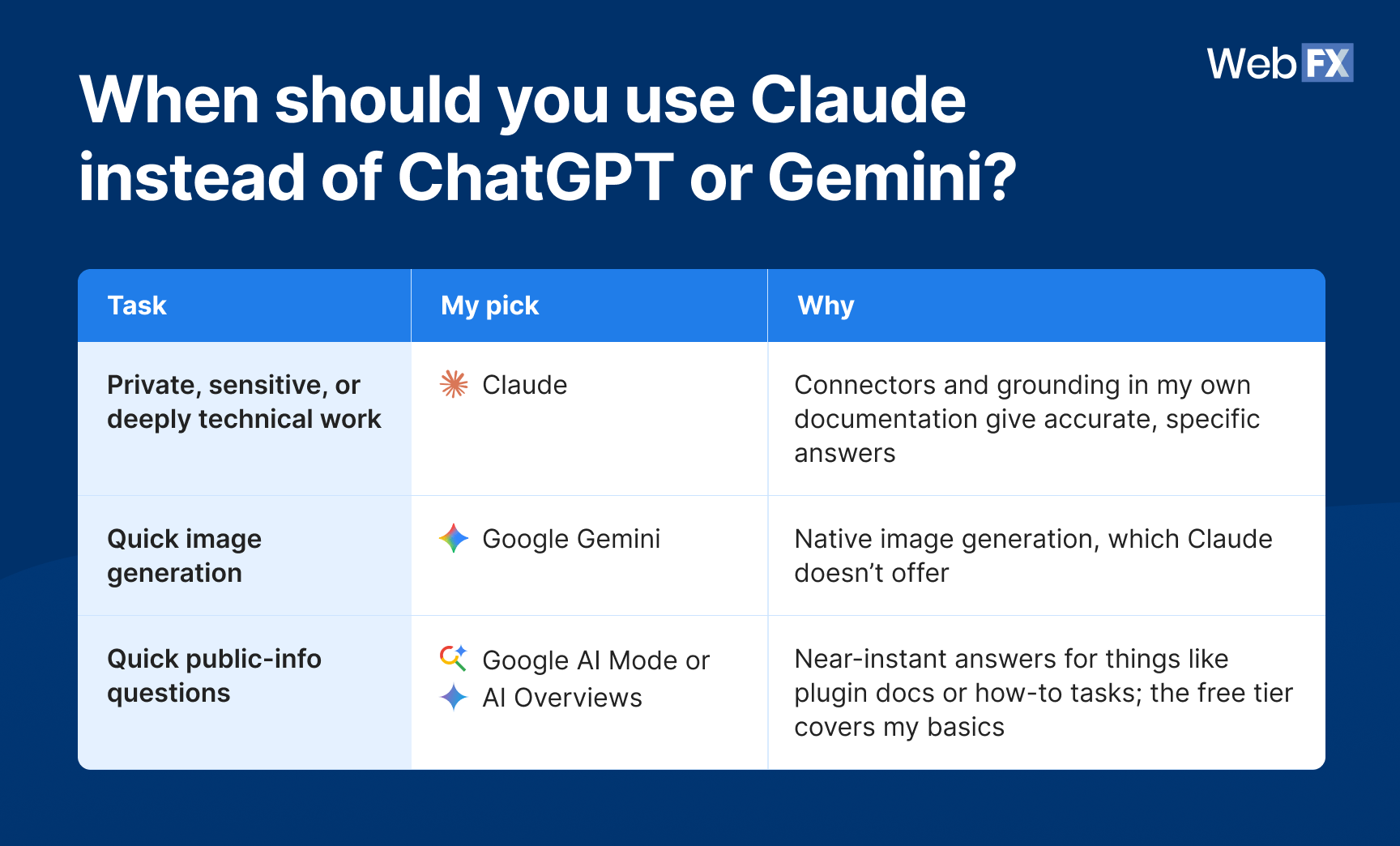
Table view:
| Task | My pick | Why |
| Private, sensitive, or deeply technical work | Claude | Connectors and grounding in my own documentation give accurate, specific answers |
| Quick image generation | Google Gemini | Native image generation, which Claude doesn’t offer |
| Quick public-info questions | Google AI Mode or AI Overviews | Near-instant answers for things like plugin docs or how-to tasks; the free tier covers my basics |
You can set up free accounts across several tools, Google AI Mode and AI Overviews, Gemini, Perplexity, ChatGPT, and Claude’s free tier, and upgrade only where your usage demands it. Just remember the privacy trade-off: Consumer free tiers may use what you share depending on their settings, so keep sensitive data out unless you’ve checked.
If you’re running work across several of these tools, a shared workspace keeps your team from scattering prompts and context across five tabs. WebFX’s TeamAI brings multiple AI models into one collaborative space, so your team can share prompts, templates, and conversations in one place.

AI Workspace for Business Teams
Imagine an AI workspace where you can collaborate with team members, share prompts, and leverage personas for generative AI.
Empower My Team with AI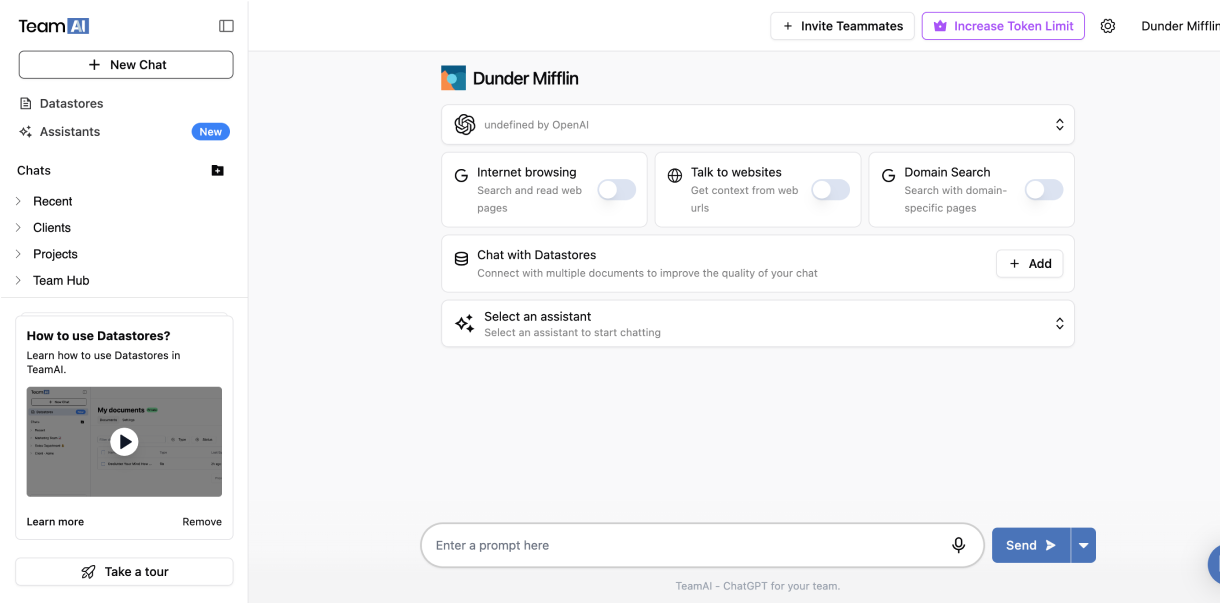
FAQs about Claude AI
Is Claude AI actually good?
Yes, Claude is a strong AI tool, particularly for writing, document analysis, coding, and reasoning through technical problems. Its standout strengths are connecting to the tools you already use and grounding answers in your own documentation. It’s less suited to fast, casual queries or native image generation.
Is Claude AI better than ChatGPT?
It depends on the task. Many people, myself included, prefer Claude for coding, long-document analysis, and technical work grounded in private data. ChatGPT and Gemini tend to be faster for quick answers, and they offer native image generation that Claude doesn’t. For my daily marketing and MarTech work, Claude wins; for throwaway questions, I often reach for something else.
Is Claude AI free?
Claude has a free tier that covers chat, web search, file creation, and connecting your apps, with daily usage limits. Paid plans start at $17 per month for Pro (billed annually), with Max, Team, and Enterprise tiers for heavier or business use.
What are the biggest disadvantages of Claude AI?
The main drawbacks are speed, since it’s slower than Gemini or ChatGPT for quick answers; text-heavy slide decks that need trimming; no native photo or illustration generation; and costs that climb with heavy usage. None are dealbreakers for my work, but they’re worth knowing going in.
Learn how WebFX grew a client’s AI traffic by 188% and earned 95% visibility for tracked AI questions.

My final verdict on Claude AI
Claude is the most valuable AI tool I use day to day. It’s slower than I’d like, text-heavy on slides, and it doesn’t generate photos or illustrations. But it connects to everything I need, answers accurately because it’s grounded in my real documentation and data, and lets me do things I couldn’t on my own: Query BigQuery, build and test small tools, and stand up reporting without another piece of software.
If you’re weighing Claude AI for marketing work, start with the connectors you can’t work without, set up your grounding, and pick your use cases carefully. Use it where it’s strongest, use something else where it isn’t, and keep an eye on usage costs. That mix has made it a real win for my team.
Want help putting AI to work across your own data and marketing stack? WebFX’s AI consulting services connect your systems, automate the repetitive work, and tie it all back to revenue. Get your free proposal or call 888-601-5359 to speak with a strategist today.
-
 Nolan is Head of Innovation for WebFX and serves as an SME for our DataTech Solutions team. Nolan’s favorite part of digital marketing is being able to have a direct impact on growing our clients’ businesses. In his spare time, he enjoys watching NCAA wrestling, hanging out with his dogs, riding motorcycles, and woodworking. View full profile
 -

WebFX is a full-service digital marketing agency delivering revenue-driving strategies across online advertising, SEO and AI search optimization, and digital marketing. Backed by 1,100+ client reviews, a 4.9-star rating on Clutch, and proprietary revenue-tracking technology, our team helps businesses grow visibility and revenue across platforms, from Google to ChatGPT to LinkedIn. Discover how our expert team and revenue-accelerating tech can drive results for you. Learn more

Try our free Marketing Calculator
Craft a tailored online marketing strategy! Utilize our free Internet marketing calculator for a custom plan based on your location, reach, timeframe, and budget.
Contents
- Claude AI review: Is it worth using in 2026?
- What is Claude AI?
- Claude AI pros and cons
- How useful is Claude AI for marketing?
- What marketing tasks does Claude handle best?
- How much does Claude cost, and is it worth paying for?
- When should you use Claude instead of ChatGPT or Gemini?
- FAQs about Claude AI
- My final verdict on Claude AI
Share this article



See AI Marketing in Action
Explore how WebFX helped a regional brand get discovered in AI search experiences — proving what’s possible with today’s AI-driven marketing!
Try our free Marketing Calculator
Craft a tailored online marketing strategy! Utilize our free Internet marketing calculator for a custom plan based on your location, reach, timeframe, and budget.