You don’t need to adopt every Claude release. Pick the one or two updates that fix your biggest bottlenecks, then build them into a repeatable workflow.
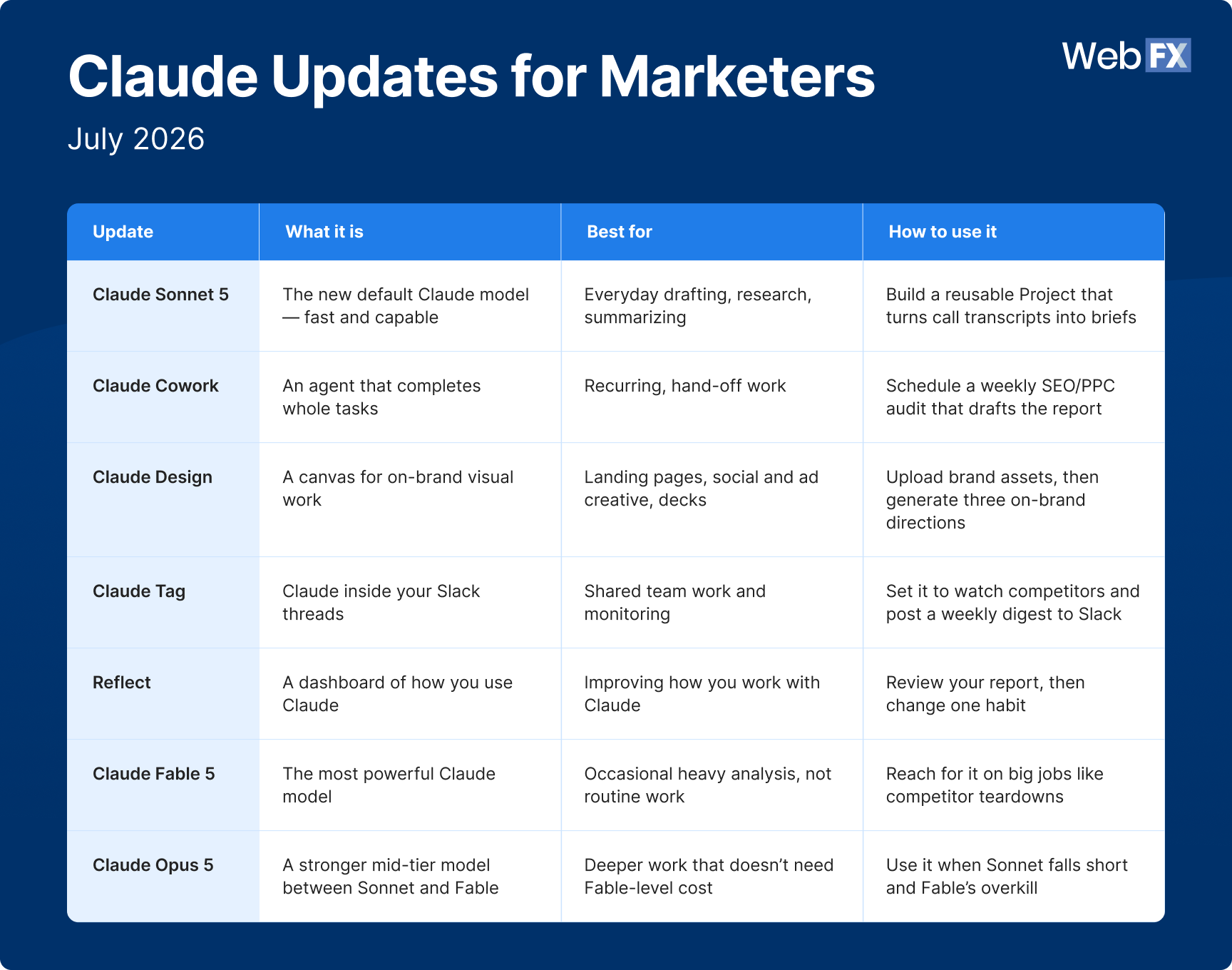
For everyday marketing work like drafting, research, and summarizing, use Claude Sonnet 5 as your default model. Use the more powerful Fable 5 only for occasional heavy analysis.
To hand off whole tasks, use Claude Cowork (now on web and mobile) for recurring work like weekly campaign audits, and Claude Tag to bring Claude into your team’s Slack threads.
Claude Design keeps your visual assets on brand, and Reflect shows you how you’re using Claude so you can work with it more deliberately.
If you already use Claude for marketing, keeping up with its product updates is a job on its own. The good news is that you don’t have to.
Only a handful are worth your attention: the faster default model (Sonnet 5), an updated Claude Design that builds on-brand assets, and Cowork now running on mobile and web. Those, plus a few more, are broken down below so you can put them to work.
Anthropic shipped a handful of updates between mid-June and mid-July 2026. To get the most out of these recent features in Claude, pick the one or two updates that solve your most urgent problems and build them into a repeatable workflow. That focus is better than trying to incorporate every new release.
The most recent Claude updates that actually matter to marketers
Anthropic shipped these updates in just a few weeks, so it’s easy to lose track of what each one is designed to do. The ones worth adopting first are those that take over a task you’re already doing manually: drafting copy, building on-brand assets, prepping for a client meeting.
Pick the one or two Claude updates that can address your biggest bottlenecks.
A stronger mid-tier model between Sonnet and Fable
Deeper work that doesn’t need Fable-level cost
Use it when Sonnet falls short and Fable’s overkill
1. Claude Sonnet 5 is your new default engine
Released on June 30, 2026, Claude Sonnet 5 is the model now running by default on Free and Pro plans. It’s Anthropic’s most agentic Sonnet model to date.
By “agentic,” it means it can plan and carry out multi-step tasks on its own rather than just answering a single prompt. Its performance is close to the more expensive Opus 4.8, but at a lower price.
Marketers can use Sonnet 5 for their everyday work, such as:
Summarizing long documents
Quick research
Organizing notes into structured outputs
Writing drafts
Pro tip: Sonnet 5 already runs at High effort by default, which is built for real reasoning and quality. So if you’re performing quick, routine work like summarizing a document, dial the effort down to Low or Medium next to the send button for a faster response. Save Max for analysis work on a messy dataset or dense competitive analysis.
Practical use case for Sonnet 5: campaign brief generation based on call transcripts
Sonnet 5 is handy for manual tasks you do repeatedly. An example is turning discovery-call transcripts into a campaign brief.
Start by creating a Project dedicated to the task of making campaign briefs based on discovery-call transcripts. In the project:
Add relevant files, such as your positioning document, style guidelines, and brand voice, to the project.
Set up the Project’s Instructions, starting with defining its role, tone, and delivery format.
In the Instructions, define the inputs Claude should expect and ask for, including the call transcript and the user’s notes for additional context.
Define the workflow, which includes the expected output, the files it must review and use throughout the process, and guardrails.
Test and refine your Instructions to improve the Project’s output.
Expert insights from
Colton W.Senior Consultant at WebFX
“Invest time in crafting really well-built Project Instructions for your Claude Project. While it can be time-consuming up front, it will save you time and headaches long term and produce consistently good outputs.”
Colton advises that you play the role of a project manager evaluating and iterating the output of your Project.
“Perfection will likely not be achieved on the first try (especially at first, when Claude doesn’t have a lot of ongoing context about what your project is for),” Colton explains. “But that the bulk of the thinking, strategizing, and execution is done quickly so that you can focus more time on the ‘fine-tuning’ and actual shipping of whatever your Project is set up to work on or build.”
2. Claude Cowork now runs on web and mobile
Claude Cowork was launched on January 12, 2026, as a desktop agent that can take on a whole task. On the desktop app, it can work directly across your local files.
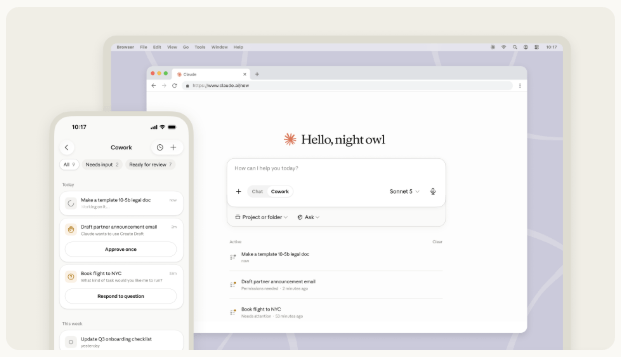
Cowork now runs on web and mobile. (Source: Anthropic)
In July 2026, Anthropic announced that Cowork can now run on web and mobile. This recent update lets you start a task on your desktop, shut down your computer, and review the agent’s output from your mobile app. Your scheduled tasks can still run even when your devices are offline.
One thing to know as you set up your own agent: The web and mobile versions work through your cloud-connected tools, while tasks that need your local files or browser stay on the desktop app.
More than 90% of Cowork use isn’t software development. The largest categories are business operations and content creation, which are similar to what a marketing team juggles all week:
Auditing paid ad campaigns
Analyzing marketing data
Monitoring competitor activities
Preparing content briefs and writing first drafts
Practical use case for Cowork: weekly campaign audits
Marketers can use Cowork for recurring campaign work, like a weekly audit of your ongoing SEO or PPC campaigns. The regular audit can help you spot trends, flag any optimization opportunities, and generate your monthly reports.
Set up a scheduled Cowork task that runs at the start of each week. Connect it to the tools where your campaign data lives: Google Analytics, Google Ads, and Search Console.
Then, tell it what “done” looks like. Instruct it to:
Pull last week’s performance across your connected SEO and PPC campaigns.
Identify changes in rankings, clicks, conversions, and cost per lead (CPL), and flag any undesirable changes, such as declining traffic or increasing CPL.
List optimization opportunities to prevent keywords from slipping in position or ad groups burning budget without converting.
Draft the weekly performance report (following your standard format), which you can review and edit.
Because Cowork acts on your behalf, it pauses for your sign-off before it changes anything in a live campaign. It hands you the analysis and the recommended moves, but you decide what the next step is.
3. Claude Design keeps your output on brand
Updated on June 17, 2026, Claude Design is Claude’s canvas for creating visual work, such as landing pages, social and ad creatives, slides, and one-pagers.
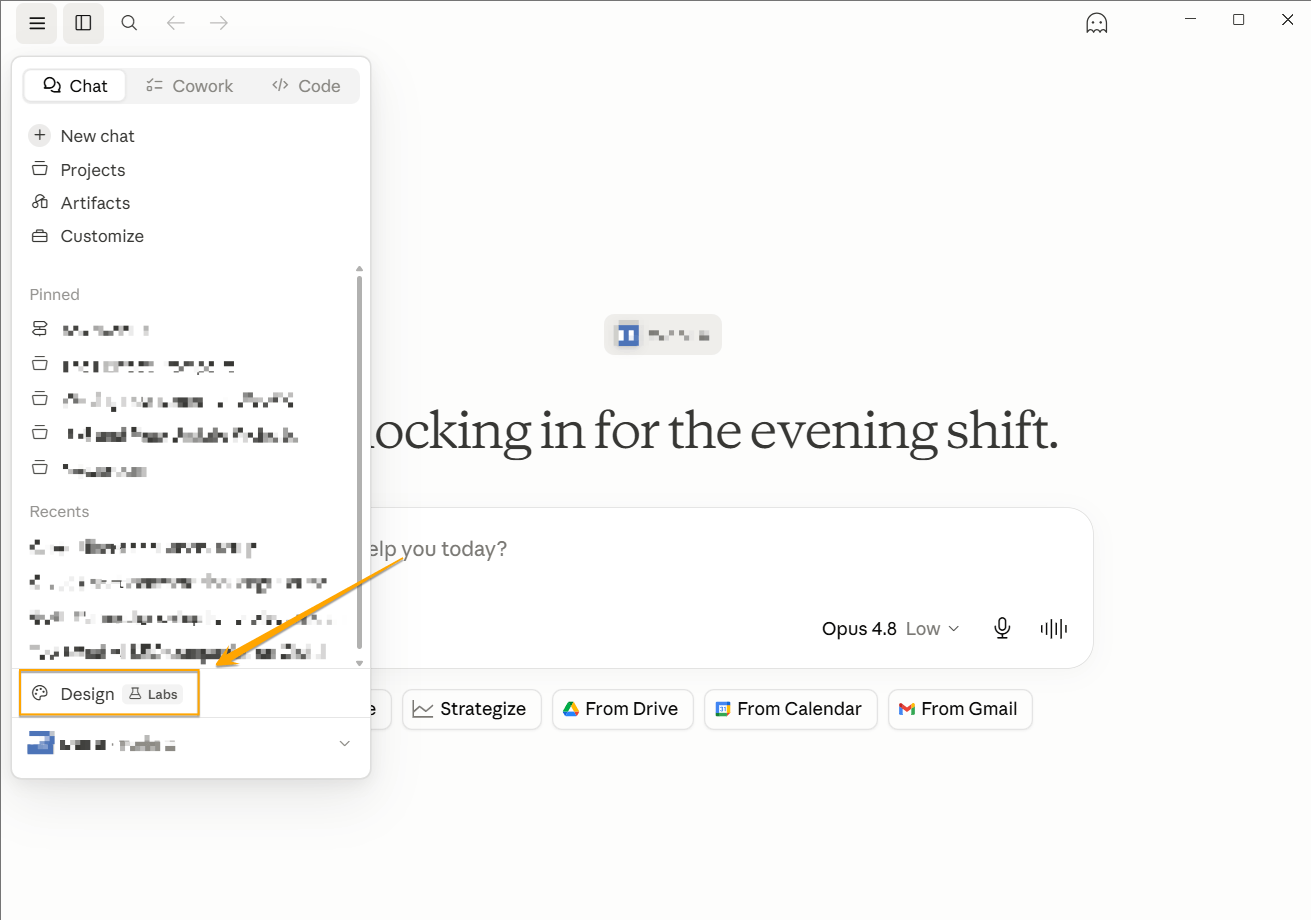
Launch Claude Design from the sidebar menu of the desktop app.
The update lets it build from your own design system, so its output matches your brand across projects. More than a million people used Claude Design in its first week after it launched.
Marketers can use it to create:
Landing page concepts
Social and ad creative
Pitch decks and one-pagers
On-brand email and campaign layouts
To keep everything on brand, upload your brand assets (hex codes, fonts, and logo files) to Claude Design. Claude then builds using those components and checks its own output against them.
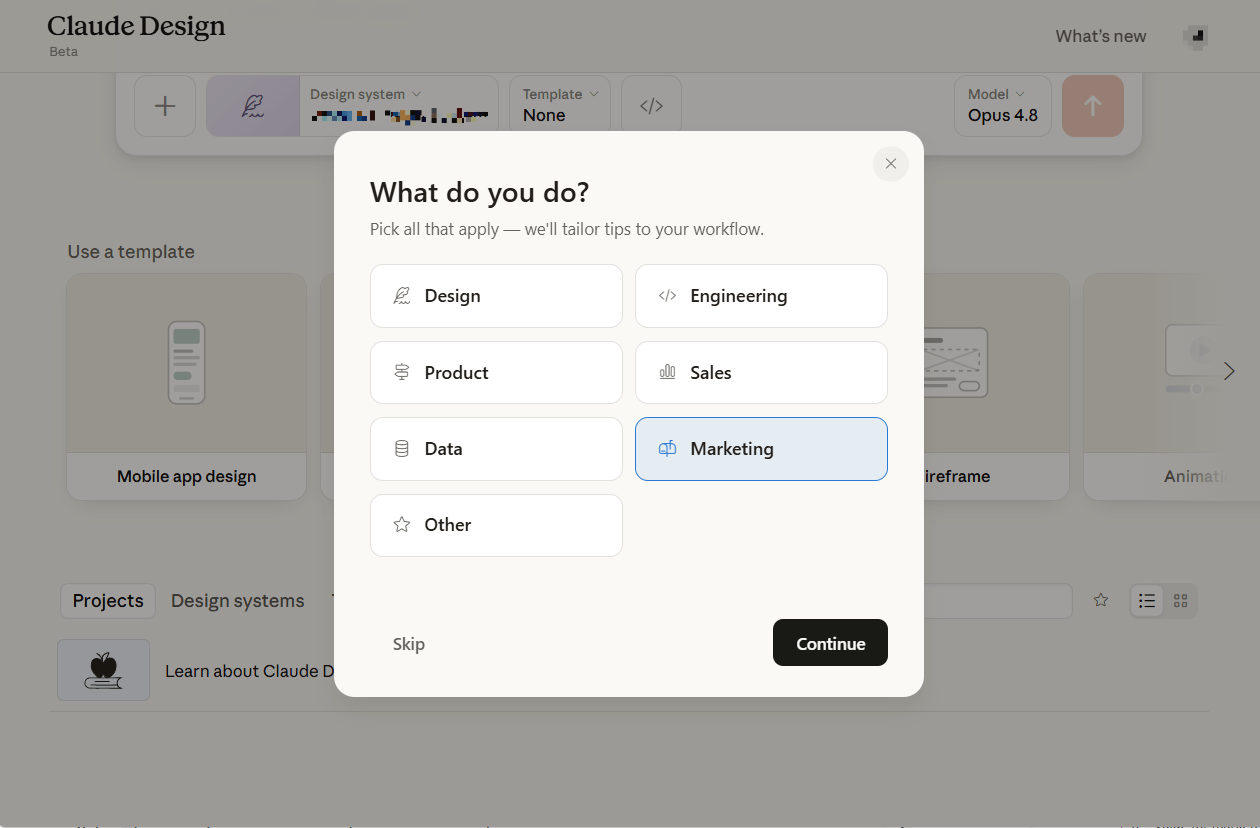
When using Claude Design for the first time, it asks what you do, so it can personalize your workflow.
For larger teams, an admin can approve one standard system and lock it, so everything the team produces matches company guidelines.
When a design is ready, you can export it straight to PowerPoint or PDF. You can also send it to a connected app, including Canva, Wix, and Adobe.
Practical use case for Claude Design: creation of quick design studies that your team can edit and build on
If you need landing page ideas by the end of the day, you can use Claude Design to generate quick studies.
Start by importing your brand assets. Then, ask Design for three on-brand directions for your landing page.
Review the studies on the canvas, refine the one you like best, and send it straight to Wix through the connector so your web team can build on it. You can also export it to hand off however your team works.
4. Claude Tag brings Claude into your Slack threads
Launched in beta on June 23, 2026, Claude Tag lets you pull Claude into a Slack thread by typing @Claude. It can read the full context of the conversation, do the work, and post back in the same thread. Claude Tag is available in beta on the Claude Team and Enterprise plans.
Claude Tag is collaborative. Within a Slack channel, one Claude works with everyone, so anyone can see what it’s doing, and it acts like a shared team member.
Because it follows a channel and conversations within it, it learns over time by gaining more context about the team’s work and focus. If you give it permission, it can also get additional context from other channels or connected tools. It can’t report from private channels, though.
If “ambient” behavior is turned on, Claude Tag proactively flags information you might need from across its channels and connected tools, and follows up on threads or tasks that have stalled without being resolved.
Practical use case for Claude Tag: competitor monitoring
Claude Tag can work asynchronously, so you can assign it to monitor your top three competitors by giving it access to the channel and the tools where it can get intel.
Instruct it to flag new campaigns, pricing changes, or new marketing messages from your competitors. Then it must post a summary of these changes to your channel every Friday.
5. Reflect shows you how you actually use Claude
Reflect is a dashboard that shows you how you’ve been using Claude over time. It reviews your past conversations and generates a report covering your most common topics, when you use Claude most, and the kinds of tasks you bring to it — across the past 1, 3, 6, or 12 months. You’ll find it in Settings on Claude’s web and desktop apps.
Launched on July 9, 2026, Reflect doesn’t do marketing work for you. Instead, it makes you better at everything else on this list. It answers the question: Am I actually using Claude well?
Reflect organizes what it finds around the 4D AI Fluency Framework, the four habits of working well with AI:
Delegation: Are you making thoughtful decisions about which tasks to do yourself and which ones you assign to Claude?
Description: Are you clearly communicating your goals and instructions to get useful results?
Discernment: Are you effectively assessing AI’s output and behavior?
Diligence: Do you use AI ethically and safely? Do you take responsibility for how you use your AI’s output?
Reflect is currently available in beta for Free, Pro, and Max users with Memory enabled.
6. Claude Fable 5 gives you a heavier engine for deep analysis
Claude Fable 5 is the most powerful Claude model you can use. Available on every paid plan, it’s built for long, complex reasoning that would overwhelm a lighter model.
Fable 5 is made for the occasional heavy lifting, not routine marketing work. Save it for the analysis that genuinely needs the extra horsepower, such as:
A competitive teardown across dozens of competitor pages at once
Synthesizing a full quarter of survey responses and call transcripts into positioning themes
Untangling a messy, multi-source attribution question
For everyday drafting, research, and summarizing, stay on Sonnet 5, which is faster and more than capable. Reach for Fable 5 only when the size or complexity of the work exceeds what Sonnet 5 can handle.
7. Claude Opus 5 fills the gap between Sonnet and Fable
Released on July 24, 2026,Claude Opus 5 sits between Sonnet 5 and Fable 5 in Anthropic’s lineup. It’s priced at $5 per million input tokens and $25 per million output tokens, the same as its predecessor Opus 4.8. However, Anthropic says it comes close to Fable 5’s frontier intelligence at roughly half the price.
Opus 5 is now the default model on Claude Max and the strongest option available on Claude Pro. It also runs on a 1-million-token context window as both the default and the maximum, which helps if you’re feeding it long campaign briefs or several past assets at once for a consistency check.
Marketers can reach for Opus 5 when:
Sonnet 5 feels underpowered for the task, but Fable 5’s cost or access limits aren’t worth it.
You need Claude to hold a long document, like a full brand guide or campaign history, in context for the whole task.
You want stronger output on longer, multistep work, like building a full deck and then revising it, without paying Fable 5 pricing.
For everyday drafting and research, Sonnet 5 stays the better default. Reach for Opus 5 when the task calls for more depth than Sonnet 5 gives you, but doesn’t justify Fable 5’s price tag.
How to build your Claude workflow one piece at a time
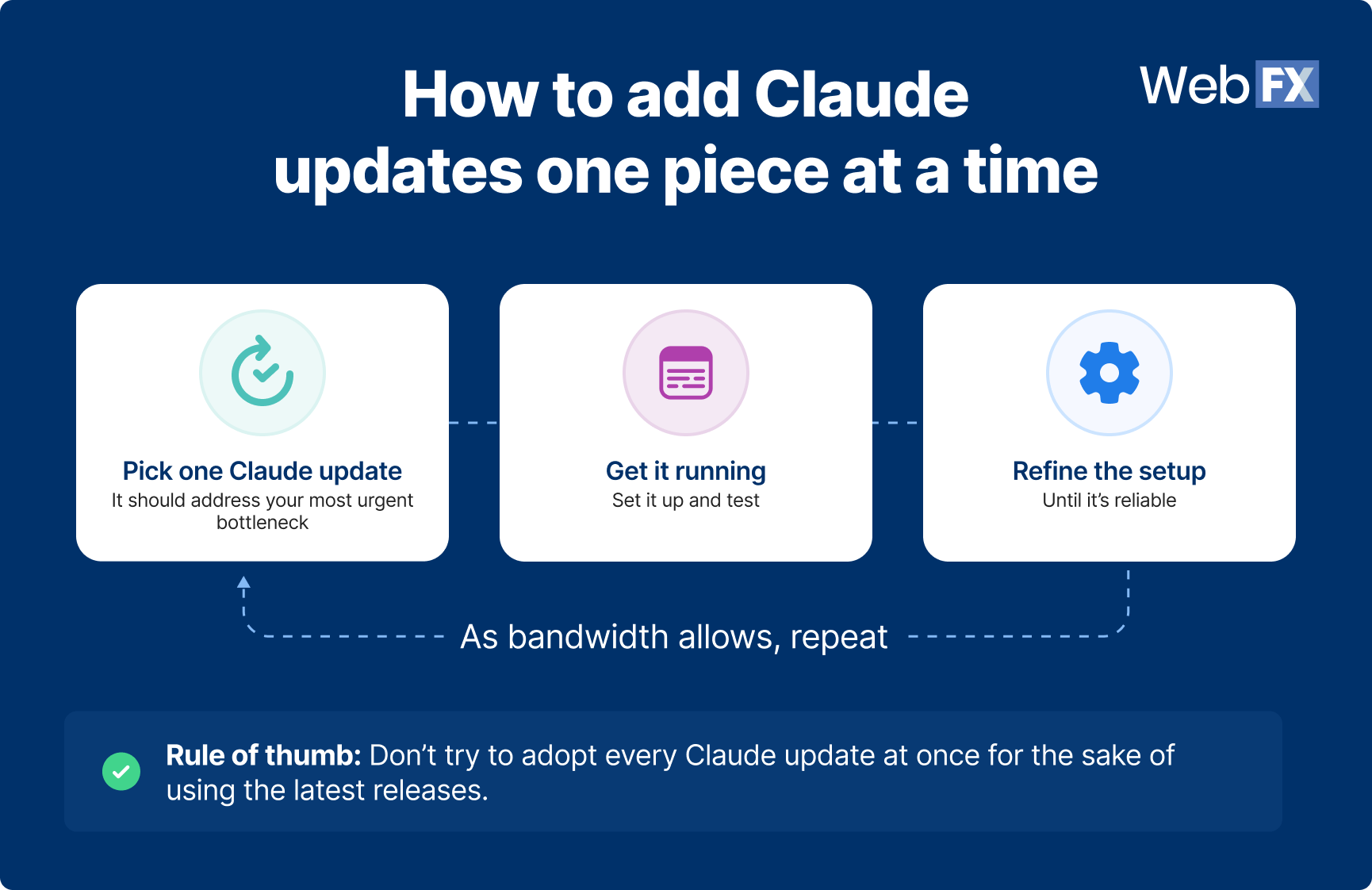
Rule of thumb: Don’t try to adopt all of these updates at once.
Expert insights from
Sarah B.Lead Consultant at WebFX
“When Claude releases an update, treat it like a buffet. Move down the line, sampling what you’re most to least interested in, and see what you find. Sonnet 5 is a great example. Some people think it’s an upgrade from 4.6, others a downgrade, and that’s okay. You won’t know what changes your workflow until you try it. Be curious (and hungry).”
If you fill your plate with all the releases (instead of just sampling them), you might overwhelm your team. That’s because with so many changes happening at once, measuring their effectiveness and improving each process can take a backseat, leaving you with a more chaotic workflow instead of a streamlined one.
Instead, pick a single update that fixes your most urgent bottleneck, get it running until it’s second nature and you’re happy with its output, then add the next piece when you have the bandwidth.
Each update works on its own, so there’s no wrong place to start. Think of it as a modular set of cabinets — you start with one module and add on to it once you’ve maximized the first cabinet.
Don’t overwhelm your team by adopting all the new Claude releases. Adopt one update at a time, set it up and test, and refine before you take on another update.
The payoff shows up as the pieces connect. Say you’re launching a campaign. Here’s a pipeline you could build one step at a time:
Create a Project with Sonnet 5 for turning discovery-call notes into first-draft briefs.
Use Claude Design to turn a brief into three on-brand landing page concepts.
Once the campaign is live, a scheduled Cowork task audits your campaign’s performance every week and drafts the report.
Set Claude Tag to watch your competitors and post a weekly summary to your team’s Slack channel
Each of those steps is useful on its own. Strung together, they turn a multi-day scramble across tools and teammates into a pipeline you run on repeat.
More Claude updates will keep coming. When the next release is announced, ask yourself or your team first: Does this new update fix a bottleneck we are currently facing?
If it does, find its place in your workflow. If it doesn’t, skip it, even if the demo looks impressive.
Forcing every release into your process — or defaulting to the newest model just because it’s new — adds effort and cost without improving the work.
Building and maintaining your workflow takes time. If you’d rather have them designed and running without stretching your team too thin, AI and data stack services from WebFX can help your team.
For most day-to-day marketing work of writing drafts, research, summarizing, and multi-step tasks, you can use the default Claude Sonnet 5. It runs automatically on Free and Pro plans.
Step up to Claude Opus 5 when a task needs more depth than Sonnet 5 offers, such as maintaining a long brand guide in context throughout a whole project or revising a full deck across multiple passes. It’s the new default model on Claude Max and the strongest option available on Claude Pro.
Save Claude Fable 5 for tasks that are genuinely heavy, like a competitive teardown analysis across multiple pages, since it’s built for complex analysis rather than routine work.
Yes, though access is rolling out in stages. As of July 7, 2026, Cowork runs on web and mobile in addition to desktop, but it started as a beta for Max users, with other plans following over the next several weeks, so check whether it’s live on your plan yet.
Once you have it, your scheduled tasks can keep running even when your devices are offline, so you can start a task at your desk and check the result from your phone.
The exception is tasks that need your local files or browser. Those tasks still run on the desktop app.
Yes. Upload your brand assets (your colors, fonts, and logo files) to Claude Design, and it builds using those components and checks its own output against them.
Your generated landing pages, decks, and social assets come out on brand, and you can export them to PowerPoint or PDF or send them to a connected app like Canva, Wix, or Adobe.
Chatting with Claude gets you an answer to a question, while Claude Cowork acts as an agent.
You hand Cowork a whole multi-step task, and it works across your connected files, email, and tools to finish it. It pauses for your approval on anything that needs your judgment. Because it takes real actions on your behalf, you set clear guardrails first.
It varies by feature. Sonnet 5 and Reflect are available on Free plans (Reflect requires Memory to be turned on).
Claude Design needs Pro or higher. Claude Tag is available on Team and Enterprise plans. Fable 5 is on every paid plan, although it’s included on some and billed through usage credits on others. Check Anthropic’s plans page for current details, since availability shifts.
You don’t need to adopt every release. The teams that get the most from Claude pick the one or two updates that solve their bottlenecks, build them into a repeatable workflow, and skip the rest.
When a new update is announced, ask this question: Does this update fix a problem we actually have? If it does, find it a place in your workflow. If it doesn’t, wait.
Meet WebFX
A world-class digital marketing agency with thousands of reviews applauding our transparency.
One of our experts will be in touch within 24 hours!
Turn new Claude features for marketers into a competitive edge
More Claude updates will keep coming, and maintaining your workflow as the tools evolve is work in itself.
If catching up with the latest Claude updates is hard to sustain in-house, let WebFX help. We can help you turn tools like Claude into systems that drive data-driven revenue growth, built around your goals and maintained as the tools evolve.
WebFX is Certified in the Claude Partner Network, so our team holds active Anthropic certifications and uses Claude every day. Our experts review every AI-assisted output before it reaches a client. Learn more about our AI consulting services.
Ready to build an AI-assisted workflow that drives leads, revenue, and business growth? Contact us online today or call us at 888-601-5359 to speak with a strategist.
Try our free Marketing Calculator
Craft a tailored online marketing strategy! Utilize our free Internet marketing calculator for a custom plan based on your location, reach, timeframe, and budget.
Craft a tailored online marketing strategy! Utilize our free Internet marketing calculator for a custom plan based on your location, reach, timeframe, and budget.









 Maria is a Lead Content Specialist at WebFX. With nearly two decades of experience in B2B and B2C publishing, marketing, and PR, she has authored hundreds of articles on digital marketing, AI, and SEO to help SMB marketers make informed strategic decisions. Maria has a degree in B.S. Development Communication major in Science Communication, and certifications in inbound marketing, content marketing, Google Analytics, and PR. When she’s not writing, you’ll find her playing with her dogs, running, swimming, or trying to love burpee broad jumps. View full profile