


Contents
- How to detect AI-generated content in text
- How AI detectors work and why they flag human writing
- How to detect AI-generated images
- AI detection tools and what each one does
- What Google evaluates instead of a detector score
- FAQs about AI detection
- Build a content process that holds up without a detector
-
What is the best way to detect AI-generated content?
No detector can confirm authorship, so review the content itself and treat any detector score as a secondary signal. Run a five-point check on the draft: query fit, sources, originality, accuracy, and brand voice. -
Do AI detection tools work?
They return probability estimates rather than verdicts, and they fail in both directions. A Stanford-led study found an average 61.3% false-positive rate on essays by non-native English writers, and detection of AI text fell to near zero after a single rewrite instruction. -
Why does a detector flag copy a person wrote?
SEO best practices and AI detection criteria measure similar things. Plain wording and commonly searched terms make text more predictable, while scannable subheadings and concise sentences even out its structure, and both profiles are what detectors associate with machine-generated writing. -
How do you detect AI-generated images?
Start with the file’s own record rather than the pixels:- Check for Content Credentials, which document an asset’s origin and edit history
- Check for a SynthID watermark in the Gemini app, though a negative result only rules out Google’s AI models
- Review metadata for device details, capture settings, and timestamps
- Run a reverse image search to trace the original source
-
Does Google penalize AI-generated content?
No. Google’s ranking systems reward original, high-quality, people-first content regardless of how it was produced. The violation is using automation primarily to manipulate rankings, which its scaled content abuse policy addresses.

TL;DR: How to detect AI-generated content?
No detector can confirm authorship, so review the content itself and use a detector only as a secondary signal. Check these five things to detect AI content:
- Query fit: Does the piece fully answer what the reader searched for?
- Sources: Does every statistic and claim link to something you can open and verify?
- Originality: Does it offer data, examples, or expertise unavailable elsewhere?
- Accuracy: Are the specifics correct, or vague enough to be unfalsifiable?
- Voice: Does it sound like the brand, or like any company in the category?
Detectors estimate how closely text matches statistical patterns in AI output. They return false positives on plain human writing, miss AI writing that has been edited, and carry no weight with Google, which evaluates content on quality regardless of how it was produced.
Detecting AI-generated content is harder than it was a year ago, and the tools built for the job are less conclusive than their scores suggest. Detectors estimate statistical patterns, so they flag plain human writing and miss AI writing that someone has edited.
That leaves you two practical routes. For text, read for the quality markers that determine whether a page performs. For images, check the file’s provenance record before you check the pixels.
This guide covers how to detect AI content in text with a five-point check, what AI detection tools actually measure and where each one falls short, how to detect AI-generated images through Content Credentials and watermarks, and what Google evaluates instead of a score. Keep reading for the full breakdown:
Don’t miss our Revenue Weekly emails!
Join 200K smart marketers for the hottest marketing news and insights in your inbox.
Inline Subscription Form
“*” indicates required fields
How to detect AI-generated content in text
If you want to know how to detect AI content in practice, run this five-point check on any draft. It works whether a person, a model, or both produced the words, and each point targets a signal that affects how the page performs.
1. Query fit
Read the target query, then read the page. Ask whether a reader who typed that query would leave satisfied or would need to open another tab.
The answer belongs high on the page rather than three paragraphs down. Content that circles a topic without resolving it is the most common failure in weak drafts of any origin.
2. Sources and attribution
Every statistic, date, and named study needs a link you can open and verify. Generative models produce confident, well-formed sentences around numbers that do not exist, so treat unsourced specifics as unverified until you check them.
Click through to the primary source rather than the article citing it. Secondary coverage routinely garbles figures, and a study’s own abstract often contradicts the blog posts summarizing it.
Watch for links that go somewhere real but do not contain the claim attached to them. That pattern is harder to spot than a missing citation and does more damage to trust.
3. Originality
Check what the piece contributes that a reader could not get from the other results on page one. First-party data, a client example, a tested workflow, an internal benchmark, or a named practitioner’s judgment all qualify.
Models generate from what already exists, so a draft built only on competitor research tends to restate the consensus. Look for recycled framing as the tell, meaning the piece organizes the topic the same way the top-ranking pages do, with the same subheadings in the same order.
That restatement is the real ranking risk, and it applies equally to a human writer who read the top five results and nothing else.
4. Accuracy and specificity
Scan for claims that sound authoritative while saying nothing measurable. Vague qualifiers, hedged recommendations, and generic best practices signal that nobody with domain knowledge reviewed the draft.
Replace soft language with concrete numbers, named tools, real timelines, and the conditions under which a recommendation applies. A recommendation without its conditions leaves readers unable to act on it.
Specificity is difficult to fake and easy for a reader to verify, which is why it correlates with trust.
5. Brand voice and audience fit
Read a few paragraphs aloud. Copy that reads smoothly while sounding like it could belong to any company in the category has lost the thing that makes a brand recognizable.
Check terminology against how your audience actually describes its own problems. Maintaining brand voice with AI-assisted drafting is achievable, and it depends on giving the model real brand and audience context before it drafts rather than editing tone in afterward.
A draft that clears all five has passed the checks that govern performance. A draft that fails one has a specific, fixable problem, which is more useful to work with than a percentage.
How AI detectors work and why they flag human writing
Anyone learning how to detect AI-generated content reaches for a tool first, so it helps to know what the tool is doing. AI detection tools do not read for meaning, and instead score text against statistical properties that tend to differ between machine output and human writing.
Common statistical signals used in AI detection include:
- Perplexity: How predictable each word is to a language model. Lower predictability reads as more human.
- Burstiness: How much sentence length and complexity vary across a passage. Humans mix short and long sentences, while models tend toward sentences of similar length.
- Classifier probability: How closely the passage resembles the training examples the detector labeled as AI-generated.
Modern detectors may also use deep-learning classifiers and other proprietary signals, so perplexity and burstiness do not describe every current detection model.
Because these are probability estimates, the output is a likelihood score rather than a finding. A tool reporting “85% AI” is saying the text’s statistical profile resembles the profile of its AI training examples, which is a different claim from “a machine wrote this.”
Why well-optimized human copy gets flagged
The most common frustration with AI detection is a flag on copy you know a person wrote. This happens because the criteria detectors measure overlap with the criteria that define good web writing.
Plain word choices, commonly searched terms, and trimmed sentences all make text more predictable and more uniform, which is exactly what perplexity and burstiness score. Well-optimized human copy therefore trips the same signals as generated copy.
A Stanford-led study tested seven GPT detectors against 91 TOEFL essays by non-native English speakers and found an average false-positive rate of 61.3%, with at least one detector flagging 97.8% of them. The essays that every detector misclassified shared one trait, which was lower perplexity than the rest.
The failure runs the other way too. When the researchers instructed the model to rewrite AI-generated essays in more literary language, detection rates fell to near zero.
Even OpenAI withdrew its own AI Text Classifier in July 2023, citing low accuracy after it correctly labeled just 26% of AI-written text.
How to detect AI-generated images
Image verification has moved away from squinting at fingers and toward checking provenance. Start with the file’s own record, then fall back to visual review.
1. Check for Content Credentials
Content Credentials attach a record of an asset’s origin and editing history to the file itself, including whether AI was involved. The Coalition for Content Provenance and Authenticity, known as C2PA, maintains the technical standard behind them.
Finding credible credentials tells you a great deal. Their absence tells you very little, since plenty of authentic images carry no credentials at all.
2. Check for an AI watermark
Google DeepMind’s SynthID embeds imperceptible watermarks into content generated by Google’s AI models, and you can check an image in the Gemini app by uploading it and asking whether it was created with AI. Google’s documentation explains that Gemini Apps use SynthID to identify images, video, and audio generated or edited by Google’s own models, alongside Content Credentials, which document origin and edit history for both AI and non-AI content.
Read a negative result carefully, because it is narrower than it looks. Google states that when no SynthID watermark is found, the content was not created or edited by Google AI, though it could still have come from a different AI system.
3. Review the metadata
Photographs from a camera or phone usually carry device details, capture settings, timestamps, and sometimes location. Uploading, screenshotting, messaging, and editing all strip or rewrite that data, so treat gaps as a reason to keep looking.
4. Look for physical inconsistencies
Check reflections and shadows against the light sources in the scene, look at how hands meet objects, read any text rendered inside the image, and watch for repeating patterns in backgrounds.
5. Check where subjects are looking
Generated images of people and animals often get anatomy right while getting attention wrong. Eyes that fail to track the object being interacted with are worth a second look, though current models handle this better than they did a year ago, so treat it as a prompt to check provenance rather than a conclusion.
6. Verify the source
A reverse image search shows whether the file exists elsewhere online, which can surface the original, reveal edits, or confirm the image is unique to its publisher. For decisions that carry weight, tracing the source beats judging whether an image looks generated.
AI detection tools and what each one does
If you need a detector for a specific reason, such as verifying a freelance submission against a contract that prohibits AI drafting, these three cover text, images, or both.
| Tool | What it checks | What it measures | Tool-specific caveat |
| GPTZero | Text | AI, human, or mixed classification with probability and confidence scores, plus sentence-level analysis | Returns a probability with a confidence category rather than a verdict, so results can come back as uncertain |
| WasItAI | Images | Whether an uploaded image or portions of it appear AI-generated | The tool’s own documentation notes that image quality and resolution affect results, and advises uploading originals instead of screenshots |
| Winston AI | Text and images | AI likelihood for both formats, plus a readability score | Image and text results deserve different levels of confidence, since only the image check can draw on provenance data |
In our testing, these detectors returned correct classifications on the samples we submitted, including AI-generated text, AI-generated images, and human-written content. Controlled samples are the easy case. The failure modes documented in independent research show up on real-world content that has been edited, translated, or written by someone whose sentence patterns fall outside the detector’s training data.
GPTZero
GPTZero checks text against models including GPT, Gemini, and Claude, and its free basic scan returns a probability split across AI-generated, mixed, and human plus sentence-level highlighting. Advanced sentence scanning, which shows which sections drove the classification, sits behind the paid tier.
Treat the sentence list as a starting point for review rather than a rewrite queue. A flagged sentence that is accurate, specific, and useful does not need changing.
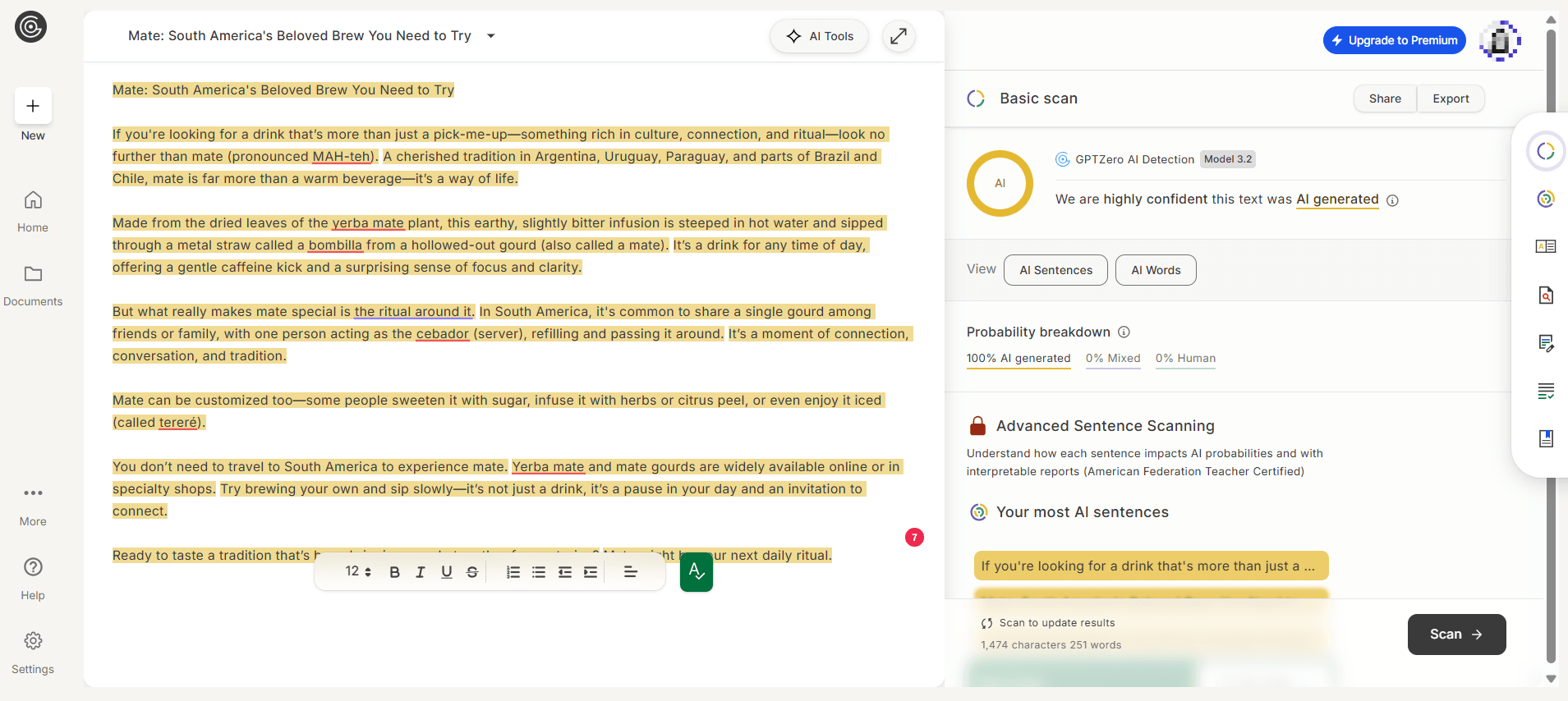
- GPTZero’s basic scan returns a probability split, while advanced sentence scanning requires a paid plan.
WasItAI
WasItAI checks images by upload or link and reports whether the file, or a significant part of it, was created by AI. A free tier covers occasional checks.
Upload the original file rather than a screenshot, since the tool’s own documentation notes that image quality and resolution affect its analysis.
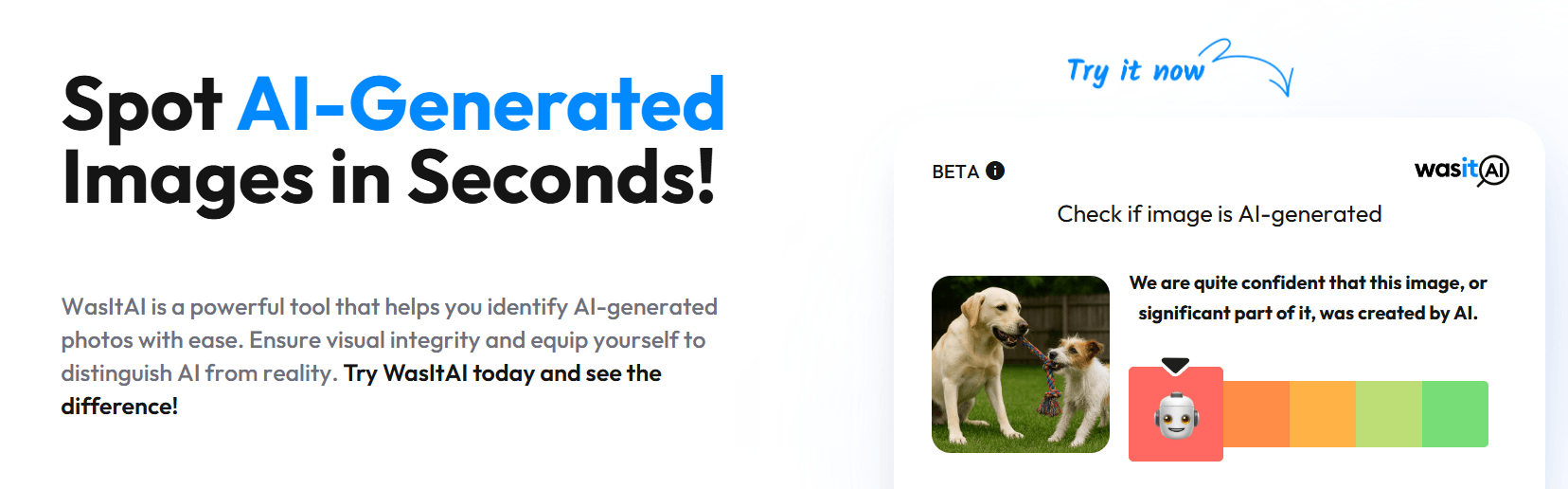
- WasItAI returns a confidence reading rather than a binary verdict.
Winston AI
Winston AI checks text and images in one place. The image scan is the more useful half, since it reads EXIF, IPTC, and C2PA data alongside its AI probability, which gives you provenance evidence rather than a statistical estimate alone.
The text scan returns an AI probability plus a readability score, with plagiarism checking on paid plans only. Weight those two numbers differently, because readability is measured while AI probability is estimated.
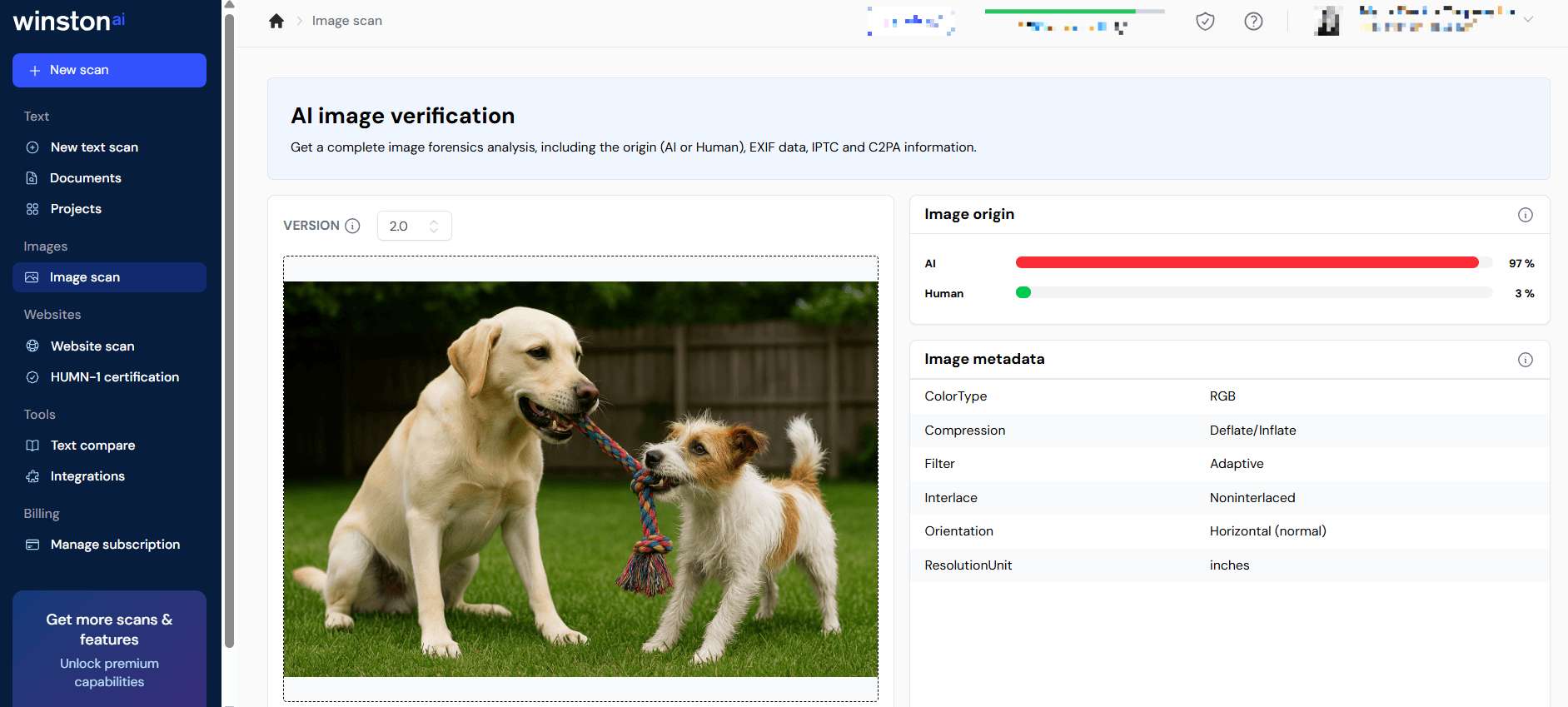
- Winston AI’s image scan pairs an AI probability with EXIF and C2PA metadata, which is stronger evidence than a score alone.
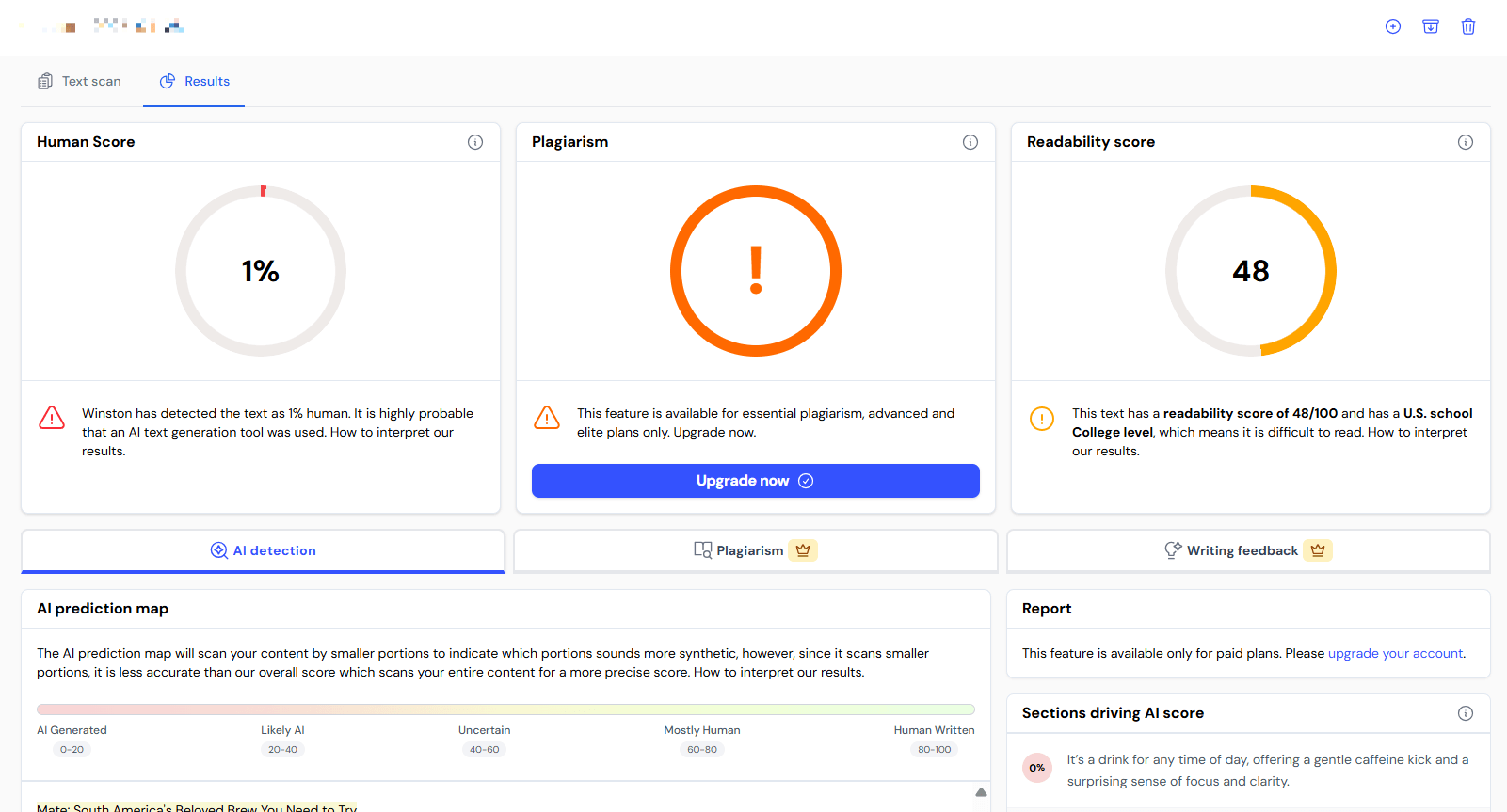
- On text, Winston AI reported the sample at 1% human alongside a readability score of 48.
Other AI detection tools you will encounter include Copyleaks, which offers section-level classifications through both a web tool and an API, Grammarly’s AI detector, which sits inside a broader writing workflow, and QuillBot’s browser-based checker. Every one returns a probability estimate built on its own model and training data, so scores from different tools are not equivalent measurements and should not be compared against each other.
What Google evaluates instead of a detector score
Detector scores play no role in how Google ranks pages. Google’s guidance on AI-generated content has been consistent since it published the policy in February 2023. Its ranking systems reward original, high-quality, people-first content that demonstrates experience, expertise, authoritativeness, and trustworthiness, however that content is produced. Using automation of any kind with the primary purpose of manipulating search rankings violates Google’s spam policies.
The line sits between quality and intent, and it has nothing to do with which tool typed the draft. Google also pointed out that the concern is not new. Roughly a decade earlier, mass-produced human-written content raised similar alarms, and the response then was to improve ranking systems to reward quality rather than ban a production method.
Enforcement follows the same logic. The March 2024 core update folded helpfulness signals into core ranking and introduced spam policies covering scaled content abuse, which applies to mass-produced low-value pages whether a person, a model, or a combination created them. Google completed the rollout on April 19, 2024, and reported 45% less low-quality, unoriginal content in results, against an expected 40%.
What this means for using AI in content
AI-assisted copy can be strong copy, and you can publish it on your website. What determines the outcome is the context you give the model and the review you apply afterward.
A model working from your brand guidelines, audience research, performance data, and a strategist’s outline produces something closer to what your readers need than the same model working from a one-line prompt. That difference shows up in accuracy, in brand voice, and in whether the piece contributes anything the search results do not already have.
Using AI well is a skill, and it takes time to build. The teams getting results from it are the ones treating generation as one step inside a process that starts with research and ends with expert review, rather than as the process itself. The same logic applies to optimizing for AI search, where structure and evidence determine whether your content gets cited.
FAQs about AI detection
Is it possible to detect AI-generated content?
Not reliably from the finished text alone. Detectors estimate the probability that text matches statistical patterns associated with AI output, which is different from identifying an author. Accuracy falls further on short passages, translated text, and AI drafts a person has revised.
Do you need a tool to know how to detect AI content?
Read the piece against the five checks above rather than running it through a tool. Verifying whether the content answers the query, sources its claims, and says anything original takes about as long as a detector scan and gives you something you can act on.
Are AI detection tools accurate?
They produce both false positives and false negatives, and different tools disagree with each other on the same passage. Treat any score as one input in a broader review rather than as evidence.
Does Google penalize AI-generated content?
No. Google’s ranking systems reward original, high-quality, people-first content regardless of how it was produced, and the violation is using automation primarily to manipulate rankings. Low-quality content underperforms whether a person or a model wrote it.
Is there a percentage of AI use that Google accepts?
No such threshold exists. Detector percentages come from third-party tools with their own methodologies and no industry standardization, and Google does not use those scores as a ranking input. Writing to hit a target number in a detector optimizes for a metric that has no bearing on performance.
Why does a detector flag copy I wrote myself?
Because SEO best practices and AI detection criteria measure similar things. Plain wording and commonly searched terms make text more predictable, while scannable subheadings and concise sentences even out its structure, and both profiles are what detectors associate with machine-generated writing. A Stanford study found an average 61.3% false-positive rate on essays by non-native English writers for the same underlying reason.
How can I show that a piece of content was human-written?
Documentation works better than a detector result. Keep version history, drafts, research notes, source files, and interview records, since those show the work rather than estimate a probability. A detector cannot clear you any more reliably than it can convict you.
Can you use AI-generated content on a website?
Yes. Google evaluates the finished page rather than the production method, so AI-assisted content that is accurate, original, and genuinely useful can rank. The risk is using AI to generate large amounts of low-value content primarily to manipulate rankings, which Google’s scaled content abuse policy addresses.
Your Revenue Growth Starts Here
Tell us about your business, and we’ll create a custom plan to grow your traffic, leads, and predictable revenue.
Build a content process that holds up without a detector
Knowing how to detect AI-generated content matters less than knowing whether the content is worth publishing. Run the five-point check on your next draft, verify every statistic against a primary source, and confirm the piece contributes something your competitors’ pages do not.
Most teams know this and lack the time to build the workflow around it. Our content marketing services put strategy, research, and expert review behind every piece, with quality measured against the standards Google’s raters actually apply.
Contact us online or call 888-601-5359 to talk with a strategist about your content program.
-
 Albert Dandy Velasquez blends SEO strategy with compelling storytelling to help businesses boost their visibility and revenue online. With a B.A. in English and certifications from HubSpot, Semrush, and Google Analytics, he has written and optimized hundreds of articles on organic SEO, content strategy, and user experience. He regularly contributes to the WebFX blog and SEO.com, creating content that helps readers turn marketing goals into measurable results. When he’s off the clock, he’s usually exploring new neighborhoods on two wheels, filming travel content, or chasing golden hour with a coffee in hand. View full profile
 -

WebFX is a full-service digital marketing agency delivering revenue-driving strategies across online advertising, SEO and AI search optimization, and digital marketing. Backed by 1,100+ client reviews, a 4.9-star rating on Clutch, and proprietary revenue-tracking technology, our team helps businesses grow visibility and revenue across platforms, from Google to ChatGPT to LinkedIn. Discover how our expert team and revenue-accelerating tech can drive results for you. Learn more

Try our free Marketing Calculator
Craft a tailored online marketing strategy! Utilize our free Internet marketing calculator for a custom plan based on your location, reach, timeframe, and budget.

Contents
- How to detect AI-generated content in text
- How AI detectors work and why they flag human writing
- How to detect AI-generated images
- AI detection tools and what each one does
- What Google evaluates instead of a detector score
- FAQs about AI detection
- Build a content process that holds up without a detector
Share this article


See AI Marketing in Action
Explore how WebFX helped a regional brand get discovered in AI search experiences — proving what’s possible with today’s AI-driven marketing!

Try our free Marketing Calculator
Craft a tailored online marketing strategy! Utilize our free Internet marketing calculator for a custom plan based on your location, reach, timeframe, and budget.