AI Max reporting can connect search terms, headlines, and landing pages.
Audit those decisions as one journey instead of isolated campaign elements.
Use conversion quality to decide whether a combination deserves intervention.
Google’s newly announced unified view has more availability details to come.
If AI Max helps decide which search to match, which message to show, and where the click lands, checking one of those choices at a time can miss the bigger problem.
Google AI Max reporting gives advertisers a clearer trail for examining search terms, headlines, landing pages, and performance together. That makes a Google AI Max reporting automation audit more useful than simply asking whether one automated decision looked right.
Google is also expanding AI Max reporting with a new unified view announced on September 23, 2026, which we’ll cover in more detail below.
In this guide, you’ll learn how to interpret what the Google AI Max reporting automation is doing, strengthen campaign inputs, and apply controls when the evidence supports them.
Measuring the metrics that affect your bottom line.
Are you interested in custom reporting that is specific to your unique business needs? Powered by RevenueCloudFX, WebFX creates custom reports based on the metrics that matter most to your company.
Google expanded its transparency on September 23, 2026, when it announced a new unified reporting experience that will connect the search terms that triggered ads, the creative assets users saw, and the pages where they landed.
Google says it will share additional details and availability later in 2026, so advertisers should separate that upcoming interface from the AI Max reporting they can already use today.
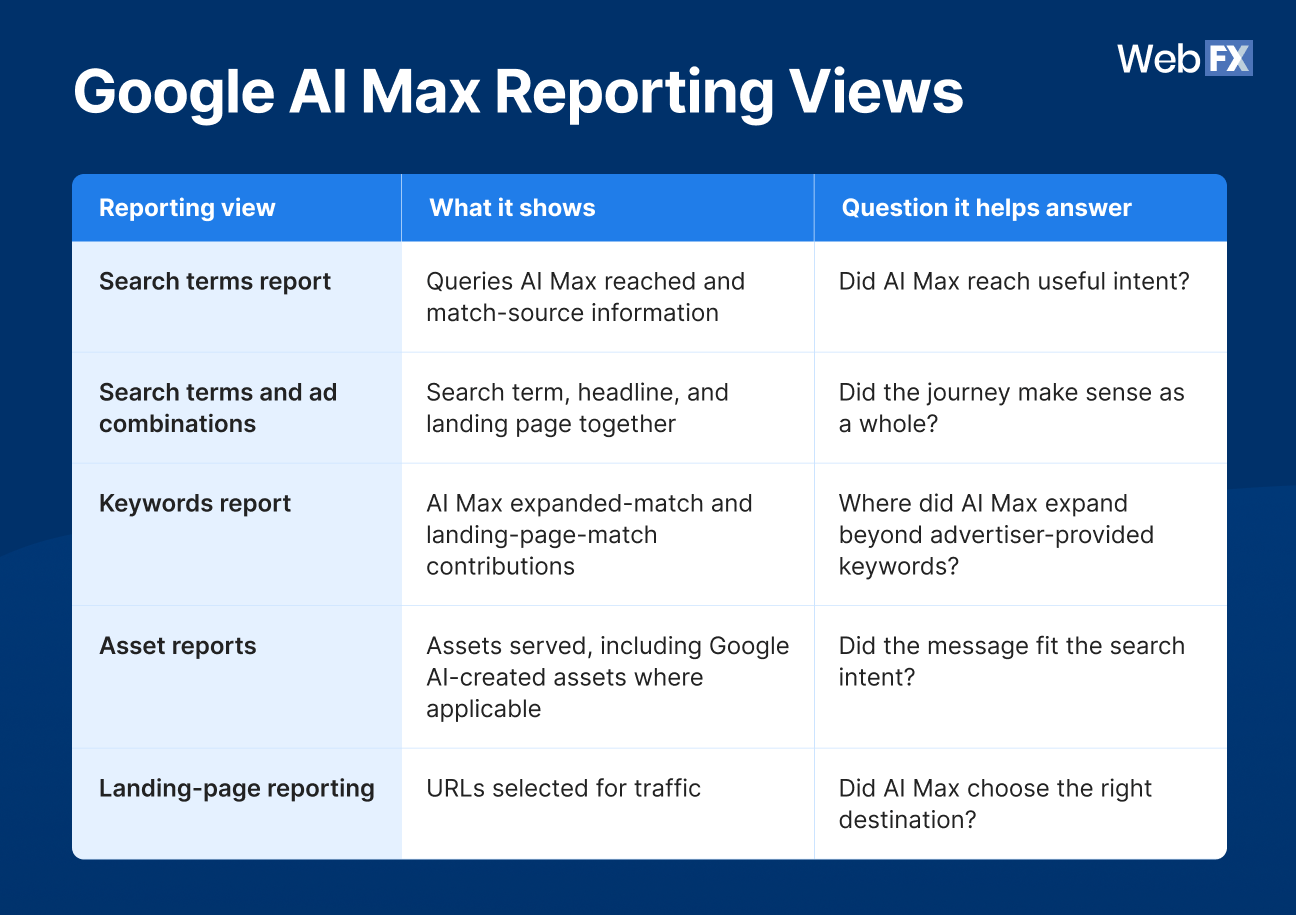
Google AI Max reporting spans search terms, keywords, assets, and landing pages. The most useful views help you understand not only which traffic AI Max generated, but also how the search term, creative, and destination worked together.
Google’s API describes ai_max_search_term_ad_combination_view as its most granular AI Max report. It shows the exact combination of search term, headline, and landing page used for an expansion and is designed for auditing relevance and seeing which combinations convert.
Queries AI Max reached and match-source information
Did AI Max reach useful intent?
Search terms and ad combinations
Search term, headline, and landing page together
Did the journey make sense as a whole?
Keywords report
AI Max expanded-match and landing-page-match contributions
Where did AI Max expand beyond advertiser-provided keywords?
Asset reports
Assets served, including Google AI-created assets where applicable
Did the message fit the search intent?
Landing-page reporting
URLs selected for traffic
Did AI Max choose the right destination?
The newly announced unified interface builds on that direction by bringing search term, creative, and landing-page visibility into a single Search Ads journey view. You do not need to wait for that rollout to begin auditing your campaigns, though. Current reporting already gives you enough information to start connecting those decisions.
Why AI Max reporting needs an automation audit, not just a performance check
Campaign-level performance can tell you whether the campaign is producing results. It cannot always tell you whether the individual journeys inside that performance make sense.
AI Max can influence who you reach through search-term matching, what message that person sees, and which landing page receives the click. That creates combinations where one piece may work while another weakens the journey.
For example, AI Max could reach a relevant query such as “inventory management software for manufacturers,” serve a headline aligned with manufacturing inventory needs, and send the visitor to a relevant product page. That is a coherent path.
Change the landing page to a broad educational article, and the search term may still look excellent in isolation. Looking at the full journey shows where the mismatch appears.
The opposite can happen, too. An unfamiliar expanded query may initially look questionable, but if the message fits, the landing page answers the need, and the traffic produces valuable conversions, the automation may have uncovered demand your keyword list missed.
The goal is not to hunt for AI mistakes. It is to identify where human intervention adds value and where automation is finding combinations worth preserving.
That kind of oversight matters because paid search already represents a meaningful investment for many businesses. WebFX surveyed more than 350 businesses about Google Ads spending and found that 54% reported being satisfied with their PPC ROI, while 26% planned to increase PPC spending over the next six months.
That alone reinforces why marketers need clear ways to evaluate what happens to their advertising investment as automation takes on more campaign decisions.
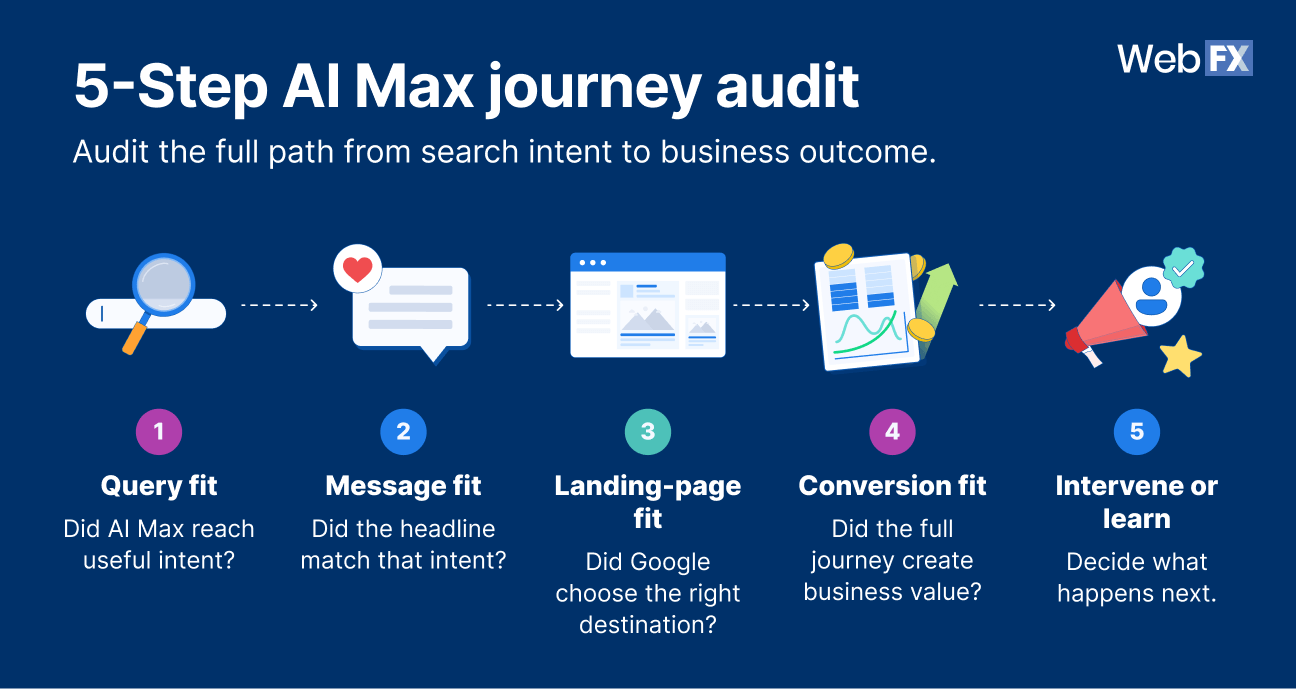
Run a 5-step AI Max journey audit
This AI Max journey audit follows the automated customer journey from the searcher’s intent through the resulting business outcome. Each step helps you determine whether the components support one another and what action, if any, the evidence supports.
5-step AI Max journey audit
1. Query fit: Did AI Max reach useful intent?
Start with the query.
Your AI Max search terms report can help you identify the searches AI Max reached and how those matches entered the campaign. Google’s API reporting distinguishes AI Max keywordless matches from AI-driven broad-match expansion, giving you more context about how the query was found.
Review:
The search term itself
The match source or type
Its relationship to your campaign goal
Its commercial relevance
Its conversion behavior
The key question is: Would we intentionally pay to reach someone expressing this intent?
A query does not need to match the wording of your existing keyword list to be useful. A B2B software advertiser may discover a new high-intent phrase that reflects the same customer need in language the team had not anticipated.
On the other hand, recurring searches for free tools or DIY alternatives may be a poor fit for a premium enterprise offer if those visitors consistently produce weak business outcomes.
One reporting caveat matters here. Google notes that search-term reporting and AI Max-specific views do not necessarily reconcile perfectly with campaign totals because of reporting dimensions and omitted search terms. Treat the query data as diagnostic evidence rather than assuming every campaign click will map neatly into one AI Max view.
2. Message fit: Did the headline match that intent?
Next, compare the query with the message the searcher actually saw.
The AI Max search terms and ad combinations view connects the triggering search term with the headline and landing page. Google’s API documentation specifically recommends examining headline relevance when auditing AI-driven matches.
Check whether the message:
Reflects the searcher’s intent
Accurately represents your offer
Fits your brand
Emphasizes a relevant benefit
Makes claims the landing page can support
Imagine someone searches for “multi-location inventory management software.” A headline focused on managing inventory across locations speaks directly to that intent. A broad headline such as “Improve Your Business Operations” may technically fit the company, but it gives the searcher less evidence that the offer solves their specific problem.
If the message fit is weak, do not assume that the only answer is to turn off automation. One asset may need review, or the campaign may need stronger source material, so text customization has better inputs to work with.
3. Landing-page fit: Did Google choose the right destination?
Once the query and message align, inspect where the click landed.
Google’s AI Max reporting includes landing-page visibility, and its expanded landing-page reporting can help identify URLs favored by AI Max expansion. Google also documents URL exclusions for cases where the intent is useful, but the system repeatedly routes visitors to an unsuitable page.
Assess:
Search intent versus destination
Message continuity
Product or service relevance
The conversion path
Whether another page would satisfy the search better
Suppose AI Max matches a high-intent service query and serves a relevant headline, but the click lands on a broad educational resource instead of the service page. The search term and message may both work while the destination creates friction.
A URL exclusion could be appropriate if that page repeatedly underperforms as a destination. But the audit may reveal a different opportunity: Your site may not have a strong enough page for that intent, or the existing page may need clearer content and conversion paths.
4. Conversion fit: Did the complete journey create business value?
A journey can look relevant from beginning to end and still produce little business value. Even a conversion in Google Ads does not necessarily tell you whether the lead was qualified, became a customer, or generated enough revenue to justify the acquisition cost.
That is why conversion fit should anchor the first three checks. Start with the conversion data available in Google Ads, then connect it with first-party lead, sales, and revenue data wherever possible to evaluate the outcome closest to business value.
Google’s AI Max combination view supports metrics including clicks, impressions, cost, conversions, cost per conversion, and conversion value.
Evaluate:
Conversions
Conversion value
Lead quality where available
Revenue or another business outcome
Cost efficiency
Then ask: Did this automated combination reach the right person, make the right promise, send them to the right place, and produce an outcome worth paying for?
For example, combination A might generate 80 clicks and four low-quality leads. Combination B might generate 35 clicks and five sales-qualified leads that enter the pipeline.
If you stop at traffic volume, A appears stronger. If your goal is revenue, B may be the journey worth preserving and studying.
The same logic applies to an unexpected AI Max combination. If the query fits the customer, the message and page stay accurate, and the combination repeatedly produces valuable outcomes, unfamiliar does not automatically mean wrong.
5. Intervene or learn: Decide what happens next
The first four steps diagnose the journey. The fifth turns the audit into an action.
Possible responses include:
Adding a negative keyword
Excluding a URL
Adjusting messaging or source assets
Improving a landing page
Preserving a productive expansion
Keep observing before making a change
Match the response to the problem.
Google’s own API guidance makes that distinction clear. Negative keywords are appropriate when the underlying search intent is irrelevant or unprofitable. URL exclusions are better suited to cases where the search term is useful, but the system repeatedly sends visitors to a poor destination.
Giving the system more time can also be a legitimate outcome. A single surprising combination is not the same as a repeatable performance pattern, so avoid narrowing automation before you have enough evidence to understand what is happening.
Expert insights from
Kayla J.PPC specialist
“With AI Max, you will likely see a lot of mediocre search intent fits in your search terms reporting. Avoid adding too many negative keywords too frequently, as overloading the system with exclusions can inhibit learning. Instead, prioritize the search terms that are actually spending. In my own AI Max reporting, I’ll see search that cost $50+ for a single click. Those are the searches I want to exclude, not the okay-but-not-great search term that is spending $0 and getting 5 impressions.”
AI Max audit decision table
Use this table as a fast reference after you complete the five checks. The goal is to match the issue to the most precise response rather than applying the same control to every unexpected result.
What you find
Likely response
What to monitor next
Wrong intent
Consider a negative keyword or other control
Whether irrelevant traffic and wasted spend decline
Right intent, wrong message
Review assets and text customization inputs
Message alignment and conversion quality
Right intent and message, wrong destination
Review Final URL expansion or URL exclusion
Destination performance and conversion rate
Coherent journey, weak conversion
Diagnose the offer, page, or conversion path
Lead quality, conversion rate, CPA, and revenue
Unexpected journey, strong business results
Preserve and investigate the pattern
Conversion value and repeatability
Limited or new data
Give the system more time
Whether the pattern persists as more data accrues
What AI Max reporting can tell you, and what it cannot
Google AI Max reporting gives you more visibility into what happened across the ad journey. It does not give you a complete explanation of every internal signal or model decision that produced the combination.
You can see that a search term triggered an ad with a particular headline and landing page. You cannot use that observation alone to reconstruct every reason Google selected those elements.
That distinction matters when you diagnose performance.
The dedicated AI Max combination view is built for relevance and combination analysis. Google explicitly cautions against using it as a financial reconciliation tool because it represents a specialized reporting dimension rather than the complete campaign accounting view.
Use combination reporting to understand journeys. Use the appropriate campaign, conversion, and attribution reporting to judge overall financial performance.
Add revenue data to your AI Max audit
Google AI Max reporting can tell you what happened in the ad journey, but it does not necessarily tell you whether that journey created meaningful business value.
A conversion in Google Ads might be a form submission that never becomes a qualified opportunity. Another search term, headline, and landing-page combination could generate fewer conversions while producing more sales-qualified leads, customers, or closed revenue.
That is why we recommend connecting AI Max reporting with first-party sales and revenue data. Instead of evaluating an automated journey on conversions alone, look at outcomes such as:
Qualified leads and sales-qualified leads
Customers and closed deals
Revenue and customer value
Customer acquisition cost and return on investment
At WebFX, RevenueCloudFX helps connect marketing and advertising activity with CRM, lead-status, sales, and revenue data so teams can follow performance beyond the initial conversion. Its closed-loop reporting can connect campaigns with downstream outcomes such as MQLs, SQLs, won opportunities, and revenue, giving marketers a stronger basis for deciding which AI Max combinations are actually worth preserving or scaling.
For example, one AI Max combination could generate twice as many form submissions as another but produce few sales-qualified leads. If the lower-volume combination consistently creates customers and stronger revenue, that is the journey your PPC team has more reason to value.
Use Google AI Max reporting to understand how the automated journey happened, then use connected first-party and revenue data to determine whether that journey was valuable to the business.
Measuring the metrics that affect your bottom line.
Are you interested in custom reporting that is specific to your unique business needs? Powered by RevenueCloudFX, WebFX creates custom reports based on the metrics that matter most to your company.
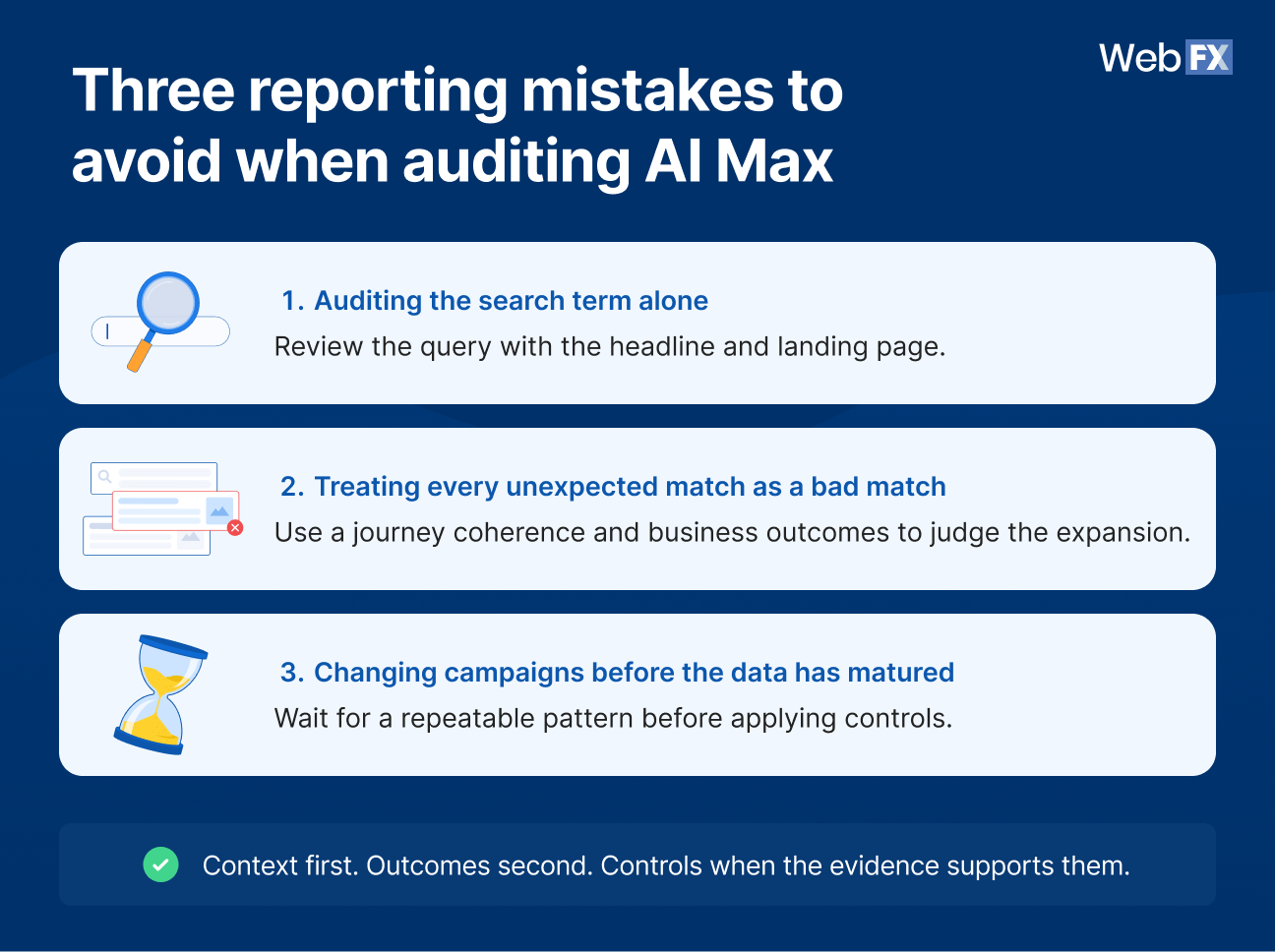
3 reporting mistakes to avoid when auditing AI Max
More reporting only helps when you interpret it in context. These three mistakes can turn useful AI Max reporting into weak campaign decisions.
1. Auditing the search term without the headline and landing page
A relevant query does not automatically equal a strong customer journey.
If the message misrepresents the offer or the destination fails to continue the promise, the search term may be the strongest part of a weak combination. The reverse can also happen: An unfamiliar query may look questionable until you see that the ad and landing page fit the intent and the journey converts.
Review the chain before judging the individual link.
2. Treating every unexpected match as a bad match
Unexpected reach and irrelevant reach are different.
AI Max may uncover a useful query your team did not manually target. If that search reflects a viable customer need, the message fits, the page answers the intent, and the combination produces business value, the unfamiliar match may be worth preserving.
Use the outcome of the journey to decide whether the expansion is useful.
3. Changing campaigns before the data has matured
Early campaign data can make one result look more important than it is.
If a query, page, or combination has limited data, continued observation may be more useful than immediate intervention. Controls are most valuable when they respond to a pattern you can explain and measure.
Turn AI Max reporting into a recurring PPC review
The AI Max journey audit becomes more useful when you treat it as an ongoing optimization process rather than a one-time setup check.
Start with combinations that have enough data to evaluate. Flag the patterns that stand out, run them through the five audit checks, make the most targeted change the evidence supports, and then measure what happens next.
A simple workflow looks like this:
Pull combinations → flag patterns → run the five checks → make a targeted change → measure the result
Keep a lightweight change log for the combinations you investigate. Record the search term, headline, landing page, conversion outcome, issue identified, action taken, and subsequent performance.
For teams using RevenueCloudFX, that review can also include downstream outcomes like qualified lead status, closed revenue, and ROI, so campaign changes are evaluated beyond platform conversions.
That history helps your team answer a valuable question later: Did the intervention improve the journey, or did the original combination perform better than expected?
Avoid forcing the process into an arbitrary review schedule. Review often enough to catch meaningful patterns while giving the campaign enough time and data to show you whether those patterns are repeatable.
Where human PPC expertise matters as Google automates more decisions
Google Ads AI Max can automate more of the execution, but marketers still provide the business context needed to judge whether that execution is useful.
That human role becomes especially important in seven areas:
Defining the business goal the campaign should optimize toward
Setting controls that reflect actual business constraints
Interpreting whether a query represents valuable customer intent
Protecting brand and offer accuracy in automated messaging
Evaluating whether platform conversions turn into qualified leads, customers, and profitable revenue
Deciding when an unexpected result deserves intervention
Feeding what you learn back into campaigns and landing pages
Those decisions depend on information Google does not fully own. Your team knows which customers are profitable, which offers sales can fulfill, what claims the brand can make, which leads turn into revenue, and where a seemingly good platform conversion can still produce a poor business outcome.
That is why expert oversight matters more as campaign execution becomes more automated. The goal is not to manually override every AI-driven choice. It is to give automation better inputs, inspect the results with business context, and intervene where the evidence supports it.
Expert insights from
Kayla J.PPC specialist
“With AI Max, human marketers should always remain in the strategic driver’s seat to drive successful business outcomes. You hold the business context that Google’s AI doesn’t have, and you also own the creative and data inputs AI Max learns from. If the ad copy, landing pages, or keywords you provide are subpar, AI Max will likely underperform. Similarly, if your conversion tracking setup is flooded with spam or low-quality leads, AI Max will struggle to drive revenue. Spend your time ensuring every data pipeline, ad headline, and landing page is excellent, and then keep a strategic pulse on your automated campaigns to quickly spot new opportunities or potential derailments.”
Measuring the metrics that affect your bottom line.
Are you interested in custom reporting that is specific to your unique business needs? Powered by RevenueCloudFX, WebFX creates custom reports based on the metrics that matter most to your company.
Google AI Max reporting is the collection of Google Ads reporting views used to understand how AI Max contributes to Search campaign performance.
Depending on the view, advertisers can inspect search terms, match sources, headlines, landing pages, assets, and performance metrics. Google’s dedicated AI Max combination view connects the search term with the headline and landing page used in the expansion.
Yes. Google’s standard search-term reporting can identify AI Max-driven traffic through match-source fields such as AI Max keywordless and AI Max broad-match expansion.
Keep in mind that search-term views may not reconcile perfectly with total campaign traffic because different reporting views represent different dimensions, and some search terms can be omitted from detailed reporting.
Yes. Google’s ai_max_search_term_ad_combination_view shows the search term, headline, and landing page used for an AI Max expansion. Google describes it as its most granular AI Max reporting view.
Google has also announced a newer unified reporting interface designed to bring search terms, creative assets, and landing pages into one Search ads journey view, with additional availability details still to come later in 2026.
Yes. Google documents negative keywords for irrelevant or unprofitable search intent and URL exclusions for cases where AI Max identifies useful traffic but repeatedly sends it to an unsuitable destination.
Use the control that matches the actual problem. A poor query and a poor landing page are different issues and should not automatically receive the same fix.
Do not base a campaign change on one surprising combination alone. Give the campaign enough data to show whether the issue is repeatable, then match the response to the part of the journey that is actually underperforming.
Google’s reporting guidance emphasizes using AI Max reports to identify patterns in query quality, asset relevance, landing-page performance, and conversion outcomes before applying exclusions or other controls.
Your Revenue Growth Starts Here
Tell us about your business, and we’ll create a custom plan to grow your traffic, leads, and predictable revenue.
Use AI Max reporting to audit the whole automated journey
Use AI Max reporting to evaluate whether the full journey from search intent to business result is working, then intervene only where the evidence supports a change.
That gives your PPC team a repeatable way to separate journeys that need intervention from combinations that deserve more time, better inputs, or room to keep working.
As Google automates more campaign decisions, the strongest PPC strategy will come from knowing what to measure, where to intervene, and when the automation has found something worth preserving.
WebFX’s PPC management team can help you apply that judgment across your Google Ads campaigns, from evaluating AI-driven search journeys and improving campaign inputs to connecting conversions with qualified leads and revenue.







 Thaakirah Abrahams is a Lead Editor at WebFX, where she leverages her 5+ years of experience to craft compelling website content. With a background in Journalism and Media studies and certifications in inbound marketing, she holds a keen eye for detail and a talent for breaking down complex topics for numerous sectors, including the legal and finance industries. When she’s not writing or optimizing content, Thaakirah enjoys the simple pleasures of reading in her garden and spending quality time with her family during game nights. View full profile