


The five signs your website needs a backlink audit are a sudden drop in visibility, a manual action notification in Google Search Console, a major website redesign, a rise in irrelevant linking URLs, and unnatural or suspicious anchor text.
Learn more about these signals and recommended next steps:
5 signs your website needs a backlink audit
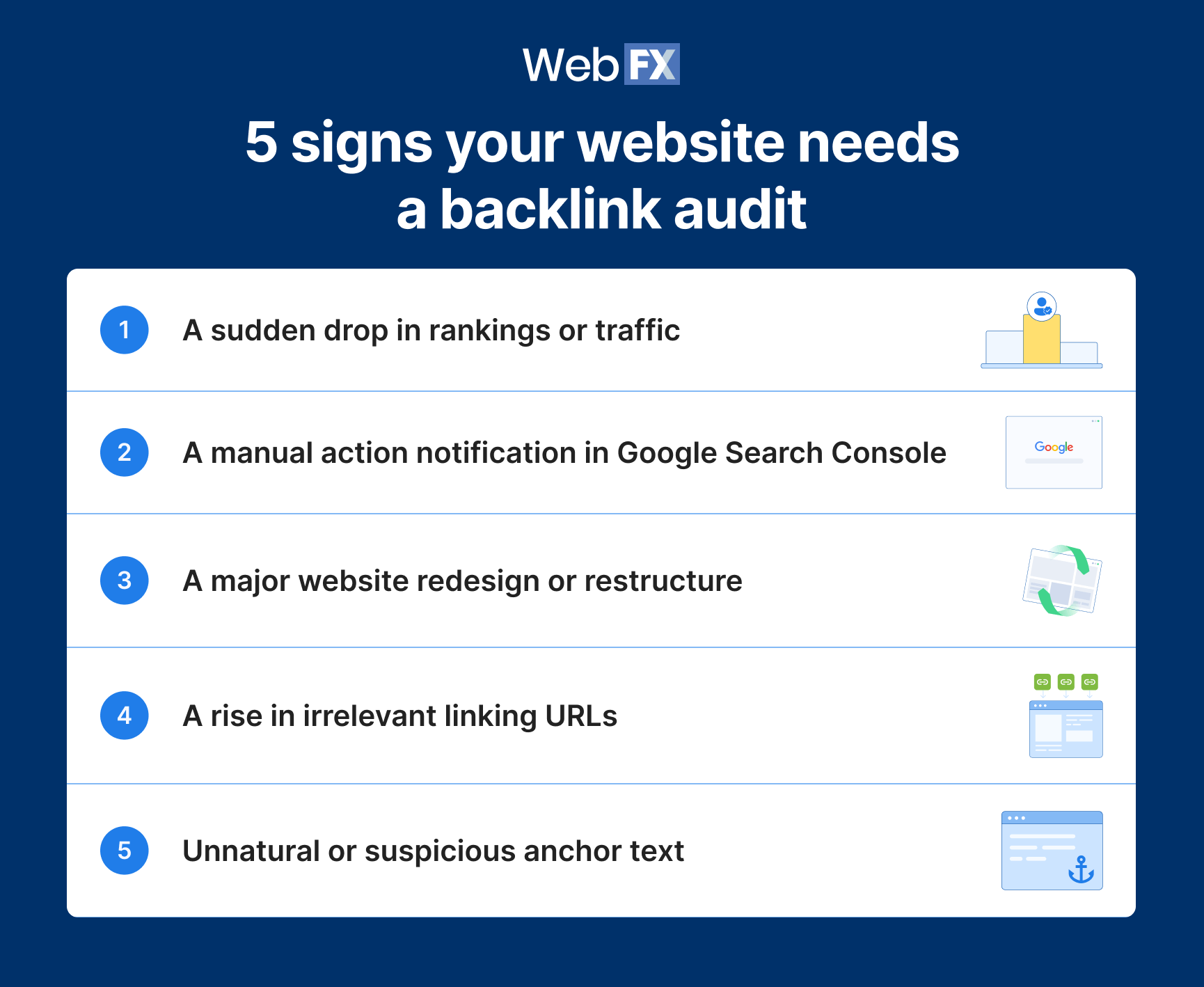
Judging when to do a backlink audit is a lot easier if you know what to look for. That’s why we’ll be looking at five of the most significant backlink audit signals to watch out for, including:
1. A sudden drop in rankings or traffic
The first backlink audit signal to watch out for is a sudden drop in search rankings or site traffic. It could mean Google has penalized your site for a poor backlink profile, but a drop alone doesn’t confirm it.
Backlink penalties happen because Google only wants to rank high-integrity sites. Backlinks serve as a “vote of confidence” for those sites, but Google wants to ensure that they’re legitimate — so they penalize sites that appear to be buying or otherwise manipulating backlinks.
If Google believes that’s the case for your site, you’ll notice a big drop in rankings, which is your first warning sign that something’s up with your profile — and shows that you should do an audit as soon as possible.
2. A manual action notification in Google Search Console
Sometimes, Google will notify you directly in the Manual actions report in Google Search Console if it notices issues with your backlink profile.
Google issues a manual action when a human reviewer determines that pages on your site don’t comply with Google’s spam policies, such as its rules against unnatural links. The notification tells you what the issue is and gives you a specific action item to resolve it.
If that happens, you should obviously start by resolving the action item Google gives you. After that, however, it’s likely worth doing a full backlink audit to see if there are any other actions you need to take to fix your backlink profile.
3. A major website redesign or restructure
It’s also probably worth conducting a backlink audit if you recently made any major redesigning, restructuring, or rebranding efforts on your website. Those types of large-scale site changes can often result in page removals or broken links, which will naturally hurt your backlink profile.
That means even when you don’t immediately notice a negative impact, it’s probably still a good idea to follow up every significant website overhaul with at least a basic backlink audit to make sure nothing was messed up in the process.
4. A rise in irrelevant linking URLs
Keep an eye on the links leading to your website. If you notice a rise in irrelevant linking URLs — such as foreign-language pages, low-authority sites, or unrelated industries — that’s a red flag, and can be an indication of when to do a backlink audit. This can also show up as a sudden spike in new backlinks — a common indicator of a negative SEO attack.
Backlinks help communicate to Google what your site is about, and if a lot of your backlinks are coming from irrelevant sites, it’ll mess up the topics that Google associates your site with. If you run a construction company and you’re getting a bunch of links from a clothing website, that’s a problem.
5. Unnatural or suspicious anchor text
Even if the backlinks themselves are coming from seemingly relevant websites, the anchor text being used for them might still indicate that a backlink audit is needed.
Anchor text that excessively relies on keyword stuffing or money-focused phrases like “cheap payday loans” can indicate that your backlink profile is either over-optimized or outright spammy. That’s likely going to result in a penalty from Google, so it’s good to catch that issue early so you can nip it in the bud.
How do I tell if links caused my site’s traffic to drop vs. AI Overviews?
Links are behind a traffic drop when the evidence points to them: A manual action, a spike in spammy linking domains, or lost links to pages you removed. If none of those show up, the drop likely has another cause, and a backlink cleanup won’t bring the traffic back.
Before you start an audit, run these checks:
- Check the Manual actions report. A manual action is the clearest sign Google has flagged your links, so confirm whether you have one in Google Search Console first.
- Compare clicks with impressions. In the Search Console Performance report, look at the queries that lost traffic. If impressions held steady while clicks fell, searchers may be getting their answer in an AI Overview instead of visiting your site.
- Look for AI Overviews on those queries. Search the queries that lost clicks to see if a Google AI Overview now sits above your result and answers the question for the searcher.
If a manual action or a pattern of spammy links does turn up, move on to the cleanup steps below.
How to fix a poor backlink profile
We’ve now seen the major signs your website needs a backlink audit — but the question is, what do you do once you find one or more of those signs? The answer is, you go through the following steps:
1. Conduct your backlink audit
When you find backlink audit signals on your website, the first step is — of course — to conduct the backlink audit itself. To do that, you should:
- Analyze all the domains linking to your website
- Filter your list of linking domains to find the spammy ones
- Look for broken or missing pages across your site
- Check your competitors’ backlink profiles to see what they’re doing differently
For a benchmark, WebFX’s 2026 backlink study found that across 15 industries, an average of 92.2% of backlinks pointing to page-one sites are editorial links, and directory and resource links combined are under 8%.
If low-quality directory links make up a much bigger share of your profile, look at them closely.
You can conduct most of these steps with tools like Google Search Console, Ahrefs, and our SEO checker. The goal of your audit is to pinpoint any potential issues that might be hurting your backlink profile. Once you’ve done that, you can move on to the following steps.
2. Restore broken pages or use redirects
The first thing you should do after conducting a backlink audit is fix any backlink issues that originate on your own website. That typically means repairing broken or missing pages that other sites might be trying to link to.
There are two main ways you can handle that. The first is to repair, restore, or replace those pages. The second is to leave the pages taken down, but redirect from their URLs to other pages on your site. Both of these methods ensure that backlinks leading to those pages don’t take users to a 404 error page.
3. Request removals and disavow toxic backlinks
The final step is to address any toxic backlinks — such as those from spammy or irrelevant websites — that might be leading to your own site. Start by reaching out to those websites and politely requesting that they remove the backlinks.
For the sites that don’t respond to your request, though, you can disavow backlinks via the Google Disavow Tool. This essentially tells Google to ignore the links coming from those websites so that they don’t factor into your backlink profile.
That said, Google’s disavow guidance says to disavow links only if you have a considerable number of spammy, artificial, or low-quality links pointing to your site and those links have caused, or likely will cause, a manual action. For most sites, that makes the Disavow Tool a fix for manual actions rather than routine maintenance.
Looking for an all-in-one SEO audit tool? You’ve found it
SEO checker provides data on key metrics to give you:
- Complete SEO score
- Backlink Analysis
- Content Grade
- and more.

FAQs about conducting a backlink audit
Here are the answers to some of the most common questions about conducting a backlink audit.
What is a backlink audit?
A backlink audit is the process of evaluating your backlink profile to look for any issues that need to be fixed. When auditing your backlink profile, you might find missing or broken pages on your site, or you might find spammy or irrelevant links coming from other websites.
How do I identify harmful backlinks?
You can identify harmful backlinks by checking to see if they are:
- Irrelevant: The backlinks should come from sites that relate to your business in some way, as opposed to sites in other languages or from completely different industries.
- Over-optimized: The anchor text should be natural, rather than using tactics like keyword stuffing.
When you find backlinks that fit either of those criteria, they’re likely harmful to your backlink profile.
Do backlink profiles still matter in 2026?
Yes, backlink profiles still matter. In WebFX’s 2026 study of 1,462 page-one domains across 15 industries, page-one sites had a median of 907 referring domains, ranging from 76 in Apparel to 3,027 in Finance & Insurance, which indicates that backlinks still shape search results.
Get help repairing your backlink profile with WebFX
Optimizing your backlink profile can be time-consuming, and sometimes it can be tricky to figure out when to do a backlink audit at all, as well as how to fix the issues you find. Of course, it helps if you have the right tools. Our SEO checker can give you some insight into how your backlink profile is doing, as well as other areas of your SEO.
And if you want some professional help repairing your backlink profile, we can help with that, too. Just get in touch with us about our SEO services by calling us at 888-601-5359 or contacting us online today!
-
 Matthew Gibbons is a Senior Data & Tech Writer at WebFX, where he strives to help businesses understand niche and complex marketing topics related to SEO, martech, and more. With a B.A. in Professional and Public Writing from Auburn University, he’s written over 1,000 marketing guides and video scripts since joining the company in 2020. In addition to the WebFX blog, you can find his work on SEO.com, Nutshell, TeamAI, and the WebFX YouTube channel. When he’s not pumping out fresh blog posts and articles, he’s usually fueling his Tolkien obsession or working on his latest creative project. View full profile
 -

WebFX is a full-service digital marketing agency delivering revenue-driving strategies across online advertising, SEO and AI search optimization, and digital marketing. Backed by 1,100+ client reviews, a 4.9-star rating on Clutch, and proprietary revenue-tracking technology, our team helps businesses grow visibility and revenue across platforms, from Google to ChatGPT to LinkedIn. Discover how our expert team and revenue-accelerating tech can drive results for you. Learn more

Try our free Marketing Calculator
Craft a tailored online marketing strategy! Utilize our free Internet marketing calculator for a custom plan based on your location, reach, timeframe, and budget.
Share this article


SEO Success with KOA
Proven Marketing Strategies
Try our free Marketing Calculator
Craft a tailored online marketing strategy! Utilize our free Internet marketing calculator for a custom plan based on your location, reach, timeframe, and budget.
What to read next