What it is: Connections between ServiceTitan and your marketing tools, ad platforms, and CRM data.
What it does: Traces a lead from its original source through to a booked job and real revenue.
How it works: Your lead source gets captured, matched to a ServiceTitan job by email or phone, and the completed job becomes a Closed Won customer with revenue tied back to the campaign.
The gap most miss: Connecting the platforms is the easy part. Attributing revenue to the campaigns that earned it is where most setups fall short.
What to do now: Check whether your setup can trace a real customer from source to revenue, rather than just counting leads.
ServiceTitan marketing integrations connect your ad platforms, call tracking, and lead data to ServiceTitan so you can trace a lead from its source all the way through to a booked job and real revenue. For home services businesses running Google Ads, call tracking, schedulers, or a wider marketing stack, these connections turn ServiceTitan from a scheduling and dispatch system into a revenue reporting engine.
Most home services marketers can tell you how many leads a campaign produced. Far fewer can tell you how many of those leads became paying customers, or how much revenue each channel actually drove. That gap is the difference between optimizing for cheap leads and optimizing for real customers, and it’s what a well-built ServiceTitan integration is supposed to close.
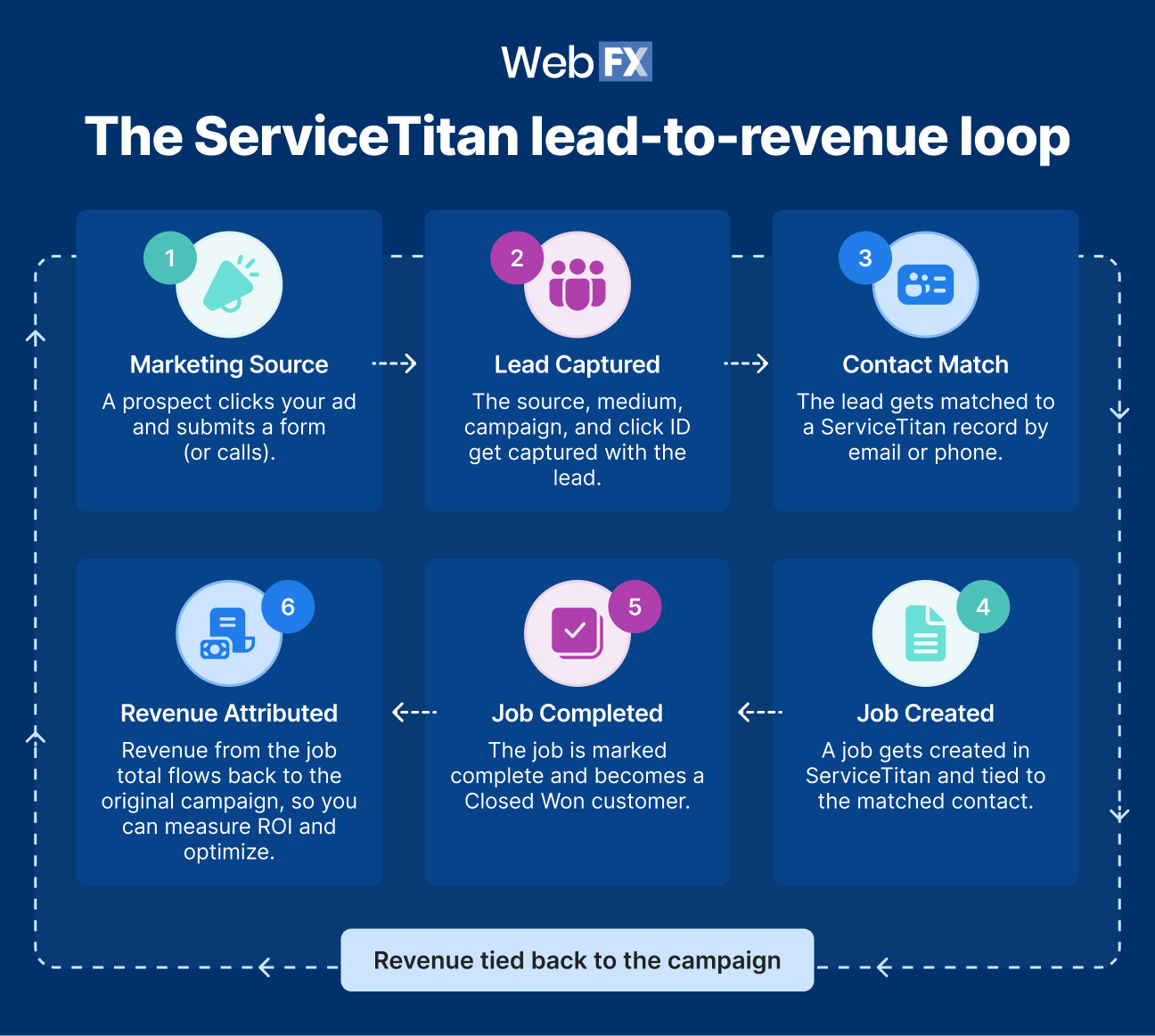
Here is the path a strong setup connects, from start to finish: Marketing source to lead to contact match to ServiceTitan job to closed revenue to campaign optimization. Let’s walk you through what needs to connect at each stage, and how to tell whether yours actually closes the loop:
Tell us about your business, and we’ll create a custom plan to grow your traffic, leads, and predictable revenue.
Which ServiceTitan marketing integrations should you prioritize?
Start with estimates, jobs, and their associated invoices. Estimates show whether a lead is progressing toward a sale, while completed jobs and invoices show where revenue gets made. Everything else you connect exists to feed those outcomes, so start there and work backward toward the lead.
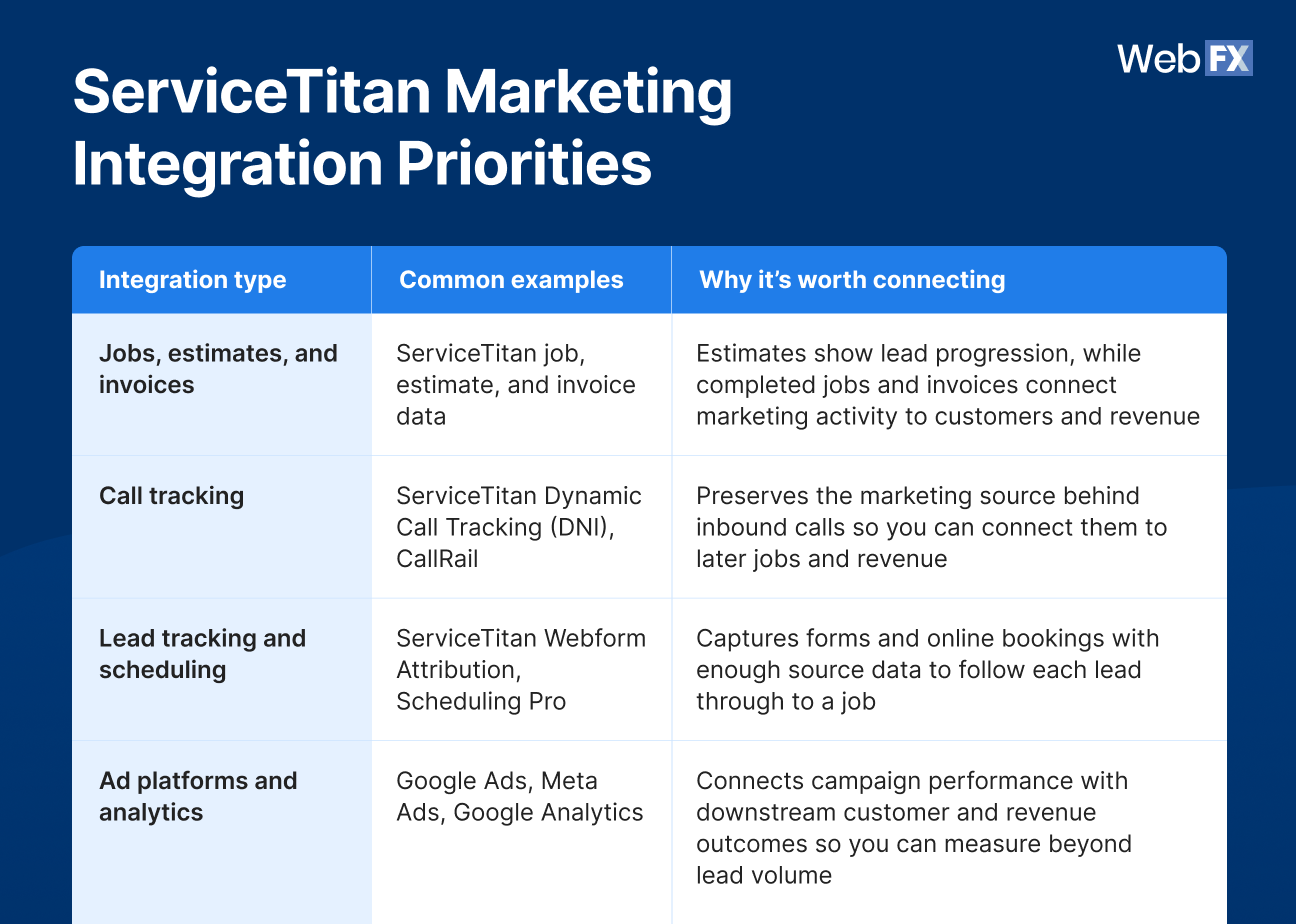
After estimates, jobs, and invoices, call tracking and lead tracking or scheduling connections carry the most weight for marketing. Here’s how the priorities stack up:
Preserves the marketing source behind inbound calls so you can connect them to later jobs and revenue
Lead tracking and scheduling
ServiceTitan Webform Attribution, Scheduling Pro
Captures forms and online bookings with enough source data to follow each lead through to a job
Ad platforms and analytics
Google Ads, Meta Ads, Google Analytics
Connects campaign performance with downstream customer and revenue outcomes so you can measure beyond lead volume
ServiceTitan covers some of this natively on certain plans. The real unlock comes from syncing all of your lead data into the field service management (FSM) platform, which powers speed-to-lead, marketing automation, and lead-to-revenue attribution in one place. A connection is only worth building if it moves you closer to knowing which marketing dollars produced customers, so judge each one by that standard rather than treating integrations as a checklist of logos. WebFX’s ServiceTitan consulting services help home services businesses set up those connections with revenue reporting in mind.
How do you connect marketing activity to jobs and revenue?
A ServiceTitan CRM integration captures each lead with its source, medium, and click ID when applicable, then matches it to a ServiceTitan job using email or phone as the primary key. When that job is completed, it becomes a Closed Won customer, and revenue pulls from the job total. That chain is what turns a form fill into a dollar figure you can attribute.
Here is the loop in practice:
A prospect clicks your ad and submits a form or calls.
The source, medium, campaign, and click ID get captured with the lead.
The lead gets matched to a ServiceTitan record by email or phone.
A job gets created in ServiceTitan and tied to the matched contact.
The job is marked complete and becomes a Closed Won customer.
Revenue from the job total flows back to the original campaign.
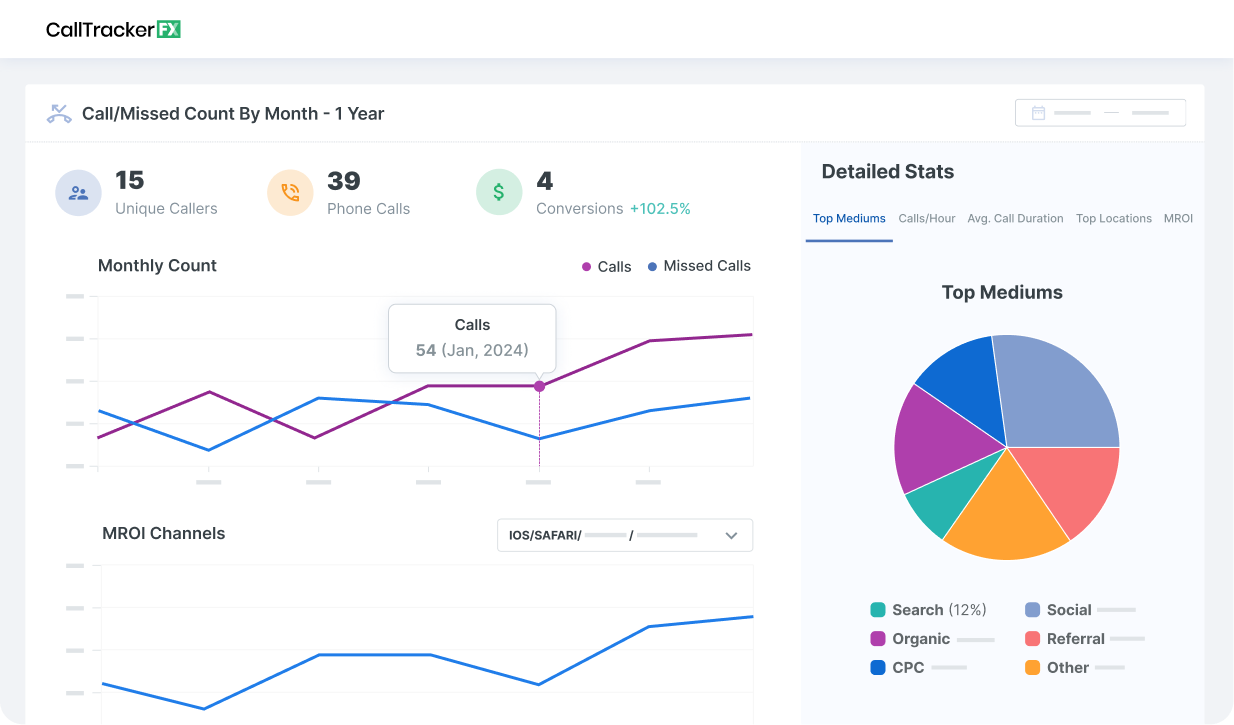
The weak point in most setups is the beginning. If lead-source data gets lost at capture, nothing downstream can reattach it, and the completed job shows up as revenue with no campaign attached. This is also where native attribution often runs thin, which is why many businesses pair ServiceTitan with external tools like RevenueCloudFX or CallRail for more granular source tracking.
What should you be able to do with connected ServiceTitan data?
You should be able to see which channels and campaigns produced closed revenue, rather than just which ones produced leads. That shift lets you measure cost per customer instead of stopping at cost per lead, which changes how you spend.
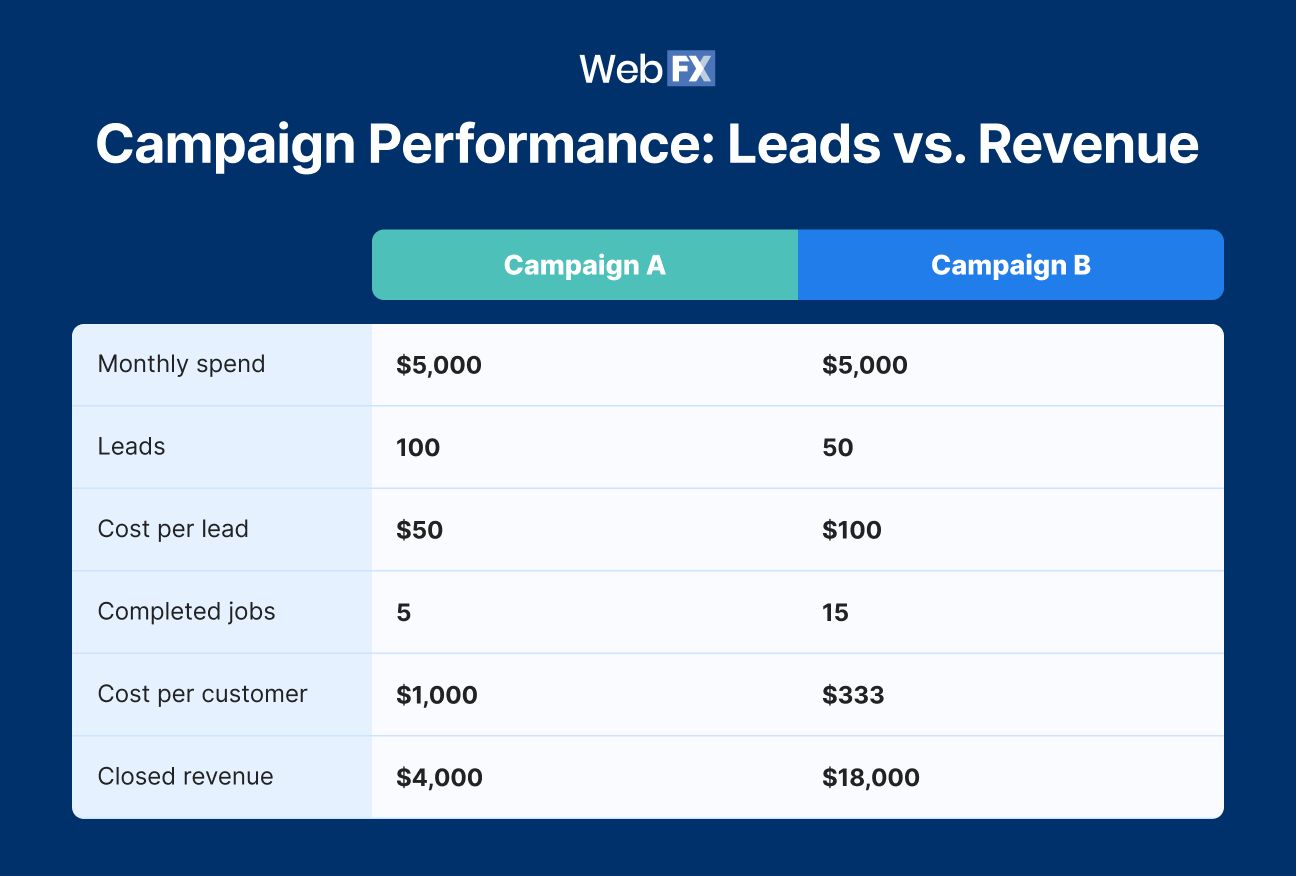
Consider two campaigns judged in two different ways:
Cost per lead alone would send your budget to Campaign A. But with the same $5,000 spend, Campaign B produces three times as many completed jobs and $18,000 in closed revenue compared with $4,000 from Campaign A. Connected revenue data tells you which campaign is actually creating more business.
Connected data also feeds your ad platforms. You can send leads, calls, and closed deals back to Google, Microsoft, and Meta so their bidding optimizes toward real customers instead of raw form fills. For search campaigns specifically, downstream data can improve the customer signals used by Target CPA or enable value-based bidding with Maximize conversion value and Target ROAS.
Expert insights from
Colton W.Sr. PPC Consultant at WebFX
“Feeding downstream customer and revenue data back into Google Ads is the prerequisite to be able to move from volume-based bidding (Maximize conversions or Target CPA) to value-based bidding (Maximize conversion value or Target ROAS). Once moved to that style of bid strategy, it trades chasing just more conversions for chasing more valuable conversions. That’s what takes campaigns from hunting raw volume of form fills (which can include plenty of low-quality leads the system would not look at any differently than high-quality ones) to producing high-quality leads that close and drive revenue and positive ROAS or ROI.”
Where does ServiceTitan Marketing Pro fit?
ServiceTitan Marketing Pro is ServiceTitan’s native marketing and attribution suite, offering dynamic call tracking, campaign mapping, and Google Ads and Google Analytics linking. Businesses that run most of their marketing inside ServiceTitan may already have many of these needs covered, and Marketing Pro is a solid option if that’s you.
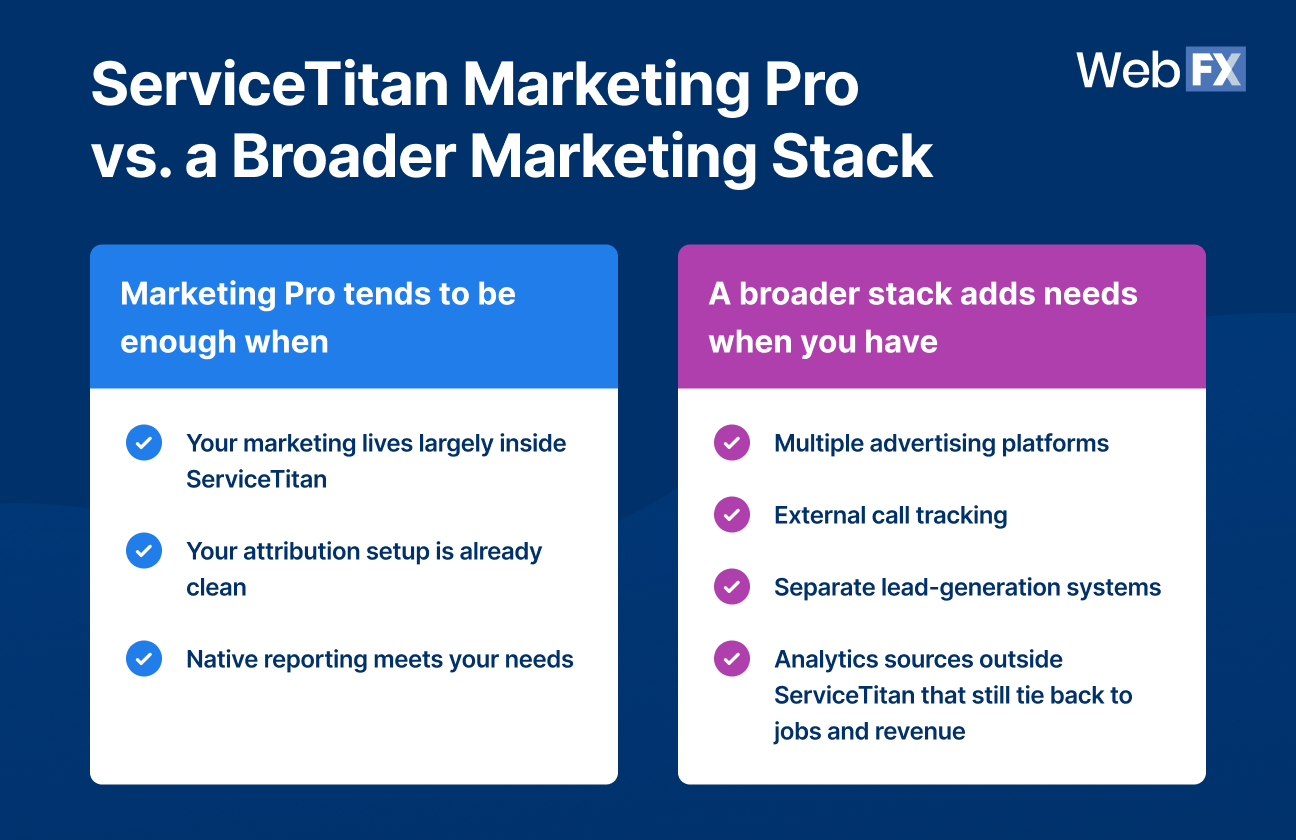
The question is how much of your marketing lives inside ServiceTitan versus across other platforms:
Analytics sources outside ServiceTitan that still tie back to jobs and revenue
Setup is where most gaps show up. Attribution rules take specialized know-how to get right, so even a small misstep can mean a channel doesn’t track, a lead goes uncounted, or traffic lands in the wrong source. A connection between two systems doesn’t create closed-loop attribution on its own. The data has to survive the full trip from lead source to revenue.
This is where a tool built for attribution helps. RevenueCloudFX comes prebuilt to auto-categorize your leads, calls, and revenue into channels using hundreds of default rules, which lowers the margin for error and makes a missed call or form far less likely. As a ServiceTitan integration, it connects your customer and revenue outcomes with the rest of your marketing data so you can report on and optimize the full picture.
Measuring the metrics that affect your bottom line.
Are you interested in custom reporting that is specific to your unique business needs? Powered by RevenueCloudFX, WebFX creates custom reports based on the metrics that matter most to your company.
How can you tell if your ServiceTitan setup actually closes the loop?
Your setup closes the loop when you can trace a real customer from their original marketing source through their ServiceTitan job and revenue, then use that outcome to make a decision. Run your current setup through this checklist:
Can you identify where each lead came from?
Are calls, forms, and bookings captured consistently?
Does the marketing contact match the right ServiceTitan customer or job?
Can you tell which jobs became completed, paying customers?
Is revenue tied back to the original channel and campaign?
Can you use those outcomes to make budget or bidding decisions?
If the chain breaks at any step, that break is your next integration or attribution problem to solve. A setup that passes all six gives you marketing decisions grounded in revenue.
ServiceTitan integrations span several categories: Advertising platforms, analytics, lead generation, call tracking, scheduling, and CRM or data systems. Rather than tracking a specific app list, focus on whether a connection preserves the data you need to tie leads to jobs and revenue.
Yes. ServiceTitan supports a Google Ads connection through Marketing Pro. The exact setup and available revenue-feedback capabilities depend on your Marketing Pro configuration.
A ServiceTitan CRM integration connects the original lead to its later customer and revenue data, which is what makes marketing attribution possible. By matching the marketing contact to the ServiceTitan job and its outcome, you can report on qualified leads, customers, and revenue by channel rather than stopping at lead counts.
Yes, as long as the setup preserves attribution data at capture and matches leads to completed jobs and their associated revenue. When that chain holds, you can attribute closed revenue back to the specific channel and campaign that produced it.
No. Marketing Pro provides strong native capabilities, but businesses with broader marketing stacks often use external attribution and integration tools to connect systems that live outside ServiceTitan. The right choice depends on how much of your marketing runs inside ServiceTitan versus across other platforms.
Connect your ServiceTitan marketing data to the revenue it produces
If your team can see leads but still can’t say which campaign created the customer or how much revenue it drove, your ServiceTitan integration work isn’t finished. The gap between lead reporting and revenue reporting is where marketing budgets get wasted and winning campaigns go unnoticed.
WebFX helps home services businesses connect ServiceTitan with their full marketing stack and tie it all back to revenue. See what closed-loop attribution looks like for your business. Request a free quote or call 888-601-5359 to speak with a strategist today about our proven ServiceTitan consulting services.
Try our free Marketing Calculator
Craft a tailored online marketing strategy! Utilize our free Internet marketing calculator for a custom plan based on your location, reach, timeframe, and budget.
Craft a tailored online marketing strategy! Utilize our free Internet marketing calculator for a custom plan based on your location, reach, timeframe, and budget.








 Albert Dandy Velasquez blends SEO strategy with compelling storytelling to help businesses boost their visibility and revenue online. With a B.A. in English and certifications from HubSpot, Semrush, and Google Analytics, he has written and optimized hundreds of articles on organic SEO, content strategy, and user experience. He regularly contributes to the WebFX blog and SEO.com, creating content that helps readers turn marketing goals into measurable results. When he’s off the clock, he’s usually exploring new neighborhoods on two wheels, filming travel content, or chasing golden hour with a coffee in hand. View full profile
 Nolan is Head of Innovation for WebFX and serves as an SME for our DataTech Solutions team. Nolan’s favorite part of digital marketing is being able to have a direct impact on growing our clients’ businesses. In his spare time, he enjoys watching NCAA wrestling, hanging out with his dogs, riding motorcycles, and woodworking. View full profile