


Contents
- What is Google Ads channel prioritization?
- Why test a cap before you set it to 0%?
- What changes in February 2027?
- The Priority Ladder Test: A four-step method
- Step 1: Classify each campaign
- Step 2: Set a baseline
- Step 3: Step down
- Step 4: Judge on revenue
- FAQs about Google Ads channel prioritization
- Test your Google Ads channel prioritization with revenue data

What you need to know about Google Ads channel prioritization
- Google announced channel prioritization and budget allocation on October 14, 2026, and the controls reach accounts progressively from October 15.
- Prioritization only moves spend when a campaign runs short of budget, so the percentage cap does the work in every other target-based campaign.
- Caps work on a best-effort basis and measure against average daily budget, which makes a stepped test safer than switching a channel to 0%.
- Setting Display explicitly before February 2027 keeps the automatic migration from deciding your channel mix for you.
Google Ads now lets you cap Display and Search partners, and 0% is a valid number you can enter. Google Ads channel prioritization ranks each channel as High or Low priority, and budget allocation caps a Low priority channel at a percentage of the campaign’s average daily budget.
Google began rolling out the controls on October 15, 2026, and in February 2027 Search campaigns with the Display Network turned on lose their current spend allocation setup. This guide shows you how the controls work and how our Priority Ladder Test tightens caps without costing you revenue.
Meet RevenueCloudFX:
Track your paid ad spend through to closed CRM revenue.
What is Google Ads channel prioritization?
Google Ads channel prioritization is a setting that sorts each channel into a High or Low priority tier, so Google funds your High priority channels first. Every channel starts as High priority, so nothing changes until you move one down.
Google Ads channel budget allocation sits on top of that. Once you mark a Google Ads low priority channel, you can enter a percentage, and Google aims to keep that channel’s daily spend at or below that share of the campaign’s average daily budget.
A 5% allocation on a $1,000 average daily budget aims for $50 a day, and Google says a 0% allocation means it won’t spend on that channel.
Google started rolling out the controls on October 15, 2026. By February 2027, Search campaigns with the Display Network enabled will lose their current spend allocation setup.
| Campaign type | Channels you can tier | Budget allocation available |
| Search | Google Search, Search partners, Display Network | Yes |
| Shopping | Google Search, Search partners | Yes |
| Performance Max | Google channels, Search partners, Display Network | Yes |
| Demand Gen | Google channels, Display Network | No |
Performance Max and Demand Gen group Search, YouTube, Maps, Gmail, and Discover into one tier called Google channels, so you cannot rank YouTube below Search there.
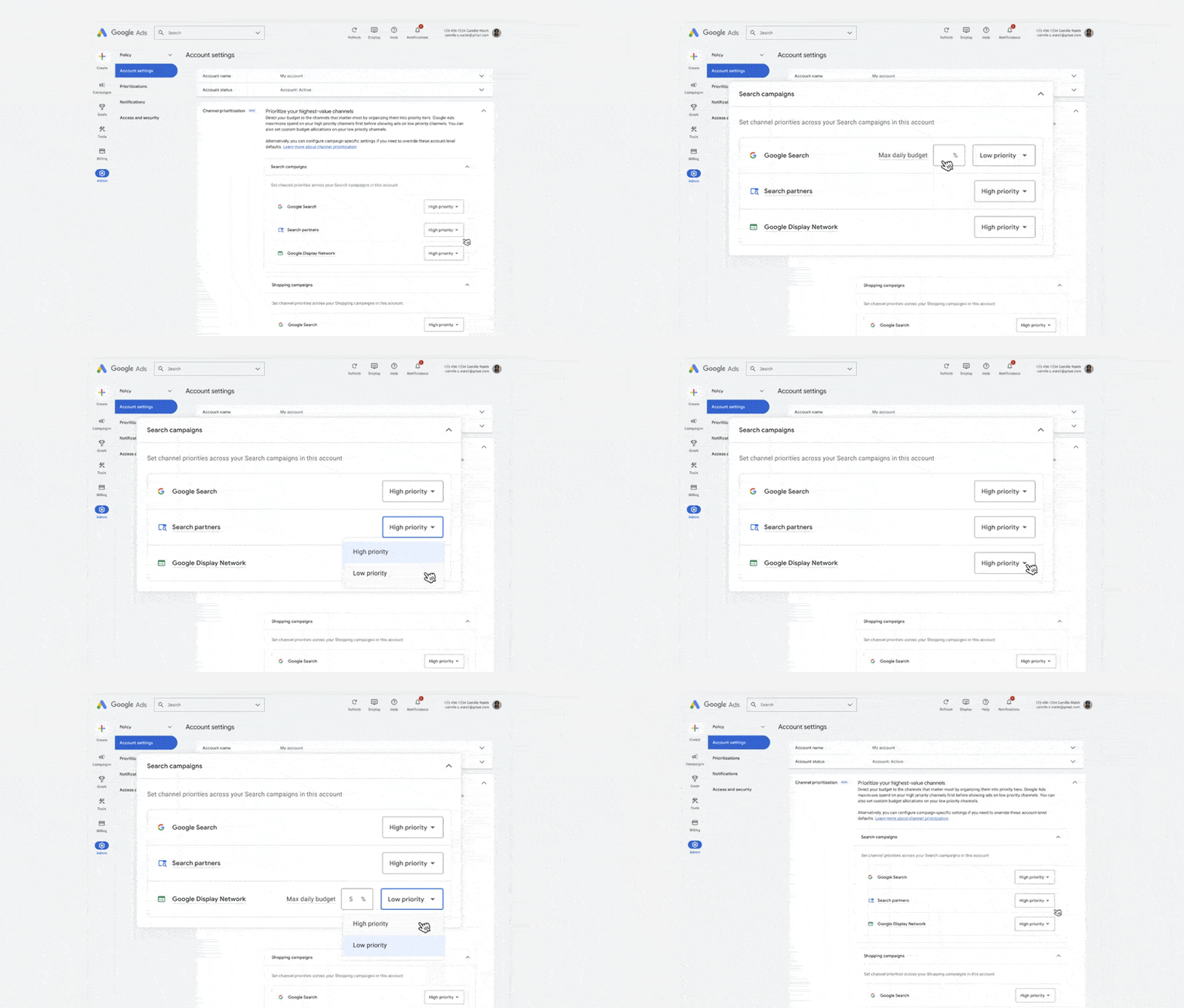
You set priorities in Account settings on the Channel Prioritization card, and you can override them for a single campaign or a shared budget when needed. Google doesn’t let you set them from a manager account, and it lists API and Editor support as “coming soon.” Check each client account for the card, because availability varies as the rollout continues.
Why test a cap before you set it to 0%?
Caps behave differently depending on your bid strategy and budget, so let’s talk about when each control moves spend and why a stepped test protects the volume that pays for itself.
Google calls allocation best-effort. Spend on a channel can occasionally exceed the cap, including on days when the campaign spends above its average daily budget. Read your network-level reports after every change, rather than assuming the cap held.
Target CPA bids toward a cost-per-acquisition goal, and Target ROAS bids toward a return-on-ad-spend goal. The table below shows what each control does under common bid strategies, based on Google’s help documentation.
| Campaign situation | What prioritization does | What the cap does |
| Target CPA, Target ROAS, or Target CPC with room left in budget | Generally nothing | Still applies |
| Target CPA, Target ROAS, or Target CPC, limited by budget | High priority spends first, and Low priority gets budget when it can hit your target | Still applies |
| Maximize Conversions, Maximize Conversion Value, Maximize Clicks, Manual CPC, or Target Impression Share | High priority spends first, and the remainder goes to Low priority | Still applies |
If a Target CPA campaign has budget to spare, a Google Ads Search partners budget cap is the only control that changes its channel mix. That makes the cap your main lever, and a lever you can adjust in small steps.
Our Google Ads benchmarks show why 0% tempts you. Based on WebFX campaign data, Search CTR averages 3% to 5% while Display averages 0.05% to 0.1%, and Search CPC runs $2 to $4 against $0.50 to $1 for Display.
Display clicks cost less, but they happen and convert far less often, so on paper, Display looks like wasted budget, and 0% feels like an easy fix. Averages blend thousands of accounts, though, and Display can also influence buyers who don’t click right away, which click-based reporting misses. Only your CRM revenue shows whether tightening Display and Search partner spend changes the number of customers you win.
Reporting matters here, too. Performance Max already reports by channel, and our guide to Performance Max channel diagnostics shows what to fix first.
Google told Search Engine Journal it expects to expand channel reporting to Search in the first quarter of 2027, so segment Search reports by network until then.
Track each campaign’s qualified leads, CRM revenue, and revenue per ad dollar, and use Google Ads network segments to see how much of its spend goes to Display and Search partners.
What changes in February 2027?
Today, Search campaigns with the Display Network turned on follow the current Display Expansion spend setup. The setup already favors Search inventory over Display, while Search partners don’t get the same treatment.
Since October 15, you can set priorities yourself. Campaigns you leave untouched keep their current behavior until February.
In February 2027, Google will automatically migrate every Search campaign with Display Expansion to the new controls, and spend can shift among Search, Search partners, and Display. To keep your current configuration, Google says to set the Display Network to Low priority with a 50% allocation, which is also best-effort. Google hasn’t named a day in February.
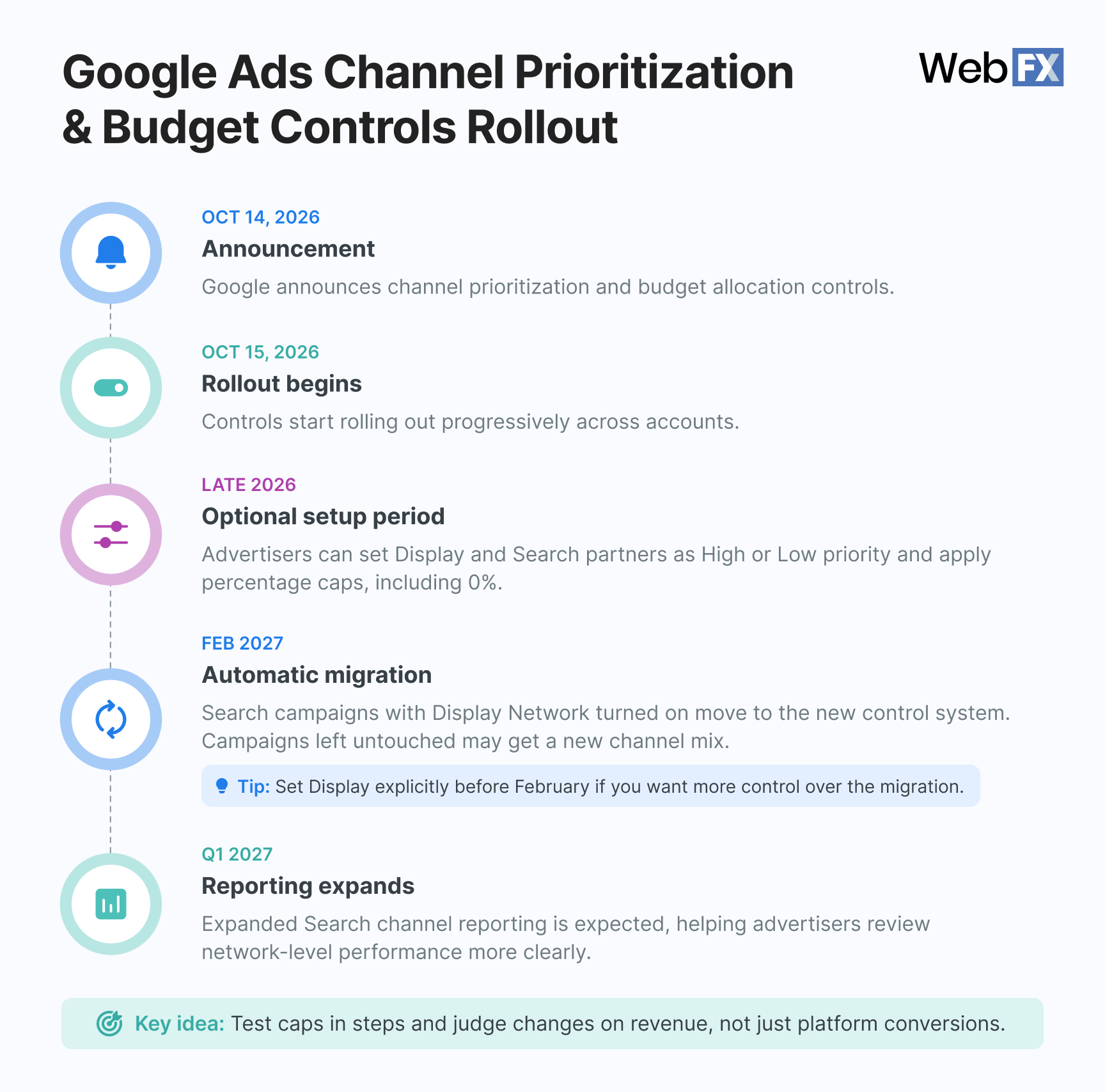
Two details matter for planning. Display will stop serving on Search campaigns that use Target Impression Share. Priorities you set before February take effect right away and replace the old Display behavior for that campaign, so a Google Ads Display Network budget percentage you choose now beats the default you’d get later.
Run this four-step check this week:
- Filter for Search campaigns with the Display Network turned on.
- Flag every campaign that uses Target Impression Share.
- Set Display explicitly on each one, either Low priority at 50% to keep today’s behavior, or a lower percentage to tighten it.
- Record each campaign’s Display share of spend before and after the change.
You’ll know your check worked when Display’s share of spend stays within a few points of where it started.
The Priority Ladder Test: A four-step method
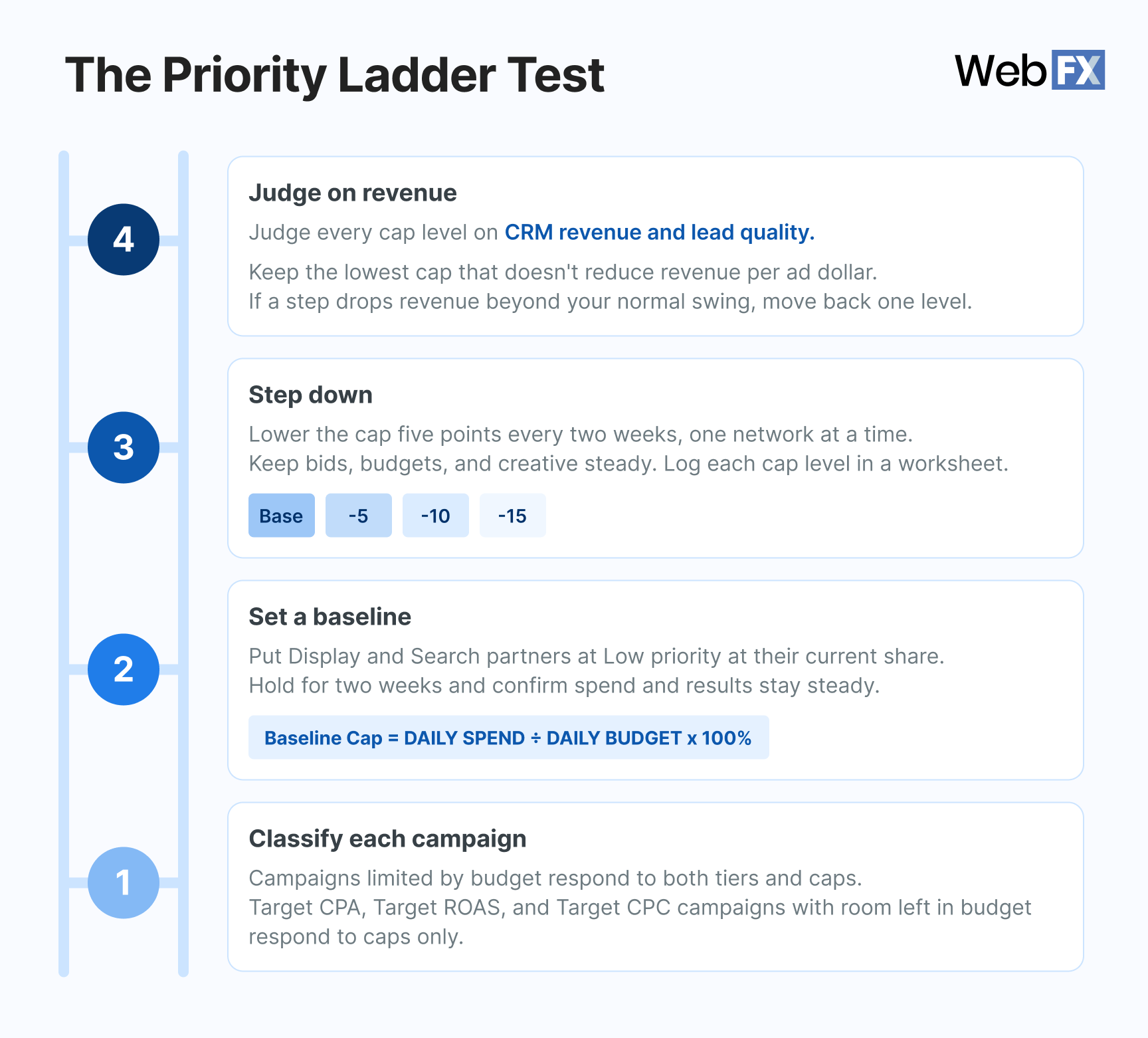
We’ve created the Priority Ladder Test to tighten Display and Search partner caps in small steps and judge each step on revenue. Run it on one network at a time.
Step 1: Classify each campaign
Sort every campaign into one of two groups. Campaigns limited by budget respond to both tiers and caps. Target CPA, Target ROAS, and Target CPC campaigns with room left in budget respond to caps only.
Check each campaign’s status for a limited-by-budget label and note its bid strategy. The sort takes about 10 minutes, and it tells you which lever deserves your attention first.
Step 2: Set a baseline
Put Display and Search partners at Low priority at their current share of spend. Convert that share carefully, because the cap measures against the campaign’s average daily budget, not against spend.
Divide the channel’s average daily spend by the campaign’s average daily budget, then multiply by 100. If Display averages $180 a day on a $1,000 average daily budget, your baseline cap is 18%. Pull 30 days of network-segmented data first, then hold the baseline for two weeks and confirm spend and results stay steady.
Step 3: Step down
Lower the cap by five points every two weeks, one network at a time, and keep bids, budgets, and creative steady.
Log each cap level in a worksheet like this one, one campaign at a time. Record the campaign’s totals for each cap level, plus Display’s and Search partners’ share of spend from Google Ads network segments, so you can confirm the cap held.
| Cap level | Display cap | Search partners cap | Campaign qualified leads | Campaign CRM revenue | Campaign revenue per ad dollar | Decision |
| Baseline | Your baseline | Your baseline | Record | Record | Record | Hold |
| Cap level 1 | Baseline minus 5 points | Baseline minus 5 points | Record | Record | Record | Keep or step back |
| Cap level 2 | Baseline minus 10 points | Baseline minus 10 points | Record | Record | Record | Keep or step back |
| Cap level 3 | Baseline minus 15 points | Baseline minus 15 points | Record | Record | Record | Keep or step back |
Plan the calendar before you start. Five points every two weeks reduces the 50% cap to 0% in 10 steps, which takes about 20 weeks, so a ladder that begins this week finishes after February.
Set Display explicitly now so the migration doesn’t choose for you, then keep stepping down. Pause stepping during peak promotion weeks so seasonality doesn’t blur the read.
Step 4: Judge on revenue
Judge every cap level on the campaign’s CRM revenue and lead quality, not platform-reported conversions. Keep the lowest cap that doesn’t reduce the campaign’s revenue per ad dollar.
If a step drops the campaign’s revenue by more than its normal swing, move back one cap level. Measure that swing as the campaign’s week-to-week variation across the prior four weeks.
For longer sales cycles, use the qualified lead rate or pipeline created as your two-week signal, then confirm against closed revenue as deals mature. RevenueCloudFX connects your campaigns’ ad spend to CRM revenue, so you read the result in one place.
Meet RevenueCloudFX:
Track your paid ad spend through to closed CRM revenue.
FAQs about Google Ads channel prioritization
Does channel prioritization work in Performance Max?
It does, with limits. Google channels tier together, while Search partners and the Display Network each get their own tier and cap. To exclude Search partners in Performance Max, a 0% allocation comes closest, and Google treats it as best-effort. A separate network opt-out has only reached a limited group of advertisers.
What happens if you set Display to 0%?
Google’s help page says it won’t spend on that channel, though the same page calls allocations best-effort. Confirm the result in your network-level reports, and use the ladder to reach 0% in steps.
Can you set channel prioritization from a manager account?
Not today. Set it in each client account or at campaign level, using the Google Ads interface or Search Ads 360.
Do you have to change anything before February 2027?
Only if you run Search campaigns with the Display Network on. Everything else stays optional because every channel defaults to High priority.
Is the percentage cap a hard limit?
Google describes it as best-effort. It measures against the average daily budget and resets each day.
Is channel prioritization available in your account yet?
Google’s rollout is progressive from October 15, 2026, and availability varies by campaign type. Look for the Channel Prioritization card in Account settings.
How do you turn off the Display Network in Google Ads?
Open your Search campaign’s network settings and clear the Display Network option. Once the new controls reach your account, you can also set Display to Low priority at 0%.
Our digital marketing campaigns impact the metrics that improve your bottom line.
See Our Approach
$10 billion

24 million

7.14 million
Test your Google Ads channel prioritization with revenue data
Before you change a single cap, identify which of your campaigns are budget-limited. Then set Display explicitly ahead of February 2027, and step caps down only as far as revenue supports.
Our PPC experts set up and run the Priority Ladder Test, and RevenueCloudFX shows which marketing channels produce revenue instead of platform-reported conversions.
With $10 billion in client revenue and 24 million qualified leads behind our work, we know how to read these numbers. Learn more about our PPC management services or contact our team of experts to see which of your marketing channels produce revenue.
-
 Thaakirah Abrahams is a Lead Editor at WebFX, where she leverages her 5+ years of experience to craft compelling website content. With a background in Journalism and Media studies and certifications in inbound marketing, she holds a keen eye for detail and a talent for breaking down complex topics for numerous sectors, including the legal and finance industries. When she’s not writing or optimizing content, Thaakirah enjoys the simple pleasures of reading in her garden and spending quality time with her family during game nights. View full profile
 -

WebFX is a full-service digital marketing agency delivering revenue-driving strategies across online advertising, SEO and AI search optimization, and digital marketing. Backed by 1,100+ client reviews, a 4.9-star rating on Clutch, and proprietary revenue-tracking technology, our team helps businesses grow visibility and revenue across platforms, from Google to ChatGPT to LinkedIn. Discover how our expert team and revenue-accelerating tech can drive results for you. Learn more
Cost Per Click (CPC) Calculator
Do you advertise on platforms that charge per click? Use our calculator and figure out exactly how many clicks will fit within your budget.
Calculate Your CPC
Contents
- What is Google Ads channel prioritization?
- Why test a cap before you set it to 0%?
- What changes in February 2027?
- The Priority Ladder Test: A four-step method
- Step 1: Classify each campaign
- Step 2: Set a baseline
- Step 3: Step down
- Step 4: Judge on revenue
- FAQs about Google Ads channel prioritization
- Test your Google Ads channel prioritization with revenue data
Share this article


Cost Per Click (CPC) Calculator
Do you advertise on platforms that charge per click? Use our calculator and figure out exactly how many clicks will fit within your budget.
Calculate Your CPC