What you need to know about the new Performance Max Channel Diagnostics feature
Channel Diagnostics flags the exact assets or eligibility issues limiting delivery on each Performance Max channel.
The feature will likely roll out gradually over the next few weeks, so check for it and act as soon as it appears.
Fix flagged eligibility issues immediately, but wait out Performance Max’s learning period before adjusting budgets or bids.
Track impressions, conversion rate, and flag status for three weeks to confirm a fix actually worked.
For years, Performance Max advertisers have had one question they couldn’t answer with data: Which channels or assets are actually holding their campaign back? Performance Max’s automation delivers reach and efficiency, but it has also left marketers guessing why a channel stopped serving or why performance suddenly stalled.
Google’s new Performance Max Channel Diagnostics feature changes that. It surfaces the specific issues limiting delivery on each channel, so you can see what’s wrong instead of guessing. Since the feature is still rolling out, checking it as soon as it appears in your account gives you a head start on fixing issues that competitors relying on guesswork won’t catch for weeks.
This article breaks down what the feature shows, which flags deserve your attention first, and how to confirm a fix actually worked.
What is the Performance Max Channel Diagnostics feature?
Channel Diagnostics is a new section inside Performance Max’s Channel Performance report that surfaces exactly what’s limiting your campaign’s delivery on each channel. You’ll find it by going to Campaigns, opening a Performance Max campaign, then navigating to Insights & Reports > Channel Performance and selecting “View channel diagnostics.”
The feature is still rolling out. Google Ads is testing Channel Diagnostics with select advertisers, and it isn’t available account-wide yet. Once it appears in your account, you can view diagnostics across all channels at once or drill into a single channel, such as YouTube or Maps, to see what’s flagged there specifically.
Because the rollout is gradual, not every advertiser will see it at the same time. Checking for it regularly and acting on it the moment it appears puts you ahead of competitors in your space who are still troubleshooting delivery issues the old way, by testing and guessing.
The problem it solves is a familiar one. Performance Max has always optimized across Search, Display, YouTube, Discover, Gmail, and Maps automatically, but advertisers had no direct way to see why a specific channel wasn’t serving. If a video asset was missing, for example, YouTube delivery could quietly underperform for weeks with no clear signal pointing to the cause.
What Channel Diagnostics actually shows you
Channel Diagnostics focuses on asset and eligibility issues, not overall return on ad spend or cost-per-acquisition trends. That distinction matters because Performance Max’s broader Channel Performance report already covers spend and conversion metrics by channel. The diagnostics feature for Performance Max campaigns fills a different gap: It tells you why a channel isn’t serving well in the first place.
Missing or disapproved assets: Headlines, descriptions, or images that Google rejected or that you never added, which limits eligibility on the channels that need them.
Merchant Center feed problems: Product feed issues that block Shopping-related delivery across Search and Display.
Missing channel-specific assets: Gaps like a missing video for YouTube or a missing location extension for Maps.
Final URL expansion settings: Configuration issues that limit how Performance Max matches your ads to relevant landing pages.
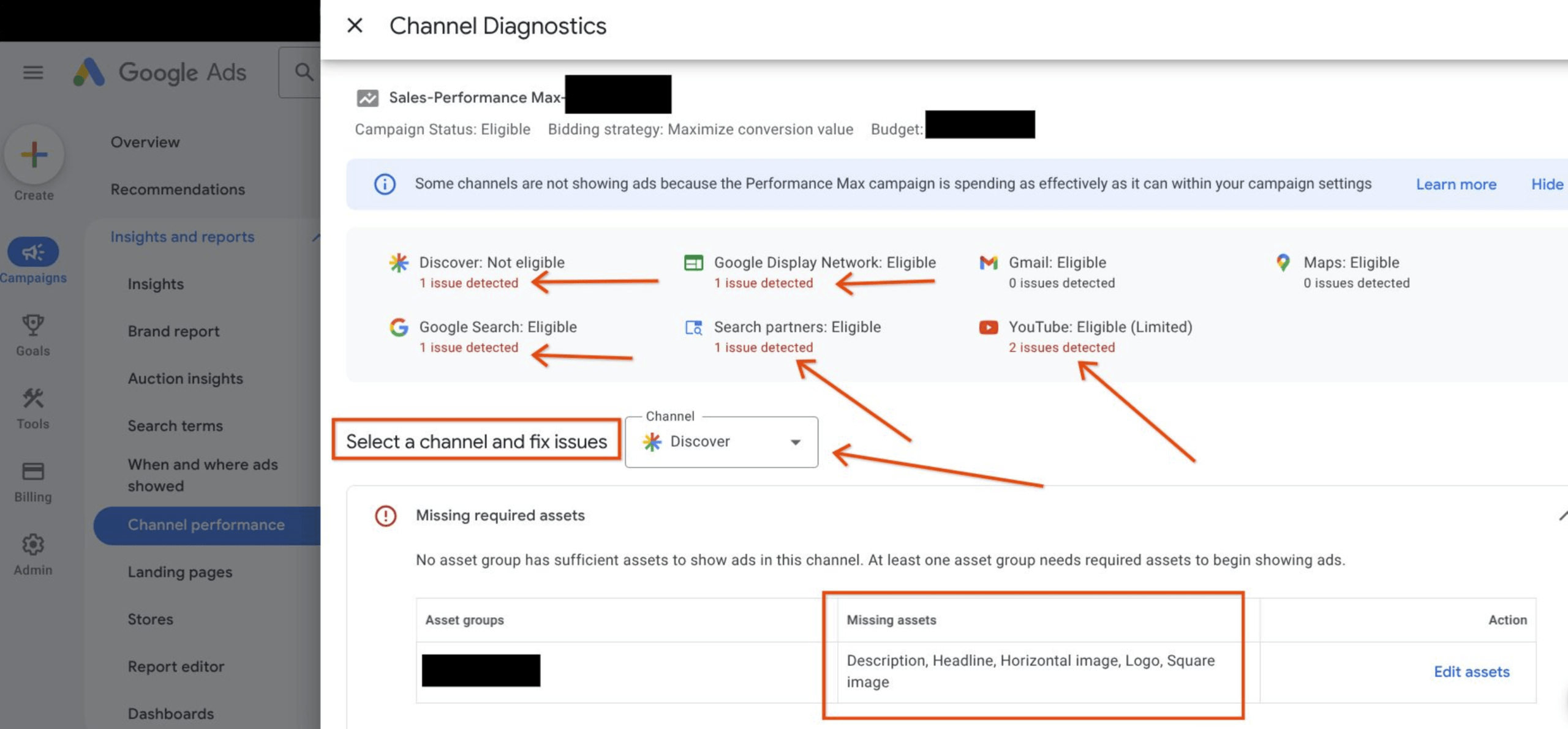
Channel Diagnostics feature in Performance Max
Source: Aleksejus P., Senior Google Ads Campaigns Specialist, via LinkedIn
Each flag comes with guidance on how to fix it, so you’re not left interpreting a vague warning. A performance max missing assets diagnostics flag, for instance, will typically name the exact asset type causing the problem, such as a missing headline or an unapproved image, rather than a generic “limited delivery” message.
Why the Channel Diagnostics feature is a win for Google Ads users
Performance Max has always asked advertisers to trust its automation, and for good reason: The system optimizes across channels faster than any manual process could. That trust has come with a trade-off, though, since advertisers haven’t had a direct way to see why a specific channel wasn’t serving well until now.
The Channel Diagnostics feature in Performance Max closes that gap by turning a guessing game into a checklist. Catching a missing location extension within a day or two, for example, means Maps delivery can recover almost immediately instead of quietly underperforming for a full billing cycle before anyone notices.
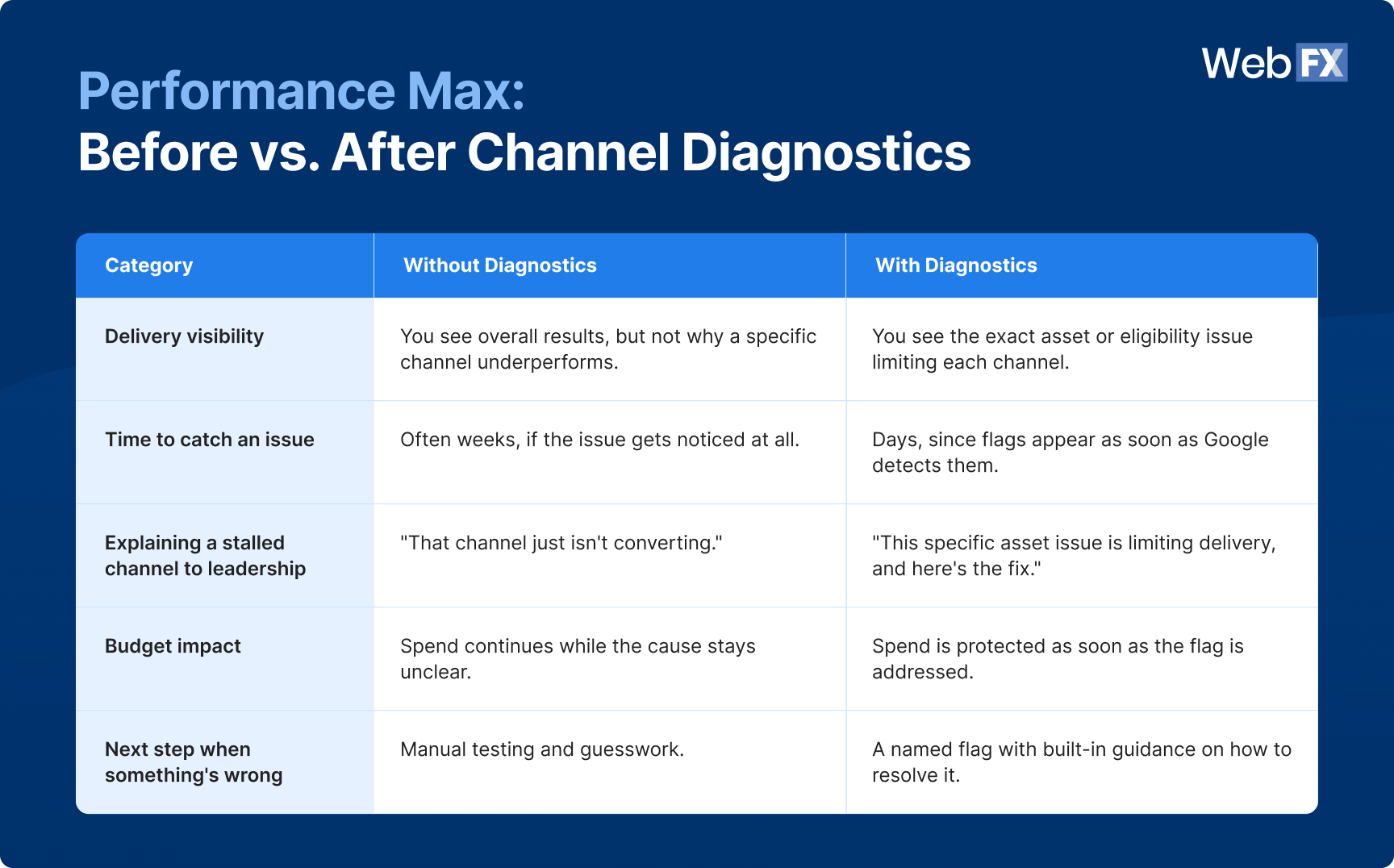
That’s the concrete mechanism behind the “win” here: Faster detection means less wasted spend, not just more visibility for its own sake. Here’s what that shift actually looks like in practice:
Performance Max: Before vs. after Channel Diagnostics
You see overall results, but not why a specific channel underperforms.
You see the exact asset or eligibility issue limiting each channel.
Time to catch an issue
Often weeks, if the issue gets noticed at all.
Days, since flags appear as soon as Google detects them.
Explaining a stalled channel to leadership
“That channel just isn’t converting.”
“This specific asset issue is limiting delivery, and here’s the fix.”
Budget impact
Spend continues while the cause stays unclear.
Spend is protected as soon as the flag is addressed.
Next step when something’s wrong
Manual testing and guesswork.
A named flag with built-in guidance on how to resolve it.
This also changes how you can communicate results to leadership. Instead of telling stakeholders that a channel “just isn’t converting,” you can point to a specific, fixable cause and a timeline for resolving it.
Expert insights from
Kayla J.PPC Specialist at WebFX
“The biggest benefit of acting on Channel Diagnostics immediately is speed-to-results. If your PMax campaign is under-serving in one or more channels because it’s not eligible, the insights provided in Channel Diagnostics will offer a clear “first-step” to optimize your campaign.
While the insights provided likely won’t solve every performance issue, they offer a beneficial starting point that competitors not currently using Channel Diagnostics are missing. For example, a campaign that’s underserving in YouTube due to missing or ineligible assets could better optimize for your target results once you fix those eligibility issues, while a competitor with the same issue could take weeks to notice.”
The diagnostic triage method: What to check first
Once you see a list of flags in Channel Diagnostics, the next challenge is knowing where to start. Here’s how to fix Performance Max asset issues using our diagnostic triage method: A simple way to work through flags in the order that protects your budget fastest, instead of tackling them in whatever order they appear on screen.
Delivery-blocking asset flags
Start with flags tied to missing or disapproved assets that stop a channel from serving at all. These create a complete delivery gap on that channel, not just weaker performance, which makes them the highest-priority fix. A disapproved headline that blocks Search delivery, for example, costs you every impression that channel would have generated until you replace it.
Partial eligibility warnings
Next, address issues like incomplete feed data or missing Final URL expansion settings. These limit delivery without fully blocking it, so they’re serious but slightly less urgent than a full channel outage. Fixing a Merchant Center feed problem, for instance, typically restores partial Shopping eligibility rather than an all-or-nothing outcome.
Format-specific gaps
Finally, work through flags tied to a single format or surface, such as a missing video asset for YouTube or a missing image size for Discover. These affect one channel’s performance rather than blocking delivery altogether, so they’re worth fixing but don’t need to jump the queue. Knowing how to fix Performance Max asset issues in this order means you protect the biggest chunks of at-risk budget first.
When to intervene manually vs. let the algorithm learn
Channel Diagnostics gives you a clear rule to work with: Fix flagged eligibility issues right away, since they sit outside Performance Max’s optimization logic entirely. An asset that’s disapproved or missing won’t resolve itself no matter how long you wait, because the algorithm can’t optimize around content that isn’t there.
Budget and bid decisions work differently. Google recommends giving Performance Max a two- to three-week learning period after a significant change, and advises against making frequent budget or bid adjustments during that window.
That means once you’ve fixed a diagnostic flag, resist the urge to also raise budgets or shift bid targets in the same session. Let the fix take effect on its own before layering in additional changes.
A simple way to apply this: if the fix addresses something Performance Max can’t control, like a missing asset, make it immediately. If the fix touches something Performance Max is actively learning from, like budget or bid strategy, wait for the learning period to finish first.
Expert insights from
Kayla J.PPC Specialist at WebFX
“The rule-of-thumb I usually follow when optimizing PMax campaigns is: If the change is large enough to substantially impact the learning period, wait until performance restabilizes before making any other large changes if possible.
For example, if the flagged issue in Channel Diagnostics stopped an entire channel from serving, I would monitor closely and wait to make other large changes. If it’s something smaller like a couple of ineligible headlines or one missing image size, you’re likely okay to proceed with other changes on your roadmap.”
What to measure after you make a change
Fixing a flag isn’t the finish line. It’s confirming whether the fix worked. Track these three things for 7 to 14 days after resolving a Channel Diagnostics issue:
Channel-level impressions: Check whether the previously limited channel is now serving impressions at a level consistent with its historical baseline or its share of your overall Performance Max mix.
Conversion rate recovery: Compare the channel’s conversion rate after the fix to its performance before the issue appeared, giving Performance Max’s learning period time to stabilize the numbers. For context, WebFX’s data shows that lead-to-customer conversion rates typically range from about 1.9% to 4.6% by industry, so your recovery target should reflect your industry’s norm, not a universal benchmark.
Flag status: Return to Channel Diagnostics and confirm the original flag has cleared, rather than assuming a single glance at delivery volume tells the full story.
If impressions recover but conversion rate doesn’t follow, that pattern tells you the eligibility issue is likely resolved, since the channel is serving again, but a separate factor, like landing page relevance or audience targeting, may be limiting results.
That’s a different problem to troubleshoot than a diagnostics flag, and it’s worth checking your landing pages and audience signals before assuming the original fix didn’t work. Tracking these three signals together tells you the difference between “the fix worked” and “a new issue appeared.”
Tracking these three signals manually in Google Ads works, but it takes a few different reports to piece together. RevenueCloudFX, WebFX’s proprietary reporting platform, pulls impressions, conversion data, and revenue into a single dashboard, so you can confirm a fix worked without switching between tabs.
Meet RevenueCloudFX:
One platform tracking countless metrics and driving stellar results.
Google hasn’t confirmed that the feature is limited to specific Performance Max goals or verticals. Since it’s still in gradual rollout, availability may vary by account regardless of campaign type.
No. Fixing an eligibility issue restores a channel’s ability to compete for budget under Performance Max’s existing bidding logic. It doesn’t override how the algorithm allocates spend across channels.
Not yet. Google Ads has been testing the feature with select advertisers since July 1, 2026, and will likely continue to roll out to more accounts over the next few weeks.
The Channel Performance report shows spend, conversions, and other performance metrics by channel. Channel Diagnostics is a more focused layer within that report, built specifically to flag asset and eligibility issues limiting delivery.
The underlying issue, such as a missing asset or feed problem, will keep limiting that channel’s delivery until it’s addressed. Performance Max can’t optimize around a gap it doesn’t have the assets to fill.
Learn how we increased Google Ads conversions by 135%, and organic sessions by 307% for a client.
Let WebFX handle your Performance Max Channel Diagnostics
Channel Diagnostics gives you a faster way to catch what’s limiting your Performance Max delivery, but knowing which flags to prioritize and when to intervene still takes consistent attention.
Our team monitors these diagnostics as part of ongoing Google Ads management, so you don’t have to catch every flag yourself or guess whether a fix actually worked. Learn more about our Google Ads management services and contact our team today to see how our Google Ads experts can keep your Performance Max campaigns running at full strength.
Cost Per Click (CPC) Calculator
Do you advertise on platforms that charge per click? Use our calculator and figure out exactly how many clicks will fit within your budget.







 Thaakirah Abrahams is a Lead Editor at WebFX, where she leverages her 5+ years of experience to craft compelling website content. With a background in Journalism and Media studies and certifications in inbound marketing, she holds a keen eye for detail and a talent for breaking down complex topics for numerous sectors, including the legal and finance industries. When she’s not writing or optimizing content, Thaakirah enjoys the simple pleasures of reading in her garden and spending quality time with her family during game nights. View full profile
 Kayla Johansen is a PPC Analyst at WebFX, where she manages the advertising campaigns for WebFX.com and Nutshell across various channels, including search, video, display, social media, audio, and connected TV. Since joining the WebFX team, she’s driven millions in revenue and consistently increased sales from PPC year over year. With a B.S. in Marketing and certifications in Google Ads and Google Analytics, she’s dedicated to generating qualified leads. When not driving revenue, she enjoys reading, creative writing, playing cozy video games, and hanging out with her dogs. View full profile