


Table of Contents
- At a glance: ChatGPT vs. Google
- Quick decision guide: Which tool should you use?
- ChatGPT vs. Google: When to use one over the other
- ChatGPT generates and synthesizes answers
- Use ChatGPT to summarize complex information
- Use ChatGPT to draft and refine content
- Use ChatGPT to flesh out ideas
- Use ChatGPT for coding and debugging code
- Use ChatGPT for document analysis
- Use Google when you need source discovery, checking, or current information
- Use Google to verify information from multiple sources
- Use Google for local information and maps
- Use Google for shopping and product research
- Use Google for news and fast-changing topics
- Use Google for quick fact-checking
- ChatGPT vs. Google for business research
- Market and audience research
- Vendor evaluation
- Content and SEO research
- Internal reporting and strategy
- Should marketers optimize for Google rankings, AI answers, or both?
- FAQs
- Choose the right tool for your task
- Use ChatGPT when you need a synthesized answer, draft, summary, explanation, or next-step recommendation.
- Use Google when you need multiple sources, original documentation, fresh updates, local results, maps, shopping information, reviews, or fact-checking.
- For business research, use ChatGPT to organize your thinking and Google to check sources before making decisions.
- Marketers should optimize for both Google rankings and AI answers because buyers now use both discovery paths.
Many people regularly alternate between ChatGPT and Google depending on what they’re trying to accomplish: ChatGPT for quick answers and Google for verifying information. They use ChatGPT for initial background information and Google for getting updated information or news.
Still, the question remains: When should you use ChatGPT, and when does Google make more sense?
The best choice depends on what you’re trying to do. ChatGPT works best when you want a direct, synthesized answer or help thinking through a task. Google Search works best when you need to verify information from multiple sources, get up-to-date information, gather local information and news, or fact-check quickly.
In business research, the most effective workflow often uses both. Use Google to gather sources and check what’s current. Use ChatGPT to organize the information and turn your findings into a brief, outline, checklist, or next-step plan.
Let’s differentiate the two and discuss how you can make the most of both tools with these topics:
- At a glance: ChatGPT vs. Google
- ChatGPT vs. Google: When to use one over the other
- ChatGPT vs. Google for business research
- Should marketers optimize for Google rankings, AI answers, or both?
- FAQs about ChatGPT vs. Google
At a glance: ChatGPT vs. Google
ChatGPT and Google can both help you find information, but they work in different ways. ChatGPT responds like an assistant that can explain, summarize, draft, and reason through a task. Google Search helps users discover web pages, compare sources, check recent information, explore local results, review products, and follow links back to original sources.
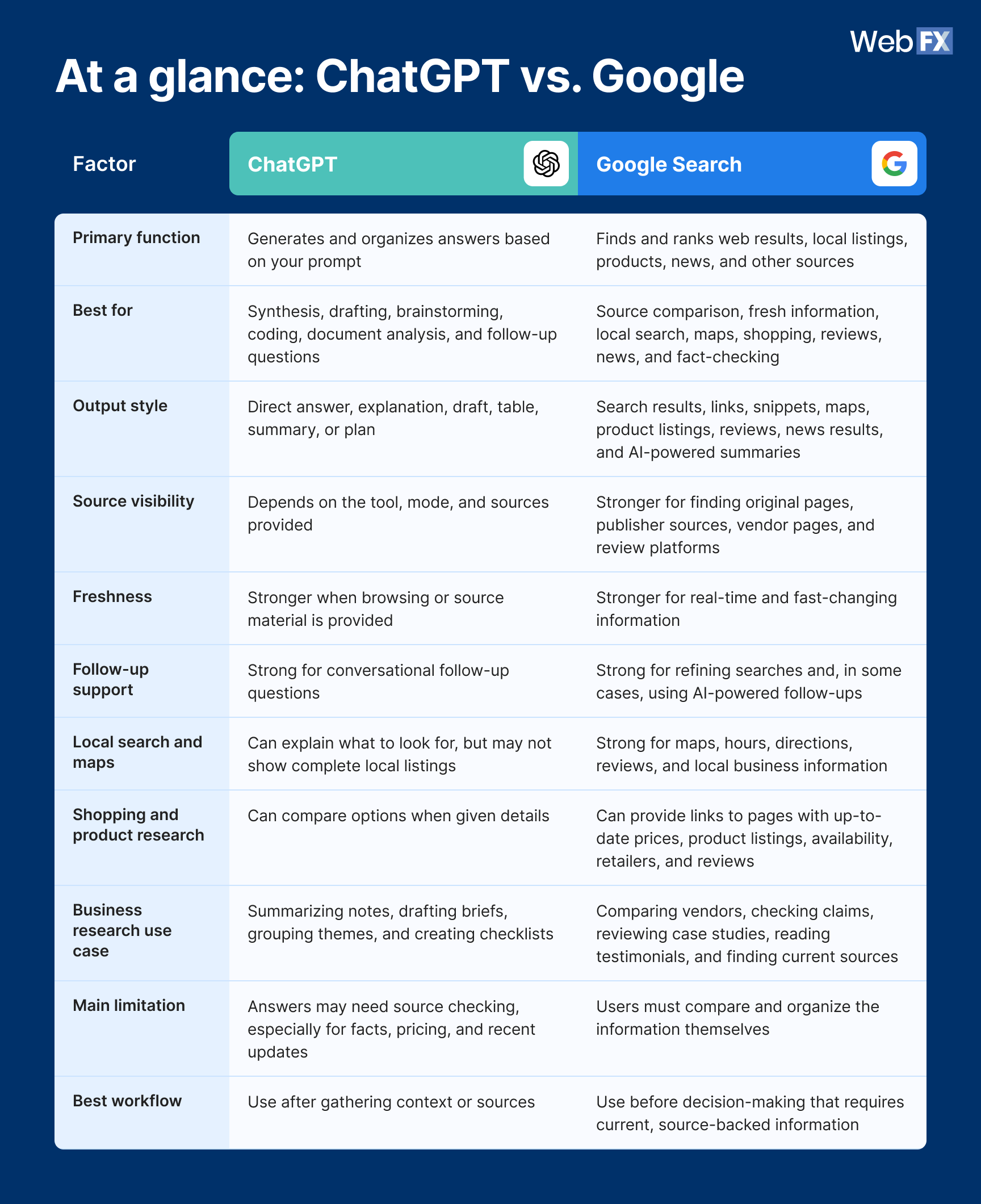
Table view:
Factor
ChatGPT
Google Search
Primary function
Generates and organizes answers based on your prompt
Finds and ranks web results, local listings, products, news, and other sources
Best for
Synthesis, drafting, brainstorming, coding, document analysis, and follow-up questions
Source comparison, fresh information, local search, maps, shopping, reviews, news, and fact-checking
Output style
Direct answer, explanation, draft, table, summary, or plan
Search results, links, snippets, maps, product listings, reviews, news results, and AI-powered summaries
Source visibility
Depends on the tool, mode, and sources provided
Stronger for finding original pages, publisher sources, vendor pages, and review platforms
Freshness
Stronger when browsing or source material is provided
Stronger for real-time and fast-changing information
Follow-up support
Strong for conversational follow-up questions
Strong for refining searches and, in some cases, using AI-powered follow-ups
Local search and maps
Can explain what to look for, but may not show complete local listings
Strong for maps, hours, directions, reviews, and local business information
Shopping and product research
Can compare options when given details
Can provide links to pages with up-to-date prices, product listings, availability, retailers, and reviews
Business research use case
Summarizing notes, drafting briefs, grouping themes, and creating checklists
Comparing vendors, checking claims, reviewing case studies, reading testimonials, and finding current sources
Main limitation
Answers may need source checking, especially for facts, pricing, and recent updates
Users must compare and organize the information themselves
Best workflow
Use after gathering context or sources
Use before decision-making that requires current, source-backed information
Based on these comparison highlights, one thing is crystal clear: Neither tool is universally better than the other. They just perform different tasks, so comparing them is like comparing apples and oranges.
Quick decision guide: Which tool should you use?
Use ChatGPT when you need to:
- Get background information about a topic
- Summarize a document or notes
- Draft or rewrite content
- Brainstorm ideas
- Compare concepts
- Write or debug code
- Ask follow-up questions
- Turn raw information into a plan, table, or checklist
Use Google when you need to:
- Find multiple sources
- Check a claim
- Review recent information
- Compare vendors or products
- Find local businesses, maps, directions, or store hours
- Shop or check prices
- Read reviews
- Find original documentation, studies, or news
Use both when you need to:
- Research a topic
- Build a content brief
- Compare vendors
- Create a marketing strategy
- Publish fact-sensitive content
- Prepare a business case for leadership
ChatGPT vs. Google: When to use one over the other
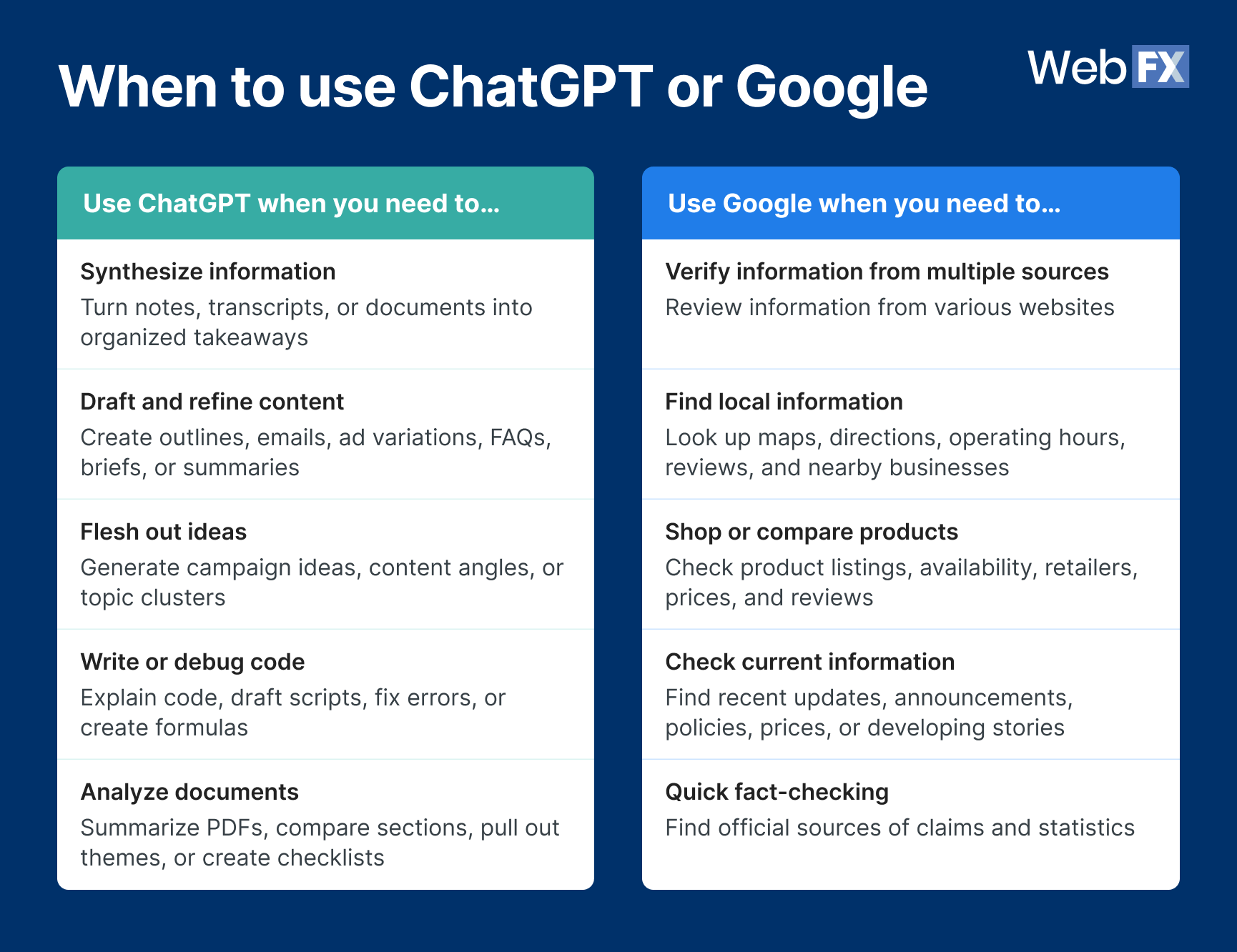
Use ChatGPT when you need help working with information. Use Google when you need to find current information, compare sources, review local results, shop, check claims, or trace information back to the original source.
Here’s a quick way to think about it: ChatGPT helps you do something with information. Google helps you find and check the information first.
ChatGPT generates and synthesizes answers
ChatGPT works like an assistant that can help you think through a task. You can ask it to:
Summarize complex information
ChatGPT can turn scattered notes, transcripts, documents, and ideas into organized takeaways. It can:
- Compare ideas
- Create comparison tables
- Summarize long documents
- Explain concepts
For example, a B2B marketer can ask ChatGPT to summarize customer interview notes into common objections, buying triggers, and content ideas. The marketer can then use those findings to update landing pages, sales enablement materials, or blog content.
This works best when you give ChatGPT strong source material. A prompt with audience details, business context, and source material usually produces a more useful response. Remember: Clear prompts lead to clear answers.
Draft and refine content
ChatGPT can help with content outlines, email drafts, ad variations, content briefs, FAQs, internal summaries, and reporting notes.
For example, you could ask ChatGPT to turn a rough campaign idea into three email subject lines. That gives your team a starting point instead of a blank page.
Pro tip: Always treat ChatGPT drafts as first drafts. Before publishing, review the copy for accuracy and customer fit, revise it to match your brand voice, and add a human expert’s insights.
Flesh out ideas
ChatGPT can help flesh out campaign ideas and content angles. This can help small marketing teams move from a single idea to a working list of ideas to evaluate.
For example, a marketer planning content for a manufacturing company’s new product line can start with a few blog topics and ask ChatGPT for other ideas. In the prompt, the marketer can add their audience type so they get suitable topic ideas from the tool.
The team can then use Google to check search results, competitor pages, and industry language before choosing topics.
Coding and debugging code
ChatGPT can help explain code, draft scripts, and debug errors. You can use it for spreadsheet formulas, simple scripts, tracking plans, or technical explanations.
When using ChatGPT or any other AI tool for coding, never paste sensitive API keys, passwords, and private company information into the chat.
Pro tip: Always test the technical output before using it in production. A coding answer can look right and still fail when it meets real data, edge cases, or platform limits.
Analyze documents
ChatGPT can help summarize long PDFs. It can pull out themes, compare sections, and turn information into checklists.
For example, a marketing director reviewing several customer interviews can ask ChatGPT to identify recurring pain points and convert them into page update recommendations.
Pro tip: Don’t upload sensitive customer information or restricted company data unless your organization allows it. Internal policies should guide what your team can share with AI tools.
Use Google when you need source discovery, checking, or current information
Use Google instead of ChatGPT when you need to:
Verify information from multiple sources
Google lets you verify information from various websites. You can check review websites, a business’s website, or an industry publication for the information you need to validate.
For example, if you want to know whether a benchmark applies to your industry, you can search for reports on Google and look at the different reputable sources you find.
Check local results and maps
When looking for location information (such as business locations, operating hours, and reviews) and maps, users can turn to Google as their tool.
That’s because businesses can update their own Google Business Profiles with their latest information, and users can immediately see them on Google Maps or in the local pack.
Meanwhile, ChatGPT uses periodic training data, which may not be updated. It also requires users to turn on active web-browsing features to access the latest information online.
Do shopping and product research
Google is the better option for product research, whether it’s for B2B or B2C. While ChatGPT can create a product comparison checklist, users can rely on Google to show links to up-to-date shopping information sources.
The search engine also has SERP features that make it easy to find shopping information. The Popular Products feature shows products related to a query, including images, pricing, ratings, and links to product pages. The Local Pack lets users find relevant businesses nearby or in a specific location.
Check the news and fast-changing topics
When you need updates on current events, the weather, and developing stories, use Google instead of ChatGPT.
ChatGPT can summarize information, but when you need current information, Google can give you more direct access to up-to-date sources for breaking news or recent market shifts. This is especially important for marketers when you’re creating a campaign brief that needs the latest information on policies, competitor pricing, or platform rules.
Do quick fact-checking
When checking claims or facts, use Google to find official pages, original reports, and documentation. This step protects your content and your brand.
For example, before adding a statistic to a blog post, find the original study or report through Google. That way, you ensure you’re publishing accurate information, which builds trust with your audience.
Google Search now includes AI-powered features, including AI Overviews and AI Mode. That means Google can provide AI-generated summaries for some queries.
Its advantage in this comparison is that it still gives users access to current web results, links, local listings, maps, shopping data, reviews, and original sources they can check.
ChatGPT vs. Google for business research
Businesses should use ChatGPT and Google together for research. ChatGPT can organize and summarize information, while Google can help teams check sources, compare vendors, and review recent information.
This approach works well for small marketing teams because it splits the work. Google helps you gather current source material from across the web, while ChatGPT helps you turn those findings into something organized and useful.
A simple workflow can help you use both tools without duplicating work:
- Start with Google to gather sources
- Use ChatGPT to organize the findings
- Return to Google to check important claims
- Use ChatGPT to draft a brief, outline, checklist, or next-step plan
- Before publishing or making a decision, do a final source check in Google
Here are a few business research tasks where Google and ChatGPT can work together:
- Market and audience research
- Vendor evaluation
- Content and SEO research
- Internal reporting and strategy
Market and audience research
You can use Google and ChatGPT for initial market and audience research to understand your audience’s pain points. Google can find current reports, search behavior, competitor pages, and industry publications, while ChatGPT can group themes, generate questions, and turn notes into summaries.
For example, a professional services provider can use Google to review People Also Ask results, industry forums, and their competitors’ pages related to their solutions. Then, they could use ChatGPT to organize those findings into questions, content gaps, and page update ideas
This combination helps the team turn information into a useful research summary while still verifying details.
Vendor evaluation
Google should be the starting point for vendor comparison because businesses need source diversity, reviews, documentation, pricing, and proof. Google can also help teams find vendor review sites, case studies, testimonials, comparison pages, and third-party coverage.
After gathering the sources, ChatGPT can organize the findings into a scorecard. You could ask it to create a table with categories like services, industry experience, proof points, pricing transparency, reporting capabilities, and potential concerns.
For example, a manufacturer comparing digital marketing agencies may want to review service pages, pricing information, industry case studies, client testimonials, platform partnerships, and independent reviews. Google gives the team resources to evaluate each provider.
The bottom line: Use Google to gather the evidence. Use ChatGPT to organize the evaluation.
Content and SEO research
Google shows what currently ranks and what formats searchers see. That makes it valuable for search engine optimization (SEO) research, content updates, and page planning.
For example, if you’re updating a service page, Google can show whether the top results include pricing sections, comparison tables, FAQs, videos, local results, or AI Overviews. Those patterns can help you understand what searchers may expect from the page.
ChatGPT can then help turn your research into outlines, briefs, comparison tables, and FAQ ideas. It can also help identify where your draft repeats itself or where a section needs a clearer example.
Marketers shouldn’t rely on ChatGPT alone for search results, keyword assumptions, or live search engine results page analysis. Use Google to see what searchers actually encounter.
Internal reporting and strategy
ChatGPT can summarize campaign notes, organize metrics, and draft reporting narratives. Google can check benchmarks, definitions, and outside references.
For example, a marketing manager preparing a quarterly report could use ChatGPT to turn raw notes into a first draft. Then, they could use Google to confirm outside benchmarks, platform definitions, and industry references before presenting to leadership.
This workflow helps teams save time while keeping the final report grounded in verified information.
Should marketers optimize for Google rankings, AI answers, or both?
Marketers should optimize for both Google rankings and AI answers because buyers now use search engines and AI tools during research. In fact, traffic from generative AI grew by 796% from January 2024 to December 2025.
AI optimization isn’t a replacement for SEO, though. Ranking in Google still matters if you want your customers to find you, but AI visibility is increasingly becoming important as users turn to these tools for research.
The good news is that SEO foundations can support both Google and AI answer visibility. Focus on:
- Creating helpful content that answers real buyer questions
- Publishing accurate service, product, and company information
- Explaining who you help and what you offer in your content
- Sharing original insight from your team or customers
- Publishing reviews, testimonials, case studies, and trust signals
- Structuring your pages’ content to make them easier to understand
- Updating your content to reflect current products, services, and policies
Balancing both takes real bandwidth. Most in-house teams are stretched thin enough optimizing for Google rankings alone, let alone tracking how AI answer engines interpret and cite content. That’s where working with a team fluent in both traditional SEO and AI search visibility pays off. They can pressure-test what’s actually working across channels instead of guessing.
If your prospects use Google and AI tools for research, your content should help both humans and answer engines understand why your business is credible.
FAQs
Should businesses use ChatGPT or Google for research?
Businesses should use both. Google helps teams find and compare sources, while ChatGPT helps summarize findings, organize ideas, and turn research into briefs, reports, or next steps.
What is the difference between ChatGPT and Google Search?
ChatGPT generates organized answers based on the user’s prompt and available context, while Google Search retrieves and ranks web results so users can compare sources, check freshness, and review claims.
In other words, ChatGPT helps you work with information, and Google helps you find and check information across the web.
When should marketers use ChatGPT instead of Google?
Marketers can use ChatGPT to get background information about a topic. You can also use the AI tool for summarizing notes, drafting content, brainstorming ideas, creating outlines, analyzing documents, or turning information into a plan.
If you need live results, source comparison, fact-checking, and looking for original documentation, use Google instead.
What are the pros and cons of ChatGPT vs. Google Search?
ChatGPT’s main advantage is synthesis. It can give users a direct answer, draft, summary, or explanation. Its main limitation is that users may still need to check sources and freshness.
Google’s main advantage is source discovery. It shows multiple results, reviews, maps, products, and news. Its main limitation is that users must spend more time comparing and organizing the information themselves.
Which is better for comparing vendors: ChatGPT or Google?
Google is usually better for the first stage of vendor comparison because it shows vendor websites, reviews, pricing pages, case studies, testimonials, and third-party sources.
ChatGPT can help after that by organizing vendor information into a comparison table or scorecard.
Is Google better than ChatGPT for local search and shopping?
Yes. Google is generally better for local search and shopping because it can show maps, business profiles, hours, reviews, product listings, prices, and availability.
ChatGPT can help summarize options or create a comparison checklist, but Google gives users more direct paths to local and product-specific information.
Should B2B teams optimize for Google rankings, AI answers, or both?
B2B teams should optimize for both. Google rankings help prospects find your website, compare sources, and validate your business. AI answers can influence your prospects’ early research, vendor shortlists, and brand discovery.
Your buyers are discovering brands across search surfaces.
Is your brand showing up in Google, ChatGPT, and beyond?
Choose the right tool for your task
ChatGPT and Google solve different problems. ChatGPT helps you think, draft, and explore ideas. Google helps you verify, discover, and evaluate information.
When you choose the tool that matches your task (or combine both strategically) you get better results with less friction.
Want more helpful content like this sent straight to your inbox? Subscribe to our newsletter for free!
-
 Matthew Gibbons is a Senior Data & Tech Writer at WebFX, where he strives to help businesses understand niche and complex marketing topics related to SEO, martech, and more. With a B.A. in Professional and Public Writing from Auburn University, he’s written over 1,000 marketing guides and video scripts since joining the company in 2020. In addition to the WebFX blog, you can find his work on SEO.com, Nutshell, TeamAI, and the WebFX YouTube channel. When he’s not pumping out fresh blog posts and articles, he’s usually fueling his Tolkien obsession or working on his latest creative project. View full profile
 -

WebFX is a full-service digital marketing agency delivering revenue-driving strategies across online advertising, SEO and AI search optimization, and digital marketing. Backed by 1,100+ client reviews, a 4.9-star rating on Clutch, and proprietary revenue-tracking technology, our team helps businesses grow visibility and revenue across platforms, from Google to ChatGPT to LinkedIn. Discover how our expert team and revenue-accelerating tech can drive results for you. Learn more
Try our free Marketing Calculator
Craft a tailored online marketing strategy! Utilize our free Internet marketing calculator for a custom plan based on your location, reach, timeframe, and budget.
Plan Your Marketing Budget
Table of Contents
- At a glance: ChatGPT vs. Google
- Quick decision guide: Which tool should you use?
- ChatGPT vs. Google: When to use one over the other
- ChatGPT generates and synthesizes answers
- Use ChatGPT to summarize complex information
- Use ChatGPT to draft and refine content
- Use ChatGPT to flesh out ideas
- Use ChatGPT for coding and debugging code
- Use ChatGPT for document analysis
- Use Google when you need source discovery, checking, or current information
- Use Google to verify information from multiple sources
- Use Google for local information and maps
- Use Google for shopping and product research
- Use Google for news and fast-changing topics
- Use Google for quick fact-checking
- ChatGPT vs. Google for business research
- Market and audience research
- Vendor evaluation
- Content and SEO research
- Internal reporting and strategy
- Should marketers optimize for Google rankings, AI answers, or both?
- FAQs
- Choose the right tool for your task
Share this article


SEO Success with KOA

Try our free Marketing Calculator
Craft a tailored online marketing strategy! Utilize our free Internet marketing calculator for a custom plan based on your location, reach, timeframe, and budget.
Plan Your Marketing Budget


What to read next