

What is the best way to detect AI-generated content?
To determine whether content is created by AI, you must:
- Review the content manually
- Use AI detection tools
AI content has become sophisticated enough that it’s best to combine these methods. And it’s worth noting that even then, you may not always be able to tell.
Learning how to detect AI content is a good way to protect your brand and avoid offering misleading information to your target audience. That’s because AI content may use repetitive expressions or fail to demonstrate deep subject understanding.
To that end, this blog post introduces steps and tools to help you detect AI content. Below, we’ll cover the following topics:
- Best way to detect AI-generated content
- How to detect AI-written text
- How to detect AI-generated images
- Best AI-detection tools
- Exercising caution with AI detection
- FAQs on AI detection
Keep reading to learn more!
How to detect AI-written text
Here are a few steps you can take to detect AI-written text:
- Analyze nuances in language style and tone
- Check the content for repetitive phrases or clichés
- Look for patterns in the writing style or word choice
- Check if the writer is aware of the topic’s context
- Check for originality and plagiarized content
Get more details on each of those tips below.
1. Analyze nuances in language style and tone
Because AI models are trained with massive amounts of content, AI can mimic human writing. However, AI-generated text still lacks the creativity, nuances, and originality of human-created works. If a written piece lacks personal experiences, emotions, or subtle nuances in language, it’s likely created by AI.
Here are a few questions you can ask yourself to help you spot subtle AI clues:
- Does the text use formal language that seems unnatural for the topic or context? AI can generate grammatically correct sentences. If its tone is too formal (or informal) for a particular context or audience, though, it’s possible that AI wrote the piece.
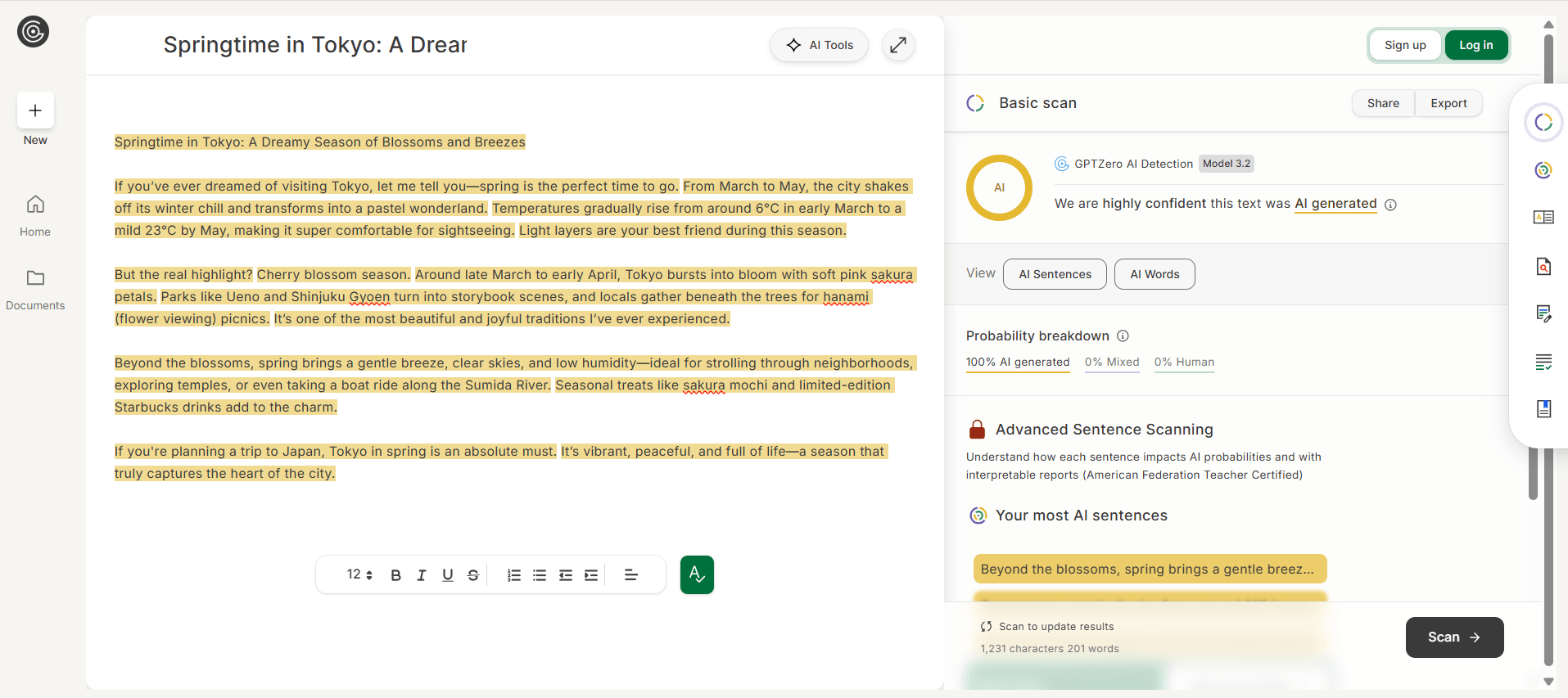
- Does the content provide examples, personal anecdotes, or a certain point of view? If a piece explains a concept well, but doesn’t provide personal stories or unique perspectives, it may be generated by AI. The screenshot above shows an example that describes spring in Tokyo, but doesn’t include a personal story about a springtime visit.
- Is the tone of the piece consistent? If the tone and style change throughout the piece, it could be a sign that it’s written by AI, which is trained on various sources, languages, and tones. Good human writers use a consistent tone, and their personal voice shines through their output.
- Is the piece emotionless? If the content seems bland, it’s possible that it’s generated by AI. Check for humor, authentic emotions, and nuances in wit and irony.
Note that this checklist isn’t a foolproof way of detecting AI-generated text. Aside from manually checking the content, you should use AI-powered tools like GPTZero that can analyze patterns to help determine the authenticity of written content. You can also run text through Grammarly’s plagiarism and AI detection feature.
2. Check the content for repetitive phrases or clichés
Even though AI technology has come a long way in recent years, it still has limitations and cannot fully match the creativity and complexity of human intellect and expression. Since AI algorithms rely on training data to generate content, repetitive phrases or clichés will often slip in.
AI often generates content using the “safe” and predictable language it’s trained on, resulting in the repetition of words, phrases, and clichés because that’s all it can “think” to use or produce.
For example, an AI-generated news article may contain repetitive phrases such as “According to sources” or “In a statement released today,” which can make it feel formulaic and lack the unique voice of a human writer. Similarly, an AI-generated product description may use clichés such as “revolutionary new product” or “cutting-edge technology” without truly conveying what makes the product stand out.
All in all, this limitation of AI technology can hinder uniqueness and limit the scope of its applications, especially in fields that require originality and innovation, such as art, literature, and advertising.
3. Look for patterns in the writing style or word choice
We’ve already established that AI-generated content often reads as generic or robotic and uses repetitive phrases and clichés, but let’s dive into that a little deeper.
The use of technical jargon or industry-specific terminology is one common pattern indicating that the content was generated by an algorithm programmed to use those terms. When you look at the AI content’s writing style and word choice, you may often notice excessive use of a “buzzword” commonly used in the industry.
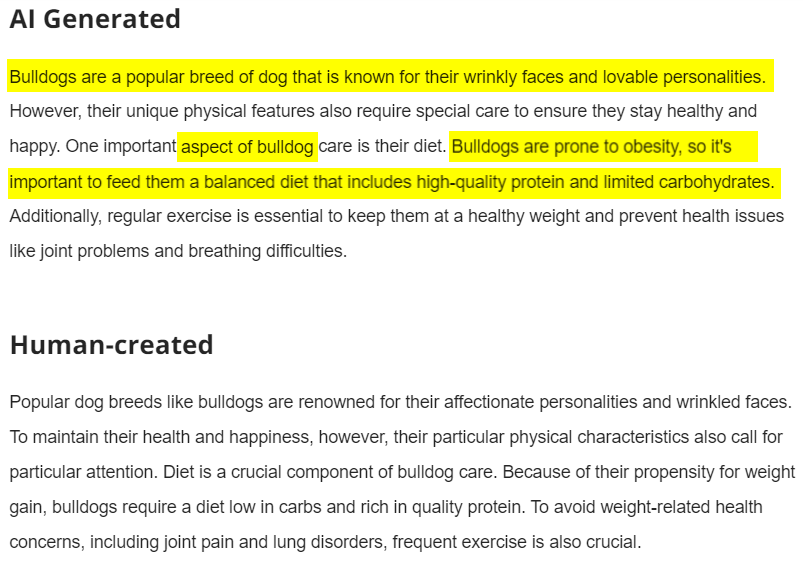
Another red flag is content that sounds like it was written using a template or other formulaic structure. That’s because AI-generated content typically conforms to a particular format, such as a news story or a product description.
Because it’s difficult for the AI algorithm to gauge the correct language level for the target audience precisely, it increases the likelihood of using either too simple or too advanced language when generating content. It becomes easier to tell if the text was created by a computer or a person when you master recognition of these patterns.
4. Check if the writer is aware of the topic’s context
While AI is trained with lots of information that it can synthesize for users, its written content can appear generic and out of context, lacking the depth of what AI agents look for in contextual understanding. AI can generate copy based on facts it “knows,” but it doesn’t consider its audience and their cultural nuances.
For example, an AI-generated blog post about traveling to Paris, France, may recommend a list of places to visit and things to do in the city. You’ll likely find every item on its generic list in other blog posts online.
Moreover, its tone may not excite readers who are traveling to the destination for the first time. That’s because AI is not great at expressing excitement over something it hasn’t experienced.
5. Check for originality and plagiarized content
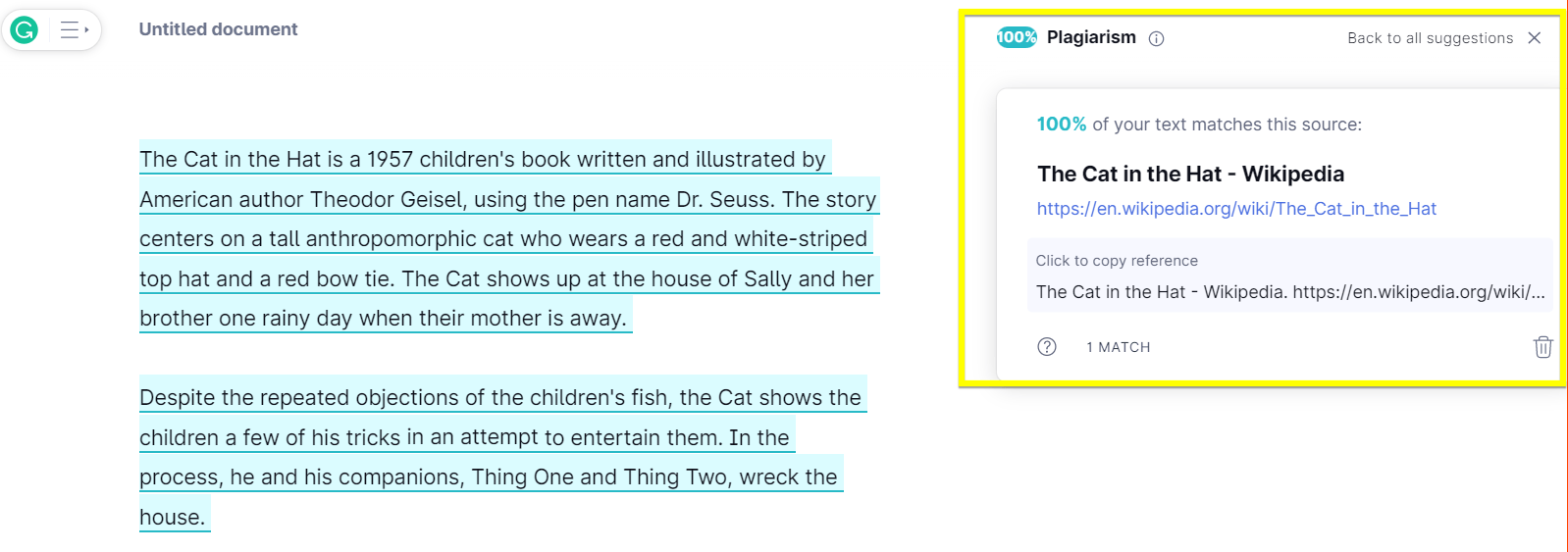
AI is great at synthesizing information, so it rarely spits out verbatim content. However, it still generates text that paraphrases existing content online, so check for unoriginal ideas.
Patchwriting is another telltale sign of AI-generated content. It stitches sentences and phrases from different sources to come up with a hodgepodge piece.
You can use plagiarism checkers to check for directly copied content. These tools might miss paraphrased content, though, so use other methods such as:
- Manually checking the piece’s consistent style
- Using other AI detection tools
How to detect AI-generated images
Think about how often you’ve looked at an image online and questioned whether or not it was real. An unrealistically stunning picture definitely isn’t real, but what about the more subtle cases? Here are four ways to tell if an image was created by AI:
- Analyze an image’s metadata
- Look for image irregularities
- Perform reverse image searches
- Compare real-world objects
Let’s look at each of those in more detail.
1. Analyze an image’s metadata
Metadata analysis is one method of identifying AI-generated images. That’s because when used on real photographs, it provides information on the camera, software, and settings used to take those photos. AI-generated images will, of course, lack that metadata.
Looking at metadata may also show when and where a photo was taken, which can help verify its legitimacy. Additionally, it can reveal if the image has been manipulated or altered. You can check an image’s metadata by checking its properties.
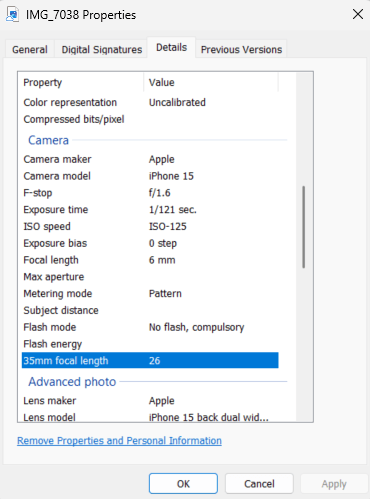
An image’s metadata can be altered or removed, though, so you’ll still need to perform other checks to verify a photo’s authenticity.
2. Look for image irregularities
Check the images carefully for any irregularities or visual artifacts. In the past, it was easy to spot AI-generated images because of obvious distortions, like extra limbs on humans.
Today, though, users must be eagle-eyed to help them spot details such as:
- Misplaced reflections or shadows
- Objects’ unusual shapes and proportions
- Image anomalies, such as repeating patterns or weird colors
- Incorrect facial expressions in humans and animals
In the example below, both dogs look realistic — no weird joints or extra body parts are visible.

When you look close enough, though, you’ll notice the dogs aren’t looking at the toy or their playmate. No two dogs play tug without looking at what they’re tugging or their playmate! A real-life example is below:

3. Perform reverse-image searches
Since AI images might not have any exact matches online, reverse-image search engines can help identify them. You can determine if a picture is unique or has been used previously by performing a reverse-image search.
This method can reveal instances in which the image has been altered. You can perform a reverse image search by simply uploading a photo or typing the link into a search engine. This method is not foolproof, but has the potential to be an invaluable asset in the identification of manipulated images.
While these techniques can be helpful, you shouldn’t use them in isolation to verify images. It’s also important to use other methods, such as seeking the opinion of specialists and comparing the findings of different sources.
4. Compare real-world objects
AI-generated images may look overly flawless or symmetrical compared to real-world objects because they lack the subtle faults and inconsistencies of natural sceneries. Examining an image’s degree of realism can provide clues as to whether or not AI generated it.
You can compare differences in lighting, shadows, and reflections to assess an image’s realism. AI images typically can’t precisely capture the subtleties of these components, which can make them appear phony.
You can verify an image’s legitimacy by scrutinizing its textures and finer features. Artificially created photos can sometimes look excessively uniform and smooth, whereas natural scenes typically have a wide range of textures and imperfections. When used in tandem with others, these strategies can significantly improve your ability to determine whether or not an image is genuine.
3 best AI detection tools
AI tools’ output has gotten better over the years. Aside from performing manual checks with the naked eye, use these AI detection tools:
| AI Detection Tool | Best for | Pricing |
| 1. GPTZero | Detecting AI-written content | Starts at $8.33 per month (Free limited version available) |
| 2. WasitAI | Detecting AI-generated images | Starts at $3.99 per month for 100 requests (Free version available) |
| 3. WinstonAI | Detecting text and image created by AI | Starts at $12 per month (14-day free trial available) |
Here’s some more info about each of those tools:
1. GPTZero
Best for: Detecting AI-written content
Pricing: Starts at $8.33 per month (Free limited version available)
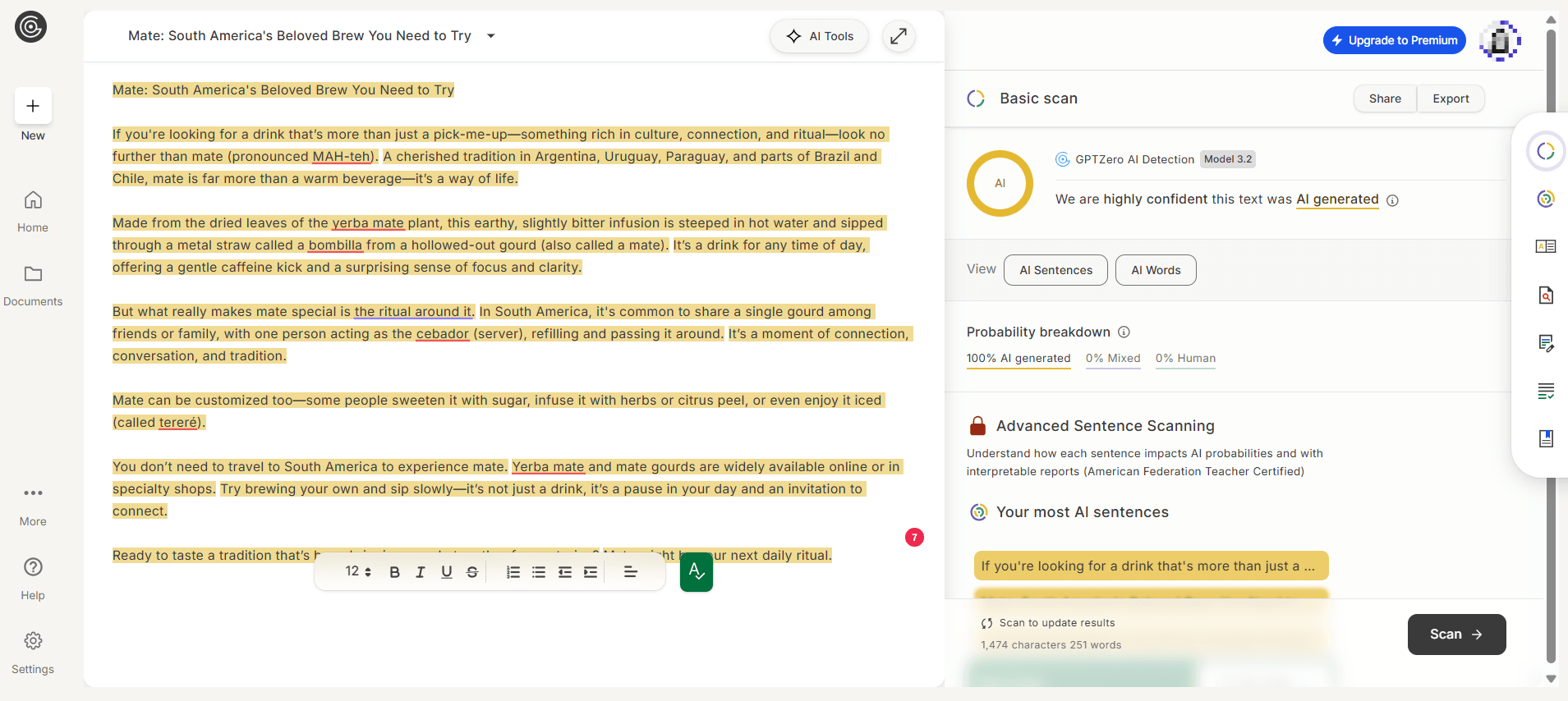
GPTZero is a tool that detects text generated by various AI models like GPT-4, Gemini, Claude, and more. Its free version can provide you with an advanced scan that highlights which sentences are likely written by AI and which ones are written by a human.
This AI tool also features plagiarism detection, which checks your text for matches with online content. It’s a handy capability that saves you from accidental plagiarism.
2. WasitAI
Best for: Detecting AI-generated images
Pricing: Starts at $3.99 per month for 100 requests (Free version available)
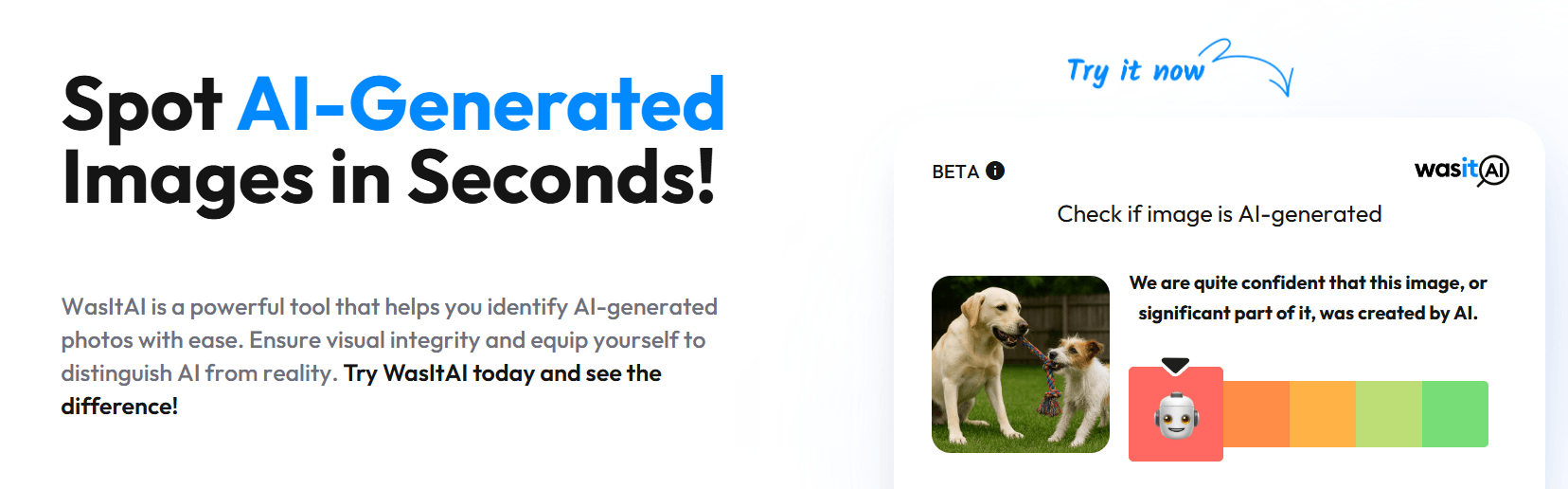
Not quite sure if an image is a deepfake or real? Use WasitAI, a tool that can help you identify AI-generated images.
You can upload the image or share a link to the image to check if an AI tool created the image. WasitAI then analyzes it and tells you whether the image (or parts of it) were generated with AI tools.
In our tests, we uploaded two AI-generated images. In both cases, WasitAI correctly identified them as AI-generated.
Its website warns that the tool may have limitations, though. Image quality and resolution may affect how it analyzes images, so it advises uploading the original image instead of screenshots.
3. Winston AI
Best for: Detecting AI text and image
Pricing: Starts at $12 per month (14-day free trial available)
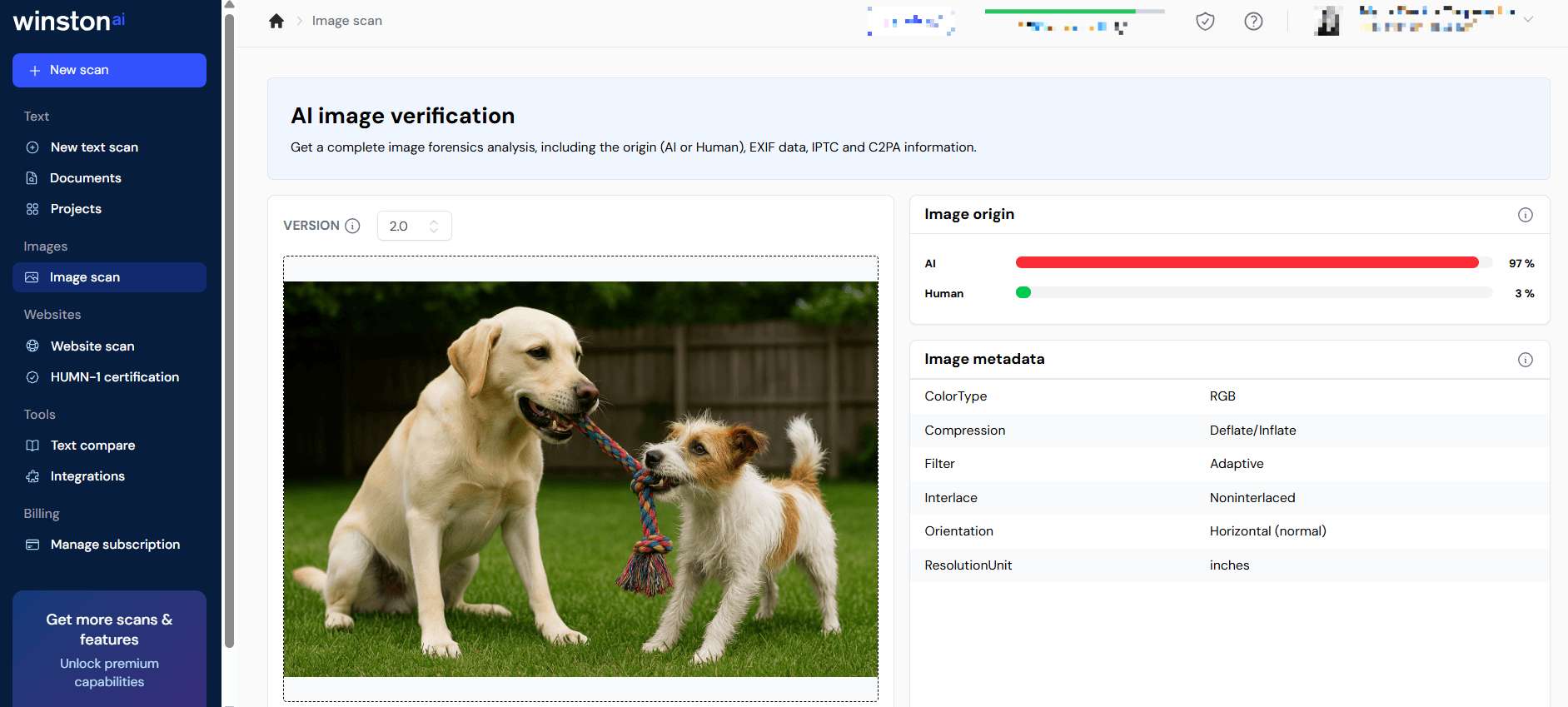
Winston AI is a tool that you can use to detect both AI text and image. Its free version requires a signup (but not a credit card), so you can test out some of its features.
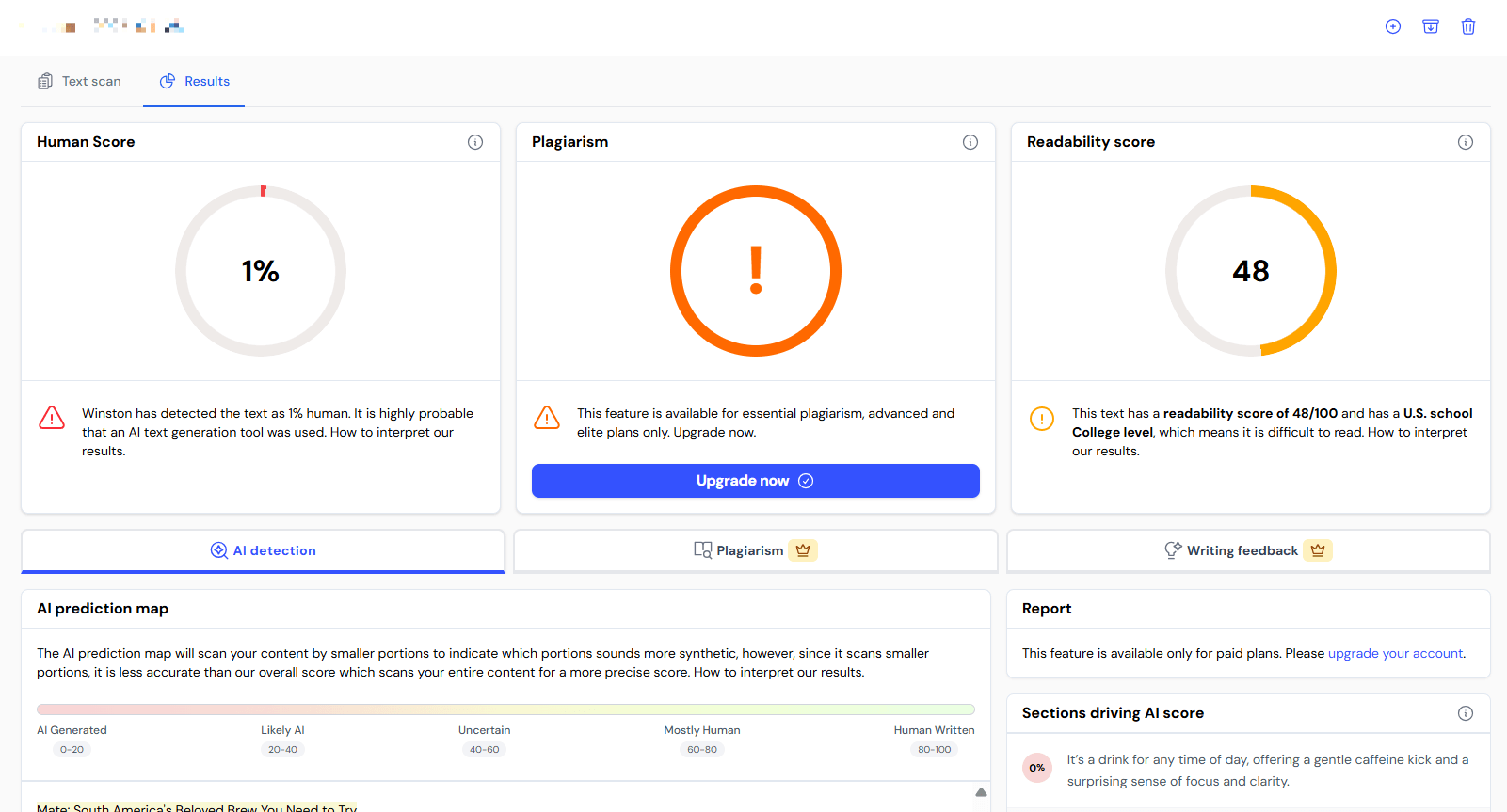
The free, limited version lets you detect images and text, and provides a readability score for text. Some of the paid features include a plagiarism checker and a writing feedback capability.
We tested this detector with an AI-generated image and text, and human-written content. In all instances, it correctly detected which ones were created by AI and which were created by a human.
Exercising caution with AI detection
All of the tools and tips listed above are helpful for distinguishing between AI-generated and human-made content. But as previously noted, they’re not infallible.
Ultimately, you can’t assume something is AI-generated just because it uses em dashes or clichés, and even the most advanced tools are prone to making mistakes. That’s not even to mention the possibility of content that features a mix of human and AI content, making it even harder to determine which is which.
For that reason, be sure not to put too much stock in any given tool or method. Even if you combine every approach outlined on this page, it’s still very possible that you’ll fail to catch some AI content, or that you’ll falsely accuse some human content of being AI-generated.
In short, there’s always room for doubt, so tread carefully. In a world where online content is growing harder and harder to trust, we’re all going to be limited in our ability to discern truth from deception, so it’s good to be aware of that limitation.
FAQs on AI detection
Let’s answer your AI detection questions in this section:
What is AI detection?
AI detection is the process of determining whether a text, image, or video is generated by AI.
Using machine learning and natural language processing, AI text detection tools examine sentence structure and writing style to identify any pattern or sudden tone shifts in a written text.
Are AI detection tools accurate?
AI detection tools are not infallible. They can either give you false positives or false negatives.
Because AI writing models are becoming more sophisticated, they’re also getting better at sounding like humans. So, what should you do instead?
The best approach is to pair AI detectors with other methods. For written text, you can:
- Manually evaluate the writing style
- Assess the overall contextual awareness of the writer on the topic
- Use plagiarism checkers
AI detection tools are handy, but critical thinking and human judgment are crucial when analyzing content.
Improve your rankings with human-created content
Using AI to generate content for your site is a tempting shortcut, but it’s also an easy way to become a forgettable brand and to lose rankings to high-quality websites.
If you need help with creating helpful and engaging content for your target audience, consider teaming up with WebFX. We employ professional content creators dedicated to providing you with top-notch, human-created content that will boost your search engine rankings and protect your business from the pitfalls of AI-generated writing.
Contact us online or call 888-601-5359 to speak with a strategist to learn more about how our content marketing services can help take your website to the next level!
-
 The WebFX team includes 750+ digital marketing specialists across SEO, PPC, web design, analytics, and beyond. Using proprietary RevenueCloudFX technology and transparent, data-driven strategies, we’ve collectively generated $10 billion in revenue and 24 million leads for our clients in the past five years.@webfx
 -

WebFX is a full-service marketing agency with 1,100+ client reviews and a 4.9-star rating on Clutch! Find out how our expert team and revenue-accelerating tech can drive results for you! Learn more
Try our free Marketing Calculator
Craft a tailored online marketing strategy! Utilize our free Internet marketing calculator for a custom plan based on your location, reach, timeframe, and budget.
Plan Your Marketing Budget
Share this article


See AI Marketing in Action
Explore how WebFX helped a regional brand get discovered in AI search experiences — proving what’s possible with today’s AI-driven marketing!

Try our free Marketing Calculator
Craft a tailored online marketing strategy! Utilize our free Internet marketing calculator for a custom plan based on your location, reach, timeframe, and budget.
Plan Your Marketing Budget