

Table of Contents
- Trend watch: Google’s Discover update is a preview purge. Here’s your framework and 7-day sprint.
- Tactic talk: Your ad targeting strategy needs a first-party data backbone. That’s what ad tech is for.
- Tool tip: Run a free SEO audit before your next Discover sprint. One URL, 60 seconds, zero excuses.
- FAQs about February 2026 digital marketing trends
- CTRL + V this into your Q2 strategy
-
What is Google's February 2026 Discover update?
The update changes how Google selects and surfaces content in the Discover feed by prioritizing locally relevant content, reducing clickbait, and rewarding in-depth, original content tied to expertise in specific topic areas. -
How does the D.I.S.C.O.V.E.R. framework help optimize content?
The framework provides eight signals to score URLs on a 0-10 scale, including depth of coverage, image quality, site speed, content originality, visual appeal, expertise signals, and relevance, helping teams prioritize fixes by impact. -
Why is first-party data crucial for ad targeting in 2026?
With Safari, Firefox, and Edge blocking third-party cookies and privacy regulations tightening, first-party data (hashed emails, CRM data, site activity) provides a more durable targeting strategy that reaches audiences across devices without cookie dependence. -
What does WebFX's SEO Checker analyze?
The free tool audits site speed, URL structure, title tags, meta descriptions, heading hierarchy, content quality, image optimization, mobile-friendliness, backlinks, and site security, providing an SEO score and prioritized recommendations in 60 seconds. -
How should marketers respond to these February 2026 trends?
Run a 7-day Discover sprint by scoring top URLs using the D.I.S.C.O.V.E.R. framework, fixing high-leverage issues like misleading titles and poor images, building first-party data infrastructure for ad targeting, and conducting regular SEO audits.
You could rank on page one, run ads to the right audience, and still lose visibility this month. That’s not a hypothetical. That’s what happens when Google overhauls Discover, browser privacy keeps tightening, and your on-page fundamentals haven’t been audited since last year.
February 2026 is resetting the rules for how content gets distributed, how ads reach real buyers, and how your site stacks up under pressure. If you’re still running the same digital marketing trends playbook from Q4, this is your wake-up call.
Here’s what this month’s CTRL + FX is breaking down:
- Trend watch: Google’s Discover update is a preview purge. Here’s your framework and 7-day sprint.
- Tactic talk: Your ad targeting strategy needs a first-party data backbone. That’s what ad tech is for.
- Tool tip: Run a free SEO audit before your next Discover sprint. One URL, 60 seconds, zero excuses.
Let’s get going.
Don’t miss our Revenue Weekly emails!
Join 200K smart marketers for the hottest marketing news and insights in your inbox.
Inline Subscription Form
"*" indicates required fields

Trend watch: Google’s Discover update is a preview purge. Here’s your framework and 7-day sprint.
The February 2026 Discover core update changes how Google selects, evaluates, and surfaces content in the Discover feed. The update improves Discover in three ways:
- Shows users more locally relevant content from websites based in their country
- Reduces sensational content and clickbait
- Surfaces more in-depth, original, timely content tied to expertise in a given area
Google rolled out this core update on February 5, 2026, to English-language users in the U.S. first, with expansion to other countries and languages in the months ahead. For teams relying on Discover for top-of-funnel visibility, this update directly affects impressions, click-through rate (CTR), and downstream lead volume.
What this core update prioritizes and penalizes
Discover can now reward topic-level expertise rather than “whole-site authority.” A site can earn Discover visibility in one subject area if it consistently publishes strong content in that lane, even if the rest of the site covers other topics. Google’s example contrasts a local news site with a dedicated gardening section against a movie review site that publishes one gardening article.
Exaggerated or misleading previews now create distribution risk. Google’s Discover documentation calls out misleading or exaggerated preview elements (titles, snippets, images) and previews that withhold key context needed to understand the content.
So, if your title promises something your content doesn’t deliver, Discover will deprioritize it. Curiosity gaps without payoff now cost visibility.
Here’s what that practically looks like:
- Before: “You Won’t Believe What This SEO Tactic Did to Our Traffic (The Results Are Shocking)”
- After: “How One SEO Tactic Increased Our Organic Traffic by 34% in 90 Days”
Same content, but the second title matches the actual payoff, uses a specific data point, and doesn’t rely on curiosity bait.
The D.I.S.C.O.V.E.R. framework: 8 signals to optimize for right now
Use this as a scorecard. Rate each of your top-performing URLs on a 0-10 scale across these eight signals, then prioritize fixes by impact.
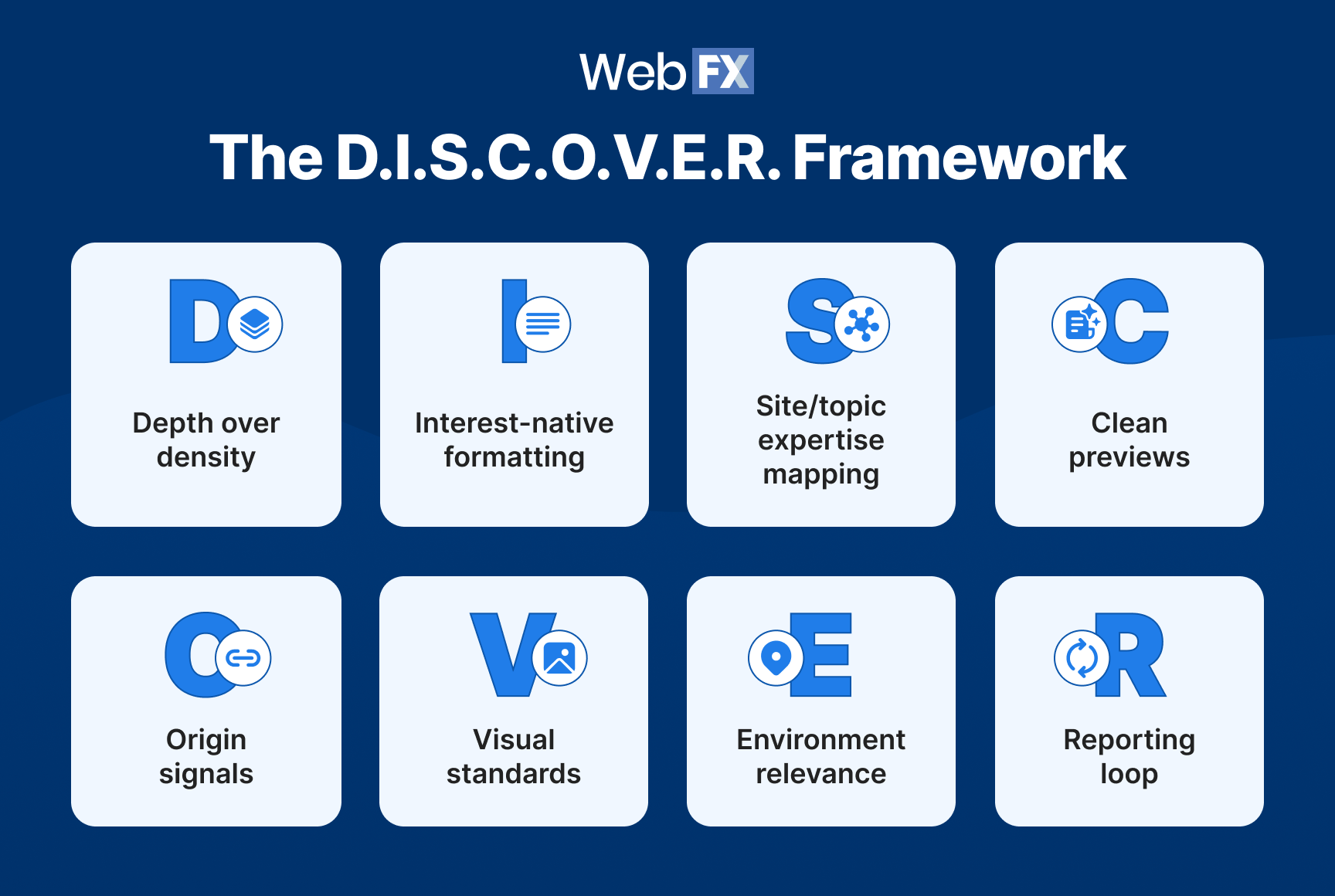
D = Depth over density
Add one original layer to every piece, like a unique insight, a firsthand data point, an expert quote, or a clear point of view. Discover favors content that offers something the reader can’t find in five other articles.
I = Interest-native formatting
Lead with the “so what” in the first two to three lines. If a reader (or Google’s systems) can’t identify the value of your content within the opening paragraph, you’ve already lost the placement.
S = Site/topic expertise mapping
Build topic clusters that prove sustained expertise in a subject area. One blog post on a trending topic won’t cut it. Discover looks for sustained patterns of depth, including multiple pieces, strong internal linking, and consistent publishing on the same subject.
C = Clean previews
Remove bait framing from titles, meta descriptions, and hero images. Every preview element should accurately represent what the content delivers. This means no exaggeration, no withholding, and no curiosity gaps that the content doesn’t close.
O = Origin signals
Add bylines with real credentials, cite primary sources, include first-party visuals where possible, and link to original data. These trust signals help Google’s systems confirm that your content comes from a credible source with genuine expertise.
V = Visual standards
Use large, high-quality images (1,200px wide minimum) and enable the max-image-preview:large robots meta tag. Google’s Discover documentation states that large images are “more likely to generate visits from Discover.”
E = Environment relevance
Add local context when it’s legitimate. If your audience is regional, reference location-specific data, examples, or trends. With Google now prioritizing content from websites based in the user’s country, local framing gives your content a relevance boost that generic content can’t match.
R = Reporting loop
Monitor Discover performance in Google Search Console (Performance tab, then Discover) and annotate changes weekly. Track impressions, clicks, and CTR for any content that appears in Discover over the last 16 months. If you’re not measuring Discover traffic separately, you’re flying blind on whether this update helped or hurt you.
Your 7-day Discover sprint
Don’t just read the framework. Run it. Here’s a five-step sprint you can start Monday:
- Pull your top 20 Discover URLs. Open Google Search Console, navigate to Performance, then click the Discover tab. Sort by impressions and identify the 20 URLs that historically earn the most Discover traffic.
- Score each URL using D.I.S.C.O.V.E.R. Walk through all eight signals for every URL. Flag anything scoring below a 5 as a priority fix.
- Fix the top five fastest wins. Focus on the changes with the highest leverage and lowest effort first:
- Rewrite titles and headers to match the actual content payoff (no bait)
- Replace or upgrade the hero image to 1,200px+ wide
- Add one original insight block (expert quote, mini data point, or clear POV)
- Add relevant local framing where it’s real and not forced
- Publish two net-new pieces built for depth and timeliness. Pick two topics where you have genuine expertise and build content that would score a 7+ on the D.I.S.C.O.V.E.R. scorecard out of the gate.
- Track for 14 days. Monitor impressions and CTR deltas in the Discover report. Log every preview change so you can tie CTR and impression shifts directly to specific edits.
Tactic talk: Your ad targeting strategy needs a first-party data backbone. That’s what ad tech is for.
Google kept third-party cookies in Chrome, but that doesn’t mean your targeting strategy is safe. Safari, Firefox, and Edge already block or restrict them by default, privacy regulations keep tightening, and consumer expectations around data transparency only move in one direction. Chrome’s reversal bought time, not a strategy.
Want to know what a more durable play is? First-party data powered by the right ad tech.
What is ad tech and how does it work?

What is ad tech?
Ad tech (short for advertising technology) is an umbrella term for the tools and software advertisers use to manage, target, and analyze their digital advertising campaigns. It covers everything from automated bidding and ad placement to audience targeting and performance measurement, helping teams launch campaigns that reach the right people across websites, apps, streaming platforms, and more.
Managing a digital ad campaign involves a lot of moving parts, like bidding, buying ad space, writing copy, targeting audiences, and measuring what’s actually working. Ad tech streamlines those processes so your team spends less time on repetitive tasks and more time on strategy.
Here’s what it handles in practice:
- Bidding: Set your budget and let the platform optimize bids based on the likelihood of clicks and conversions.
- Purchasing ad space: Automate placements across websites, apps, streaming platforms, and connected TV.
- Audience targeting and retargeting: Use first-party data like CRM records, site behavior, and form submissions to reach the people most likely to buy.
- Measuring results: Track impressions, clicks, and conversions in one place so you can optimize campaigns based on what’s actually driving revenue.
🎥 Video: Ad tech — a no-nonsense explanation for beginners
Why ad tech matters in 2026
If your ad targeting still depends on third-party signals that degrade every time a browser updates its privacy policy, you’re building campaigns on increasingly shaky ground. Better targeting always starts with better data.
Here’s what first-party ad tech unlocks that legacy cookie-dependent platforms can’t:
- Reach your ideal customers with your own data. First-party ad tech uses identifiers you already own (hashed emails, CRM data, site activity) to find your audience across every device, no third-party cookies needed.
- Keep your brand visible throughout the buying process. Long sales cycles need multiple touchpoints. Ad tech keeps you in front of prospects across phones, desktops, smart TVs, and streaming platforms while they’re still deciding.
- Drive a stronger ROI. When your targeting runs on first-party data, you spend less on reaching unqualified traffic and more on converting people who actually match your ideal customer profile (ICP).
Want to put your first-party data to work across display, video, and connected TV? AdTechFX, our programmatic advertising platform housed within RevenueCloudFX, was built for exactly this. Learn more about our ad tech services.
Tool tip: Run a free SEO audit before your next Discover sprint. One URL, 60 seconds, zero excuses.
You just read that Google’s Discover update rewards clean previews, topical depth, strong page experience, and high-quality visuals. But it’s hard to fix what you can’t measure. WebFX’s free SEO Checker gives you the baseline score, the priority list, and the fastest wins in a single audit.
🎥 Video: The FREE SEO AUDIT TOOL you didn’t know you needed | WebFX SEO Checker
What is the WebFX SEO Checker?
The WebFX SEO Checker is a free tool that runs a complete SEO audit on any URL and generates a personalized report with an overall SEO score (0-100), a breakdown of what passed, what needs improving, and what’s broken, plus prioritized recommendations based on SEO impact and solving complexity.
Enter your URL, get results in 60 seconds or less. No login, no setup, no credit card required. A copy of your report gets sent straight to your email so you can save, share, and revisit it anytime.
What does the SEO Checker analyze?
The checker audits your page across the on-page, off-page, and technical signals that directly affect how your site ranks and performs:
- Site speed: Tests page load time and identifies assets (HTML, CSS, JavaScript, images) that can be compressed or minified to improve performance.
- URL structure: Checks for keyword inclusion, proper use of hyphens over underscores, and top-level domain setup.
- Title tag: Evaluates length (60 characters or less), keyword placement, and whether your title accurately represents the content.
- Meta description: Flags descriptions exceeding 160 characters and checks for exact-match primary keyword inclusion.
- Heading tags: Scans for proper H1 through H5 hierarchy and keyword usage across your headings.
- Content quality: Grades keyword frequency, placement within the first 100 words, and overall content depth.
- Image optimization: Identifies missing alt tags, poorly named files, and uncompressed images.
- Mobile-friendliness: Checks for viewport meta tags, tap targets, mobile sitemaps, and compression.
- Page links: Generates a backlink score based on total links earned and unique referring domains.
- Site security: Verifies SSL setup, HTTPS redirects, and certificate status.
What’s inside your SEO report
Your report covers both on-page and off-page SEO (with technical SEO findings included in the on-page section), and each element gets scored across three dimensions:
- Score: Whether an element passed, needs improving, or generated an error.
- Impact: How much that element affects your SEO performance. Use this to prioritize which fixes to tackle first.
- Solving complexity: How hard the fix is to implement. Pair this with impact to find your fastest wins.
The report also includes actionable tips for every element and links to related articles so you can go deeper on any issue it flags. Keep in mind that the checker generates recommendations, not requirements. Depending on your business and SEO strategy, some suggestions may not apply.
Curious how your site stacks up? Run your free SEO audit and get your free SEO report now: WebFX SEO Checker
Looking for an all-in-one SEO audit tool? You’ve found it
SEO checker provides data on key metrics to give you:
- Complete SEO score
- Site Speed Analysis
- Content Grade
- and more.

FAQs about February 2026 digital marketing trends
What are the biggest digital marketing trends in February 2026?
The biggest digital marketing trends in February 2026 are Google’s Discover core update, the rise of first-party ad tech, and the growing importance of on-page SEO fundamentals.
Google’s February 5 Discover update now evaluates topic-level expertise, penalizes clickbait previews, and prioritizes locally relevant content. On the ad tech side, first-party data platforms are becoming the more durable targeting option as third-party cookie reliability continues to erode across browsers. And on-page SEO signals like title tag accuracy, content depth, image optimization, and site speed remain the foundation for visibility across both traditional search and Discover.
What is Google's February 2026 Discover core update?
Google’s February 2026 Discover core update is a broad update to the systems that surface content in Google Discover. Released on February 5, 2026, the update improves the Discover experience in three ways: Showing users more locally relevant content from websites based in their country, reducing sensational content and clickbait, and surfacing more in-depth, original, and timely content tied to topic-level expertise. The update rolled out to English-language users in the U.S. first, with expansion to all countries and languages planned for the months ahead.
How does Google evaluate expertise for Discover after the February 2026 update?
Google now evaluates expertise on a topic-by-topic basis, not at the site level. A site can earn Discover visibility in a specific subject area if it demonstrates consistent depth in that topic through multiple pieces, strong internal linking, and sustained publishing. Google’s example: A local news site with a dedicated gardening section could earn Discover placement for gardening content, while a movie review site that published one gardening article likely would not.
What is ad tech?
Ad tech (short for advertising technology) is an umbrella term for the tools and software advertisers use to manage, target, and analyze digital advertising campaigns. It covers everything from automated bidding and ad placement to audience targeting and performance measurement, helping teams launch campaigns that reach the right people across websites, apps, streaming platforms, and connected TV.
Why does ad tech matter in 2026?
Ad tech matters in 2026 because first-party data is now the most reliable foundation for ad targeting. Safari, Firefox, and Edge already block or restrict third-party cookies by default, privacy regulations like GDPR and CCPA keep tightening, and ad blockers continue chipping away at tracking reliability. First-party ad tech platforms, like AdTechFX, that use data businesses already own (CRM records, form submissions, site behavior, hashed emails) offer more accurate, privacy-compliant, and durable targeting than cookie-dependent alternatives.
What is the WebFX SEO Checker?
The WebFX SEO Checker is a free tool that runs a complete SEO audit on any URL and generates a personalized report in 60 seconds or less. The report includes an overall SEO score (0-100), a breakdown of what passed, what needs improving, and what generated errors, plus prioritized recommendations based on SEO impact and solving complexity. It analyzes site speed, URL structure, title tags, meta descriptions, heading tags, content quality, image optimization, mobile-friendliness, page links, and site security.
How do I use the SEO Checker?
The SEO Checker works in a few simple steps: Enter your website URL (or a specific page URL) at webfx.com/seo-checker, then the tool generates your report in 60 seconds or less, and a copy gets sent to your email so you can save, share, and revisit it anytime. Each element in the report includes a score, an impact rating, a solving complexity rating, actionable tips, and links to related articles for deeper learning.

CTRL + V this into your Q2 strategy
That’s February 2026 wrapped. Google’s Discover update just raised the bar for content quality, preview integrity, and topic-level expertise. First-party ad tech became the smartest hedge against a fractured targeting landscape. And a 60-second SEO audit gave you the baseline to act on both.
If you’re heading into Q2 with the same playbook you ran in Q1, the gap between you and the teams already adapting gets wider every month. You have to act smart and fast. Explore our award-winning SEO services and AdTechFX to get ahead, or try our SEO Checker to get a free, almost-instant SEO report.
You blink, you miss. Follow WebFX on Instagram, LinkedIn, and YouTube to stay in the know. Same shortcut next month. Stay visible.
-
 Albert Dandy Velasquez blends SEO strategy with compelling storytelling to help businesses boost their visibility and revenue online. With a B.A. in English and certifications from HubSpot, Semrush, and Google Analytics, he has written and optimized hundreds of articles on organic SEO, content strategy, and user experience. He regularly contributes to the WebFX blog and SEO.com, creating content that helps readers turn marketing goals into measurable results. When he’s off the clock, he's usually exploring new neighborhoods on two wheels, filming travel content, or chasing golden hour with a coffee in hand.
 -

WebFX is a full-service marketing agency with 1,100+ client reviews and a 4.9-star rating on Clutch! Find out how our expert team and revenue-accelerating tech can drive results for you! Learn more
Join our mission
to provide industry-leading digital marketing services to businesses around the globe - all while growing as an individual and leaving the world a better place.
I Want to Apply!
Table of Contents
- Trend watch: Google’s Discover update is a preview purge. Here’s your framework and 7-day sprint.
- Tactic talk: Your ad targeting strategy needs a first-party data backbone. That’s what ad tech is for.
- Tool tip: Run a free SEO audit before your next Discover sprint. One URL, 60 seconds, zero excuses.
- FAQs about February 2026 digital marketing trends
- CTRL + V this into your Q2 strategy
Share this article



Join our mission
to provide industry-leading digital marketing services to businesses around the globe – all while growing as an individual and leaving the world a better place.
I Want to Apply!
What to read next