What they are: Short, positive-only commentary that Google’s AI writes from reviews of your business and places inside your Search ads.
Where they show: English-language Search campaigns in the U.S., UK, Australia, and India, eligible for all ad positions on Google.com.
What you can control: You can’t edit the text, and Google hasn’t documented a way to turn them off.
What you should do now: Run the Ad Copy Control Audit to find platform-written copy in your ads, fix the inputs behind it, and check it every month.
Google Ads AI-generated review summaries are short, positive-only snippets that Google’s AI writes from your online reviews and places inside your Search ads. According to Google’s help documentation, you can’t edit or customize the text, and Google hasn’t documented a way to turn it off. The feature runs in English-language Search campaigns in the U.S., UK, Australia, and India, and Google shows a summary only when it predicts the summary will lift ad performance.
Part of your paid ad copy now comes from Google, which hands a slice of your brand message to whoever leaves your reviews. Here’s how review summaries work, what you can and can’t control, and a three-step Ad Copy Control Audit to keep that messaging accurate:
What are Google Ads AI-generated review summaries?
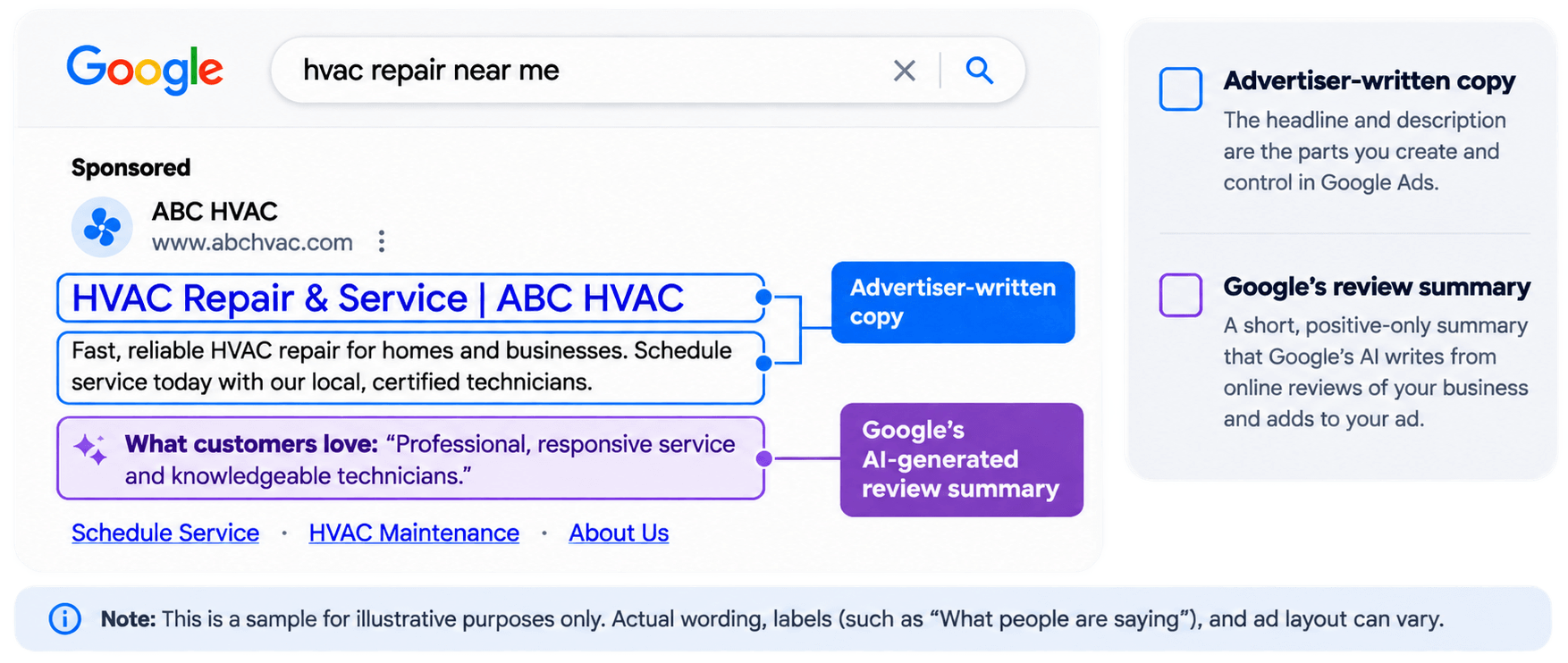
Google Ads AI-generated review summaries are AI-written commentary that Google adds to Search ads, built from online reviews of your business. Google says the summaries represent customer experiences and key insights, and every summary is positive only.
They work differently from seller ratings in Google Ads. Seller ratings show a star score and review count next to your ad. Review summaries turn that review signal into sentences that sit inside the ad itself.
AI review summaries can appear when your campaign meets these conditions:
Campaign type: Search campaigns
Placement: All ad positions on Google.com
Markets: The U.S., UK, Australia, and India, in English
Devices: All supported devices
Verticals: All except sensitive categories, such as pharmaceuticals
Review-related formats have shown up in Search ads since December 2025, when PPC News Feed first spotted AI review snippets. Later tests used labels like “What people are saying” and “What customers love,” according to PPC Land.
Illustrative Google Search ad for ABC HVAC showing an advertiser-written headline and description alongside a Google AI-generated review summary labeled “What customers love.”
Can you edit or turn off Google Ads review summaries?
As of November 5, 2026, Google confirms you can’t edit or customize AI-generated review summaries, and its documentation doesn’t say whether you can turn them off. Google’s reasoning is that the summaries represent user feedback, so the text stays out of advertisers’ hands.
Google’s account-level automated assets guide explains how to switch off Google Ads automated assets like seller ratings and dynamic sitelinks. That guide doesn’t list review summaries, so don’t assume those settings cover them.
This gap hits hardest for brands with legal or compliance review on ad copy. A summary can appear on any eligible ad without passing through your approval process, so flag it to whoever signs off on your ads now.
What do AI-generated review summaries change for advertisers?
AI review summaries move part of your Search ad copy out of your hands. Google shows a summary only when it predicts it will improve ad performance, so Google’s model decides when your ad changes.
The help page doesn’t name the performance metric behind that prediction. It also cites no click-through rate, conversion, or lead-quality data to back the benefits Google lists.
That positive-only framing can cut both ways. If a business has mixed reviews but its summary highlights only praise, the ad may set expectations the business can’t meet. Advertisers still pay for those clicks, so monitor lead quality, address recurring customer complaints, and keep your targeting aligned with the customers you can serve.
Review summaries are one of several places where ad platforms now write copy for you:
AI explainers in Google’s AI Mode: Gemini writes short text explaining how an ad relates to a search, and advertisers can’t write, edit, approve, or opt out of it, according to Google’s AI Mode ads documentation.
ChatGPT Ads creative enhancements: OpenAI turned these on by default for new and existing campaigns in late October 2026. They can rewrite ad titles, descriptions, and destination links without approval of each version.
AI review summaries come from online reviews of your business, which Google’s AI collects and condenses. Google doesn’t list which review platforms it pulls from, so treat every public review profile as possible ad copy.
That puts your review footprint inside your paid search strategy. 93% of buyers read online reviews first, and now some of that feedback reaches them inside your ad before they click. Review management and PPC often sit with different owners, and review summaries give both teams a shared stake.
Measuring the metrics that affect your bottom line.
Are you interested in custom reporting that is specific to your unique business needs? Powered by RevenueCloudFX, WebFX creates custom reports based on the metrics that matter most to your company.
How to audit what Google writes into your ads with the Ad Copy Control Audit
The Ad Copy Control Audit is a three-step process for finding platform-written copy in your ads, strengthening the inputs behind it, and checking it on a set schedule. Run it once now, then every month.
The Ad Copy Control Audit
A three-step process for auditing platform-written copy in your ads.
Start with an inventory of every feature that can change your ad copy or add AI-written messaging around your ads. Here’s what that looks like across the platforms covered above:
Platform
AI-generated feature
Can you edit it?
Can you turn it off?
Google Search
AI-generated review summaries
No
Not documented
Google AI Mode
AI explainers
No
No
Google Ads
AI Max text customization
You can remove individual assets
Yes
ChatGPT Ads
Creative enhancements
No approval of each version
Yes, at the account or campaign level
Add rows for Google Ads automated assets you have turned on, like seller ratings and dynamic sitelinks, and for every other channel where you run automated creative. Your inventory is the list of copy you’re paying for but didn’t approve.
Document each suspected review summary as you find it, with these details:
The query and date
Which of your ads showed it
The summary text, copied exactly
A screenshot
The follow-up action, such as checking your reviews for the claim the summary makes
The timing on this step is tight. Within days of Google’s review-summary documentation surfacing in late October, OpenAI enabled creative enhancements by default in ChatGPT Ads. If you haven’t checked your settings since, unapproved copy may already be running.
Step 2. Fix the inputs AI uses
You can’t edit review summaries, but you can improve the material AI tools read. Focus on these inputs:
Recent reviews: Invite customers to share honest reviews on the platforms your buyers use, and respond to the feedback you already have.
Landing pages: Update outdated offers, service descriptions, and pricing so generated copy pulls from accurate pages. Google says current site content also helps its AI explainers stay accurate.
Pinned assets: Pin the headlines and descriptions that must appear. Pinning protects the copy you wrote, but it won’t stop Google from adding a review summary.
Text guidelines: In AI Max and Performance Max, add up to 25 term exclusions and 40 messaging restrictions per campaign to block wording you never want in generated copy.
Reviews are the only input Google documents for review summaries. Landing pages, pinned assets, and text guidelines shape AI explainers, AI Max text, and the rest of your ad copy.
Expert insights from
Kayla J.PPC Specialist at WebFX
“Given that Google indicates these summaries draw directly from authentic customer reviews, your primary optimization levers will likely be your review touchpoints: On-site reviews and third-party platforms. If you haven’t already optimized your third-party listings and started a regular process for gathering customer feedback, now’s the time to start.”
Step 3. Check your AI-generated messaging regularly
Set a monthly review for every platform on your inventory. Do these each month:
Search your top 10 high-intent keywords from a location in an eligible market, and screenshot what appears in your ads.
Review Google Ads automated assets and generated text, plus creative enhancement settings in ChatGPT Ads.
Flag anything inaccurate, outdated, or off-brand, then fix the input behind it.
Log what you found and when.
Track click-through rate, conversion rate, and cost per lead alongside your log. For reference, WebFX’s 2026 Google Ads benchmarks, based on our aggregated U.S. campaign data, put Search CTR at 3% to 5% and overall conversion rate at 3% to 5%, rising to 7% to 12% for lead generation.
Use these figures alongside your own baseline. Don’t credit performance changes to review summaries based on timing alone. Bid changes, competitor moves, and shifts in search demand can cause the same swings.
Google says review summaries improve click quality. Watch your qualified-lead rate and cost per qualified lead alongside CTR as signs of overall lead quality, though they can’t isolate what a summary did on its own. If your conversion data counts every form fill the same, Google Ads conversion adjustments can correct it so Smart Bidding learns from the leads you want.
Seller ratings show a star rating and review count alongside your ad. Google Ads review summaries are AI-written sentences inside the ad that describe what customers praise. You can switch off seller ratings in Google Ads at the account level, under automated assets, but Google hasn’t documented the same control for review summaries.
They don’t. Google shows a review summary only when it predicts it will improve ad performance, and only for eligible Search campaigns in the U.S., UK, Australia, and India.
Google says it pulls reviews from across the web. Its documentation doesn’t name the platforms it uses or explain how it selects which reviews to summarize.
ChatGPT Ads creative enhancements can rewrite your ad titles, descriptions, and destination links to fit the conversation. Unlike review summaries, you can opt out at the account or campaign level in ChatGPT Ads Manager.
Google excludes sensitive advertiser categories, such as pharmaceuticals, from AI-generated review summaries. However, not all healthcare businesses are necessarily excluded. See Google’s review-summary eligibility requirements for the current conditions.
Our digital marketing campaigns impact the metrics that improve your bottom line.
WebFX has driven the following results for clients:
$10 billion
in client revenue
24 million
leads for our clients
7.14 million
client phone calls
Check what Google adds to your ads this week
Your first move is simple: Run your top 10 high-intent queries from a location in an eligible market and take a screenshot of exactly what Google adds to your ads. That screenshot set becomes Step 1 of your Ad Copy Control Audit and shows you which platform-written copy your budget is funding.
Tracking every platform-written line across Google Ads takes ongoing work, and it gets harder as automated features stack up. WebFX’s Google Ads management team can audit your campaign assets, automated creative settings, and messaging accuracy, then keep your inputs current as platforms ship new features. RevenueCloudFX connects your campaign and CRM data, so you can see which clicks, forms, and calls lead to qualified opportunities and revenue.
With 30+ years of experience and 150+ Google Ads-certified team members, WebFX keeps your paid search focused on the leads and revenue your leadership tracks. Get your free proposal or call 888-601-5359 to speak with a strategist today about our proven Google Ads management services.
Cost Per Click (CPC) Calculator
Do you advertise on platforms that charge per click? Use our calculator and figure out exactly how many clicks will fit within your budget.










 Albert Dandy Velasquez blends SEO strategy with compelling storytelling to help businesses boost their visibility and revenue online. With a B.A. in English and certifications from HubSpot, Semrush, and Google Analytics, he has written and optimized hundreds of articles on organic SEO, content strategy, and user experience. He regularly contributes to the WebFX blog and SEO.com, creating content that helps readers turn marketing goals into measurable results. When he’s off the clock, he’s usually exploring new neighborhoods on two wheels, filming travel content, or chasing golden hour with a coffee in hand. View full profile