What they are: Google Ads conversion adjustments let you correct a conversion after Google has already recorded it.
What a retraction does: A retraction removes an invalid conversion from the count and sets its value to zero.
What a restatement does: A restatement keeps the conversion count intact while updating its value as better information becomes available.
Why they’re useful: Retractions and restatements give Smart Bidding more accurate data about which conversions reflect real lead quality and value.
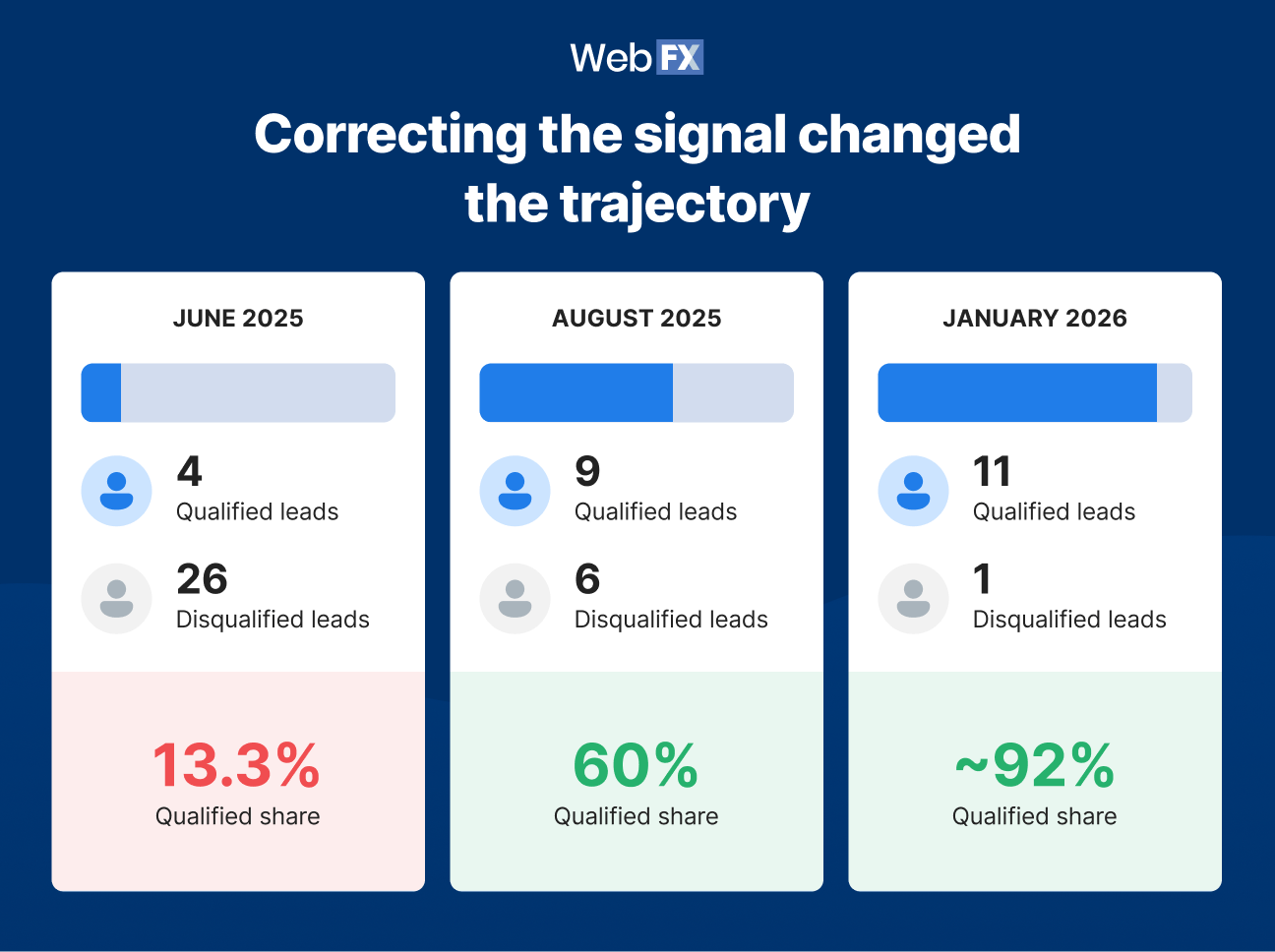
What this can look like: After one account implemented a broader feedback system using conversion adjustments, lead-quality signals, and value-based bidding, qualified lead share increased from 13.3% to about 92%.
Google Ads conversion adjustments let you correct a conversion after Google has already recorded it, retracting one that should no longer count or restating its value when better information changes what that conversion is worth. They’re especially useful when that first recorded conversion does not reflect the outcome you want Smart Bidding to learn from.
A form fill can look valuable the moment it lands and turn out to be spam two days later. Another lead can come in with a generic value and become your biggest deal of the quarter. If Google never receives either update, its bidding system keeps working from the original signal.
Retractions and restatements close that gap by giving Google better information about which conversions were valid and what they were actually worth. For lead-generation advertisers, that gives Smart Bidding a cleaner picture of lead quality as the sales process unfolds.
Tell us about your business, and we’ll create a custom plan to grow your traffic, leads, and predictable revenue.
How do Google Ads conversion adjustments work?
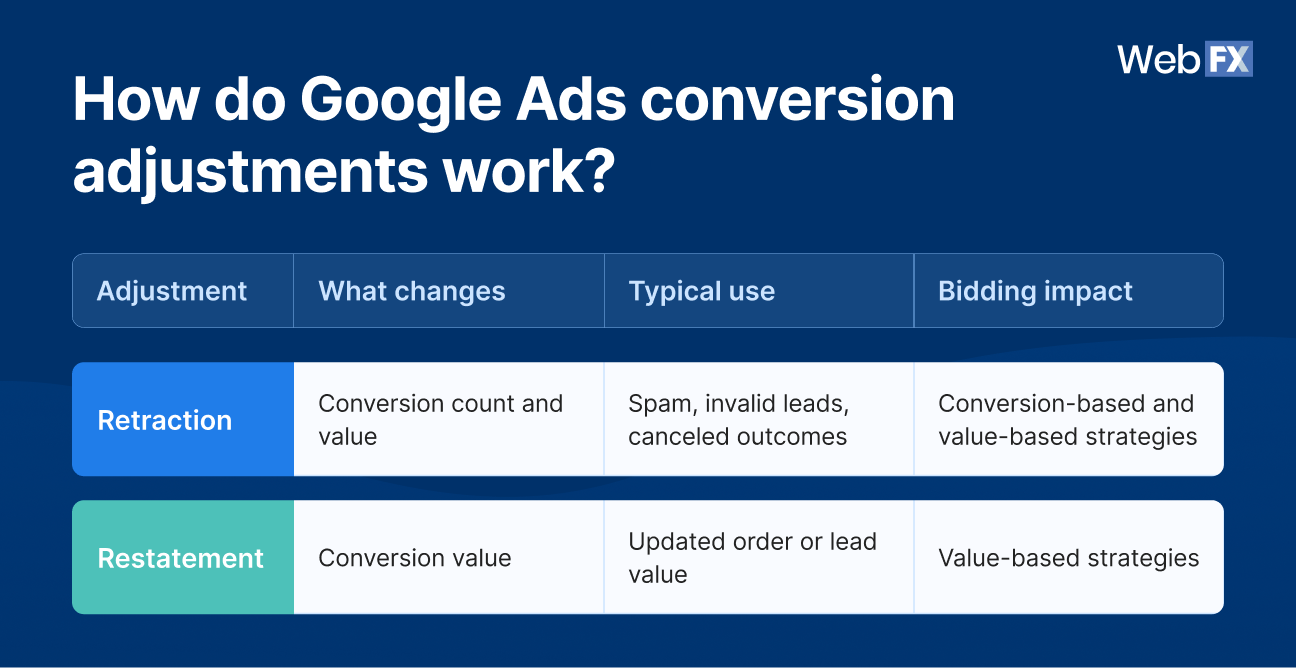
Google Ads conversion adjustments modify a conversion after Google has already recorded it, and you can either retract the conversion entirely or restate its value, depending on what you learned after it came in.
Google defines the two types this way: A restatement changes conversion value without changing the conversion count, while a retraction permanently removes the conversion and sets its value to zero. Google also specifies the bidding impact, noting that restatements affect ROAS bid strategies, while retractions affect both CPA and ROAS strategies. In practice, retractions can affect conversion-based strategies like Maximize Conversions and Target CPA as well as value-based strategies like Maximize Conversion Value and Target ROAS, while restatements affect the value-based side.
A few conditions apply to both. The conversion has to exist in your account before you can adjust it, and Google needs a way to match your adjustment back to that original conversion. For ecommerce conversions, that commonly means an order or transaction ID. For lead-generation workflows, Google can also match certain imported conversions using the Google Click ID (GCLID) and conversion time, while enhanced conversions can supplement attribution with hashed first-party data such as email or phone.
You send adjustments either by uploading a file or through the Google Ads API. Once processed, they update your reporting and the data automated bidding uses.
When should you use a Google Ads conversion retraction?
Use a Google Ads conversion retraction when a conversion Google already counted later proves invalid and should no longer contribute to your conversion count or value. Google confirms a retraction permanently removes the conversion, sets its value to zero, and affects both CPA and ROAS bidding strategies.
Inquiries for products or services you do not offer
Any outcome your business has consistently defined as invalid
One caution before you automate this. Google confirms that once a conversion is retracted, or restated to zero, it can’t be adjusted again, and any later attempt is ignored without an error message. Treat retraction as a final call.
Keep known bad leads out before they need a retraction
The cleanest retraction is the one you never have to make. If you already know a lead is invalid the moment it arrives, such as an obvious bot, do not report it as a conversion in the first place.
Retractions are for the cases you catch later. Those usually surface through CRM updates, manual review, lead-quality scoring, call analysis, or direct sales feedback days after the lead first came in.
Do not retract every lead that fails to close
A qualified prospect who considered your business and did not buy is not the same as spam, a bot, or an irrelevant inquiry. Retracting legitimate leads that simply failed to close removes real demand from the conversion data Google uses for optimization.
Before you automate retractions, sales and marketing need a shared definition of what actually counts as invalid. Without that agreement, poor qualification rules quietly turn a cleaner feedback loop into a new source of bad data.
When should you use a Google Ads conversion restatement?
Use a Google Ads conversion restatement when the conversion is still legitimate but later information shows its value should go up or down. The count stays the same, and only the value changes.
The familiar ecommerce version is simple. An order comes in at $300 for three items, the customer returns one, and you restate the order value to $200 so your reporting and ROAS bidding reflect what the sale was really worth.
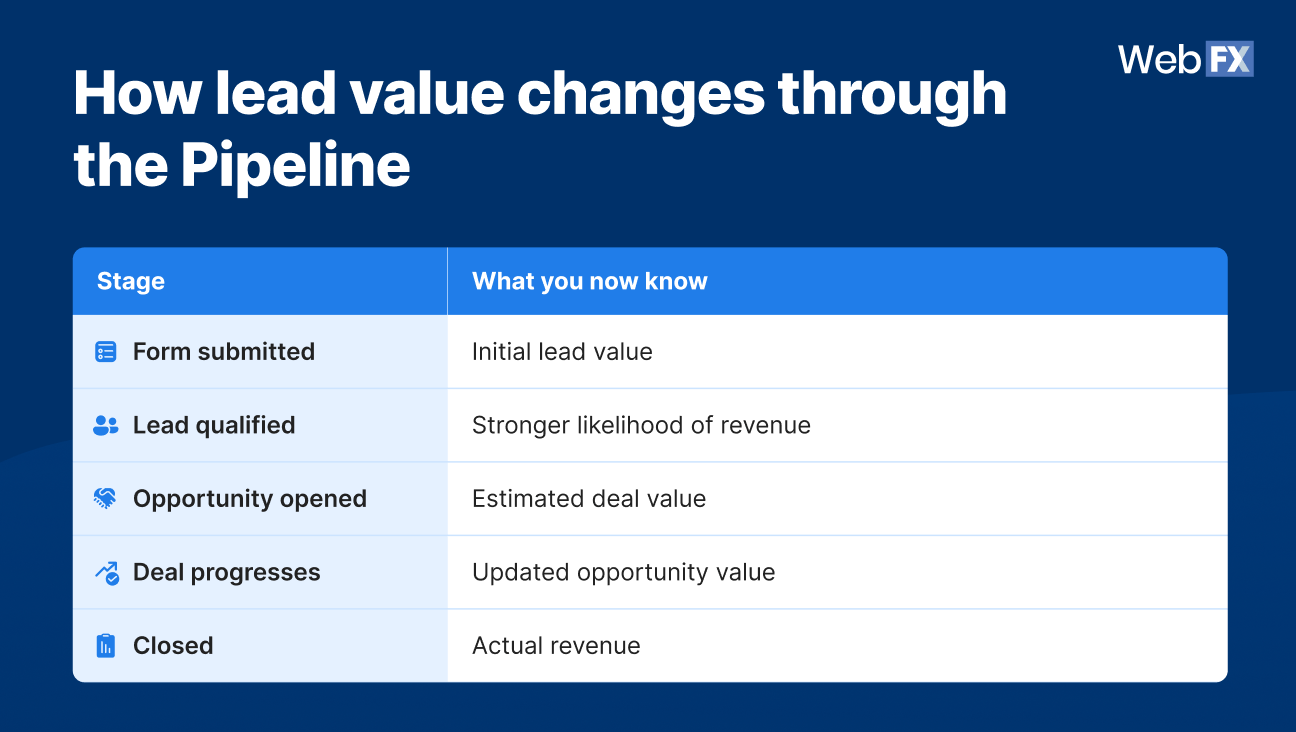
Lead generation is where restatements become especially useful. Many Google Ads accounts assign a flat value at conversion time, such as $200 for a quote request or $150 for a phone call, no matter what happens to that lead afterward. That guess is the first thing worth fixing, because a lead’s real value only becomes clear as it moves through your pipeline:
A restatement lets the original conversion reflect that newer information. A form fill that entered at $200 can move up as it qualifies, get revised again as project scope changes, and settle at its true value once the deal closes. Google supports adjusting the same conversion more than once, processing the adjustment with the earlier adjustment time first, so the value can keep pace with the pipeline. Those dollar figures are illustrative rather than a fixed valuation model, but the principle holds: The value Google learns from should match what the lead was actually worth.
How do conversion adjustments affect Smart Bidding and Google Ads lead quality?
Conversion adjustments improve the signals Smart Bidding receives by removing invalid outcomes and correcting the value of legitimate ones. That gives Google a more accurate record of which conversions match your definition of Google Ads lead quality, and better data to optimize against.
The feedback loop works like this:
A user converts.
Google receives that conversion as a positive signal.
Smart Bidding folds it into how it optimizes.
Your business later learns what actually happened to that lead.
A retraction removes an invalid signal.
A restatement updates the value of a legitimate one.
Google optimizes against data that better reflects real outcomes.
The distinction between the two adjustments matters for which bidding strategy they affect:
Retractions change both your conversion count and value, so they can influence conversion-based strategies like Maximize Conversions and Target CPA as well as value-based strategies like Maximize Conversion Value and Target ROAS.
Restatements change value only, which means their impact lands on value-based strategies like Maximize Conversion Value and Target ROAS rather than Target CPA.
That correction is easy to get wrong. Target CPA bids toward a cost per conversion and does not read conversion value, so restating values will not move it. If you want restatements to do real work, pair them with a value-based bidding strategy.
For a full breakdown of the bidding side, WebFX PPC consultant Colton Wilkinson walks through how this approach cut one account’s cost per qualified lead by 47%:
Every conversion teaches Google something. Conversion adjustments let you correct the lesson when the original signal turns out to be wrong.
Conversion adjustments vs. offline conversion tracking
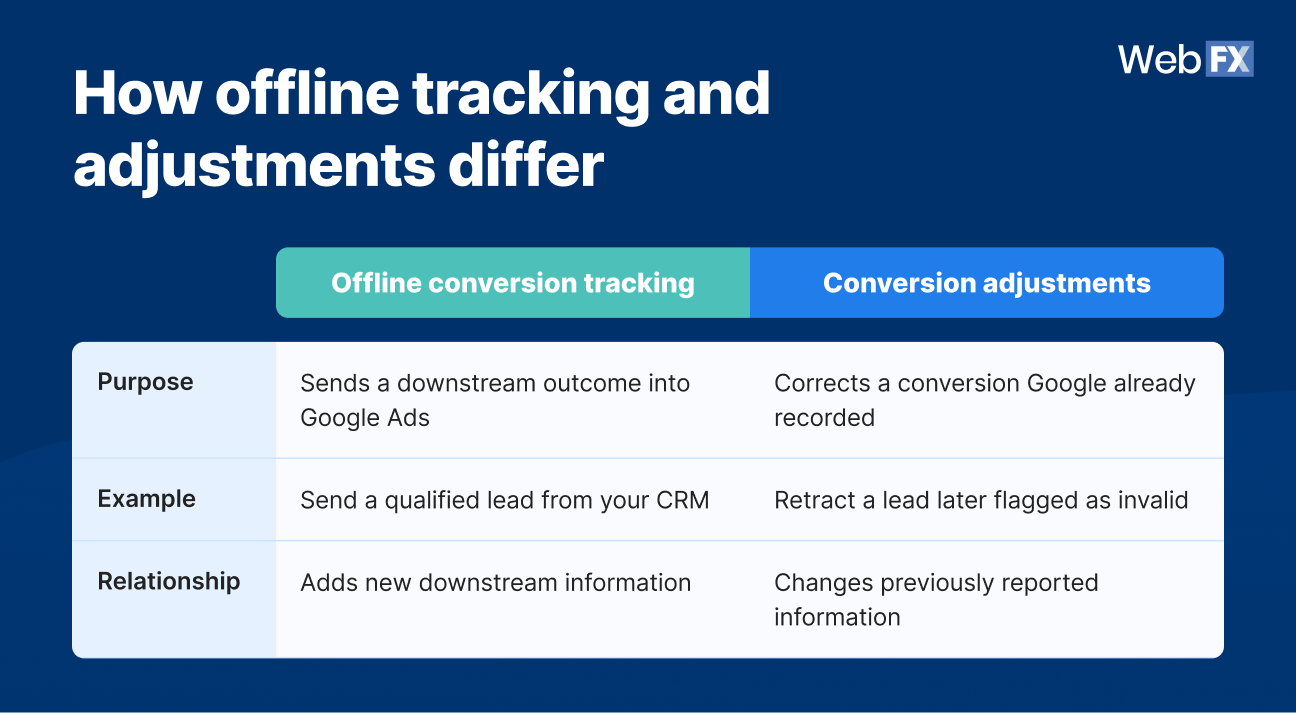
Conversion adjustments and offline conversion tracking can work together, but they do different jobs.
Offline conversion tracking gets the outcome into Google, and conversion adjustments keep that record accurate as the lead changes. Used together, they give bidding a fuller and more current picture of which leads became revenue.
How to make Google Ads conversion adjustments
You can make Google Ads conversion adjustments in four steps, whether you are correcting one conversion or thousands. The mechanics are the same either way.
1. Match the original conversion
Google needs to identify the exact conversion you are changing. Ecommerce conversions commonly use an order or transaction ID, which Google recommends for reliable matching. For lead-generation workflows, certain imported conversions can be matched using the original Google Click ID (GCLID) and conversion time. Enhanced conversions also use hashed first-party data such as email and phone number to improve attribution back to the original ad impression or click.
2. Choose a retraction or restatement
The decision rule is short. An invalid conversion gets a retraction, and a legitimate conversion whose value changed gets a restatement.
3. Send the adjustment to Google Ads
You have two paths. A spreadsheet upload works for occasional, manual corrections, while the Google Ads API handles adjustments programmatically when you need to send them continuously and at volume. In the API, Google defines RETRACTION as negating a conversion and RESTATEMENT as changing its value.
This is where scale starts to matter. Uploading one adjustment is straightforward, but repeating it across thousands of leads, calls, qualification changes, and closed deals becomes a much larger data-management problem.
4. Confirm Google processed the adjustment
Use Google’s conversion-adjustment reporting to confirm the correction was processed. The Conversion adjustment segment shows the original count and value against the change applied afterward, while the Days to conversion or adjustment segment shows how long adjustments take to occur.
How RevenueCloudFX automates conversion adjustments at scale
A one-off conversion adjustment is easy to handle by hand. It gets hard the moment you need to evaluate hundreds or thousands of forms, calls, CRM updates, and sales outcomes every month and send corrections back to Google continuously, across every campaign and account.
At that scale, each conversion raises a running list of questions: Was the lead legitimate? Did the call show real intent? Did sales qualify it, did it become an opportunity, did its expected value change, and did it close? Answering those by hand across an entire account, month after month, is where a manual process quietly falls apart.
The Revenue Signal Feed feature in RevenueCloudFX operationalizes that feedback loop so the corrections happen automatically instead of living in a spreadsheet someone has to maintain.
Filter bad leads before they become conversions
The Revenue Signal Feed we’ve built scores incoming leads against several signals at once, including AI-based quality scoring, CRM triggers you configure, and manual ratings. When a lead is clearly invalid before it is ever reported, the system holds it back rather than sending a bad conversion signal that would need correcting later.
Retract bad leads discovered later
Some bad leads look fine on arrival. When a later CRM update or manual review reveals that a reported lead was spam or otherwise invalid, Revenue Signal Feed sends the Google Ads conversion retraction through the API automatically, so that outcome stops shaping the conversion data Google optimizes against.
Restate lead value as pipeline data changes
As a lead moves from lead to qualified to opportunity to closed, the value of its original conversion changes with it. Our Revenue Signal Feed updates that value through the API as the pipeline progresses, giving Google a steadily more accurate picture of which forms and calls behave like real revenue.
CRM data quality sets the ceiling
This loop only works as well as the pipeline data behind it. If CRM stages are inconsistent, outcomes go unlogged, or qualification is unreliable, automating the feed will not fix any of that. Automating bad CRM data only sends bad signals faster, which is why clean pipeline data is the real prerequisite here.
Measuring the metrics that affect your bottom line.
Are you interested in custom reporting that is specific to your unique business needs? Powered by RevenueCloudFX, WebFX creates custom reports based on the metrics that matter most to your company.
What results can a cleaner conversion feedback loop produce?
One WebFX client, a specialty furniture and lumber company selling high-ticket custom work, shows what this looks like in practice. Their Google Ads problem was never volume. It was quality, with people searching for plywood and basic building materials filling out forms for products the business didn’t sell.
Before the feedback loop was in place, every one of those mismatched form fills counted as a conversion, so those outcomes remained part of the conversion data Smart Bidding used for optimization. Correcting the signal changed the trajectory:
The trend held as it compounded. Qualified leads climbed from 4 a month to 11 between June and January, the account settled into a steady state around 15 qualified leads a month, and qualified leads consistently made up more than 80% of campaign leads. Cost per qualified lead fell from more than $200 to about $50.
That result came from the full system working together rather than any single lever. The account retracted invalid and unqualified conversions, restated stronger leads to their real values, ran Maximize Conversion Value for value-based bidding, and fed the loop with a continuous mix of AI scoring, manual review, and CRM-verified outcomes.
Once the conversion data reflected the leads the business actually wanted, Google had a much better picture to optimize against. The case shows why Google Ads lead quality depends on what happens after the initial conversion rather than simply how many forms a campaign generates.
What do you need before scaling conversion adjustments?
Automated conversion adjustments need four things in place: Consistent lead definitions, trustworthy CRM data, reliable conversion matching, and a bidding strategy that actually uses the signal you are changing. Miss one, and the loop sends noise instead of clarity.
1. Define lead quality consistently
Sales and marketing need shared definitions for what counts as invalid, qualified, an opportunity, and closed. Those definitions are what the whole system corrects against, so a disqualified inquiry for something you never sell should not carry the same weight as a legitimate opportunity that closed-lost.
2. Keep CRM outcomes reliable
If one rep marks every conversation as qualified while another updates the CRM only after a deal closes, the signals you send Google inherit that inconsistency. The correction is only as good as the record it reads from.
3. Preserve reliable conversion matching
Each downstream outcome has to map back to the correct original Google Ads conversion, which is why the identifier you send, whether an order ID or a GCLID and conversion time, has to stay consistent. Break that link, and the adjustment has nothing to attach to.
4. Align adjustments with your bidding strategy
Restatements change value, so they pay off most under value-based bidding. Retractions change count and value, so they can affect conversion-based strategies like Maximize Conversions and Target CPA as well as value-based strategies like Maximize Conversion Value and Target ROAS. Match the adjustment to the strategy and the goal you actually care about.
Treat conversion adjustments as measurement and optimization infrastructure rather than a switch you flip for an instant lift.
Expert insights from
Colton W.Sr. PPC Consultant at WebFX
“The biggest point of failure in the feedback loop is almost always a lack of data cleanliness between the CRM and Google. If the integration isn’t mapping conversions to the correct GCLID, or if lead qualification data is being pushed back to the platform with too much latency, the algorithm ends up training on ‘stale’ or inaccurate signals. You essentially end up feeding the machine noise, which prevents it from ever identifying the true patterns of a high-value lead.”
A Google Ads conversion adjustment is a correction you send Google after a conversion has already been recorded, either retracting it or changing its value. It updates your reporting and the data automated bidding uses.
A Google Ads conversion retraction removes a conversion and drops its value to zero, changing both count and value. A Google Ads conversion restatement keeps the conversion but changes its value, leaving the count intact.
Yes. As long as Google already recorded the lead as a conversion and you can match the adjustment to that original event, you can retract it so it stops influencing your bidding. For leads you can identify as invalid before they report, keeping them out of the conversion feed entirely creates an even cleaner signal.
Yes, and the effect depends on the adjustment type. Retractions change count and value, so they can affect conversion-based strategies like Maximize Conversions and Target CPA as well as value-based strategies like Maximize Conversion Value and Target ROAS, while restatements change value only and affect value-based strategies like Maximize Conversion Value and Target ROAS.
Yes. Google supports adjustments through its API, which lets tools like Revenue Signal Feed in RevenueCloudFX send retractions and restatements continuously instead of by manual upload.
Learn how WebFX grew a client’s conversions from paid ads by 670% and cut their cost per lead by 321%.
If Google records the form fill but never learns what happened after it, your conversion data captures only the first step of the lead journey. Retractions and restatements let you finish the story, updating that record as lead quality and revenue become clear so Smart Bidding has better outcomes to optimize toward.
Doing that consistently, across every lead and account, is the hard part, and it is what WebFX and RevenueCloudFX automate end to end, connecting your lead tracking, CRM outcomes, and Google Ads into one feedback loop. If your campaigns are still bidding on form fills while your revenue depends on qualified opportunities, your bidding may be optimizing around outcomes that do not reflect the leads your business values most.








 Nolan is Head of Innovation for WebFX and serves as an SME for our DataTech Solutions team. Nolan’s favorite part of digital marketing is being able to have a direct impact on growing our clients’ businesses. In his spare time, he enjoys watching NCAA wrestling, hanging out with his dogs, riding motorcycles, and woodworking. View full profile
 Albert Dandy Velasquez blends SEO strategy with compelling storytelling to help businesses boost their visibility and revenue online. With a B.A. in English and certifications from HubSpot, Semrush, and Google Analytics, he has written and optimized hundreds of articles on organic SEO, content strategy, and user experience. He regularly contributes to the WebFX blog and SEO.com, creating content that helps readers turn marketing goals into measurable results. When he’s off the clock, he’s usually exploring new neighborhoods on two wheels, filming travel content, or chasing golden hour with a coffee in hand. View full profile