What it is: Google Ads audience targeting is how you tell Google which groups of people to reach, monitor, exclude, or prioritize across your campaigns.
What audiences do: They do three jobs: Steer bids and reach, reduce wasted spend, and feed Google’s machine learning better signals.
What segments are available: Affinity, in-market, Customer Match, and more exist across campaigns, but which you can use, and whether they restrict reach, depends on the campaign type.
What signals really do: In Performance Max, audience signals guide Google’s AI toward likely customers. They do not restrict who sees your ads.
What’s most underused: Exclusions are among the highest-ROI plays, helping you avoid paying to show acquisition ads to existing customers and people who already converted.
Google Ads audience targeting helps you reach, analyze, or exclude groups of people based on their interests, demographics, purchase intent, and previous interactions with your business. How those audiences affect your ad delivery depends on the campaign type and the settings you choose.
That last part is where budgets quietly leak or compound. Selecting an audience does not always mean Google restricts delivery to those users, and several controls that once worked as hard targeting now behave more like suggestions to Google’s automation. Two of the highest-value uses, excluding people you should not pay for and winning back prospects who got away, get the least attention.
Here’s what you need to know about the available audience controls, how they work across campaign types, and which strategies are worth testing:
Tell us about your business, and we’ll create a custom plan to grow your traffic, leads, and predictable revenue.
What is Google Ads audience targeting?
Google Ads audience targeting is the set of controls that tell Google which groups of people to reach, monitor, exclude, or prioritize, based on who they are and how they have interacted with you. The effect of each control depends on the campaign type and whether automation is involved.
Audiences do three jobs:
Steer bids and reach: Show ads to defined groups, or bid differently on them, where the campaign type supports it.
Reduce wasted spend: Keep ads away from people you do not want to pay for, such as existing customers searching for a login page.
Feed Google’s machine learning: Give automated campaigns better signals about who your valuable customers are.
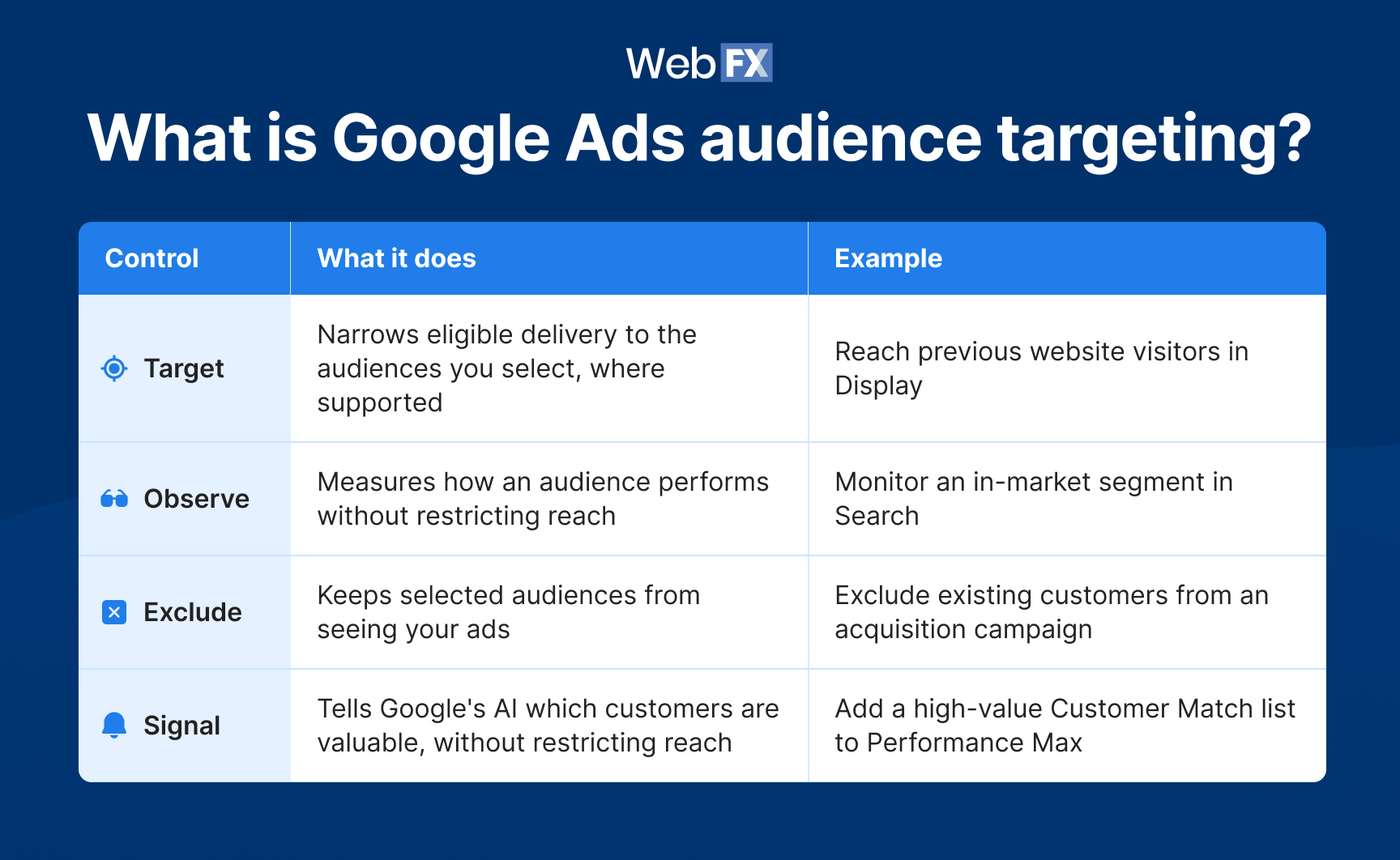
To do those jobs, you apply one of four controls to an audience. The control, not the segment, is what decides what Google does:
Narrows eligible delivery to the audiences you select, where supported
Reach previous website visitors in Display
Observe
Measures how an audience performs without restricting reach
Monitor an in-market segment in Search
Exclude
Keeps selected audiences from seeing your ads
Exclude existing customers from an acquisition campaign
Signal
Tells Google’s AI which customers are valuable, without restricting reach
Add a high-value Customer Match list to Performance Max
The segment names who. The control decides what Google does with them, and the same list behaves very differently depending on which of these four you apply and where.
What Google Ads audience segments are available?
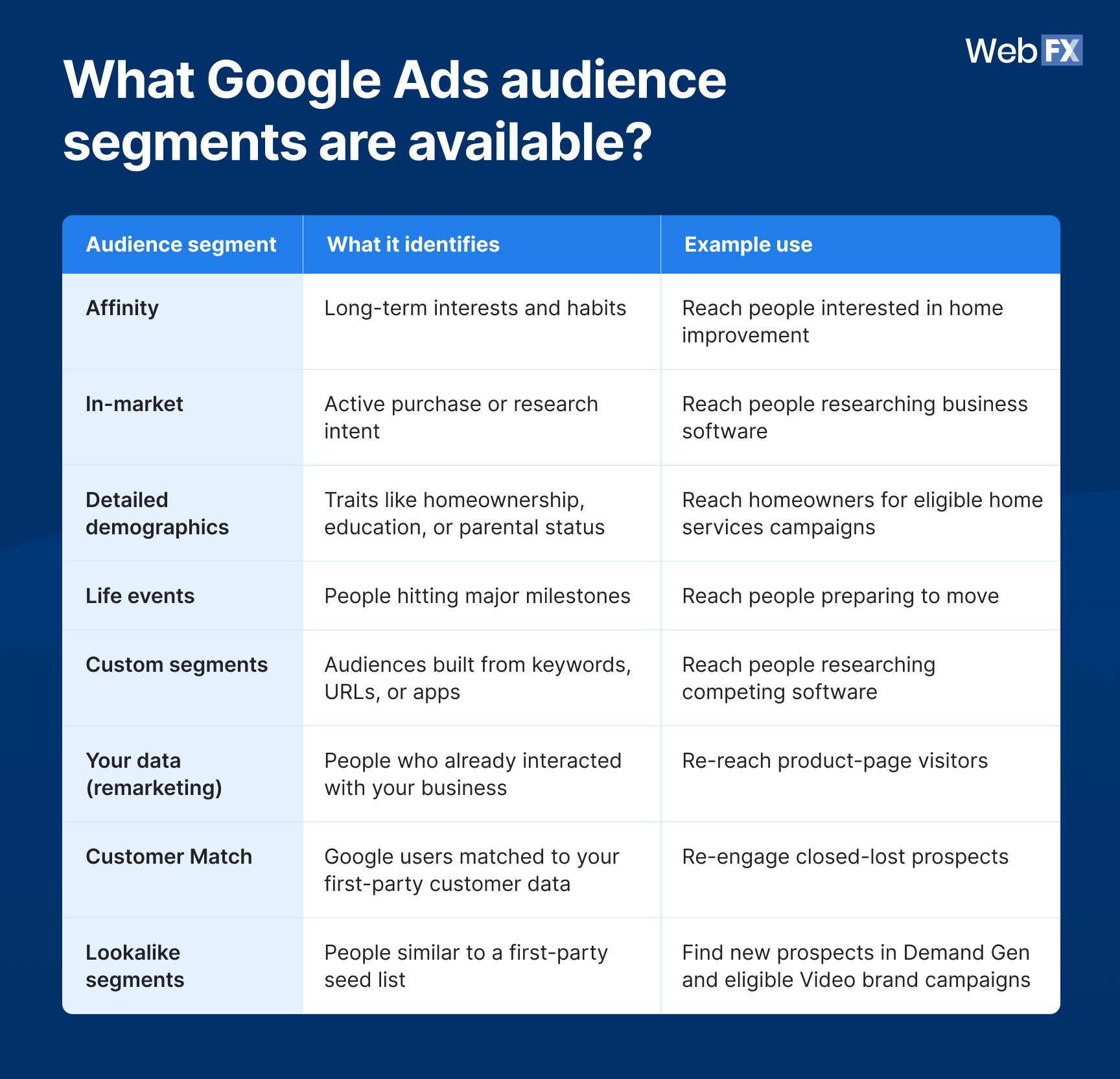
Google Ads audience segments group people by interests, purchase intent, demographic traits, and past interactions with your business. You choose from these Google Ads audience segments based on who you want to reach and which campaign types support them:
Traits like homeownership, education, or parental status
Reach homeowners for eligible home services campaigns
Life events
People hitting major milestones
Reach people preparing to move
Custom segments
Audiences built from keywords, URLs, or apps
Reach people researching competing software
Your data (remarketing)
People who already interacted with your business
Re-reach product-page visitors
Customer Match
Google users matched to your first-party customer data
Re-engage closed-lost prospects
Lookalike segments
People similar to a first-party seed list
Find new prospects in Demand Gen and eligible Video brand campaigns
Not every Google Ads audience segment works across every campaign type. Custom segments and life events, for example, are available in Display, Video, and Demand Gen, but not Search or Standard Shopping. If your strategy depends on those segments, choose a compatible campaign type rather than trying to force an unsupported one.
A few details that matter:
Lookalikes are campaign-specific. They are available in Demand Gen and eligible Video brand campaigns, not everywhere, and they refresh automatically every one to two days. The 2026 shift toward suggestion-based behavior (below) applies specifically to Demand Gen.
Custom segments are inputs, not proof of behavior. A custom segment built from competitor URLs reaches people who browse similar sites. It does not place your ads on those URLs, and it does not confirm anyone visited a specific competitor.
Detailed demographics are not the same as basic demographic targeting. Age and gender targeting are separate from the detailed demographic segments above.
Use the table to answer the “what exists” question, then move to the decisions that actually change your results.
When should you use targeting vs. observation in Google Ads?
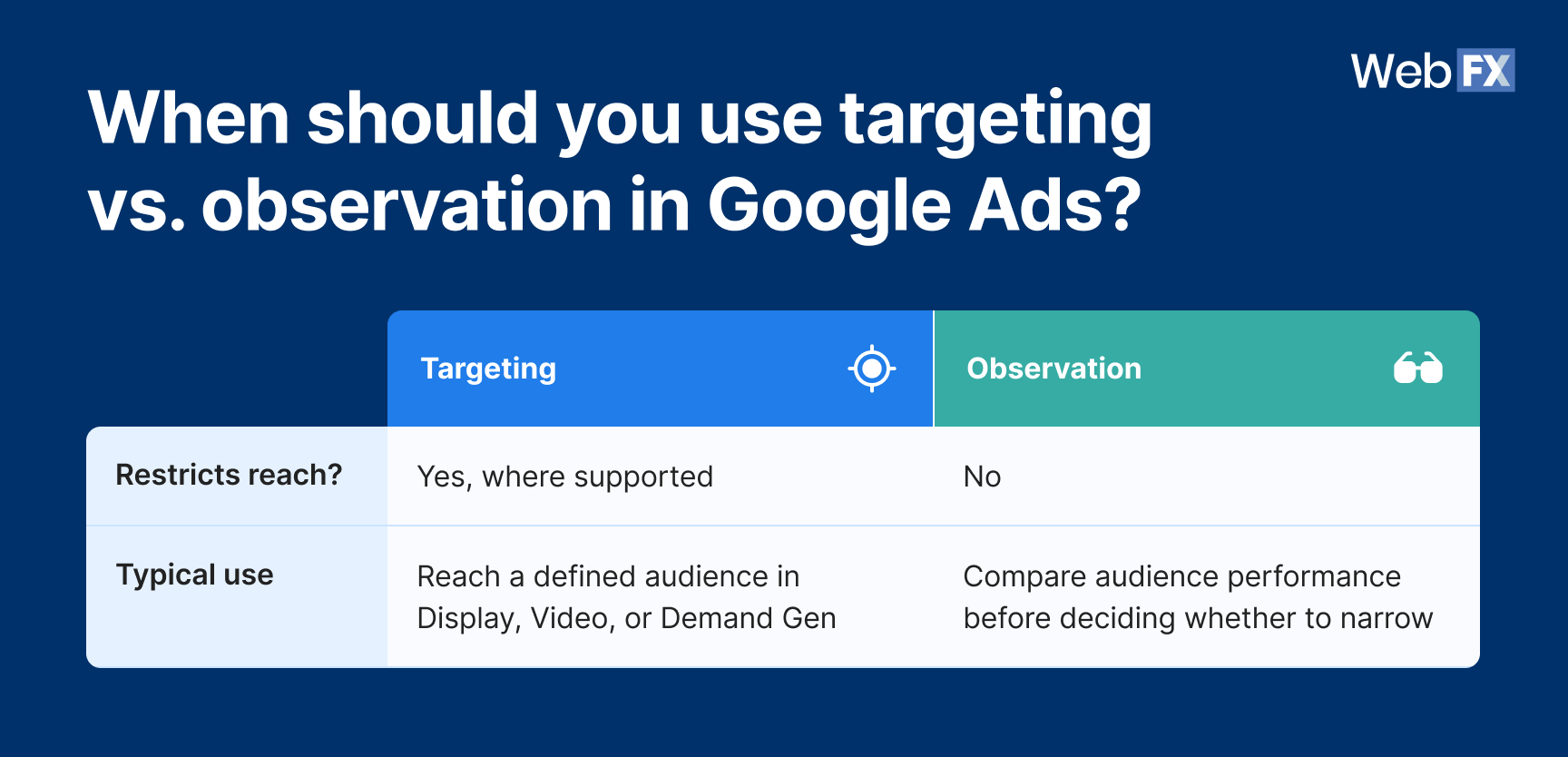
Targeting restricts your ad delivery to the audiences you select. Observation does not restrict anything. It lets you monitor how audiences perform so you can make decisions later. For most Search campaigns, observation is the safer starting point because it gathers data without shrinking your reach.
Reach a defined audience in Display, Video, or Demand Gen
Observation
No
Compare audience performance before deciding whether to narrow
A practical example: A B2B software company wants to know whether an in-market audience converts better than its broader Search traffic. In observation, it can compare the two without cutting reach. If the in-market group clearly outperforms, the company can then decide whether to narrow.
Where people get this wrong: Observation lets you measure audience performance, but it does not automatically mean you can manually bid up that audience. Smart Bidding strategies, including Target CPA, Target ROAS, Maximize conversions, and Maximize conversion value, don’t support manual audience bid adjustments because they automatically set bids based on your conversion goals. With Smart Bidding, first-party audiences you add in observation inform the bidding system rather than giving you a manual bid lever. If you have read that you can simply “bid up when a past customer searches your brand,” check whether your bidding strategy actually supports that before you count on it.
Which audience controls work with each Google Ads campaign type?
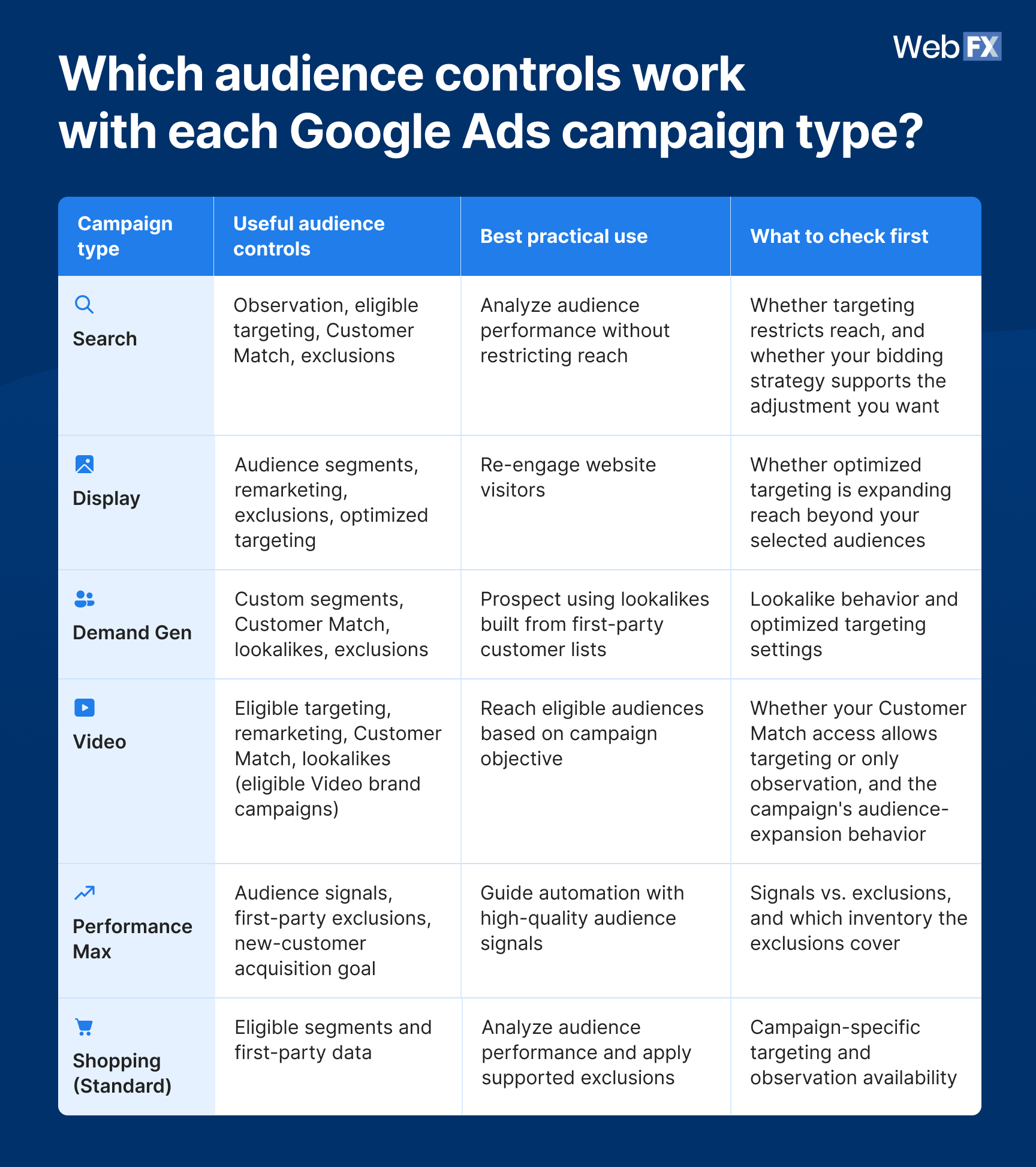
The same audience can help or hurt depending on the campaign it runs in, because each campaign type hands Google a different set of levers. The table below maps the practical controls to each campaign type so you can pick the right one instead of memorizing every feature:
Guide automation with high-quality audience signals
Signals vs. exclusions, and which inventory the exclusions cover
Shopping (Standard)
Eligible segments and first-party data
Analyze audience performance and apply supported exclusions
Campaign-specific targeting and observation availability
Use it to answer one question: Which control should I use for the campaign I’m running? For example:
Want to learn which Search audiences perform best? Start with observation.
Want to stop showing acquisition ads to existing customers? Look at supported exclusions and the new-customer acquisition goal.
Want to guide Performance Max toward better prospects? Supply strong first-party audience signals.
Want to prospect for similar users in Demand Gen? Evaluate lookalikes, seed quality, and targeting behavior.
How do Google Ads audience exclusions reduce wasted spend?
Google Ads audience exclusions help prevent your ads from reaching people you do not want to pay for, which frees budget for the prospects you actually want. They are a strong lever, though not an absolute one, since exclusions may not catch users who have opted out of ad personalization. In our experience, this is one of the most underused levers in a typical account, and often where some of the fastest efficiency gains hide.
Three applications deliver the most value:
Exclude existing customers from acquisition campaigns. Stop paying for customers who are searching for a login page or support doc, not a sales page. A SaaS company can exclude current subscribers from an acquisition campaign while keeping them in a separate upsell campaign.
Exclude people who already converted from lead-gen campaigns. Do not keep paying to promote a demo to someone who already booked it. A B2B business can exclude recent demo-bookers from the campaign promoting that same demo.
Use Performance Max first-party exclusions and the new-customer acquisition goal. These are the practical levers for keeping Performance Max from spending on people you already have. Keep three distinct controls straight here: First-party audience exclusions, brand exclusions, and the new-customer acquisition goal each do a different job.
The trade-off: A broad exclusion can remove customers who are also real upsell prospects, and exclusion lists only work if the underlying CRM or conversion data is clean and current. Exclude the wrong list, and you cut off demand you wanted.
Exclusions depend on list quality: Clean, current customer lists keep you from cutting the wrong people. That is a separate job from conversion adjustments, which correct conversion data after Google has already recorded an outcome. Exclusions decide who your ads reach; conversion adjustments fix what Google learns from the leads that do come in. You often want both.
How do Performance Max audience signals work?
In Performance Max, audience signals tell Google’s AI who your valuable customers are likely to be. Performance Max audience signals are a starting point for the model, not a fence. Performance Max can and does serve outside your audience signals when it predicts those users will meet your campaign goal.
How Performance Max audience signals work is one of the most common points of confusion in modern Google Ads, so it is worth stating plainly:
Audience signals guide who Google’s AI prioritizes. They do not restrict delivery.
Audience exclusions and supported targeting restrictions are what actually keep people in or out.
In practice, that means using high-quality first-party lists as signals to speed up learning, while not relying on signals to keep unwanted users out. If you need people excluded, use exclusions, not signals.
Expert insights from
Kayla J.PPC Analyst at WebFX
“With AI-driven campaign types taking over the PPC world, what sets the top performing advertisers apart are 1) human-led strategic insight, 2) strong data integration, and 3) high-quality creatives.”
What changed about Google Ads audience targeting in 2026?
Google has shifted more audience decisions toward automation, which changed how some targeting inputs affect delivery. You still have meaningful controls, but the line between a targeting restriction, an audience signal, and an exclusion matters more than it used to.
Demand Gen lookalikes now behave more like suggestions than hard targeting
Google announced that starting in March 2026, Demand Gen lookalike segments default to suggestion-based behavior rather than strict similarity thresholds, with the lookalike data informing the algorithm instead of gating delivery. Advertisers who want to keep lookalikes as a strict targeting constraint can opt out through Google’s form, and a “signal” tag appears in audience reporting when a segment is in suggestion mode.
This change applies to Demand Gen lookalikes specifically. Rollout and in-account behavior can vary, so confirm how yours behaves before you count on strict targeting.
Performance Max supports first-party audience exclusions
You can now exclude specific first-party lists from Performance Max, which is different from supplying that list as a signal. Per Google’s documentation, the supported list types are Customer Match, website visitor lists, and Google Analytics lists, and these data exclusions apply to Search, Display, Shopping, Video, and Discover inventory within Performance Max. That is not all of Performance Max’s inventory, so treat exclusions as strong but not absolute, and keep your underlying lists clean.
Optimized targeting can expand beyond your selected audiences
In supported Display, Video, and Demand Gen campaigns, optimized targeting can reach users beyond the audiences you picked. Check whether it is enabled before assuming your selected audience defines the whole campaign’s reach.
Audience signals influence who Google’s AI prioritizes, while exclusions and supported restrictions determine who you keep in or out. Actual delivery still depends on each feature’s current behavior, which is why verifying in-account beats trusting last year’s playbook. Automation is reshaping other corners of the platform too, including Local Services Ads moving into Performance Max.
What are the best Google Ads audience targeting strategies to test?
The strongest audience strategies use first-party data, remarketing, observation, exclusions, and signals to serve a specific goal. The right play depends on whether you need to acquire new customers, re-engage prospects, improve campaign learning, or cut wasted spend. Here are five worth testing, each with the upside and the catch stated plainly:
Win back closed-lost opportunities with Customer Match. Build a Customer Match list from prospects who got a proposal but did not buy, then re-engage them through supported campaigns, including branded Search. Branded Search can be a cost-efficient way to re-engage prospects who already know your business. Catch: Lists go stale, CRM match rates vary widely by data quality and run well under 100%, and lost reasons differ. Do not promise a specific bid adjustment unless your bidding strategy supports it.
Remarket to visitors based on buying stage. Treat a blog reader differently from a pricing-page visitor. Educational messaging for the top of the funnel, an evaluation or consultation offer for high-intent pages. Catch: Small pools limit delivery in low-traffic B2B, and remarketing performance does not automatically prove incremental conversions.
Use Customer Match for upsell and cross-sell. Sell a different offer to known customers with a message built for them, instead of a generic acquisition ad. Catch: Customer Match policy and consent requirements apply, and lists need regular maintenance.
Supply high-value customer lists as Performance Max signals. Give the model your closed-won customers, not every raw form fill, so it learns from your best buyers. Catch: Signals guide learning, they do not restrict delivery, so pair them with clean conversion data.
Test lookalikes and custom segments for prospecting. Use a qualified seed list for Demand Gen lookalikes, and build custom segments around competing solutions to reach comparison shoppers. Catch: These are loose, exploratory inputs. A competitor-URL custom segment does not confirm anyone visited that competitor.
Does better audience targeting actually improve lead quality?
Better audience targeting can improve lead quality, but it won’t fix a junk-lead problem on its own. Audience controls influence who sees your ads, while accurate conversion data helps Google’s bidding systems recognize which leads are valuable. Measure results using qualified-lead rates and cost per qualified lead, and evaluate them against your business economics and Google Ads benchmarks.
WebFX’s first-party research shows why conversion data matters. For one specialty furniture and lumber client, qualified-lead share increased from 13.3% in June 2025 to about 92% in January 2026 after implementing a lead-quality feedback system involving conversion adjustments and value-based bidding. On a separate account, cleaner conversion signals and value-based bidding helped reduce cost per qualified lead by about 47% year over year. Neither result measures the impact of audience targeting. Instead, both demonstrate why accurate conversion data matters alongside your audience strategy.
WebFX’s RevenueCloudFX helps close that gap through its Audience Intelligence Sync. It automatically tracks forms and calls, uses hundreds of first-party data points to build audiences, and lets you sync those audiences to Google Ads in a few clicks after setup. As users enter or leave a segment, their membership updates automatically, keeping your targeting and exclusions aligned with current customer data.
Measuring the metrics that affect your bottom line.
Are you interested in custom reporting that is specific to your unique business needs? Powered by RevenueCloudFX, WebFX creates custom reports based on the metrics that matter most to your company.
Not in the way targeting works elsewhere. Performance Max uses audience signals to guide Google’s AI toward likely customers, and it supports first-party exclusions to keep specific lists out, but signals do not restrict who sees your ads.
Yes. Google Ads audience exclusions let you remove customer lists from branded, acquisition, and lead-gen campaigns, and Performance Max supports first-party exclusions plus a new-customer acquisition goal. Behavior varies by campaign type, so confirm what your campaign supports.
Yes. Lookalike segments are available in Demand Gen and eligible Video brand campaigns. Google’s 2026 shift toward suggestion-based behavior applies specifically to Demand Gen, so verify how they behave in your account before relying on them as strict targeting.
Google Ads generally requires at least 100 active users within the past 30 days for your data segments to serve on Search, Display, and YouTube. For Customer Match, this threshold applies to lists uploaded or refreshed after February 1, 2024; older lists that haven’t been refreshed still require 1,000 matched users. Check your segment’s eligibility in Audience Manager, since uploaded contacts don’t necessarily equal active, eligible users.
Yes. First-party audiences added in observation can inform Smart Bidding, even though Smart Bidding generally does not take manual audience bid adjustments.
Learn how WebFX grew a client’s conversions from paid ads by 670% and cut their cost per lead by 321%.
Improve your Google Ads audience targeting with WebFX
Start with one audit. Look at where your campaigns use targeting, observation, exclusions, and audience signals, and whether each is doing the job you think it is. A good first step is to review your existing customer lists and converted-lead exclusions, since those are often set up once and never revisited.
If your campaigns generate clicks but struggle to produce qualified leads, the fix usually spans audience strategy and conversion data. With 30+ years of experience, 150+ Google Ads-certified team members, and RevenueCloudFX helping build and automatically update Google Ads audiences using first-party data, WebFX can align your audience targeting, exclusion lists, and conversion signals to help your budget prioritize qualified leads that drive revenue.








 Nolan is Head of Innovation for WebFX and serves as an SME for our DataTech Solutions team. Nolan’s favorite part of digital marketing is being able to have a direct impact on growing our clients’ businesses. In his spare time, he enjoys watching NCAA wrestling, hanging out with his dogs, riding motorcycles, and woodworking. View full profile
 Albert Dandy Velasquez blends SEO strategy with compelling storytelling to help businesses boost their visibility and revenue online. With a B.A. in English and certifications from HubSpot, Semrush, and Google Analytics, he has written and optimized hundreds of articles on organic SEO, content strategy, and user experience. He regularly contributes to the WebFX blog and SEO.com, creating content that helps readers turn marketing goals into measurable results. When he’s off the clock, he’s usually exploring new neighborhoods on two wheels, filming travel content, or chasing golden hour with a coffee in hand. View full profile