What is the Local Services Ads transition to Performance Max? Google is moving Local Services Ads out of the standalone dashboard and into Google Ads as Performance Max campaigns with pay-per-lead goals. Despite the Performance Max name, these campaigns still serve only on Google Search and Google Maps, stay keywordless, and charge per valid lead rather than per click.
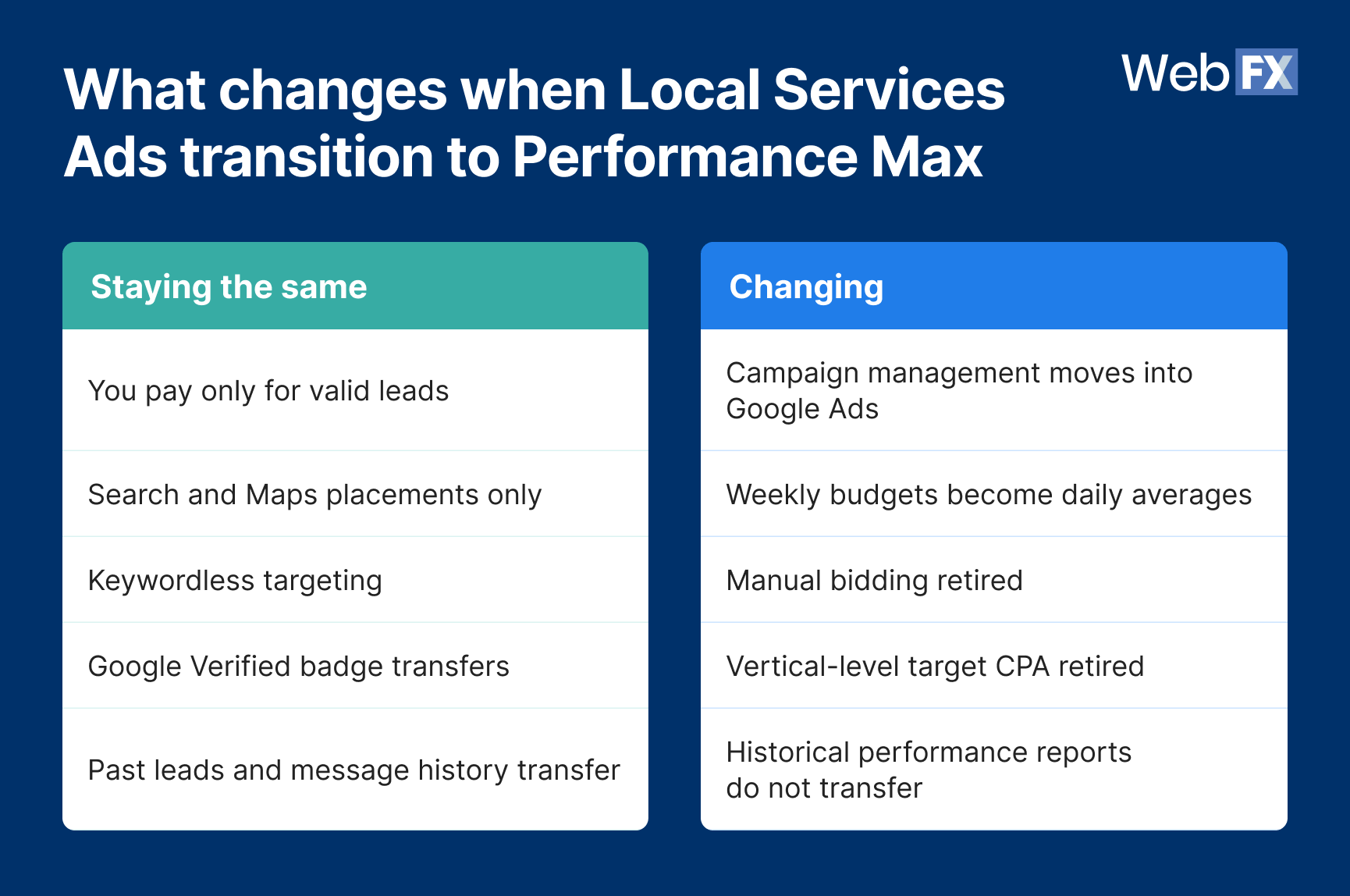
Are Local Services Ads going away? Local Services Ads are not going away. What Google retires for migrated accounts is the separate dashboard, while pay-per-lead billing, Search and Maps placements, keywordless targeting, and the Google Verified badge all survive the move.
What do you lose in the migration? Google drops your historical performance reports and retires manual bidding and vertical-level target CPA on the same day. You lose your reporting baseline and your bidding levers at once, which makes any cost-per-lead change afterward much harder to diagnose. Your lead history and message threads do transfer.
When will your Local Services Ads account migrate? Google is migrating in three phases. Phase one began in August 2026 for select U.S. advertisers across nine home and storefront trades, covering plumbing, HVAC, electrical, appliance repair, house cleaning, lawn care, roofing, pest control, and moving. Service-area businesses follow in late 2026, and non-U.S. accounts plus remaining categories transition in 2027.
What should you save before migration day? Capture five things while you still have dashboard access: historical spend and lead volume, cost per lead by service category, and your current bidding settings including manual bid ceilings and vertical-level target CPAs. Then save your lead quality benchmarks by service and your full campaign setup, covering service areas, ad schedule, and callouts.
TL;DR: Local Services Ads transition to Performance Max
What changed: Google is moving Local Services Ads into Google Ads as Performance Max campaigns with pay-per-lead goals.
When: The phased rollout began in August 2026 and continues through 2027.
What stays: Pay-per-lead billing, Search and Maps placements, keywordless targeting, and your Google Verified badge.
What you lose: Historical performance reports, manual bidding, vertical-level target CPA, and Better Business Bureau callouts.
What to do now: Save your reporting baseline before your 14-day migration notice arrives.
Google began the Local Services Ads transition to Performance Max in August 2026, moving campaigns out of the standalone Local Services Ads dashboard and into Google Ads. Your ads still run in the same positions on Google Search and Google Maps, you still pay per valid lead, and your campaign stays keywordless.
Google will not carry your historical performance reports into Google Ads, and it retires manual bidding and vertical-level target cost per action (CPA) on the same day. You lose your reporting baseline and your bidding levers at once, which makes any cost-per-lead change afterward much harder to explain.
Phase one is already live for select U.S. advertisers across nine home and storefront trades, including plumbing, HVAC, electrical, roofing, and pest control. If you run Google Local Services Ads in one of those categories, your migration notice could arrive within days. Here is what changes, what stays the same, and the five things worth capturing before Google moves your account:
Tell us about your business, and we’ll create a custom plan to grow your traffic, leads, and predictable revenue.
What changes when Local Services Ads transition to Performance Max
The Local Services Ads transition to Performance Max changes where you manage campaigns, how you bid, how your budget is structured, and what reporting history you keep. It does not change where your ads appear or how you pay for leads, according to Google’s migration documentation.
You will manage budgets, targeting, leads, and customer replies from Google Ads instead of the separate Local Services Ads dashboard. Once your account migrates, logging into the old dashboard redirects you to your campaign overview in Google Ads.
You also gain control you did not have before. Google lets you change the phone number your call and message leads route to in real time, directly in the campaign.
Your historical performance reports do not migrate
Google confirms that previous campaign performance metrics, including past impressions, clicks, weekly spend, and ad-level reports, will not move to Google Ads. Your lead history transfers. The performance data you would use to compare before and after does not.
Do this before migration day: Save enough historical reporting to preserve your year-over-year comparisons and your cost-per-lead trend. Google plans to add a download page and recommends screenshots if you need the data sooner.
Your Google Business Profile becomes the source for core details
Google Ads pre-populates your campaign from your Google Business Profile, and your business name, address, and hours sync from the profile into Google Ads rather than the reverse. To change those core details, you edit the Business Profile.
Significant changes to your business name, storefront address, or primary category trigger a verification review. That review typically takes 24 to 48 hours and can pause your campaign while it runs, which is a strong argument against making major profile edits near your migration date.
Google retires Better Business Bureau callouts
Better Business Bureau (BBB) callouts no longer appear after migration. Google directs you to your campaign’s assets tab to select at least six other structured callouts, such as business hours, specialties, or accepted payment methods.
Are Local Services Ads going away?
Local Services Ads are not going away. Google is moving them into Google Ads infrastructure, and the product itself keeps working the way it does today.
Several widely shared LinkedIn and Reddit posts describe Google as killing Local Services Ads or discontinuing them outright, and “What happened to Google local service ads?” now appears in the People Also Ask box for the term.
What Google retires for migrated accounts is the separate Google LSA dashboard. Your pay-per-lead billing, your Search and Maps placements, your keywordless targeting, and your Google Verified badge all survive the move.
When will your Local Services Ads account migrate?
Google is migrating accounts in three phases rather than all at once, starting with U.S. home and storefront service advertisers in August 2026.
August 2026: Select U.S. advertisers in nine trades migrate first, covering plumbing, HVAC, electrical, appliance repair, house cleaning, lawn care, roofing, pest control, and moving.
Late 2026: The rollout expands to service-area businesses without physical storefronts, plus accounts running custom bidding or booking configurations.
2027: Non-U.S. accounts and all remaining business categories transition, including advanced-verification categories such as locksmiths and garage door services.
If your category requires advanced verification, or you operate outside supported regions, Google directs you to keep managing campaigns on the legacy Local Services Ads portal at g.co/localservices until your phase arrives.
Your account administrator receives an email 14 days before your migration date, along with warning banners in the dashboard, followed by a reminder email seven days later. Google also asks you to allow up to two weeks after migration for performance to stabilize.
Those first-wave trades are the ones where a single top placement matters most. Before the migration began, WebFX research on home services SERP features found that Local Services Ads appeared in roughly 28% of home services searches and ranked position 1 in every search where they appeared.
Why this is not a standard Performance Max campaign
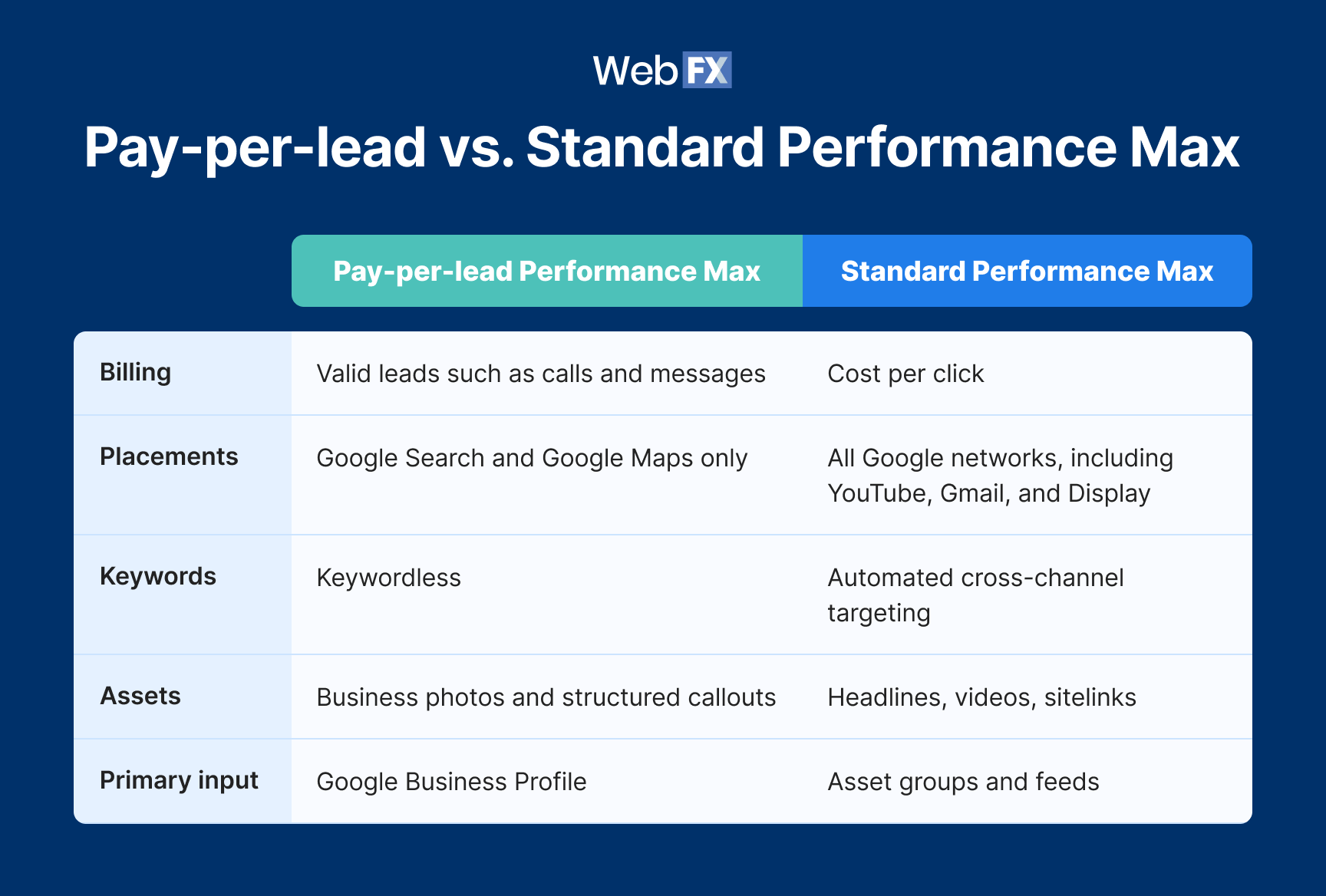
Campaigns with pay-per-lead goals share the Performance Max name but almost none of the behavior advertisers associate with it. Google states clearly that these campaigns do not expand to its other advertising channels.
All Google networks, including YouTube, Gmail, and Display
Keywords
Keywordless
Automated cross-channel targeting
Assets
Business photos and structured callouts
Headlines, videos, sitelinks
Primary input
Google Business Profile
Asset groups and feeds
Managing this campaign like a standard Performance Max campaign will waste your time. Asset expansion, channel exclusions, and the creative testing playbooks built for how Performance Max campaigns work across networks have no application here, because there are no other networks to expand into.
What changes in your bidding and budget
Google applies three bidding and budget changes automatically on transition day, and two of them remove controls you may rely on now.
Google no longer supports manual bidding, including a maximum cost per lead. It also retires vertical-level target CPA, so if you managed separate targets for separate service lines under one campaign, Google calculates a single campaign-level target CPA and applies it to every category. Your weekly budget becomes a daily average, divided by seven, with monthly spend capped at that daily average multiplied by 30.4.
Plumbing and HVAC rarely share the same lead economics. A drain call and a system replacement carry very different revenue, so one blended target CPA changes what each service line can afford to pay for a lead.
WebFX research on home services search visibility sharpens that point. Across 500 searches run in May 2026, before the migration started, Local Services Ads appeared in 36% of garage door searches, 32% of plumbing searches, 28% of HVAC searches, 25% of electrical searches, and 21% of roofing searches. Four of those five trades sit in Google’s first migration phase, and garage door services waits until 2027, so a unified target CPA now applies one number across service lines whose top-of-page visibility differs by 11 percentage points.
If you need separate bidding rules by category after migration, Google’s stated workaround is to build a separate campaign for each vertical. Reviewing your Local Services Ads cost factors by service line before your notice arrives tells you whether that split earns its overhead.
Expert insights from
Colton W.Sr. PPC Consultant at WebFX
“When using a blended target CPA across service lines with varying margins, the service that wins is largely going to depend on the target and the type of services that are included in the blend. I take the position of assuming that algorithms/machine learning is going to take the easiest path to achieve the letter of what you told it to do, not the spirit of what you told it to do. So with that said, I’ve seen accounts come to us with targets/service blends in such a way that it might look like it’s winning on paper but it’s just getting a high volume of thin margin service leads at a cost that doesn’t make economic sense.
The telltale sign that you’re starving a specific line rather than just experiencing a slow week is a persistent divergence in impression share and lead volume that mirrors the margin delta between the services. Unless the services are highly similar in conversion rate and value, I would recommend preemptively splitting them into separate campaigns so that you can maintain granular control over your ROAS and lead quality, rather than letting the algorithm optimize toward the easiest conversions at the expense of your actual business goals.”
The Baseline Lockbox: Five things to save before migration day
Your reporting history and your bidding controls disappear together, so the only way to diagnose a post-migration performance change is to build your own baseline first. Most migration advice stops at exporting your spend reports, which is the right first step and nowhere near enough. Capture all five of these while you still have access to your Google LSA dashboard.
Historical spend and lead volume. Export enough months to support a year-over-year comparison. Google flags this step directly, so treat it as your floor rather than your plan.
Cost per lead by service category. This becomes your only record of what each service line actually paid before a single target CPA replaced your per-vertical targets, and it matters most when multiple trades share one campaign.
Current bidding settings. Screenshot your manual bid ceilings and every vertical-level target CPA, since Google replaces them with one calculated number.
Lead quality and downstream conversion benchmarks. Capture your qualified-lead rate, booked rate, or close rate by service, so you can tell cheaper leads apart from worse leads once cost per lead shifts.
Full campaign setup and assets. Record service areas, service categories, ad schedule, lead-routing phone number, business photos, and your existing callouts, including the BBB callouts you will need to replace.
Expert insights from
Kayla J.PPC Specialist at WebFX
“When I’ve evaluated performance after the fact for a historical campaign, I’ve found myself missing the spend data — whether broken down by campaign, ad group, ad, or keyword/asset. That’s the one metric I can’t access from our CRM, so once you lose it, it’s gone unless you save it yourself.”
Measuring the metrics that affect your bottom line.
Are you interested in custom reporting that is specific to your unique business needs? Powered by RevenueCloudFX, WebFX creates custom reports based on the metrics that matter most to your company.
Google handles the technical transfer, so your work in the two weeks beforehand comes down to preserving what the transfer leaves behind and verifying what it moved.
When the 14-day notice arrives
Export your historical reporting and capture the Baseline Lockbox. Confirm who holds access to the destination Google Ads account and that they receive the migration emails. Identify any vertical-level bidding setup that needs restructuring.
At the seven-day reminder
Verify your saved reports open and read correctly. Hold off on major Google Business Profile edits, since a name, address, or category change can trigger a verification review that pauses your campaign. Confirm your CRM still captures leads correctly.
On migration day
Work through your settings against what you saved:
Daily budget matches your previous weekly budget divided by seven
Service areas and service categories carried over
Ad schedule carried over
Business photos carried over
Lead-routing phone number is correct
Message leads send and receive
Past customer leads and message history appear on the Leads page
Replacement structured callouts are active
Google Verified badge shows on your profile
During the first two weeks
Compare performance against your saved baseline rather than against an empty dashboard. Google says campaigns need up to two weeks to ramp back to stable levels, so two or three days of volatility tells you nothing. Escalate when a cost-per-lead change persists past that window, or when one service line drops while the others hold.
FAQs about the Local Services Ads transition to Performance Max
Local Services Ads still run, still appear on Google Search and Google Maps, and still charge per valid lead. What Google retired for migrated accounts is the standalone dashboard, which now lives inside Google Ads as a Performance Max campaign type.
Performance Max here describes the campaign infrastructure rather than the cross-channel behavior advertisers know. Campaigns with pay-per-lead goals serve only on Search and Maps, stay keywordless, and charge for leads instead of clicks.
No. Google confirms previous campaign performance metrics do not migrate, which makes saving them before your transition date the highest-priority task in the process.
Those do transfer. Your customer contact details, message threads, and older call recordings move to the Leads page in Google Ads, where you can keep replying to them.
Not yet. Google says campaign creation will come later and directs you to g.co/localservices in the meantime for additional campaigns or local accounts.
For businesses that already completed verification, the verified status and badge carry over automatically. Google also dropped the insurance and license reverification requirement.
Learn how WebFX grew a client’s conversions from paid ads by 670% and cut their cost per lead by 321%.
Google will move your campaign for you, and it will do that part well. What it will not do is preserve your cost per lead by service line, your bid ceilings, or the close rates that tell you whether a lead was worth what you paid. Open your Google LSA dashboard today, capture all five items in the Baseline Lockbox, and you keep the ability to prove what the migration actually did to your pipeline.
If your reporting already lives in a spreadsheet someone rebuilds every month, the migration is going to hurt more than it should. WebFX can rebuild your measurement around revenue instead of platform exports, pairing RevenueCloudFX with a paid search team that has managed Local Services Ads and Performance Max campaigns through every rollout Google has shipped. Your lead data should outlive whatever dashboard Google retires next.









 Albert Dandy Velasquez blends SEO strategy with compelling storytelling to help businesses boost their visibility and revenue online. With a B.A. in English and certifications from HubSpot, Semrush, and Google Analytics, he has written and optimized hundreds of articles on organic SEO, content strategy, and user experience. He regularly contributes to the WebFX blog and SEO.com, creating content that helps readers turn marketing goals into measurable results. When he’s off the clock, he’s usually exploring new neighborhoods on two wheels, filming travel content, or chasing golden hour with a coffee in hand. View full profile