

Table of Contents
- Basics and strategy
- Platform and channel
- Ad formats and types
- Keywords and targeting
- Remarketing and retargeting
- Ad placement and visibility
- Landing page
- Campaign set up and management
- Tools and technology
- Metrics and analytics
- Testing and optimization
- Costs and budgeting
- Audits and lead generation
- Services and agencies
- Put these PPC answers to use in your own advertising strategy
-
What is PPC?
PPC is a form of digital advertising where you pay only when someone clicks your ad, helping you drive targeted traffic and measure performance. -
How does PPC work?
Ads are triggered by keywords, bids, and quality signals, and are shown across search engines and other platforms. -
How much does PPC cost?
Costs depend on competition and industry, and advertisers set their own budgets to control spending. -
How do you target users with PPC?
Targeting uses keywords, demographics, and behaviors to reach relevant audiences. -
Why use PPC?
PPC provides fast visibility, measurable results, and the ability to optimize campaigns for better ROI.
Get answers to common pay-per-click (PPC) advertising questions, from campaign costs and keyword targeting to Google Ads optimization and conversion tracking. Learn how PPC works, which strategies fit your business goals, and how to improve campaign performance.
Below, we cover 50+ of the most common PPC questions. These questions are divided into the following categories:
- PPC definition and basics
- PPC platforms and channels
- Ad formats and components
- Keywords and targeting
- Ad placement and visibility
- PPC landing pages
- PPC tools and technology
- PPC metrics and analytics
- PPC costs and budgeting
- PPC services and agencies
Read on for the full list of PPC FAQs and answers!
PPC basics and strategy FAQs
Start with the essentials of PPC, including what it is and how it works. This section covers the core concepts and platforms you need to build a strong foundation.
What is pay-per-click (PPC) advertising?
Pay-per-click (PPC) advertising is a digital advertising model in which you pay each time someone clicks your ad. PPC ads can appear in search results, on websites and apps, on social platforms, and in other digital channels.
The goal is to put your business in front of interested people and turn some of them into customers.
How does PPC advertising work?
PPC advertising works through an auction. When someone searches or loads a page with ad space, the platform decides which ads to show based on each advertiser’s bid, ad quality, and other signals.
You choose your targeting, budget, and bidding strategy, and you pay when someone clicks your ad. What you pay per click is often less than the maximum bid you set. On Google, you generally pay the minimum needed to hold your position.
You can target by keywords, demographics, locations, and audiences, though the options vary by platform.
What are the main benefits of using PPC?
The main benefits of PPC are speed, control, and measurability. Your ads can start reaching people as soon as your campaign is approved, you set the budget, and you can track which clicks turn into leads or sales.
You also pay for clicks, not impressions. That doesn’t make every click valuable, though. Irrelevant searches and weak landing pages can burn through budget quickly, which is why targeting and conversion tracking matter.
When campaigns are tracked and managed well, PPC can deliver strong ROI. The return depends on your industry, offer, and conversion rate, so measure against your own numbers.
How can I convince my company to invest in PPC?
You convince your company to invest in PPC by highlighting its ability to drive revenue in as little as a few days. With PPC ads, businesses can reach users instantly, whether on Google, Instagram, or LinkedIn, to build awareness and generate leads and revenue.
Should I use PPC or SEO?
You should use both. PPC and SEO do different jobs, and they work best together.
PPC gives you paid visibility while your campaigns run, so you can start reaching searchers quickly. SEO builds organic rankings over time, without a per-click cost.
With Google Ads, you pay for each click, and traffic stops when you pause. SEO takes ongoing work and doesn’t guarantee rankings. If you need leads this quarter, start with PPC. If you’re building long-term traffic, invest more in SEO.
Compare both on lead quality, cost per lead, and revenue. For a deeper look, see our SEO vs. PPC guide.
How long does it take for PPC to work?
Because PPC ads can begin appearing to users the moment you launch them, a PPC campaign can theoretically start driving results immediately. However, in practice, it takes time to optimize your campaign to reach your target audience and convert new customers. That means PPC campaigns typically take around three months, on average, to drive substantial results.
What types of businesses should use PPC?
Many types of businesses can benefit from PPC, from local restaurants to large tech companies. It works best when people search for what you sell, or when your audience can be reached on an ad platform.
Before you start, check that:
- Your audience uses the platform
- A customer is worth more than it costs to acquire one
- You can track results
Can PPC increase brand awareness?
Yes. PPC isn’t only for direct conversions. Someone might see your ad, skip it, and remember your brand later. Others click without converting and come back when they’re ready.
For awareness goals, track reach, impressions, video views, and branded searches, not just conversions.
Is PPC worth it for my business?
PPC is worth it when you need fast, measurable results and have a plan for turning clicks into leads or sales. It works best if you have:
- Optimized landing pages
- A budget that supports testing
- A way to track conversions and sales
If you can wait months for results and want long-term organic growth, SEO may be a better fit. Many businesses use both.
What is a paid search strategy?
A paid search strategy is your plan for advertising on search platforms like Google Ads and Microsoft Advertising. It covers how you structure campaigns, choose keywords, write ads, set budgets, and measure results.
A strong strategy includes:
- Platforms: Where you’ll advertise
- Targeting: The keywords and audiences you’ll reach
- Messaging: Ad copy that fits what searchers want
- Measurement: How you’ll track and improve performance
How can I improve my paid search strategy?
Improve your paid search strategy by finding what’s wasting budget and what’s working, then shifting spend toward what works. Start with these steps:
- Check your conversion tracking, so you’re measuring leads and sales, not just clicks.
- Review your search terms report. Add negative keywords for irrelevant queries, and add high-performing terms as keywords.
- Test your ads and landing pages, changing one thing at a time.
- Review performance by location, device, audience, and time of day, then adjust your targeting and budgets.
- Add strategies you aren’t using yet, like remarketing or Smart Bidding (see the best PPC strategies).
- Consider a PPC audit from an agency or consultant to find issues you may have missed.
What are the best PPC strategies to use?
The best PPC strategies combine precise targeting, strong ads and landing pages, smart bidding, and reliable measurement. These are the ones that matter most:
- High-intent keyword targeting: Bid on searches that signal buying intent, and use negative keywords to block the rest.
- Remarketing: Show ads to people who visited your site but didn’t convert.
- Smart Bidding: Let Google set bids toward your conversion goals once your tracking is reliable.
- Ad assets: Add sitelinks, callouts, and images so your ads give searchers more information.
- Dedicated landing pages: Send clicks to mobile-friendly pages that match the ad and have one clear call to action.
- Responsive search ads: Give Google multiple headlines and descriptions to test, and review which combinations perform.
- Qualified conversion tracking: Optimize for leads that become customers, not just form fills.
- AI-powered campaigns: Use Performance Max or AI Max for Search when you have good tracking and creative assets.
- Multi-platform advertising: Expand to Microsoft Advertising or social platforms where your audience spends time.
Start with a clear goal, like leads, sales, or calls, and add strategies as your campaigns prove out.
What are the most common PPC mistakes to avoid?
Common PPC mistakes include:
- Targeting the wrong keywords
- Skipping negative keywords
- Not tracking conversions or lead quality
- Sending clicks to weak landing pages
- Launching campaigns and never reviewing them
PPC platform and channel FAQs
One of the biggest aspects of running a PPC campaign is deciding which ad platforms to use, and which channels to run your ads on. To help you do that, here are some of the most common PPC FAQs about advertising platforms and channels.
What is Google Ads?
Google Ads is Google’s paid advertising platform. It lets you run ads in Google search results, on YouTube, Gmail, and Maps, and across websites and apps in the Google Display Network. It was formerly known as Google AdWords.
Google says the Display Network reaches over 90% of the global internet population. For most advertisers, Google Ads is the best place to start, for both search and display advertising.
What is Microsoft Advertising?
Microsoft Advertising is Microsoft’s paid advertising platform. Its search ads can appear on Bing and on partner sites like Yahoo, AOL, and DuckDuckGo, and it also offers audience ads on Microsoft sites. It was formerly known as Bing Ads.
It reaches fewer searchers than Google, but it’s a useful way to reach people your Google ads miss.
Should I advertise on Google or Bing?
For many businesses, the best approach is to use both. Google reaches more searchers, and Microsoft Advertising reaches Bing users and search partners like Yahoo and DuckDuckGo.
- If you can only pick one, start with Google for its larger reach.
- If you have budget for both, add Microsoft Advertising once your Google campaigns are working. You can import Google Ads campaigns into Microsoft Advertising to save time.
What PPC platforms should my business use?
The best platforms depend on where your audience spends time and what you want them to do. Common options include:
- Google Ads
- Microsoft Advertising
- Amazon Ads
- Meta (Facebook and Instagram)
- YouTube
Start with one or two that fit your audience, then expand when your results support it.
What is social media PPC advertising?
Social media PPC advertising is paid promotion on social platforms like Facebook, Instagram, LinkedIn, Pinterest, and X. Ads appear in feeds, stories, and other placements, often as sponsored posts.

Choose platforms based on where your audience spends time, and judge results by your goal, like leads, sales, or awareness.
How do I set up and use Google Ads?
Start by creating your Google Ads account (just go to the Google Ads homepage and click “start now”), then research keywords to target using tools like Google Keyword Planner or KeywordsFX.
Next, bid on those keywords based on your budget, design your ads with clear headlines and simple landing pages centered around one call to action, and refine your targeting with negative keywords and custom audiences.
After launch, monitor your campaign metrics like click-through rate and conversion rate, then adjust your budget and strategy based on what’s working.
How do you advertise on Google?
Start by setting a clear goal for your campaign (like earning conversions or building brand awareness), then conduct keyword research to find long-tail keywords that will trigger your ad to appear in relevant search results.
Set your maximum budget and bid for ad placement (the average cost per click is between $1 to $2 for most companies), create a customized landing page that matches your ad content, and work to improve your quality score by ensuring your ad is relevant to the search terms.
Once you launch your campaign through Google Ads, monitor its performance using the Google Ads dashboard to track impressions, clicks, and conversions.
Where can my ads appear with Google PPC?
Where your Google ads can appear depends on the campaign type. Common placements include:
- Google Search: Above or below search results, plus places like the Shopping tab, Google Images, and Maps
- Search partners: Other search sites, included by default in Search campaigns (you can opt out)
- Display Network: Websites, apps, YouTube, and Gmail
- AI Overviews: Eligible search and shopping ads can show above, below, or within AI Overviews in select markets
Performance Max and Demand Gen campaigns can serve across several of these from a single campaign.
What does a PPC specialist do?
A PPC specialist plans, launches, and manages paid ad campaigns. Their work usually includes:
- Research: Keywords and audiences
- Setup: Campaigns, ads, and landing page recommendations
- Management: Budgets, bids, and testing
- Reporting: Tracking conversions and showing results
A good specialist connects ad performance to leads and revenue. If your campaigns are managed but results aren’t improving, ask how they measure progress and what they plan to test next.
Ad formats and types FAQs
In this section, we’ll answer some PPC questions related to different ad formats, as well as some of the different components you can include in your ads.
What are search ads in PPC?
Search ads are PPC ads that appear on search engine results pages when someone searches for something related to your keywords. On Google, they usually appear above or below organic results with an “Ad” label.
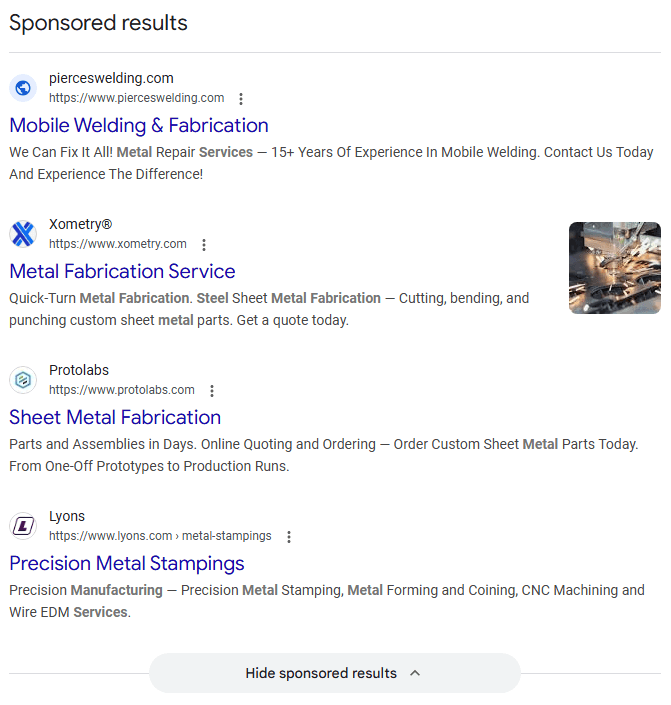
Common formats include responsive search ads, Shopping ads, and Local Services Ads. You can run search ads on Google, Bing, and other search engines.
To drive phone calls, add call assets to your responsive search ads. Google is retiring call-only ads.
What are display ads in PPC?
Display ads are visual ads, like images, video, or responsive ads, that appear on websites, apps, and other eligible placements instead of in search results. Display advertising is the practice of buying that ad space to reach people while they browse.

You can target by audience, topic, placement, or past site visits. Use display for awareness, consideration, or remarketing, and judge results against that goal.
What’s the difference between search ads and display ads?
Search ads show when someone searches for something, and display ads show on websites and apps as people browse. Search captures people who are already looking, and display builds awareness and re-engages past visitors.
Use search when you need to reach active shoppers, have a short sales cycle, or want tight control over spend. Use display when your sales cycle is long, your product is visual, or you’re focused on awareness and remarketing.
Most businesses use both, since they do different jobs.
What’s the difference between native advertising and display advertising?
Display ads are recognizable ad units, like banners, that clearly look like ads. Native ads match the look and format of the content around them and carry a label like “Sponsored” or “Promoted.”
Neither is more effective across the board. Display works well for broad reach and remarketing across many sites, and native works well for content-led campaigns on specific publishers. Test both against the same goal, and compare qualified conversions.
What is the difference between programmatic ads and display ads?
The difference between programmatic ads and display ads is the purchase process. Programmatic advertising uses automated software to purchase ad space across multiple ad exchanges, while display advertising typically uses a single ad network like Google Ads.
The two terms refer to different aspects of digital advertising, so they can overlap. Some programmatic ads are display ads, and some display ads are programmatic, but you can also place display ads manually instead of using automation.
What are programmatic ads?
Programmatic ads are online ads that advertisers purchase and place using software instead of manual methods. This automated software allows advertisers to purchase ad space, choose ideal ad locations, target specific audiences, and place bids without negotiating with human representatives or manually requesting individual ad placements.
Programmatic advertising offers advantages like efficiency through automation, precise targeting based on demographics and interests, real-time reporting and optimization, and improved ROI.
What are dynamic search ads?
Dynamic Search Ads (DSAs) are Google Ads campaigns that use your website’s content to match searches and write headlines, instead of relying on a keyword list. Google also picks a landing page from your site that fits each search.
DSAs helped advertisers cover relevant searches their keywords missed, and they saved time on sites with lots of pages. They’re now being replaced by AI Max for Search. Google extended the DSA upgrade timeline, and automatic upgrades for DSAs will begin in February 2027.
If you run DSAs today, consider upgrading on your own schedule so you keep control of the settings. Afterward, review your search terms and landing pages, and exclude pages or queries that don’t fit your offer.
What is AI Max for Search?
AI Max for Search is a suite of AI-powered features you can turn on inside Google Ads Search campaigns. It’s not a separate campaign type.
It includes three main features:
- Search term matching: Finds relevant searches beyond your keyword list.
- Text customization: Generates ad text based on your website and existing ads.
- Final URL expansion: Can send people to a different page on your site.
Google moved AI Max out of beta in April 2026. Campaigns using automatically created assets or the campaign-level broad match setting began upgrading to it in September 2026.
AI Max works best with conversion-based bidding like Maximize Conversions or Maximize Conversion Value. Google’s AI Max FAQ says it’s limited with Manual CPC. Negative keywords still apply.
Test it in one campaign first. Compare conversions and cost per conversion against your current setup, and review the search terms report often.
What is Performance Max?
Performance Max is a goal-based Google Ads campaign type that runs ads across YouTube, Display, Search, Discover, Gmail, and Maps from a single campaign. You provide creative assets, conversion goals, and audience signals, and Google’s AI handles bidding and placement. Google’s overview covers the details.
It works best when you have reliable conversion tracking and enough creative assets. You give up some manual control, so use the available controls (negative keywords, brand exclusions, search themes) and review channel reports.
Performance Max complements keyword-based Search campaigns, and it doesn’t replace them.
Can I use images in PPC ads?
Yes, but it depends on the platform and format.
- Display, Demand Gen, Performance Max, and social ads rely heavily on images and video.
- Shopping ads show product photos from your product feed.
- Google Search campaigns can include image assets alongside your text ads.
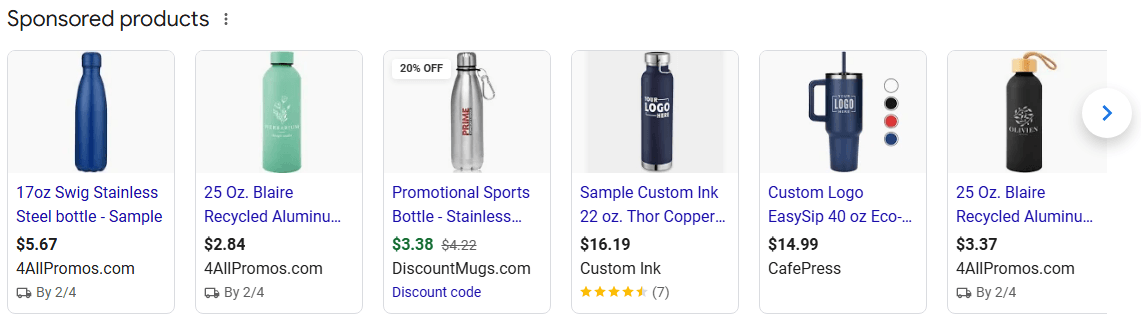
Check each platform’s specifications and policies before you build your creative.
What are PPC ad extensions?
Ad extensions add extra information or actions to your ads. Google Ads now calls them assets. Common types include:
- Sitelinks: Links to specific pages
- Callouts: Short selling points
- Call assets: Your phone number
- Location assets: Your address
- Structured snippets: Lists of features or services
- Image assets
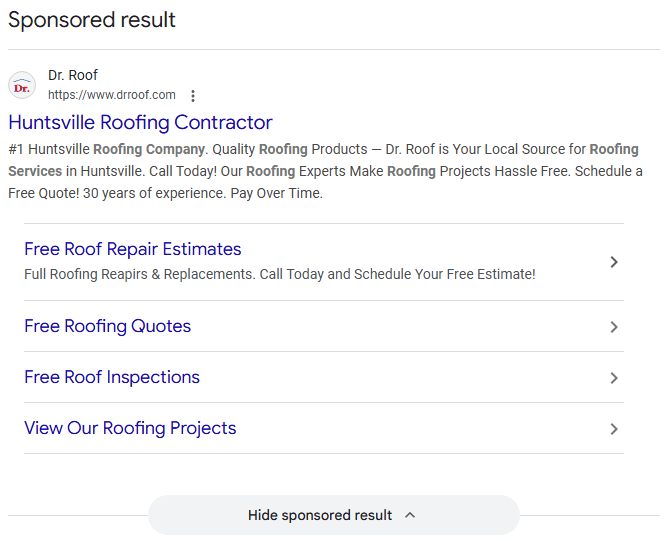
Google decides which eligible assets to show, and it considers their expected impact when ranking ads. For stronger responsive search ads, Google recommends at least 6 sitelinks.
Which is better, Google Shopping or Bing Shopping?
Neither is better for every business. Google Shopping gives you access to Google’s larger search audience. Microsoft Shopping adds reach on Bing and its partners.
Microsoft Shopping is easy to add. You need a Microsoft Merchant Center store and an approved product catalog, and you can import your Google Merchant Center feed and Shopping campaigns.
Most retailers start with Google, then add Microsoft once their campaigns are working. Compare cost per sale on each platform.
What do I need before I can set up Google Shopping ads?
Google’s requirements are:
- Linked accounts: A Google Merchant Center account and a Google Ads account
- A verified and claimed website
- Product data that meets Google’s product data specification, sent at least every 30 days
- Policy compliance: Shopping ads policies are different from standard Google Ads policies
How do I create Google Shopping ads?
Follow Google’s steps to create a Shopping campaign:
- Add your products to Merchant Center, and link it to Google Ads.
- In Google Ads, select the plus button, then New campaign, and choose your goal.
- Select Shopping as the campaign type, and choose your Merchant Center account.
- Name the campaign, then set your budget and automated bidding.
- Choose your locations, and create your first ad group and product groups.
- Review your settings, then select Publish campaign.
Your product ads are created automatically from your Merchant Center data. Google also offers Performance Max with a product feed, which it recommends for maximizing online sales across all Google inventory.
Where does display advertising fit in the sales funnel?
Display advertising can support any stage of the funnel, depending on your goal and audience.
- Awareness: Use broad segments, like affinity or custom segments, to introduce your brand.
- Consideration: Reach in-market segments of people researching products like yours.
- Conversion: Use your data segments, like website visitors and Customer Match lists, with messages about what sets you apart.
Match your audience, message, and landing page to the stage.
What audiences should you target for bottom-of-funnel display ads?
For bottom-of-funnel display ads, focus on people who’ve already shown strong interest:
- Visitors to product, pricing, or service pages
- People who started but didn’t finish a conversion
- Customer lists (Customer Match), like contacts who downloaded gated content, where policy allows
Use messages that highlight what sets you apart, and exclude people who already converted. Your goal is to turn interested visitors into leads or sales.
How do I write an effective ad?
Write ads that match what the searcher wants, state one clear benefit, and tell them the next step. Include:
- A headline with your main keyword or offer
- Benefits, not just features
- Specific details, like pricing, guarantees, or service area
- A clear call to action, like “Get a quote” or “Shop now”
- Short sentences that make every word count
In Google responsive search ads, you can add up to 15 headlines and 4 descriptions, and Google tests the combinations. Make sure your landing page delivers what the ad promised. Avoid excessive capitalization, repeated punctuation, and unsupported claims, since they can get ads disapproved.
What elements should I include in my ad copy?
Your ad should include a strong headline with your top keyword that grabs attention, emotional words that make readers feel excited or trusting, visual elements like symbols to stand out, benefits that show how your product helps the reader (not just features), short sentences that make every word count, and a clear call-to-action that tells viewers the next step like “shop our selection” or “contact us for service.”
With limited ad space, every word should impact viewers and guide them toward conversion.
What is headline pinning in Google Ads and how does it work?
Headline pinning lets you lock a headline or description to a specific position in a responsive search ad. It gives you control when certain text must appear, like a legal disclaimer, but it limits Google’s ability to test combinations.
Keywords and targeting FAQs
When running a PPC campaign, it’s crucial that your ads reach the right audience. You can make that happen through things like keywords and audience targeting. If you don’t know much about those, though, don’t worry — we’ve got the answers right here.
What are keywords in PPC?
Keywords refer to specific words or phrases that people look up in search results like Google. In the context of PPC, keywords are important because paid search ads are targeted to specific keywords. You bid on the keywords you want to target with your ads, and your ads should be tailored to those keywords.
What is keyword match type in PPC?
Keyword match type controls how closely a search has to relate to your keyword for your ad to be eligible. Google Ads has three: broad, phrase, and exact.
Matching is based on meaning and intent, not just the words in the query. Here’s how each works:
- Broad match: Reaches the most searches, including related ones that don’t contain your keyword’s words.
- Phrase match: Reaches searches that include the meaning of your keyword, including more specific searches.
- Exact match: Reaches searches with the same meaning or intent as your keyword.
For example, if you bid on “manufacturers in Dallas,” exact match could show for “Dallas manufacturing companies.” Phrase match could show for “sheet metal manufacturers in Dallas Texas.” Broad match could show for a related search like “contract fabrication shops near me.”
Review the search terms report regularly so you can see what each match type is actually triggering. Google’s match type guide has the full details.
What’s the difference between phrase match and broad match in Google Ads?
Phrase match keeps your ads close to your keyword’s meaning, while broad match reaches related searches that may use different words. The tradeoff is control versus reach.
Phrase match fits specific keywords where you want tighter control. Broad match fits discovery, especially when paired with Smart Bidding, which Google says is critical for broad match.
Either can match to more specific searches than your keyword. Check the search terms report and add negative keywords for anything that doesn’t fit.
When should I use broad match instead of phrase match?
Use broad match when you have reliable conversion tracking and a conversion-based Smart Bidding strategy, and you want to find relevant searches your keyword list misses. Smart Bidding evaluates each search at auction time, which helps keep broad match from spending on weak traffic.
Skip broad match if you’re using manual bidding, have no conversion tracking, or run a very small budget. In those cases it can spend on irrelevant searches.
Check search terms weekly at first, add negatives, and compare cost per conversion against your phrase and exact keywords. Also note that Google began upgrading campaigns that use the campaign-level broad match setting to AI Max in September 2026.
What are negative keywords?
Negative keywords refer to keywords you don’t want your ads to appear for. In Google Ads, for instance, you can set negative keywords to tell Google not to let your ads appear for those terms.
Negative keywords are helpful to target in situations where your target keyword could appear in multiple contexts. Say you’re targeting the keyword “printers for sale,” because you sell ink printers. If you’re using broad match or phrase match, your ad could end up appearing in a search for “3D printers for sale.”
Since you don’t sell 3D printers, that means your ad would be appearing for the wrong audience. To avoid that, you could list “3D” as a negative keyword, ensuring that your ads never appear in searches that include that term.
How do I choose keywords for my Google Ads campaign?
Choose keywords that match what your customers type when they’re ready to act. Use these steps:
- Start with what you sell. List the products, services, and problems you solve, and group them by intent.
- Prioritize specific, high-intent phrases. For example, “tactical backpack” will usually bring more qualified traffic than “backpack.”
- Include your brand name. Branded searches come from people who already know you.
- Add negative keywords. If you sell ink printers, you could exclude “3D.”
- Refine after launch. Use your search terms report to add strong terms and remove weak ones.
How many keywords per ad group should I use?
The general rule of thumb is less than 30 keywords per ad group, but there’s no precise answer since the right number depends on your ad content, target audience, and budget.
You’ll hear recommendations of 20 to 25 keywords, but those numbers aren’t accurate for every business. Quality always outweighs quantity, so you’re better off targeting 10 high-quality, long-tail keywords than 50 low-quality ones.
For example, if your daily PPC budget is $40 and your cost-per-click is $1, targeting 20 keywords gives you room for each keyword to generate clicks, but targeting 50 keywords means your budget can’t support your keyword list.
What’s the difference between branded and non-branded keywords?
Branded keywords contain your company’s name (like “WebFX SEO services” or “Zappos boots”), and they’re searched by users who already know about your brand and are typically further along in the buying process.
Non-branded keywords relate to your products or services but don’t include your company name (like “SEO services” or “running shoes”), and they’re used by people researching options who may not be familiar with your brand yet.
While branded keywords are unique to your company, non-branded keywords have far more options since the phrases your audience uses to research what you offer are almost limitless.
How do I add negative keywords to my Google Ads campaigns?
Log into Google Ads, select your campaign, click the Keywords tab, then click the Negative Keywords option where you can add your negative keywords at both the ad group level and campaign level.
This process takes just a couple of minutes and immediately optimizes your campaigns by preventing your ads from showing for irrelevant searches. Adding negative keywords at the campaign level applies them across all ad groups in that campaign, while adding them at the ad group level gives you more granular control over individual ad groups.
What are the most expensive keywords on Google?
The most expensive Google Ads keywords are in industries where one customer is worth a lot, like legal, insurance, and finance. In our U.S. campaign data, legal and insurance keywords often run $50 to $100 or more per click.
There’s no permanent list, since costs change with competition, location, and search intent. To see current estimates for your keywords, use Google Keyword Planner.
How do you perform keyword research for PPC campaigns?
Start with a list of the products, services, and customer problems you cover. Expand it with tools like Google Keyword Planner, KeywordsFX, or Ahrefs, and look at what your competitors target.
Then check search volume, estimated cost, and intent for each term. High volume alone doesn’t make a keyword valuable. A broad term like “recreation” can bring plenty of clicks from people who want something else.
Group keywords by theme, choose match types, and build a negative keyword list. After you launch, use the search terms report to add or remove keywords.
What types of targeting methods are available for Google Ads?
Yes, PPC ads can target specific audiences. In Google Ads, the options depend on your campaign type, but they generally fall into two groups:
- Audience targeting: Reach people by demographics, interests, in-market behavior, custom segments, and your own data, like remarketing lists and Customer Match.
- Content targeting: Reach people based on what they’re viewing, using keywords, topics, or specific placements.
Other platforms have their own options, like job title or company size on LinkedIn. Pick the targeting that fits your goal, then check performance by segment.
What are the best practices for using Google Ads targeting?
Use these best practices to keep your targeting focused:
- Segment your best customers. Group them by what they need, since a homepage visitor and a pricing page visitor shouldn’t see the same ad.
- Cut waste with exclusions. Use negative keywords, placement exclusions, and exclusions for people who already converted.
- Match your location settings to how customers buy. See our location targeting answer.
- Review results by audience and placement. Shift budget toward what converts.
How does location targeting work in Google Ads?
Yes, PPC ads can target specific locations. Google Ads location targeting lets you choose where your ads can show, from entire countries down to a radius around your business.
Google now offers two location options:
- Presence or interest: The default and the recommended option. It reaches people in, regularly in, or who’ve shown interest in your locations.
- Presence: Reaches only people likely in or regularly in your locations.
Google removed the old “search interest” option in 2023.
If you serve customers at a physical location, like a salon in Harrisburg, PA, choose Presence. That avoids paying for clicks from people who are interested in the area but won’t visit. Presence or interest can work better for travel, real estate, and education.
Location signals are Google’s best estimate, so check your location reports for traffic outside your market.
How do I use PPC for my local business?
PPC works well for local businesses because you can show ads only to people in your service area. That keeps you from paying to reach people who can’t visit, and competition is often lower than for national terms.
To get started:
- Set your location targeting, and add location terms to your keywords, like “hair salons in Harrisburg, PA.”
- Consider Local Services Ads if they’re available for your business type.
- Send clicks to a landing page with accurate business details, fast load times, and one clear call to action.
- Track calls as well as form fills.
- Use remarketing to bring back website visitors.
Remarketing and retargeting FAQs
Have questions about remarketing and retargeting ads? Get the answers here!
What is remarketing in PPC?
Remarketing refers to marketing directed at users who have already expressed an interest in your business, typically by visiting your website. Many ad platforms let you target ads to users who have visited your site, ensuring that you’re reaching the people who are already the most interested in you.
What’s the difference between remarketing and retargeting?
Remarketing typically refers to re-engaging users through email marketing (like abandoned cart emails or product recommendations), while retargeting usually refers to showing display ads or social media ads to users who previously interacted with your brand.
The distinction isn’t really about the strategy itself but rather the channel you’re using, and in today’s digital landscape, these lines are becoming increasingly blurry as platforms like Google Ads and Facebook allow you to target email lists with paid ads.
How does email remarketing work?
Email remarketing uses automated email campaigns to bring users back to complete a purchase or make additional purchases based on their previous interactions with your site.
For example, if a user abandons an item in their shopping cart, you can automatically send them a reminder email the next day (often with a special discount to encourage completion), or you can email existing customers with product recommendations that complement their recent purchases.
Why should I use remarketing?
Remarketing helps you reconnect with the 96% of visitors who leave your site without purchasing, giving them multiple chances to convert while building brand awareness and trust through repeated exposure.
Every time someone sees your ad, they naturally gain more trust in your brand, and this repeated visibility slowly leads them down the sales funnel toward conversion. Remarketing delivers a high return on investment because it targets people who already showed interest in your business, making them more likely to come back and buy compared to cold audiences.
What are the different types of remarketing?
The main types of remarketing include display remarketing (shows ads on over 2 million sites in Google’s Display Network), dynamic remarketing (shows ads featuring the specific products or services users viewed on your site), and search remarketing (shows text ads at the top of search results to people looking for relevant information).
You can also use video remarketing on YouTube, mobile app remarketing for apps and mobile sites, social media remarketing on platforms like Facebook and Instagram, distribution list remarketing for email subscribers, and customer list remarketing to target previous customers. Each type targets users in different formats and on different platforms based on where your audience spends time online.
What is Google Ads Customer Match?
Customer Match is a Google Ads feature that lets you upload first-party customer data, like email addresses or phone numbers, to build audience segments for your campaigns. Google matches your list to signed-in Google users.
You can use these segments to reach existing customers, build upsell campaigns, or exclude customers from acquisition campaigns. For example, if you collect emails at an open house, you could upload that list and show ads to those contacts.
You can only upload data you collected directly from customers, and you need any required consent and disclosures. Google’s Customer Match policy also requires a good policy and payment history on your account, so not every account is eligible.
How do I set up Google Ads Customer Match?
To set up Customer Match, follow the steps in Google’s upload guide:
- Prepare your file. Collect data with permission and save it as a CSV. Column headers must be in English (Email, Phone, First Name, Last Name, Country, Zip).
- Open Audience manager. In Google Ads, click Tools, then Shared library, then Audience manager, then Your data segments.
- Create the list. Click the plus button, choose Customer list, name it, and upload your file.
- Confirm compliance. Check the box confirming the data was collected in line with Customer Match policies.
- Set a membership duration. The maximum is 540 days.
- Upload. Click Upload and create.
Processing can take up to 48 hours. After that, you’ll see your match rate. Lists need at least 100 active users to serve ads, so refresh them regularly to keep them eligible.
How do I create custom audiences in Google Ads?
Custom segments are audiences you build by entering search terms, URLs, or apps that signal your ideal customer’s interests. They’re different from Customer Match, which uses your own customer list.
To create one, open Audience manager under Tools and Shared library, then go to Custom segments and click the plus button. Enter the terms or URLs, name the segment, and save it.
Use custom segments to reach new prospects and Customer Match to reach people you already know.
What are the best practices for retargeting ads?
Good retargeting reaches the right people with the right message. Follow these best practices:
- Build audiences around meaningful actions, like visiting a product page or starting checkout.
- Tailor the message to each audience. Someone who abandoned a cart needs a different ad than a blog reader.
- Exclude people who already converted.
- Set frequency caps where the platform allows.
- Test your creative regularly, and track conversions to see what works.
What are common retargeting mistakes to avoid?
Most retargeting problems come from showing the wrong ads to the wrong people, too often. Avoid these mistakes:
- Showing the same ad too often.
- Retargeting people who already bought.
- Using audiences that are too broad or too small.
- Ignoring consent and privacy requirements.
- Skipping performance checks. There’s no universal ideal number of impressions per person, so watch frequency alongside conversions.
Ad placement and visibility FAQs
One area you may have questions about is where your ads rank relative to those from other companies. Below are the answers to some common questions about PPC ad placement and visibility.
What is Quality Score in Google Ads?
Quality Score is a diagnostic rating from 1 to 10 that shows how your ad experience compares with other advertisers’ for a keyword. It’s based on three components: expected click-through rate, ad relevance, and landing page experience. Each one is rated above average, average, or below average.
Google says Quality Score isn’t an input in the ad auction and shouldn’t be treated as a KPI. So don’t chase a 10. Use the component ratings to find what to fix.
For example, a below average landing page experience usually means your page doesn’t deliver what the ad promised. Fix that, then check your conversions.
What is Ad Rank in Google Ads?
Ad Rank is the score Google calculates in each auction to decide whether your ad is eligible to show and where it appears relative to other ads. It isn’t your ad’s position. It’s the value that determines your position.
Google recalculates Ad Rank every time a search triggers an auction, so your position can differ from one search to the next. Ad Rank also helps decide which assets and ad formats show with your ad.
How does Google determine ad placement?
Google determines ad placement by comparing the Ad Rank of every eligible ad in an auction. The ad with the highest Ad Rank gets the top spot, and the rest follow in order.
Google combines several factors to calculate Ad Rank:
- Auction-time ad quality (expected click-through rate, ad relevance, and landing page experience)
- Your bid
- Ad Rank thresholds (minimums your ad has to clear to show at all)
- How competitive the auction is
- The context of the search
- The expected impact of assets and other ad formats
The thresholds are typically higher for ads above the search results than for ads below them. Google doesn’t publish the exact formula.
Bid alone doesn’t decide placement. Quality Score also isn’t a direct input, though the same quality signals feed Ad Rank at auction time. If your page doesn’t match your ad, expect a weaker position even with a high bid.
Can a lower bid outrank a higher bid?
Yes. Google’s auction uses quality as well as bid, so an advertiser with a lower bid can win a higher position if its ads and landing page are more relevant.
For example, you bid $5 with an ad that doesn’t match the landing page, and a competitor bids $3 with a closely matched ad and page. The competitor could outrank you and still pay less per click.
Ad Rank thresholds, search context, and assets can also change the outcome, so you can’t simply bid your way to the top.
Why are my ads not showing?
Ads usually don’t show because of a status problem, a budget limit, narrow targeting, or a weak position in the auction. Check these in order:
- Status. Look for paused, ended, limited, or disapproved campaigns, ad groups, and ads.
- Policy. Check for disapprovals in the Policy manager.
- Budget. Your daily budget may run out early, so check how much impression share you’re losing to budget.
- Targeting. Location, schedule, language, or audience settings may be too narrow, or your keywords may have low search volume.
- Auction. A low Ad Rank, from low bids or weak relevance, can keep you from showing.
Searching for your own ad isn’t a reliable test. Results vary by location, timing, and user. Use Google’s Ad Preview and Diagnosis tool instead.
How can I improve my Google PPC ad ranking?
Improve the factors that feed your Ad Rank: ad relevance, expected CTR, landing page experience, assets, and bids.
Start with the ad and landing page. Match your copy to the search, and send clicks to a page that delivers what the ad promised. If your ad promotes “cheap golf bags,” the landing page should show discounted golf bags, not your homepage.
Then add assets like sitelinks and callouts, since Google considers their expected impact. Raise bids only where the conversions justify the cost.
Use Quality Score components to diagnose problems. And track conversions, not just position, because the top spot isn’t always the most profitable.
Why was my Google Ad disapproved?
Google disapproves an ad when it breaks an advertising policy or when there’s a problem with the landing page. Common causes include:
- Editorial issues, like repeated punctuation or symbols in a headline
- Restricted content, like products or services Google limits
- Landing page problems that conflict with Google’s policies
To find your exact reason, hover over the “Disapproved” status in your Ads table, then select the policy link.
How do I fix a disapproved Google Ad?
The fix depends on the policy violation, but the process is the same:
- Hover over the “Disapproved” status and read the policy.
- Go to Ads, hover over the ad, and select Edit.
- Change the ad to comply with the policy, then select Save.
Google reviews the ad again automatically, usually within 1 to 2 business days. If the landing page is the problem, fix the page first, then appeal so Google can review it again. If you think Google made a mistake, see our appeal answer below.
Can I appeal a Google Ads disapproval?
Yes. If you’ve fixed the issue or think Google made a mistake, you can appeal in your account:
- Go to Tools, then Troubleshooting, then Policy manager.
- On the Policy issues tab, select Appeal next to the ad.
- Choose “Dispute decision” or “Made changes to comply with policy,” then select Submit.
You can also select disapproved ads on the Ads page, choose Edit, then Appeal policy decision. Each ad is limited to 3 appeals, and you should wait at least 24 hours between appeals on the same ad. You can track results on the Appeal history tab in Policy manager.
How much should I bid on Google Ads keywords?
Bid an amount you can comfortably afford while staying competitive, keeping in mind that Google displays ads based on both your bid amount and your Quality Score (Google’s assessment of your campaign quality). You only pay when someone clicks your ad, so you won’t waste budget on impressions.
Monitor your campaign performance after launch and adjust bids based on results. For high-performing ads, you might increase your budget, while underperforming ads may need to be paused or reoptimized.
Should I use search advertising or display advertising?
Use search advertising if you have a small marketing budget and need precise control over who sees your ads, cater to a local market, have products with short sales cycles, or need to reach customers urgently searching for your services.
Use display advertising if you offer products with lengthy sales cycles (like cars or enterprise software) where you’re generating leads rather than immediate sales, cater to niche or luxury buyers who spend time on select sites, want to use photos and videos in your ads, or focus on building brand awareness rather than immediate conversions.
If your marketing budget allows, you can use both search and display ads together since they serve different purposes and aren’t interchangeable, with search ads capturing active shoppers and display ads building awareness and remarketing to previous visitors.
PPC landing page FAQs
Every PPC ad links to a landing page. But what are landing pages, and how should you approach yours? Find the answers to those questions below.
What is a PPC landing page?
In a PPC ad campaign, the landing page is the website page that the ad links to. When a user clicks on your ad, it will direct them to the landing page. Typically, that landing page will directly encourage users to convert.
What makes a high-converting landing page?
Successful landing pages share several qualities, including:
- Clear CTA: A call to action (CTA) that directly tells users what action you want them to take.
- No clutter: A lack of excessive information or graphics that might distract users from the CTA.
- Cohesive message: A single-minded message focused only on one CTA, rather than multiple, competing CTAs.
These are the best ways to ensure that visitors to your landing page take the action you want from them.
Should PPC ads lead to my homepage?
Generally speaking, it’s not a good idea to use your website’s homepage as a landing page. That’s because landing pages should be highly specific and actionable, which homepages are not. Whereas a homepage typically features general information about your business, a good landing page will highlight a specific product or service, along with a single CTA that it directs users toward.
How can I improve my Google Ads landing page to generate more leads?
Improve your landing page by making it fast (users expect two-second load times or less), relevant to your ad content, and easy to navigate without pop-ups or confusing elements.
Use PageSpeed Insights to identify technical issues like render-blocking resources, coordinate your landing page messaging with your ad copy (if you advertise red sneakers at 50 percent off, your landing page should emphasize that exact offer), and make your contact information and conversion path obvious.
Google evaluates landing page quality when determining your Ad Rank, so a better landing page can lower your cost-per-click and increase conversion rates.
PPC campaign set up and management FAQs
Learn how to set up a PPC campaign and how to manage an effective one in this section!
What are PPC goals?
PPC goals are the specific results you want your paid campaigns to deliver, like leads, sales, calls, or brand awareness. They should connect to your overall business goals.
Goals can change over time. A new business might focus on awareness for the first few months, then shift to generating leads and sales for specific products.
How do you set PPC campaign goals?
Set PPC goals by starting with what your business needs:
- Start with the business outcome, like 50 qualified leads a month.
- Pick the metric that shows it, like cost per lead or ROAS, and set a target.
- Add benchmarks. Use weekly or monthly targets for the short term and quarterly or annual targets for the long term.
- Make each goal SMART: specific, measurable, achievable, relevant, and time-bound.
- Check your progress regularly, and adjust based on what your data shows.
What are the best digital advertising tips to drive results?
Start with SEO optimization (using target keywords and improving page speed) and launch PPC campaigns through Google Ads where you only pay when users click your ads.
Create compelling content like blog posts and videos, run social media ads where users spend most of their time online, and know your target audience so you can limit ads to people who fit your customer profile.
Use clear calls to action, display customer testimonials to build trust, retarget visitors who left without converting, apply consistent branding across all advertising, and track key performance indicators like conversion rate and cost per lead through Google Analytics to see what’s working.
What should I include in my PPC campaign checklist?
A PPC campaign checklist covers what to set up before launch and what to review afterward.
Before launch
- Goal: One measurable target, like 30 leads a month
- Targeting: Your audience, location, and keywords (plus negative keywords)
- Ads and landing pages: Ads and a page that match the offer
- Budget and bidding: A daily budget and a bidding strategy
- Conversion tracking: A test confirming form fills and calls are recorded
After launch
- Weekly: Review search terms and spend
- Monthly: Compare results to your goal, and test one change
How do you manage a successful PPC campaign?
Managing a successful PPC campaign comes down to four things:
- Targeting specific keywords. Use terms that show intent to buy, like “ladders for sale in [your area],” instead of just “ladders.”
- Matching your landing pages. Send clicks to pages that answer the searcher’s question, not your homepage.
- Writing ads that fit the search. Include your keyword or offer and a clear call to action, like “Buy now” or “Sign up now.”
- Tracking and refining. Use your results to adjust over time, and avoid big changes based on a few days of data.
Should I use ad scheduling for my PPC campaigns?
Yes, implementing ad scheduling can help you avoid wasting money running ads when no one is available to answer your phones or when your target audience isn’t actively searching.
By default, your ads show 24/7, but for B2B businesses, you’ll most likely want to adjust your ad schedule to your business hours so you have someone in the office to answer calls from potential clients.
For B2C businesses, check the Day & Hour report to identify peak hours, and remember that the ad schedule is determined by your account’s time zone, so factor in time differences if you sell to consumers across multiple time zones.
What are automated rules in Google Ads?
Automated rules in Google Ads let you make changes to your account automatically based on settings and campaign performance conditions you choose. You can set automated rules at the campaign, ad group, keywords, and ad text levels to handle tasks that are usually done manually.
For example, you can schedule ads to go live at midnight for a holiday promotion, pause campaigns that spend a certain budget partway through the month, or pause low-performing ads based on metrics like CTR and impressions. Setting up automated rules takes about two minutes but can save you 1-2 hours per week in campaign optimization.
What is PPC automation and what are its benefits?
PPC automation uses platform tools or software to handle tasks like bidding, ad creation, targeting, and reporting. The main benefits are:
- Time savings on repetitive tasks
- Faster reactions to performance changes than manual updates allow
- Easier scaling across more campaigns
- Simpler reporting, with data from multiple sources in one place
Automation depends on accurate conversion data and gives you less direct control. Review your search terms and reports regularly.
What are common PPC performance issues I might not realize are hurting my campaigns?
Five common issues that may be hurting your PPC performance include:
- Incorrect conversion settings (either not set up at all or set up incorrectly)
- Keyword intent that doesn’t match your product or service
- Incorrect or outdated location targeting
- Lack of ad scheduling so your ads run 24/7 even when no one is available to answer calls
- Redirecting or broken landing pages that affect quality scores and increase cost-per-click.
For example, if you’re targeting keywords that are too generic (like “recreation” for a camping products company), you’re likely wasting budget on irrelevant clicks from searchers looking for other types of recreation.
PPC tools and technology FAQs
As with just about any digital marketing strategy, PPC works best when it’s approached with the right digital toolset. But what tools should go in that toolset? We’ll answer that question with the below FAQs about PPC tools and technology.
What tools are used for PPC?
There are several different types of tools you can use for PPC. Here are some of the main types of tools you might take advantage of:
- Paid advertising networks (e.g., Google Ads, Microsoft Ads)
- Keyword research tools (e.g., Google Keyword Planner, KeywordsFX)
- Competitor research tools (e.g., Ahrefs, SpyFu)
- Landing page design tools (e.g., Leadpages, Unbounce)
What is automated bidding in PPC?
Automated bidding lets an ad platform set your bids based on a goal, like conversions or return on ad spend. You set the goal, and the platform adjusts bids at auction time.
In Google Ads, Smart Bidding covers the conversion-focused strategies: Maximize Conversions, Maximize Conversion Value, Target CPA, and Target ROAS. Maximize Clicks is also automated, but it optimizes for traffic, not conversions.
Performance Max is a campaign type that uses Smart Bidding, but it isn’t what automated bidding means.
Automated bidding only works as well as your conversion tracking, because the platform optimizes toward whatever conversions you’ve marked as primary. Don’t hand it over without monitoring. Review your search terms, targets, and conversion volume regularly.
How much conversion data do I need for automated bidding?
Google doesn’t set a minimum. It recommends evaluating Smart Bidding over longer periods, such as a month or more, with at least 30 conversions (50 for Target ROAS). That’s guidance for judging results, not an eligibility rule.
Smart Bidding can also use data from your other campaigns, so new campaigns may still perform reasonably well.
If you have low conversion volume, Google suggests adding relevant keywords to expand targeting. Consider optimizing for an earlier action, like a form submission, if purchases are rare. Just confirm those leads are actually good.
How does AI affect PPC advertising?
AI has changed the way advertisers approach PPC in several different areas. Some of the ways it’s impacted paid advertising include:
- Automating bidding and targeting
- Predicting user search intent
- Assisting with audience segmentation
- Detecting patterns and trends in ad data
In short, it functions as a tool for improving PPC automation and data analysis.
How do I fix conversion tracking issues in Google Ads?
Start by checking each conversion action’s status in your account, then work through the usual causes:
- Tag problems. Confirm the tag fires once, on the right action. Duplicate tagging, such as a CMS plugin plus a manual tag, can double count conversions.
- Auto-tagging. Make sure it’s on, and that redirects and click trackers pass the click ID (GCLID) to your landing pages and conversion pages.
- Primary vs. secondary. Conversions created through Google Analytics are set as secondary by default. Change them to primary if you want to bid on them.
- Reporting gaps. Compare Google Ads numbers with your analytics and CRM data, and investigate big differences.
Fix tracking before you rely on automated bidding, since it optimizes toward whatever you’ve set up.
PPC metrics and analytics FAQs
Measuring your results is always important, and PPC is no exception. If you don’t know what kinds of results you’re driving, you won’t know if your PPC is working like it should. That’s why in this section, we’ll look at some FAQs related to PPC metrics and analytics.
What metrics matter most in PPC?
Some of the most important metrics to track in your PPC campaigns include:
- Conversion rate
- Click-through rate (CTR)
- Cost per click (CPC)
- Return on ad spend (ROAS)
- Customer acquisition cost (CAC)
We’ll look at some of those metrics in more detail below.
What is a conversion in PPC?
In PPC, a conversion is when someone takes the action that your ad is trying to get them to take. That means for a conversion to happen, someone has to see your ad, click on it, read the CTA on the landing page, and then do what the CTA is encouraging them to do.
A conversion could refer to a making a purchase, signing up for an email list, starting a free trial, or any other action you want your audience to take.
What is a good conversion rate for PPC?
A good PPC conversion rate depends on your business model. Our Google Ads benchmarks for the U.S. put the overall average at 3% to 5%.
- Ecommerce: 2% to 3%
- B2B services: 5% to 10%
- Lead generation: 7% to 12%
These are directional ranges, not targets. Compare your results with your own history, and look at cost per lead and revenue alongside conversion rate.
What is a good click-through rate (CTR) for PPC?
A good CTR depends on your campaign type. In our 2026 U.S. campaign data, search ads average a 3% to 5% CTR, and top performers reach 7% to 10%. Display ads run much lower, at 0.05% to 0.1%.
A higher CTR only helps if conversions follow. Otherwise, you’re paying for clicks that don’t produce revenue.
What’s the difference between CPC, CPA, CPL, and ROAS?
- CPC (cost per click): Ad cost ÷ clicks
- CPA (cost per acquisition): Ad cost ÷ conversions
- CPL (cost per lead): Ad cost ÷ leads, which is CPA when your conversion is a lead
- ROAS (return on ad spend): Revenue from ads ÷ ad spend. For example, $5,000 in revenue from $1,000 in spend is a 5:1 ROAS.
Use the metric that matches your goal: CPC for traffic, CPL for leads, CPA for other conversions, and ROAS for revenue. ROAS doesn’t account for product costs or profit margins.
How do I calculate PPC ROI?
PPC return on investment (ROI) compares the profit your ads generate with what you spend on them. The formula is:
ROI = (profit from ads minus ad cost) ÷ ad cost × 100
For example, say your ads earn $6,000 in profit and cost $3,000. Your ROI is ($6,000 minus $3,000) ÷ $3,000 × 100, or 100%.
That means you earned $1 in profit for every $1 you spent on ads.
What’s the difference between impressions, clicks, and conversions?
These three metrics track how people move from seeing your ad to taking action:
- Impression: Your ad is shown to someone.
- Click: Someone clicks your ad.
- Conversion: Someone completes the action you want, like a purchase or form fill.
Every click starts with an impression, and most conversions start with a click. But not every impression leads to a click, and not every click leads to a conversion.
How do I track impressions and clicks for my ads?
Track impressions and clicks in the platform where you run your ads:
- In the ad platform: In Google Ads, your Campaigns page shows impressions, clicks, and click-through rate (CTR), which is the share of impressions that lead to clicks.
- In your analytics tool: Google Analytics shows what visitors do on your landing page after they click.
How do I improve low clicks or conversions on my ads?
If you’re getting impressions but not many clicks, that’s a sign your ad copy isn’t resonating with your audience or doesn’t align with search intent for the keywords you’re targeting.
Reoptimize your ad copy to be more engaging and relevant. If you’re getting clicks but not conversions, the issue is with your landing pages. Make sure your landing page content matches your ad, create a single clear call to action so users aren’t confused, and ensure the page is enticing enough to convert interested visitors.
What are offline conversions in Google Ads?
Offline conversions are outcomes that happen after the click and off your website, like a phone sale, an in-store purchase, or a deal closed in your CRM. Google Ads can’t track them automatically.
You import them into Google Ads so it can see which ads and keywords lead to real business results. That also gives automated bidding better data to optimize for.
How do I set up offline conversions in Google Ads?
Google now recommends enhanced conversions for leads, an upgraded version of offline conversion import:
- Go to Goals, then Conversions, then Settings, and turn on enhanced conversions for leads.
- Create an import conversion action, and choose a goal like qualified lead or converted lead.
- Connect your CRM or file through Data Manager, or a partner like HubSpot or Zapier.
- Upload conversions with the Google click ID (GCLID) and, if possible, a hashed email or phone number.
Upload promptly. Conversions uploaded more than 90 days after the click aren’t imported, and the limit is 63 days for enhanced conversions for leads.
How do I set up conversion tracking in Google Ads?
To set up conversion tracking, follow these steps:
- Define your conversions. Choose actions that matter to your business, like purchases, qualified form submissions, or calls.
- Install the Google tag. Google recommends the Google tag installed site-wide with event snippets, or Google Tag Manager with the conversion linker. Turn on auto-tagging.
- Or import from Google Analytics. Only events marked as key events in GA4 can be imported, and they can take 24 to 48 hours to appear.
- Set the count. “Every” fits sales, and “One” fits leads.
- Choose attribution. Google Ads now offers data-driven attribution (the default for most conversions) and last click. First click, linear, time decay, and position-based were retired in 2023.
- Turn on enhanced conversions. This sends hashed first-party data to improve measurement. It isn’t supported for conversions imported from Google Analytics goals.
- Mark primary conversions. Only primary conversions are used for bidding.
Test the setup before you launch.
How does PPC call tracking work?
PPC call tracking uses unique phone numbers to show which campaigns, ads, and keywords drive calls. Each number is tied to a specific campaign or landing page, and calls forward to your main line.
With dynamic number insertion, a script on your site swaps the displayed number based on how the visitor found you, like their source, landing page, or keyword. That lets you connect each call back to the ad that produced it.
What are the benefits of PPC call tracking?
Call tracking gives you:
- Call sources: See which campaigns, ads, and keywords drive calls.
- Split testing: Assign different numbers to different ad versions.
- Call data: Learn when people call most, to guide targeting and scheduling.
- Better bidding: Find which keywords produce the most calls, and adjust your bids.
- Revenue tracking: Tie calls to revenue, so you can put a dollar figure on each campaign.
PPC testing and optimization FAQs
When it comes to creating effective PPC ads, it’s important to test and optimize your ads to maximize your ROI. Find how to test and optimize your ads below!
What is PPC optimization?
PPC optimization is the practice of analyzing and improving your pay-per-click campaigns at the campaign and ad group level by updating elements like landing pages, ad copy, and keyword bids. The goal is to help your ads win valuable ad space, earn more clicks from qualified audiences, and boost conversions without wasting your ad spend on underperforming elements.
What is PPC testing?
PPC testing, often called A/B testing, means changing one element of a campaign at a time and comparing the results to see what performs best. You can test ad versions, features, and settings to learn what your audience responds to.
Use what you learn as a template for future campaigns. In Google Ads, Experiments lets you run ad variations and custom experiments. Google suggests allowing 4 to 6 weeks if results aren’t clear yet.
What should you test in your PPC ads?
Good things to test include:
- Ad copy: Offers, calls to action, and urgency. For example, “10% Off” vs. “$15 Off,” or “Buy Now” vs. “Place Your Order.”
- Landing pages: Changes to your current page, or a different page entirely.
- Assets: Sitelinks, images, and other ad assets.
- Bidding strategies and match types: Compare how each affects cost per conversion.
Change one variable at a time, and wait for enough data before choosing a winner.
What is A/B testing for responsive search ads?
A/B testing for responsive search ads (RSAs) compares different messages, offers, or ad versions to see which drives more conversions. RSAs already test combinations of your headlines and descriptions automatically, so you test at a higher level.
Because RSAs help you qualify for more auctions, Google suggests judging them by incremental clicks and conversions for the whole ad group or campaign, not just CTR on one ad.
What are the best A/B testing strategies for responsive search ads?
The five most effective A/B testing strategies are:
- Segmenting by message (creating different ad groups around specific keywords and themes)
- Testing dynamic keyword insertion (comparing ads with and without DKI enabled)
- Pinning vs. mix-and-match (testing pinned headlines against freely rotating ones)
- Pseudo-ETA tests (creating pinned ads that resemble expanded text ads compared to control responsive search ads)
- Landing page testing (comparing different page versions or redirecting to different site pages)
Each strategy helps you optimize different aspects of your ad performance.
How do I A/B test responsive search ad headlines?
Use ad variations in Google Ads, following Google’s setup steps:
- Go to Experiments, then Ad variations, and click the plus button.
- Choose your campaigns, and select Responsive search ads.
- Pick a variation type, like find and replace (“Book now” with “Call now”) or update text.
- Name the test, set start and end dates, and choose the share of traffic.
- Create the variation, and compare results before applying it.
Test one change at a time. Google doesn’t recommend pinning for most advertisers because it limits the combinations it can test. If you pin, pin 2 or 3 unique assets to each position, not just one.
PPC costs and budgeting FAQs
The cost of PPC is one of the largest concerns for many businesses, but we’re here to help clear up some of the confusion around it. Here are the answers to some of the most common questions about PPC costs and budgeting.
How much does PPC cost?
PPC costs include ad spend (what platforms charge for clicks) and management costs (agency fees, tools, or in-house time). You set the ad budget, so you can start small and scale as results come in.
On Google Ads, you control your budget, but the ad auction determines what you pay per click. Your industry, keywords, and competition all affect the price. On the Google Search Network, that’s typically $0.51 – $5 per click, and businesses typically spend $100 – $10,000 per month.
Cost per lead is a better measure of value than cost per click. Across our client campaigns, it runs from about $70 to $819 depending on industry and whether you sell to businesses or consumers.
Agencies typically charge a percentage of ad spend or a flat fee. See how our PPC pricing scales with your ad spend.
What is the average cost per click (CPC) of paid advertising?
The average cost per click for Google search ads in the U.S. is $2 to $4, based on our 2026 campaign data. Display clicks cost less, at $0.50 to $1 on average.
Competitive industries cost much more. Legal and insurance keywords often run $50 to $100 or more per click.
Treat these as directional ranges. Your CPC will depend on your industry, keywords, location, competition, and bidding strategy. Social ads work differently and usually have their own benchmarks.
How does PPC bidding work?
PPC bidding is how you tell an ad platform what a click or conversion is worth to you. With manual bidding, you set a maximum cost per click. With automated bidding, you set a goal, like a target CPA, and the platform sets bids at auction time.
Your max bid is a ceiling, not the price. In Google Ads, you generally pay the minimum needed to clear Ad Rank thresholds and beat the advertiser below you. Your actual CPC is often lower, sometimes much lower. Bid adjustments and automated bidding can push it above your max.
For example, you set a max CPC of $4.00 for “car repair services.” If the next advertiser’s Ad Rank only requires you to pay $3.10, that’s what you’re charged.
How do I reduce wasted PPC spend?
Reduce wasted spend by cutting the clicks that don’t lead to customers. Here’s where to look:
- Search terms report: Add negative keywords for irrelevant queries.
- Targeting: Exclude locations, schedules, and audiences that don’t convert.
- Landing pages: Fix pages that don’t match the ad.
- Tracking: Make sure your bidding optimizes toward qualified conversions.
- Budgets: Move spend from weak campaigns to strong ones.
How do I lower my customer acquisition cost?
Customer acquisition cost (CAC) is what you spend to win one new customer. To lower it, either spend less per customer or win more customers from the same spend:
- Remove clicks that don’t convert, and add negative keywords for queries that bring traffic but no customers.
- Segment your campaigns so you can put more budget behind the ones that produce customers.
- Improve your landing pages and offers to raise your conversion rate.
- Track lead quality, so you spend on leads that become customers.
When should I increase or decrease my PPC budget?
Increase your budget when a campaign is limited by budget and is meeting your cost and return targets. Decrease or shift it when results stay outside your targets, or when a stronger campaign needs the funding.
Before you change anything:
- Check that your conversion tracking is accurate.
- Look at conversion quality, not just volume.
- Account for seasonality.
- Change budgets gradually, and watch cost per conversion.
How do I scale a PPC campaign?
If you’re looking to scale your PPC strategy, there are a few ways you can do so. Some of the best tactics include the following:
- Experimenting with different channels and platforms
- Investing in advertising automation tools
- Increasing your advertising budget
- Using data to evaluate and enhance your campaigns
Each of those steps helps you level up your PPC and expand the reach and impact of your campaigns.
What is the cost per lead formula?
Cost per lead (CPL) is the total campaign cost divided by the number of leads in the same period. If you spend $1,000 and generate 50 leads, your CPL is $20.
State what your cost includes. Ad spend alone gives a different number than ad spend plus management fees, creative, and tools.
For reference, the average cost per acquisition (CPA) across our U.S. Google Ads campaigns in 2026 is $50 to $80, and B2B services run $100 to $300. These are directional planning ranges. When your conversion is a lead, that CPA is your average Google Ads cost per lead.
Whether your CPL is good depends on how many leads become customers and what each customer is worth. If 1 in 5 leads becomes a customer, a $60 CPL means about $300 per customer, which works if each customer brings in $1,000.
How do I reduce my cost per lead?
Zero in on your target audience by segmenting them into subgroups based on demographics, socioeconomic status, and shared characteristics instead of targeting one large group, which helps you create ads that resonate with specific audiences and avoid wasting money on uninterested leads.
Focus on creating relevant content that aligns with each segment’s interests (for example, a young professional woman needs different content than a married mother), which increases engagement and conversions since people interact more with tailored messages.
Use remarketing to re-engage people who showed interest but didn’t convert, which costs very little to run and often provides the final nudge leads need to become customers, lowering your overall CPL while increasing conversions.
PPC audits and lead generation FAQS
Explore PPC audits, how to conduct one, and how PPC can help you generate more leads below!
What is a PPC audit and how do I conduct one?
A PPC audit assesses the short- and long-term value of your paid advertising strategy by examining the performance, cost, and returns of your ad campaigns, and it should happen on a routine basis to maximize results. Start by choosing a date range (at least three months of data), downloading your campaign data from Google Ads or Bing, and documenting your budget and cost-per-click.
Review your ad content and landing pages for relevance and clear calls to action. Check your quality score and keyword targeting (focusing on long-tail keywords), then analyze your click-through and conversion rates together. Review your bids, location targeting, and ad schedule effectiveness.
You’ll also want to compile areas of wasted spend, like irrelevant keywords that need negative keyword blocking. Double-check your conversion tracking accuracy, conduct a competitor PPC analysis, and evaluate any automated ad campaigns to ensure they’re still driving conversions aligned with your goals.
How do I generate leads with PPC ads?
You can generate leads with PPC by targeting industry-related keywords that match your products or services, writing eye-catching headlines that include your target keywords and unique selling points like free consultations or pricing, using clear calls to action like “Sign up now” or “Get a quote today,” and incorporating ad extensions that display additional information or form fields. Each of these strategies makes it easier for potential customers to find you and take action. The key is working within your budget and testing different combinations to see which performs best for your business.
How do I measure PPC lead quality, not just lead volume?
Measure lead quality by tracking what happens to leads after they come in:
- Define a qualified lead with your sales team, using criteria like budget, need, and timing.
- Import offline conversions from your CRM (see our offline conversions answer), so Google Ads can optimize for qualified leads and sales.
- Track cost per qualified lead and your lead-to-customer rate.
- Review by campaign and keyword, since cheap leads can come from low-quality searches.
PPC services and agencies FAQs
For this final section, we’ll look at some questions related to hiring a professional agency for help with your PPC strategy.
Should I hire a PPC agency?
Hire a PPC agency when you don’t have the time, skills, or tools to manage campaigns well. If you already know PPC and have the hours to run it, you may not need one.
Signs it’s time to hire include:
- Wasted spend or rising acquisition costs
- Stalled performance
- Unreliable conversion tracking
- Plans to expand to new platforms
- No one to own the account
When is it time to hire a PPC agency?
The most common signs that it’s time to hire a pay-per-click agency is an organization not having the time, resources, or skills to manage the company’s paid advertising, which results in wasted ad spend and higher acquisition costs.
What is the difference between in-house PPC management and a PPC agency?
The difference between in-house PPC management and a PPC agency are the capabilities. PPC companies have greater capabilities, through team talent and ad network partnerships, while in-house management teams have smaller team sizes and fewer available tools.
What does a PPC agency do?
A PPC agency helps other businesses (like yours) manage their paid advertising strategy. That can include every aspect of PPC, from doing keyword research to setting bids to optimizing campaigns based on performance data.
Of course, many agencies will let you decide which specific deliverables you want from them. In some cases, you might only want a PPC consultant, while in other cases you might want someone to manage your entire paid ad strategy for you. Either way, a PPC agency can deliver.
How much do PPC services cost?
PPC agency fees typically run $100 – $5,000 per month. Agencies usually charge either a percentage of your ad spend or a flat fee.
What you pay depends on your ad budget, the platforms you use, and what’s included, like creative and reporting. Ask what’s included and how fees change as your ad spend grows.
What should I look for in a PPC agency?
Look for an agency that shows how it measures results, lets you own your ad accounts, and has relevant experience. Check for:
- Results: Case studies and client results, ideally in your industry
- Reporting: Clear reports tied to leads and revenue, not just clicks
- Deliverables: What’s included and who manages your account
- Pricing: What the fee covers and how it scales with ad spend
- Reviews: Feedback from past clients
What is the most common mistake businesses make when hiring a paid advertising agency?
The most common mistake is choosing the cheapest agency that promises the biggest returns. Strong agencies often cost more because of their talent, technology, and experience.
Ask what the fee includes and how the agency will measure results, so you compare value, not just price.
What are some red flags when hiring a pay-per-click agency?
Red flags when hiring a pay-per-click company include the agency requiring ownership of your advertising accounts, like Google Ads, while also promoting vague deliverables and few case studies.
What should I do if my PPC company isn’t driving results?
First, communicate the issue to the PPC agency. Next, review your contract with them to understand the cancellation terms and conditions. Finally, start researching some alternative pay-per-click companies (who will often perform an audit at no cost). If your current agency fails to improve, you’ll then have an alternative ready.
How can I tell if my PPC management company is doing a good job?
You can tell if a PPC management company is doing a good job by looking at your bottom-line. Most PPC campaigns focus on lead and sale generation and have excellent attribution, so it’s easy to see if a paid advertising agency is delivering results. If you’re uncertain, connect with your account manager to discuss the performance metrics you’re using to evaluate the agency’s contributions.
Is a PPC agency worth it?
A PPC agency is worth it when it improves your results by more than it costs. Agencies bring expertise, more time on your account, and advertising technology that in-house teams often lack.
Ask any agency how it measures results, so you can compare the return with the fee.
Put these PPC answers to use in your own advertising strategy
Do you have questions that we didn’t feature in our PPC FAQ? Get answers with our vast PPC resource hub, which covers even more info about paid advertising. From learning about PPC basics to trying advanced PPC strategies, you can find it all in this resource library.On the other hand, maybe you now know all you need to know about PPC for the moment, and your next step is looking for a PPC agency. If so, look no further than WebFX. With over 30 years of experience with digital marketing and PPC, we have a long history of driving revenue for our clients.Interested in partnering with us for our PPC services? Just give us a call at 888-601-5359 or contact us online today to get started!
-
 Matthew Gibbons is a Senior Data & Tech Writer at WebFX, where he strives to help businesses understand niche and complex marketing topics related to SEO, martech, and more. With a B.A. in Professional and Public Writing from Auburn University, he’s written over 1,000 marketing guides and video scripts since joining the company in 2020. In addition to the WebFX blog, you can find his work on SEO.com, Nutshell, TeamAI, and the WebFX YouTube channel. When he’s not pumping out fresh blog posts and articles, he’s usually fueling his Tolkien obsession or working on his latest creative project. View full profile
 -

WebFX is a full-service digital marketing agency delivering revenue-driving strategies across online advertising, SEO and AI search optimization, and digital marketing. Backed by 1,100+ client reviews, a 4.9-star rating on Clutch, and proprietary revenue-tracking technology, our team helps businesses grow visibility and revenue across platforms, from Google to ChatGPT to LinkedIn. Discover how our expert team and revenue-accelerating tech can drive results for you. Learn more
Try our free Marketing Calculator
Craft a tailored online marketing strategy! Utilize our free Internet marketing calculator for a custom plan based on your location, reach, timeframe, and budget.
Plan Your Marketing Budget
Table of Contents
- Basics and strategy
- Platform and channel
- Ad formats and types
- Keywords and targeting
- Remarketing and retargeting
- Ad placement and visibility
- Landing page
- Campaign set up and management
- Tools and technology
- Metrics and analytics
- Testing and optimization
- Costs and budgeting
- Audits and lead generation
- Services and agencies
- Put these PPC answers to use in your own advertising strategy
Share this article


Proven Marketing Strategies
Try our free Marketing Calculator
Craft a tailored online marketing strategy! Utilize our free Internet marketing calculator for a custom plan based on your location, reach, timeframe, and budget.
Plan Your Marketing Budget