

Table of Contents
- At a glance: ChatGPT vs. Google
- The core difference: generating answers vs. retrieving information
- ChatGPT: Your generative synthesizer
- Google: Your verification and discovery engine
- How to choose the right tool using the task-tool matcher framework
- Use ChatGPT for creative and generative tasks
- Use Google for research, validation, and real-time information
- Head-to-head breakdown: Accuracy, creativity, and data freshness
- Using ChatGPT and Google together
- FAQs
- Choose the right tool for your task
- ChatGPT and Google serve different purposes.
- The right tool depends on the task, not which platform is “better” overall.
- Use ChatGPT for creative and generative work, such as brainstorming, drafting, and summarizing content.
- Use Google for research, validation, and real-time information, especially when accuracy and source credibility matter.
When ChatGPT first gained mainstream attention, it sparked a wave of questions about the future of online search. People began experimenting with conversational AI instead of turning to traditional search engines to ask questions. In some cases, users were getting faster, clearer answers than they were used to.
Today, many people regularly alternate between ChatGPT and Google depending on what they’re trying to accomplish: ChatGPT for quick answers and Google for verifying information. They use ChatGPT for initial background information and Google for getting updated information or news.
Still, the question remains: When should you use ChatGPT, and when does Google make more sense?
The short answer is that ChatGPT and Google serve different purposes. ChatGPT excels at generating, organizing, and synthesizing information, while Google remains the go-to tool for discovering sources, verifying facts, and accessing up-to-date information from across the web.
Understanding that difference — and knowing how to apply it with our task-tool matcher framework — can help you search more efficiently, make better decisions, and avoid common mistakes with both tools.
This guide breaks down:
- The core differences between ChatGPT and Google
- How to choose the right tool using the task-tool matcher framework
- Head-to-head breakdown: Accuracy, creativity, and data freshness
- How to use ChatGPT and Google together
At a glance: ChatGPT vs. Google
If you just need a quick answer, this overview captures the differences of these two tools.
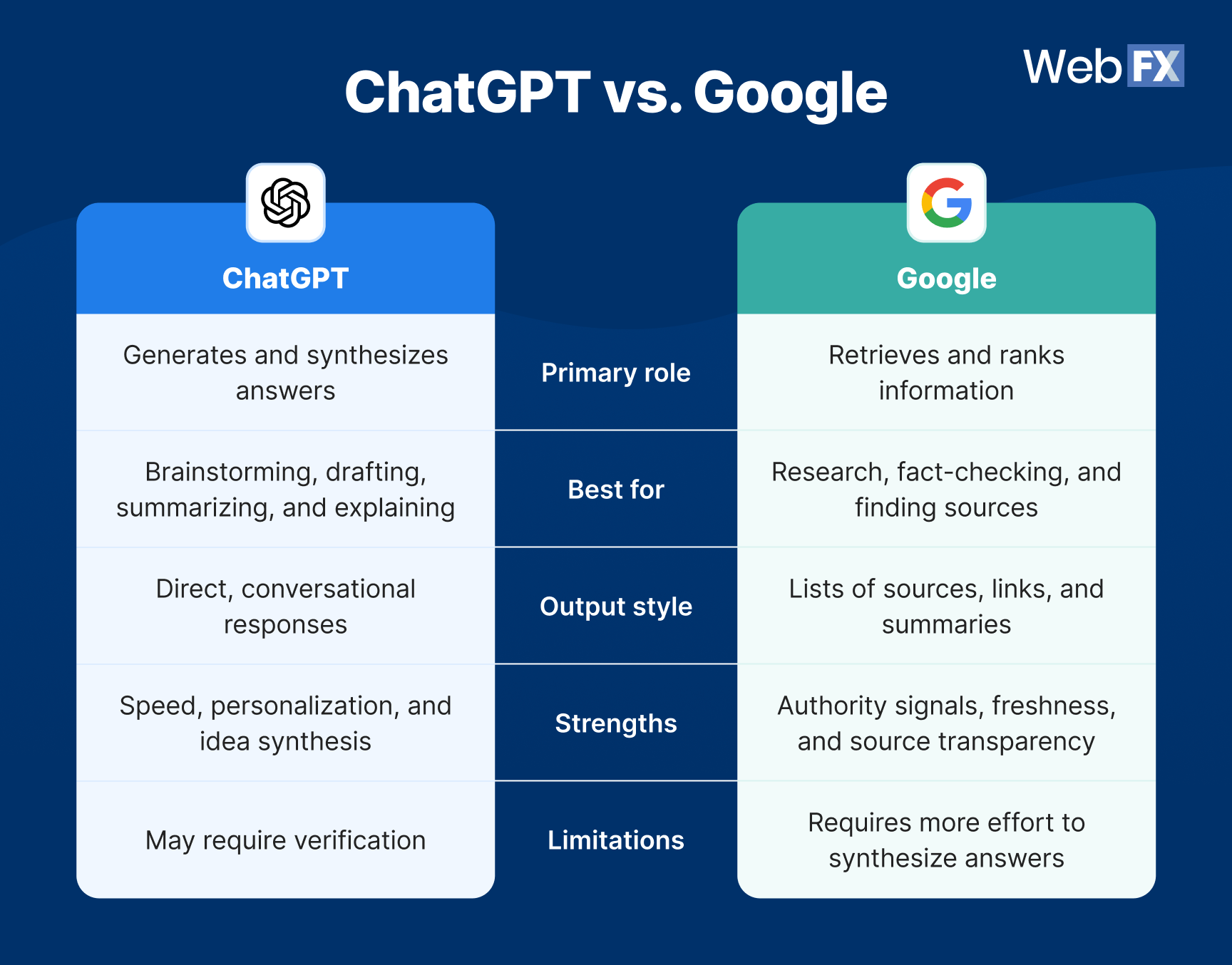
Table view:
| Feature | ChatGPT | |
| Primary role | Generates and synthesizes answers | Retrieves and ranks information |
| Best for | Brainstorming, drafting, summarizing, and explaining | Research, fact-checking, and finding sources |
| Output style | Direct, conversational responses | Lists of sources, links, and summaries |
| Strengths | Speed, personalization, and idea synthesis | Authority signals, freshness, and source transparency |
| Limitations | May require verification | Requires more effort to synthesize answers |
Based on these comparison highlights, one thing is crystal clear: Neither tool is universally better than the other. They just perform different tasks, so comparing them is like comparing apples and oranges.
The core difference: generating answers vs. retrieving information
At the heart of the ChatGPT vs. Google debate is how each tool handles information.
ChatGPT generates responses based on patterns in language. Google retrieves information from across the web and help you evaluate it. Let’s look at how these tools operate.
ChatGPT: Your generative synthesizer
ChatGPT works best when you need help thinking through something, not when you need to prove something. It’s especially effective at:
- Turning vague ideas into structured outlines
- Summarizing complex topics in plain language
- Rewriting or refining drafts
- Comparing concepts
- Walking through step-by-step explanations
Note that ChatGPT’s confidence can be misleading, though. While it often sounds authoritative, its responses don’t automatically cite sources or guarantee accuracy. That means ChatGPT’s output works best as a first draft or thinking partner.

Google: Your verification and discovery engine
Google, on the other hand, excels when accuracy, timeliness, and source credibility matter.
It’s particularly useful for:
- Verifying facts or statistics
- Finding original research or official documentation
- Tracking recent news or industry updates
- Comparing multiple viewpoints
- Evaluating the authority behind a claim
Google has been incorporating more search features, such as AI Overviews and AI Mode into its results, but its core strength remains the same: It still connects you to reliable sources of information.
How to choose the right tool using the task-tool matcher framework
Instead of asking which tool is better overall, a more productive question is: What am I trying to accomplish right now?
This simple question turns the ChatGPT vs. Google debate into a practical decision-making process:
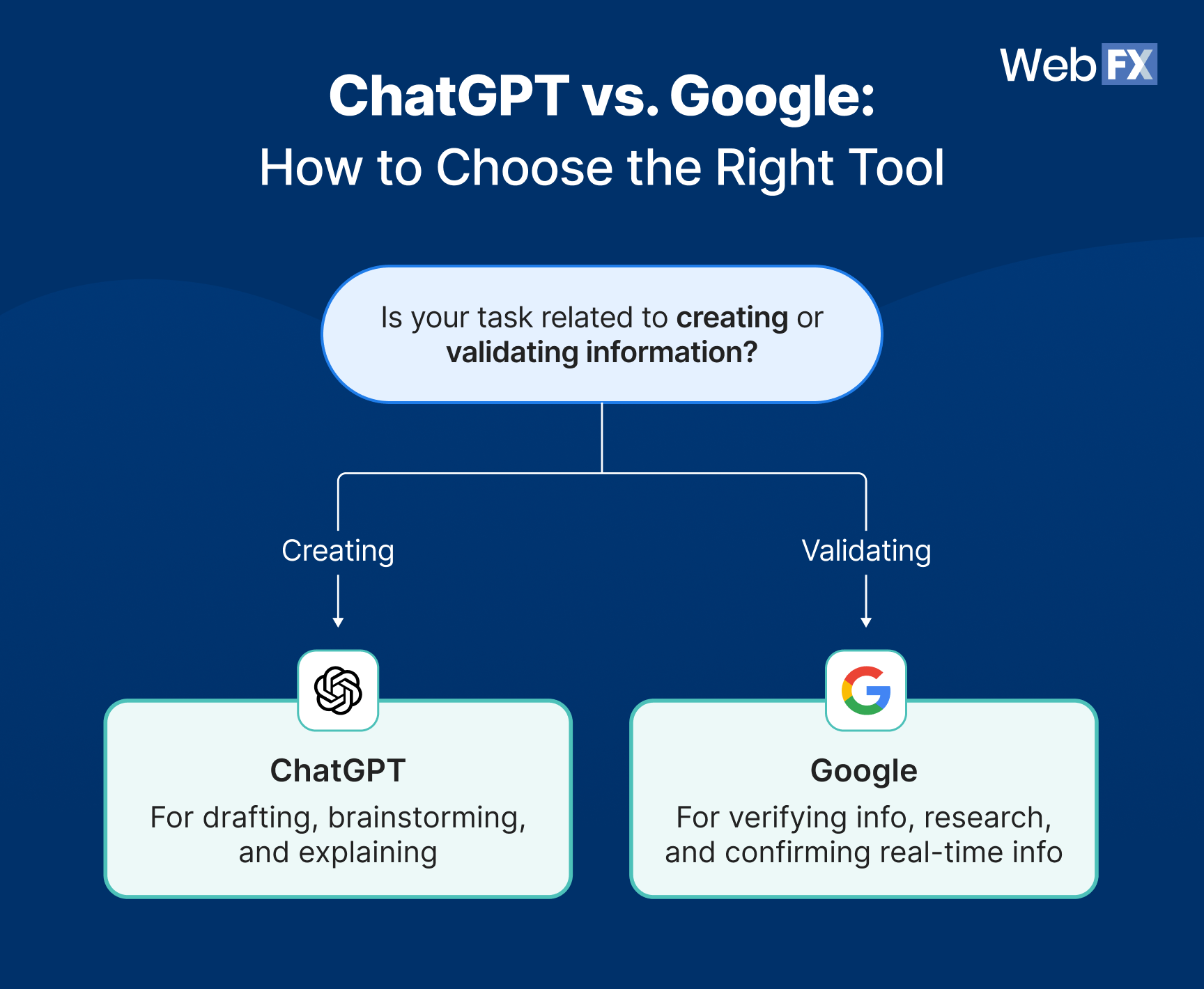
- Use ChatGPT for creative and generative tasks
- Use Google for research, validation, and real-time information
Use ChatGPT for creative and generative tasks
ChatGPT is often the better choice when your task involves creation, synthesis, or exploration. Use ChatGPT when you’re:
- Brainstorming ideas
- Drafting content
- Summarizing long material
- Rewriting for clarity or tone
- Exploring “what if” scenarios
For example, let’s say you’re marketing a home services business. If you want to understand an emerging concept or technology in the industry, create a blog post outline, or draft an email, ChatGPT can give you a starting point.
Pro tip: Treat ChatGPT’s output as a starting point, not a finished product. Verify key details separately with the help of Google.
Use Google for research, validation, and real-time information
Google is usually the better option when your task depends on accuracy, authority, or timeliness. Turn to Google when you’re:
- Fact-checking information
- Looking for statistics or benchmarks
- Researching competitors or industries
- Reviewing official guidelines or documentation
- Tracking current events or industry updates
For example, if you need to confirm a statistic, evaluate multiple sources, or understand how something works in the real world right now, Google provides the context and transparency ChatGPT lacks on its own.
Head-to-head breakdown: Accuracy, creativity, and data freshness
Rather than declaring winners, it’s more helpful to look at where each tool tends to perform better.
Accuracy and fact-checking: Use Google
Google generally has the advantage when accuracy is critical. It allows you to see the information sources, assess the sources’ credibility, and compare multiple perspectives.
ChatGPT can produce accurate responses, but it doesn’t inherently disclose its sources unless prompted. Even then, the user must verify if the synthesized information matches the source.
For tasks where mistakes carry consequences, Google is the safer default.
Creativity and content generation: Use ChatGPT
ChatGPT stands out for creative and generative tasks. It can adapt tone, structure ideas, and help users move from a blank page to a workable draft quickly.
Google’s SERPs can cite examples and sources, but they don’t actively help you synthesize or create in the same way. If your goal is to generate ideas or content, ChatGPT usually provides more immediate value.
Data freshness and source visibility: Use Google
Google’s strength lies in real-time access to the web. It excels at retrieving the latest information and showing how recently it was published.
ChatGPT’s responses may not always reflect the most current developments, especially for fast-moving topics.
When recency matters, Google should be your starting point.
Using ChatGPT and Google together
In practice, many people don’t choose between ChatGPT and Google. Instead, they use both. The most effective workflows combine ChatGPT’s speed with Google’s reliability.
Here’s a simple way to use both tools together:
- Start with ChatGPT to brainstorm ideas, clarify your thinking, or create an initial outline.
- Use Google to research key points, verify facts, and gather authoritative sources.
- Return to ChatGPT to refine your draft, improve clarity, or restructure content.
- Double-check critical claims with Google before publishing or sharing.
This hybrid approach balances efficiency with accuracy, and reduces the weaknesses of each tool.
FAQs
What is the main difference between ChatGPT and Google?
ChatGPT generates responses, while Google retrieves and ranks information from the web.
Which tool is better for research?
Google is typically better for research that requires sources, citations, or up-to-date information.
Can ChatGPT provide accurate answers?
ChatGPT can be accurate, but users must verify information independently.
Can ChatGPT replace Google?
Not entirely.
ChatGPT can replace Google for certain tasks, such as brainstorming, drafting, or summarizing information you already trust. However, it doesn’t replace Google’s role in verification, discovery, and real-time research.
As long as trust, transparency, and accuracy remain important, Google will continue to play a central role even as AI-powered tools evolve.
How does this impact search and content marketing?
For marketers and content creators, the rise of generative AI doesn’t eliminate the need for search — it raises the bar.
Today’s content needs to:
- Be accurate and well-sourced
- Provide real value beyond surface-level answers
- Demonstrate experience and expertise
- Be easy for both users and AI systems to understand
Instead of choosing between optimizing for ChatGPT or Google, successful strategies focus on clarity, authority, and usefulness, principles that support visibility across platforms.
That’s where OmniSEO® comes in. OmniSEO® is a strategy that focuses on increasing your search visibility across multiple channels. In addition to traditional search results, it can help you optimize for AI responses, forums, social media, and more.
Should I stop using Google if I use ChatGPT?
No. Most people benefit from using both tools depending on the task.
Choose the right tool for your task
ChatGPT and Google solve different problems. ChatGPT helps you think, draft, and explore ideas. Google helps you verify, discover, and evaluate information.
When you choose the tool that matches your task (or combine both strategically) you get better results with less friction.
Want more helpful content like this sent straight to your inbox? Subscribe to our newsletter for free!
-
 Matthew Gibbons is a Senior Data & Tech Writer at WebFX, where he strives to help businesses understand niche and complex marketing topics related to SEO, martech, and more. With a B.A. in Professional and Public Writing from Auburn University, he’s written over 1,000 marketing guides and video scripts since joining the company in 2020. In addition to the WebFX blog, you can find his work on SEO.com, Nutshell, TeamAI, and the WebFX YouTube channel. When he’s not pumping out fresh blog posts and articles, he’s usually fueling his Tolkien obsession or working on his latest creative project.
 -

WebFX is a full-service marketing agency with 1,100+ client reviews and a 4.9-star rating on Clutch! Find out how our expert team and revenue-accelerating tech can drive results for you! Learn more
Try our free Marketing Calculator
Craft a tailored online marketing strategy! Utilize our free Internet marketing calculator for a custom plan based on your location, reach, timeframe, and budget.
Plan Your Marketing Budget
Table of Contents
- At a glance: ChatGPT vs. Google
- The core difference: generating answers vs. retrieving information
- ChatGPT: Your generative synthesizer
- Google: Your verification and discovery engine
- How to choose the right tool using the task-tool matcher framework
- Use ChatGPT for creative and generative tasks
- Use Google for research, validation, and real-time information
- Head-to-head breakdown: Accuracy, creativity, and data freshness
- Using ChatGPT and Google together
- FAQs
- Choose the right tool for your task
Share this article


SEO Success with KOA

Try our free Marketing Calculator
Craft a tailored online marketing strategy! Utilize our free Internet marketing calculator for a custom plan based on your location, reach, timeframe, and budget.
Plan Your Marketing Budget