Marketing moves fast. Add WebFX as a preferred source on Google and get our latest insights when you search.
Abbey is a Junior Copy Project Manager at WebFX. She has worked on over 200 client campaigns and WebFX, and she specializes in marketing strategy analysis and industry-specific digital marketing plans. Outside of writing and editing, you’ll likely find her taking pictures of her cat, making a new playlist, or tending to her houseplants. View full profile
When creating a website, we must keep our customers in mind. They’re who we’re making the site for, right?
To attract your customers and encourage them to take action on your website, focus on your site’s user interface (UI) and user experience (UX). These disciplines help you design pages, flows, and interactions that feel seamless, especially as AI changes how users search, decide, and complete tasks online.
Here are the 2026 UX/UI trends that you should be on your radar to ensure you’re delighting customers on your website:
Take a look at some UX/UI trends for 2027 below that are worth keeping an eye on (and maybe even investing in!). Ready to get started with WebFX’s UX design services? Call us at 888-601-5359 or contact us online now!
In the past, UX and UI trend lists focused heavily on visual design and navigation. Websites had to look modern and help users find information quickly.
Today, UX/UI trends are about supporting user intent. Businesses meet users where they are in the customer journey — whether they’re researching, comparing options, or ready to buy.
1. AI-first interfaces
AI-first interfaces are changing how users navigate a website. They help businesses improve conversion rates and lead quality by easing the path to a user’s next steps.
Instead of clicking through the navigation and guessing which page has the answer, users describe what they need (in a conversational manner or structured inputs), and the AI system returns answers, recommendations, or next steps.
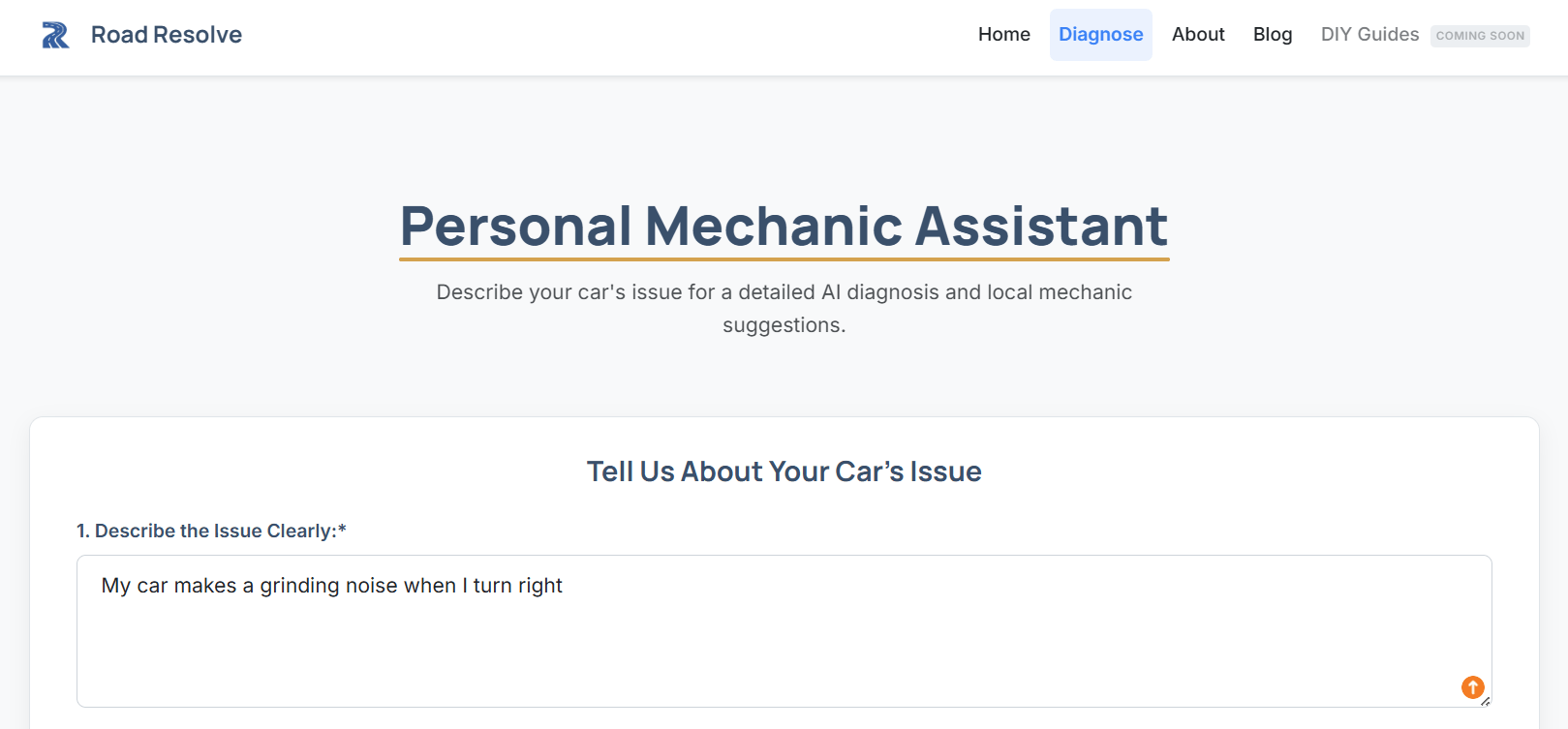
Road Resolve’s Personal Mechanic Assistant is an AI-powered tool that suggests local mechanics and provides an AI diagnosis along with estimated costs.
An example of this UX/UI trend is Road Resolve’s Personal Mechanic Assistant feature. It asks for a few details, like your car’s issue, make, model, and year, as well as your postal code.
This AI-powered tool then gives you a diagnosis summary, recommended next steps, and estimated repair costs, along with suggested nearby mechanics who can help you. Users don’t have to manually filter mechanics by location and request a quote from each one.
Pro tip: If your AI-first interface performs a multi-step task, make sure users can monitor progress and adjust the process without starting over.
AI-first interfaces also work well for service or product selectors, helping users find the right fit based on intent. Road Resolve’s Personal Mechanic Assistant is an example of this.
AI-first interfaces are useful in support and onboarding flows, where AI can answer common questions and direct users to a help article, an online form, or a human contact option.
AI-first interfaces are also becoming more agentic. That means AI can complete parts of a workflow on the user’s behalf, not just answer a question.
As a result, users spend less time acting as operators and more time supervising the system’s work. “The familiar toolbars and blank canvases are fading away and are being replaced with ‘agentic UX’ interfaces that act as digital command centers,” explains Jesslyn F., Lead Web and Product Designer at WebFX.
“These layouts are built for delegating tasks, monitoring the AI’s progress, and quick adjustments,” Jesslyn adds. “Rather than giving users buttons to do the work, we have dashboards to help them manage their new AI workers.”
2. Explainable AI and trust UX
As AI becomes more common in websites and apps, users need more than an answer. They also want to know why and how the system made a recommendation, returned a result, or suggested a next step.
Expert insights from
Jesslyn F.Lead Web and Product Designer
“Trust is the ultimate currency in UX. If a user doesn’t understand or trust an AI’s output, they simply won’t use the tool. This is where explainable AI (XAI) comes in.”
Explainable AI helps users understand how an AI system reached its output, which can make the experience easier to trust.
In practice, explainable AI can show up as:
a short note explaining why a product, service, or plan was recommended
a confidence label or score that shows how certain the system is
a tooltip or expandable panel that shows the top factors behind the output
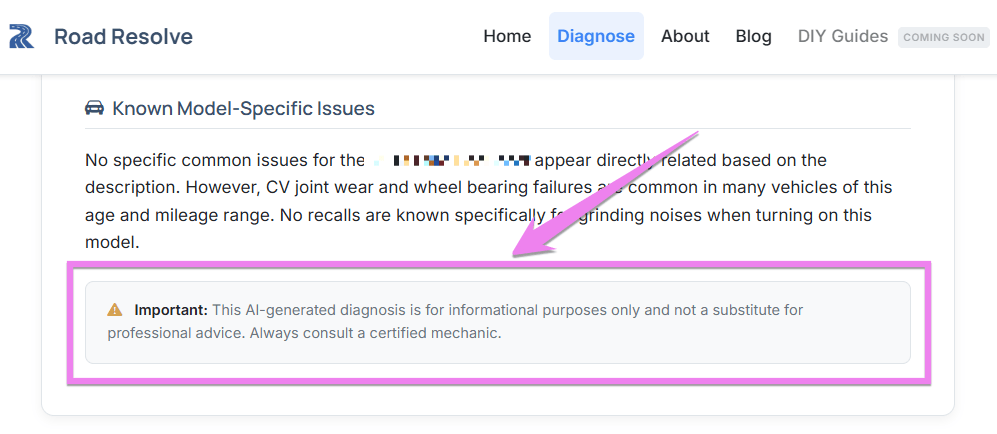
An example of an AI interface that adds transparency and context to its output
In this example, Road Resolve’s AI-powered Personal Mechanic Assistant provides a diagnosis of the user’s car issue. Below its diagnosis is a message for users that the diagnosis is purely informational and should not replace professional advice. While this does not fully explain how the AI reached its conclusion, it does give users helpful context about how to interpret the output.
“Instead of giving users only the final answer, introduce ‘Confidence Visuals,’” Jesslyn advises. “This can be as simple as a progress bar to show the AI’s confidence level. For example, users see a small, clickable tooltip that opens a modal listing the top three data points the AI used.”
Use cases of explainable AI
AI-assisted search and answers: If an AI tool returns an answer instead of a list of links or references, XAI tells the user where the answer came from or what content informed it.
AI-powered recommendations: XAI is especially helpful in this use case because it explains what influenced a product, service, or next-step recommendation. As a result, a user better understands their options.
Agentic and workflow-based AI experiences: When AI completes steps on a user’s behalf, XAI doesn’t leave users in the dark and tells them what the system is doing and why.
Key takeaway: Don’t just give the final answer. Show enough of the AI’s reasoning and processes to help users trust the output and act on it.
3. AI-assisted web design workflows
Don’t confuse this UX/UI trend with using AI in lieu of designers. Humans still lead web design workflows and are only assisted by AI to speed up parts of the design process.
As more design tools like Figma and Adobe add AI features, teams can use them to generate wireframes, create layout variations, summarize research notes, and speed up production work. That improved speed helps design teams deliver improvements more quickly and iterate on high-impact pages, such as landing pages and lead-generation forms.
Where to use AI-assisted design workflows
Creating mood boards and early concept directions
Updating design system components such as spacing rules, text styles, and reusable UI patterns
Generating rapid landing page variants for A/B testing
Best practice: Use AI only to generate options, not final decisions. Always have your team review, refine, and approve anything that goes live. Validate changes with usability feedback and performance data before rolling them out sitewide.
4. Predictive UX and proactive interfaces
In 2026, improving your website’s UX goes beyond optimizing navigation. You want to anticipate a user’s intent and help them complete a task on your site.
That means instead of making users navigate through your pages, you use predictive UX and proactive interfaces. Together, they use context and behavioral signals to improve your site visitors’ overall experience by suggesting the next pages to view, recommending the next steps, or highlighting the most relevant path forward for each user.
For example, a returning visitor to a healthcare SaaS company might see a “continue where you left off” prompt or a pre-filled form field. If a visitor has viewed your service and pricing pages, the site may recommend booking a demo or scheduling a call.
Predictive UX reduces cognitive load and speeds task completion. The less a user has to stop and think, the more likely they are to finish the action you want them to take.
Best applications of predictive UX and proactive interfaces
Guided quote forms
Account portals that surface “next steps” based on previous activities
Pro tip: Keep predictions transparent and reversible. Users should always be able to override a suggestion, edit a pre-filled field, or choose a different action.
5. Dynamic personalization
Personalization is not just about greeting someone by name or changing an email subject line. In 2026, dynamic personalization is expected from a user-friendly online experience.
This UX/UI trend adapts the experience based on behavior, segment, or lifecycle stage, which refers to what a visitor is doing on your site and how close they are to taking action.
In real life, this often looks like a website changing what it prioritizes. For example, first-time visitors of a medical equipment company’s website may see explainer content and proof points. Meanwhile, returning visitors may see shortcuts to pages they’ve explored and calls to action like “Contact Us.”
Behavior-driven personalization improves your website’s relevance to your visitors. When the right content appears at the right time, users move forward faster, and they don’t have to “dig” for answers.
Use cases of dynamic personalization
Industry-specific landing pages: Personalize examples, proof points, and use cases according to a visitor’s industry, but keep the page structure consistent.
Returning visitor messaging: Make it easy for returning visitors to resume browsing by saving comparisons, providing “continue where you left off” prompts, or offering quick links to recently viewed pages.
Content recommendations by intent stage: Show different content based on behavior signals. Provide educational guides for early-stage visitors, while high-intent visitors get case studies and pricing details as recommended content.
Pro tip: Start small with two to three segments or pages, instead of implementing dynamic personalization site-wide. For example, you can personalize a “recommended resources” section or a testimonial/case study module by industry.
Measure your personalization’s results to see if the efforts are worth scaling. Track conversion rates, engagement, and lead quality.
6. Conversational interfaces
Some website users land on a page and feel unsure about what to do next, so they bounce or abandon a form. You can minimize a user’s hesitation and guide them through their journey with a conversational interface.
This UI trend uses dialogue to guide users through decisions and tasks on your website. Instead of your visitors navigating on their own to find answers and decide on their own, a conversational interface asks them questions and uses their answers to lead them to the relevant next steps, like the right form, help flow, or page.
Some conversational interfaces use preset questions and rules, while others use AI to interpret questions and responses. Either way, the goal stays the same: help users move forward when they aren’t sure what to click next.
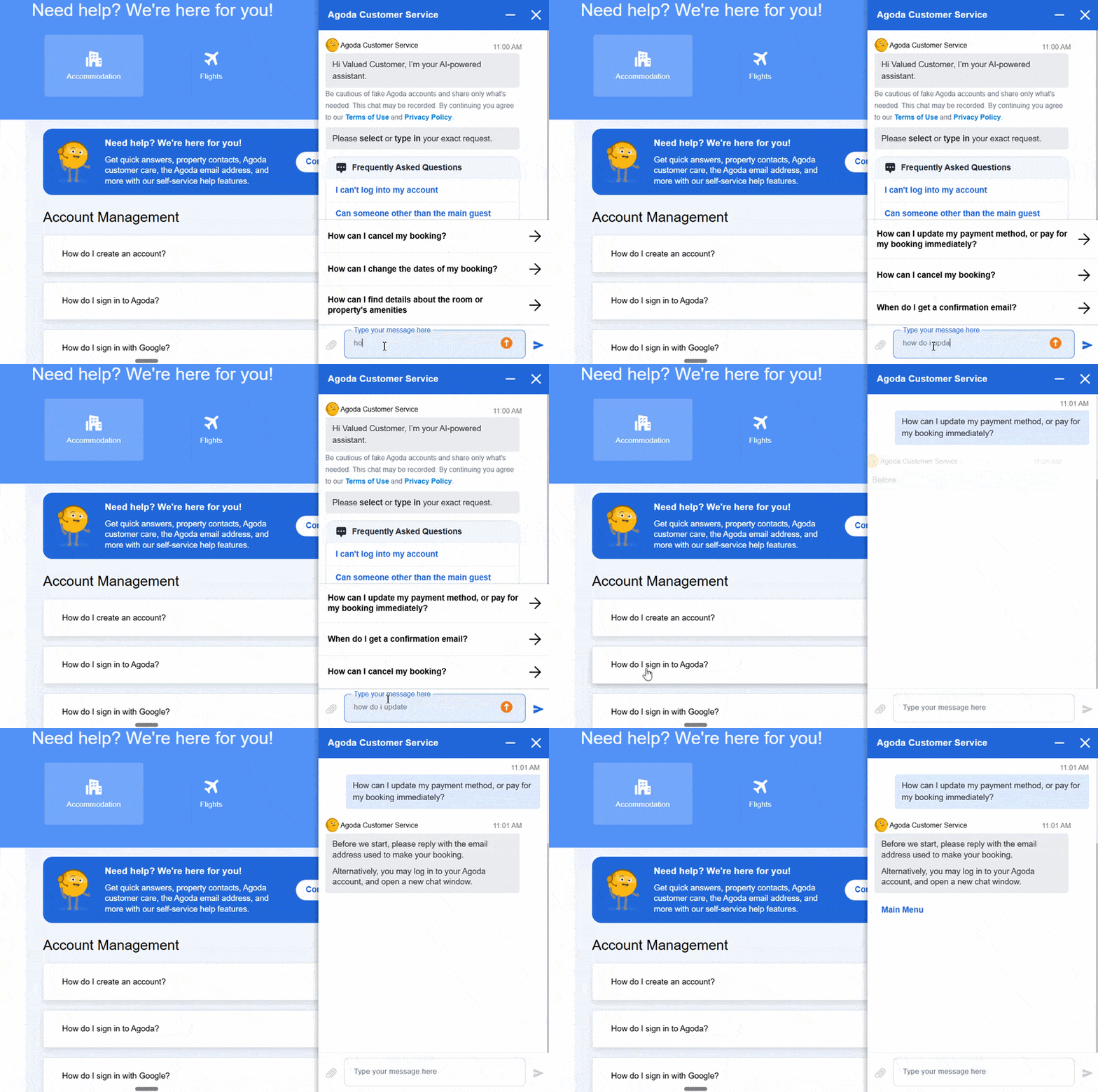
An example of an AI-assisted conversational interface
An example of an AI-powered conversational interface is Agoda’s customer service. As users type a question or concern, the interface displays relevant help topics.
It then guides users to the next step, which, in this case, is logging in to change their payment method. Once logged in, the AI-powered assistant guides the user to the right form to update their payment details.
Where to use conversational interfaces
A conversational interface works best when users need guidance to find answers or complete a task. Here are a few use cases of this UX/UI trend:
Product or service recommendations: A conversational UI can help users shortlist the product or service that best suits their needs, making the process feel less intimidating. A B2B SaaS company that offers multiple service plans can use a guided conversation to help a prospect narrow down their options. Instead of reading every service page, users can answer questions about team size, primary goal, budget, and timeline, and get a shortlist of options that fit their business.
Help center answers: When customers only need a quick answer, searching through support pages can be discouraging. A conversational interface can make this task easier for users. For example, a home security services company’s support page with a guided chat can direct users to the right help page. With this feature, a user types in “I need help with replacing my batteries,” and the interface helps them identify their device and batteries, and leads them to the right page and battery order form.
Contact form guidance: Some prospects are ready to inquire, but a long or generic lead form can deter them from completing it. With a conversational interface, the process becomes simpler. For example, a commercial HVAC company’s chat feature can ask a prospect to select or type their building type, service needed, and location before routing them to a shorter form to schedule a service or request a quote.
7. Biometric and passwordless authentication
Biometric and passwordless authentication lets users sign in with a fingerprint, face scan, or another device-based identifier rather than relying only on a password.
It has a couple of benefits. For users, this UX/UI trend can make sign-in faster and more secure. It can also strengthen trust, which matters even more for businesses that handle sensitive information or account access.
This UX/UI trend is useful for businesses that require users to log in before completing an important action, such as viewing account details or accessing protected content. It works best in the following:
Client portals
Customer dashboards
Ecommerce and checkout experiences
Membership websites
Learning platforms
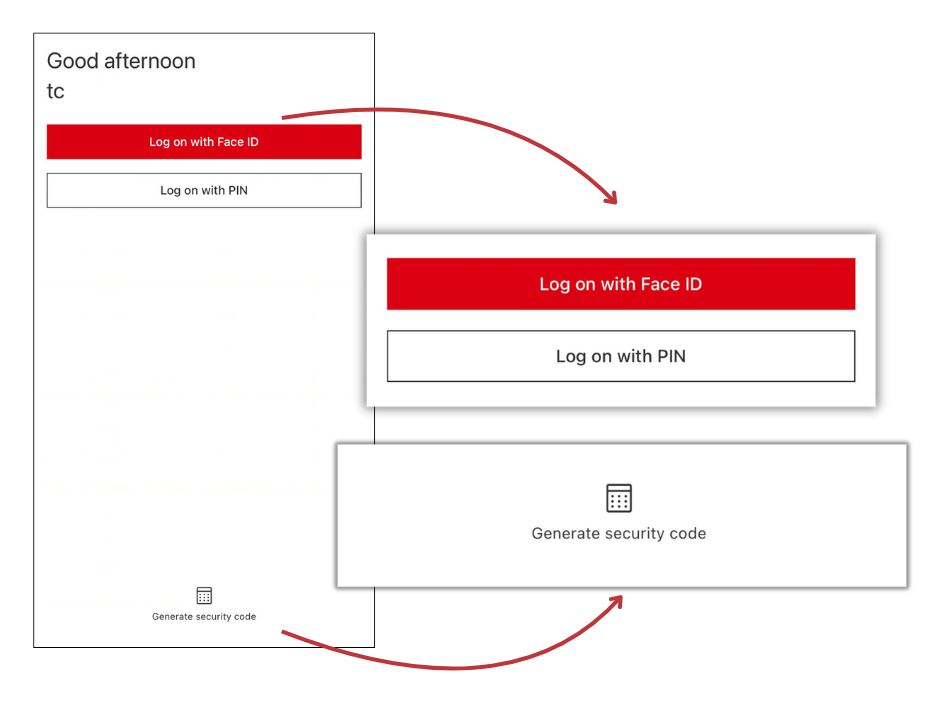
Pro tip: Offer multiple log-in options, and make recovery simple. Don’t rely on a single sign-in method, because some users may not have a compatible device, may not prefer biometrics, or may need a backup option if authentication fails.
An example of an app login that provides different options: face scan, PIN, or security code
8. Cognitive inclusion and accessibility
By now, many teams already know that they need to implement accessibility best practices. In 2026, cognitive inclusion is gaining importance in UX/UI because it addresses cognitive load or the mental effort required to process information, make decisions, or complete a task online.
As websites ask users to absorb more information and complete more actions, a cognitively inclusive experience becomes even more important. This UX trend makes the whole online experience easier with:
Cognitive inclusion makes a difference for various users. People with dyslexia, anxiety, attention disorders, or other processing challenges can benefit from this website feature.
Busy users who want to take the fastest path to their research or purchase will also appreciate a cognitively inclusive website.
Where cognitive inclusion matters most
While ease of use is ideally implemented sitewide, pay close attention to these parts of your website:
Contact forms, checkout flows, and multistep processes
Pricing pages
Product or service comparisons
Navigation and page hierarchy
9. Microinteractions that guide decisions
Imagine a user filling out a quote form. After they type in their email, choose a service, and click the next button, nothing on the page tells them how far they are from finishing or whether their information was accepted.
Such uncertainty can make them hesitate to move forward or make errors while filling out your form. In these moments, microinteractions help assure users that they’re on the right track.
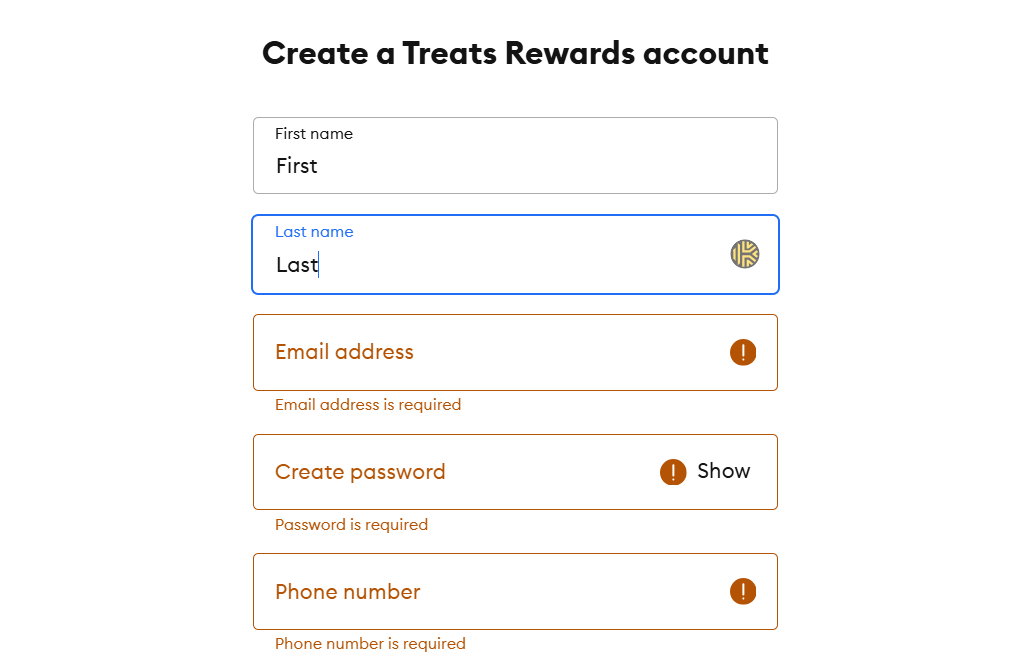
An example of an inline validation microinteraction that immediately tells a user the errors in their form so they can correct them before moving to the next step
Microinteractions are small moments of feedback that make an interface feel responsive. They include:
Inline validation: It gives users immediate feedback as they complete a form field, helping them fix errors as they fill out the form and before submitting it.
Progress indicators: They show users how far they are in a process and how many steps remain. You’ll often see them in multistep forms, checkout flows, or onboarding sequences.
Hover states: When a user hovers their cursor over a button or link, they’ll see visual changes indicating that the site element is clickable.
Confirmation messages: These messages let users know that their action worked. For example, a message appears after someone submits a form or adds an item to their cart.
Loading states: Is the system processing your request, or do you need to resubmit your form? Loading states answer these questions and tell users the status of their request. They can appear as progress bars, spinners, or messages like “loading” or “processing.”
Though microinteractions may seem minor, they give users clear signals about the status of their task or transaction, making them feel confident to continue.
Pro tip: Use microinteractions to prevent errors and reduce drop-offs in form fields and multistep flows, not to add flair. If an animation slows users down, it is not an effective use of a microinteraction.
Some brands are also pairing microinteractions with lower-fidelity, more native-looking interface elements. Instead of polished animations or highly stylized controls, these experiences use simple text overlays, standard emojis, unfiltered visuals, and straightforward prompts that feel faster and more human.
Expert insights from
Jesslyn F.Lead Web and Product Designer
“If we look at the digital landscape today, we are caught between two opposing currents. On one hand, AI is becoming increasingly advanced and complex. On the other hand, everyday users are craving more raw, unfiltered, human experiences.”
For audiences who value authenticity over polish, these lighter-touch interactions can feel more approachable and less intimidating.
10. Immersive product experiences like augmented reality, virtual reality, or 3D
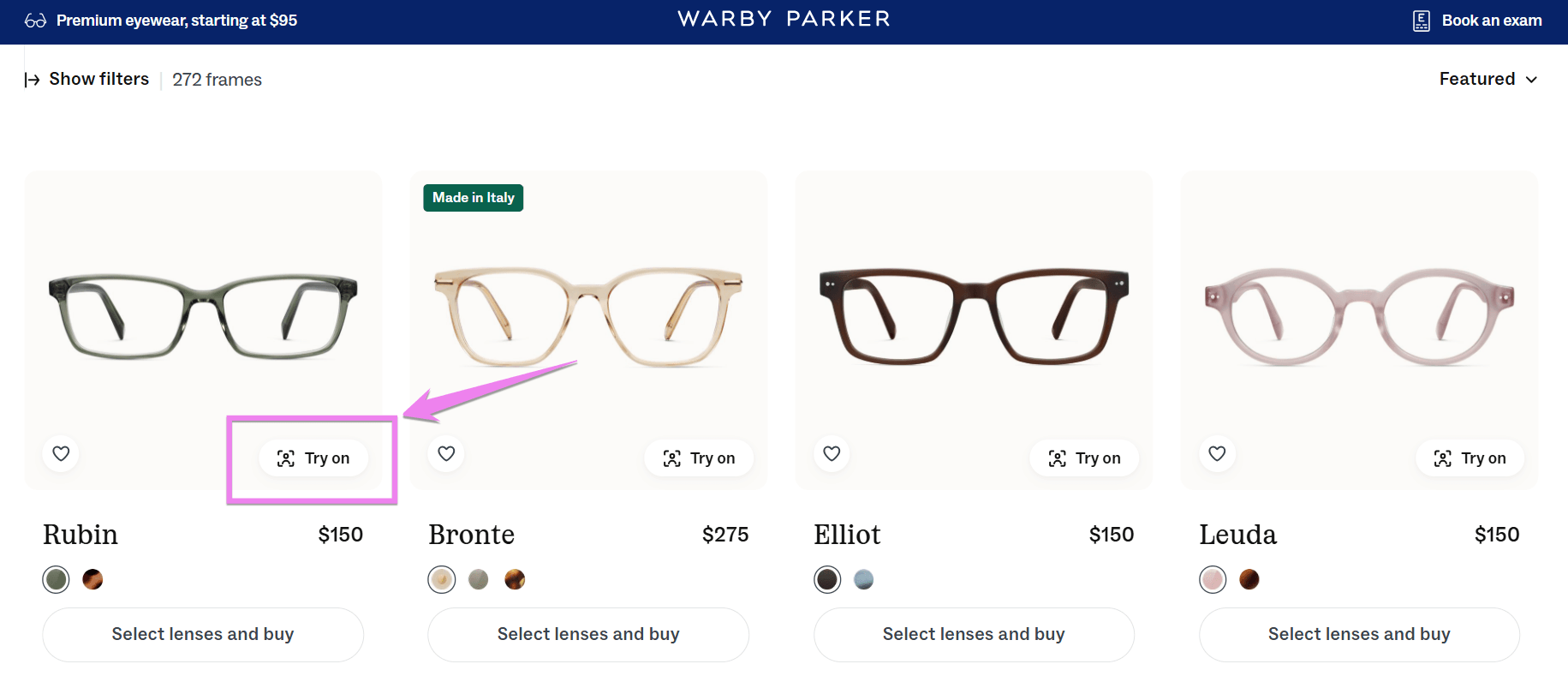
Immersive product experiences help users understand a product’s scale, fit, and features, enabling them to make decisions faster. Augmented reality (AR), virtual reality (VR), and 3D can improve conversion rates and reduce returns by helping users evaluate products.
That being said, immersive experiences aren’t a trend you add to impress your prospects. These product experiences should solve a user’s evaluation problem.
Best use cases include:
Ecommerce product pages with 3D views and feature exploration
VR experiences for real estate properties, vehicles, or B2B products that need a preview or demonstration
AR experiences for furniture or color swatches
An example of an immersive product experience that lets shoppers try on eyeglasses virtually before buying
11. Gamification
Gamification involves adding interactive elements to a website or app that encourage users to complete a specific action. The idea is to make progress feel more engaging and rewarding.
Expert insights from
Keely Y.Senior Web Designer
“The idea [of gamification] is to get users engaged in the form that it feels like a game rather than a chore to get things entered.”
Gamification improves retention when it supports a meaningful outcome, like completing setup, using a key feature for the first time, or returning for the next step.
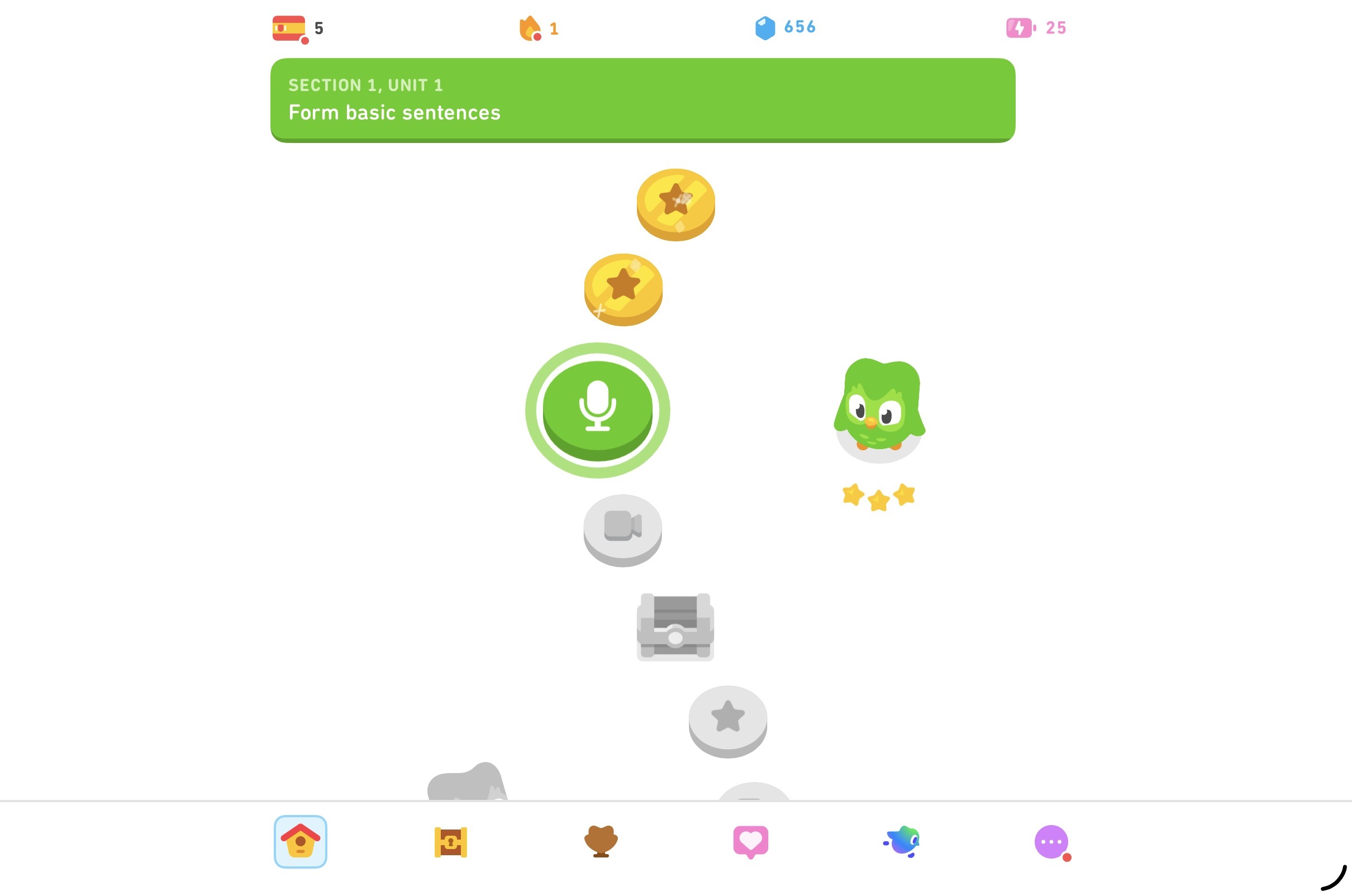
Think of Duolingo’s format. They use a map theme with different levels to help their users learn a new language and interact with the platform.
An example of a gamification interface from Duolingo shows a user’s progress, rewards, and streaks.
Gamification is best used in:
Onboarding and setup flows
Learning and training experiences
Loyalty and engagement programs
Frequently Asked Questions
Why should I follow UX/UI trends in 2026?
You should follow UX/UI trends because user expectations and behavior are constantly evolving.
What was once smooth and intuitive years ago may no longer be user-friendly today. So if your website is designed for how people searched and converted a few years ago, it may no longer be optimized for 2026 users.
That doesn’t mean you need to chase every new design idea, though. It means you need to pay attention to the relevant trends that change how your prospects and customers move through your site and make decisions.
For example, AI-first interfaces, predictive UX, and dynamic personalization all affect how quickly users find answers and take action. If you ignore those trends, your website can start to feel slower, less relevant, or harder to use than your competitors’ experiences.
The goal of following UX/UI trends is to improve your audience’s experience with your website or app so they’ll engage with your business more easily and convert.
Do I need to implement every UX/UI trend on this list?
No. Most businesses don’t need to implement every UX/UI trend at once.
Some of the trends on this list are foundational, while others are more situational. For example, cognitive inclusion, microinteractions, and stronger authentication options can improve many websites across industries.
Other trends, like immersive product experiences or AI-first interfaces, make more sense only when they solve a specific user problem.
A better approach is to prioritize the trends that align with your site or app user’s biggest friction points. If they abandon forms, start with microinteractions and clearer form flows.
Do they struggle with finding the right service or product? Test conversational or predictive experiences. Businesses with account access or client portals must prioritize stronger passwordless authentication.
We foster and form long-term partnerships so that your business has long-term results.
Over 90%
of WebFX clients continue partnering with us into year 2 of their campaign.
UX/UI design services are a must-have for any business looking to build a website customers will love — that’s where WebFX comes in.
WebFX offers UX/UI design services that can help you nail these 2027 UX/UI trends so you can start nurturing and converting leads. Not convinced? Check out our client testimonials that prove our dedicated UX/UI team can get the job done.







 Abbey is a Junior Copy Project Manager at WebFX. She has worked on over 200 client campaigns and WebFX, and she specializes in marketing strategy analysis and industry-specific digital marketing plans. Outside of writing and editing, you’ll likely find her taking pictures of her cat, making a new playlist, or tending to her houseplants. View full profile