

Redirect Checker
Easily check status code and redirect chains.


What is a redirect?
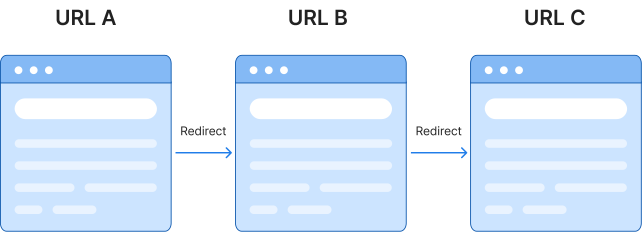
A redirect automatically makes a browser go from one URL to another URL. Redirects are used when content on a website moves from one page to another, so the user is redirected to the correct URL.
Why is it important to check redirects?
Knowing the redirect path or redirect loop of a page can be vital when trying to spot SEO issues on your website. A redirect loop or chain (too many redirects) can negatively affect your SEO efforts or cause bottlenecks.
Our Redirect Checker can determine the redirect path (if any) of a given URL. This tool will provide the path the entered URL will follow when entered in a browser.
Understanding HTTP Status Codes
Here are some of the most common status codes you may find in your results.
| Category | Status code | Status message | What this means |
|---|
| 2xx – Success | 200 | This URL works perfectly — no redirects, no errors. | |
| 3xx – Redirect | 301 | This URL has a new permanent home. Good for SEO; search engines will update their index. | |
| 3xx – Redirect | 302 | This URL is pointing somewhere else for now, but the original address may come back. | |
| 3xx – Redirect | 307 | Same as 302, but your browser must use the exact same request method on the new URL. | |
| 3xx – Redirect | 308 | Same as 301, but your browser must use the exact same request method on the new URL. | |
| 4xx – Client Error | 404 | This URL doesn’t exist. It may have been deleted or the address may be wrong. |
FAQs about the Redirect Checker Tool
What is a redirect checker?
A redirect checker is a tool developed to determine the redirect path (if any) of a given URL. The tool will provide the path the entered URL will follow when entered in a browser.
How to use our redirect checker tool?
Simply enter the URL you want to check in the tool above and click “Check Status!” and confirm you’re not a robot by ticking the box.
How to read your redirect check results
After entering your URL, you will be presented with a redirect path of the URL you entered. If your page has no redirects and functions properly, you should see an HTTP status code of 200 next to the URL and no further path.
Sometimes redirects need to be used for content that gets moved or deleted. In these cases, the most commonly used redirects are permanent redirects (also known as a 301 redirect) or a temporary redirect (also known as a 302 redirect). The numbers in front of the redirect or URL refer to the HTTP status code of the URL.
What are the different types of redirects?
The different types of redirects include:
- 301, which means the redirect is permanent
- 302, which means the redirect is temporary
While there are additional redirect types, the above are the most common.
Does a redirect pass link equity?
Yes, redirects pass link equity. That’s why it’s recommended to use redirects when moving to a new website domain, consolidating pages, or merging domains.
Can redirect mistakes affect search visibility?
Yes, redirect mistakes can affect search visibility. One of the most common mistakes when migrating a site to a new domain is failing to set up redirects, which causes a business to lose its past visibility.
Should I redirect 404s generated by LLMs?
Redirecting LLM-generated 404s is a smart tactic if those broken URLs are receiving multiple visits. In some instances, LLMs like ChatGPT hallucinate links, and when users click those links, they hit a 404 error.
If you monitor your LLM referral traffic and test the HTTP status codes of these URLs and notice repeated traffic to a hallucinated URL, redirect it to the most relevant page on your site.
Should I redirect 404 pages to my homepage?
Redirecting broken or deleted pages to your homepage is not recommended. Google treats mass-homepage redirects as soft 404s, which means Google recognizes that your homepage doesn’t match the intent of the original URL.
As a result, Google ignores the redirect, refuses to pass link equity, and drops the original page from its index anyway — which makes your redirect null and void.
Are redirects bad for SEO?
No, redirects are not bad for search engine optimization. In fact, redirects are good for SEO because they allow webmasters to pass a redirected page’s past authority and history to another page.
How do redirects affect Core Web Vitals?
Redirect chains affect Core Web Vitals by making the browser issue multiple HTTP requests before reaching the final page. Each redirect adds delays that slow your Time to First Byte (TTFB) and Largest Contentful Paint (LCP).
Should I update internal links pointing to a 301 redirect?
Yes. Internal links should point to the final destination URL (vs. the redirect). While a 301 redirect sends users and bots to the correct page, leaving your internal links pointing to redirects creates unnecessary server strain and crawl delays.
How do redirects impact crawl budget?
Redirects impact crawl budget by forcing search engine crawlers to spend time and resources processing extra HTTP requests instead of indexing your actual content pages. Each redirect consumes budget that could be spent discovering and crawling pages that actually matter to your business.
How can I monitor redirects automatically?
Monitor redirects automatically through:
- Scheduled Screaming Frog crawls
- Scheduled Ahrefs audits
- Scheduled AI-led audits, like through Claude
Integrate these into your company’s workflows and you can have redirect issues, from 3xx errors to redirect chains, into your project management system for repairs.
Turn your technical SEO into an asset with WebFX
Capture visibility across search experiences, from ChatGPT to Perplexity to AI Overviews, with a technical SEO program built for success. Discover how WebFX’s award-winning team can help by contacting us online today about our AI search and SEO services!