Why Is My Website Traffic Going Down? How to Find and Fix the Cause
Most website traffic drops are caused by Google algorithm updates, technical issues, AI Overviews and AI search, content day, or increased competition. A traffic drop is a common issue site owners deal with, and in most cases, it’s fixable once you know what’s behind it. If you’re asking, “Why is my website traffic going down”, we’ve got the answers for you, plus how you can diagnose and fix it, so just keep reading!
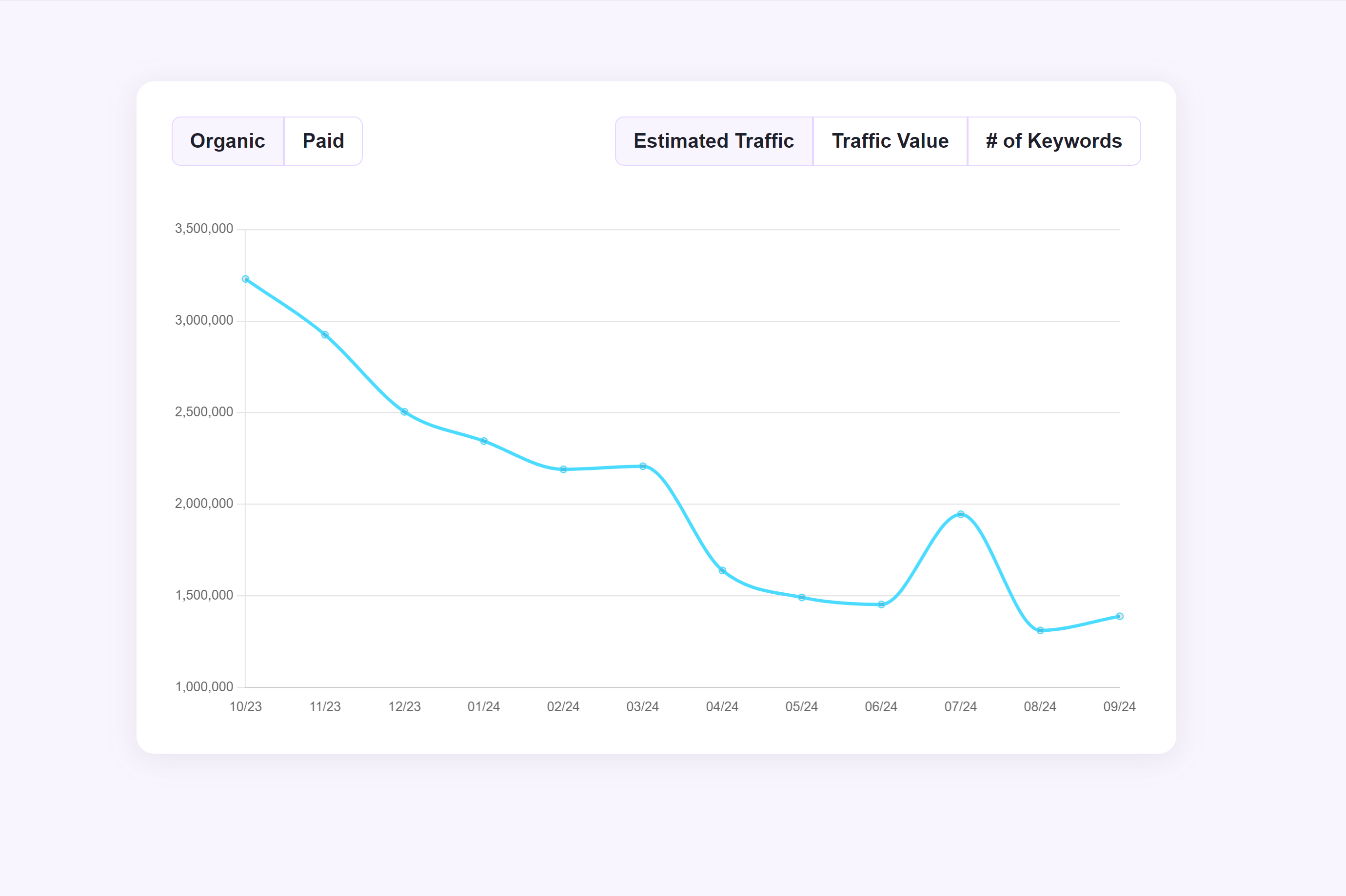

Table of Contents
- What are the most common reasons my website traffic is going down?
- 1. Google algorithm updates
- 2. Technical and tracking errors
- 3. AI Overviews and AI-assisted search
- 4. Content decay
- 5. Seasonality
- 6. Competitor activity
- How to diagnose a drop in website traffic
- 1. Start in Google Search Console
- 2. Check whether a Google update aligns with the drop
- 3. Rule out tracking and technical errors
- 4. Audit content performance and freshness
- 5. Rule out seasonality and external factors
- FAQs
- Restore your website traffic (and then some) with WebFX
Most website traffic drops are due to one of these causes:
- Google algorithm updates
- Technical and tracking errors
- AI Overviews and AI-assisted search
- Content decay
- Seasonality
- Competitor activity
The good news is you don’t have to guess which one caused it. Start in Google Search Console, which flags two problems you want to immediately rule out: a manual penalty or pages that Google can’t index.
Then, look at how the drop behaves, and match that pattern to a likely cause. Find out:
- When the decline started
- Whether the drop affected only one page or your entire site
- Whether you lost rankings or just clicks
🎥Watch: Not Enough Website Traffic? You Can Fix That!
Why is my website traffic going down? 6 common reasons
There are different forms of traffic drops. Some happen overnight, while others gradually decline for months. Some traffic dips may mean you lost rankings, while some may mean you’re still ranking but you’re losing clicks.
Knowing which kind you’re dealing with can point you to the right fix. Here’s what each cause looks like, how to recognize it, and what it costs you if you leave it.

6 Common Reasons Your Site Traffic is Going Down
1. Google algorithm updates
Google updates its search algorithm thousands of times a year, and the larger “core updates” can move rankings enough to change your traffic overnight. When a core update rolls out, Google usually adjusts how it weighs content quality and relevance, so a website traffic decline that aligns with the update date typically means your content no longer matches what Google wants to rank for those queries.
For example, a professional services firm that held the top spot for a keyword might slip to the second page after a core update, losing most of the clicks that position earned. If your traffic keeps going down, the number of qualified visitors to your site will also decline, which can result in a stagnant pipeline later.
Another possible reason related to an algorithm update is a manual penalty, where a human reviewer at Google flags your site for violating guidelines. If it happens, you’ll see a notice in your Google Search Console.
2. Technical and tracking errors
Sometimes your traffic hasn’t actually dropped. A broken tracking tag or an altered GA4 setup can stop analytics from recording visits.
Rule out these errors first, because this is the one “drop” that isn’t a real problem. Spending time trying to fix what isn’t broken is a waste of your team’s time.
Technical problems can also result in a decline in website traffic. These issues often show up after a website redesign.
“Many sites experience a dip in traffic after launching a new website, especially if there are major changes to URLs,” explains Clayton T., Internet Marketing Expert at WebFX. “If you didn’t properly prepare for a redesign by migrating content, implementing 301 redirects, or updating internal links, you will likely see a drop in traffic that might take some time to recover from.”
3. AI Overviews and AI-assisted search
If your website visits are declining while your rankings remain steady, AI-assisted search and AI Overviews are likely the reason.
When the SERP shows an AI Overview that answers the query, the searcher gets what they need without having to click through. That’s a “zero-click” search: Your page still ranks and still earns an impression, but gets no visit. Determining if AI search is hurting your traffic can help you distinguish this type of traffic loss from other causes.
AI Overviews now appear in about one of every four U.S. searches, and that share climbs past 50% once a query reaches seven words or longer. The longer, more specific searches that used to drive your most qualified traffic are exactly the ones AI Overviews answer first, so the visits you lose are often your highest-intent ones.
🎥 Video: Is AI Stealing Your Website Traffic?
4. Content decay
Content that once ranked well can lose traffic over time if you don’t refresh it. The most common reason is simple: Your page’s information, statistics, and examples go stale, and a fresher page overtakes you.
This is content decay, and it usually shows as a gradual slide rather than a sudden drop. A competitor can then outpace you by publishing something more useful on a topic you used to own, bumping your page down a few positions.
Another reason is evolving search intent. A person searching “travel guidelines” for a destination in 2020 was looking for pandemic restrictions, while a person searching for travel guidelines today may be searching for passport validity or insurance requirements. Hence, a travel agency’s blog post that still answers the 2020 question no longer matches what searchers want today, so it stops ranking.
Update your stale content to address the new search intent, and it can climb back up the SERPs.
5. Seasonality
Sometimes your site’s traffic decline is just because of the season. Businesses with natural seasonal cycles see traffic rise and fall with demand, so a January dip after a December peak can be completely normal.
Take a retailer that sells outdoor gear as an example. Search interest for its products declines as the warm season ends every year.
Treating that seasonal dip as an emergency wastes your team’s effort. To avoid the mistake of identifying every traffic decline as an emergency, compare the same period year over year, not month over month.
6. Competitor activity
A website traffic drop doesn’t always start with something you did. When looking at rankings, you also have to consider the competitive field.
When a competitor gains ground, you may lose traffic and rankings, even if your pages didn’t change. If your competitor earns authoritative links and turns a thin article into a helpful resource, Google may reward that page and rank it above yours.
This cause is easy to miss because nothing on your website is broken. To find out if this is the reason behind your declining traffic, check the ranking pages for keywords you used to dominate.
How to diagnose a drop in website traffic
When it comes to answering the question, “Why is my website traffic going down,” it’s important to understand how to diagnose your website to uncover the reason why.
Before implementing any changes to address your declining site traffic, you need to identify the underlying cause. That’s because the wrong fix wastes time and can make things worse.
Diagnosis always starts in the same place: Google Search Console. What you see in that platform points you toward the checks that confirm what’s actually going on:
- Start in Google Search Console to check for a penalty or indexing problem, see how widespread the drop is, and compare your impressions and clicks
- Check whether a Google update lines up with the traffic decline
- Rule out tracking and technical errors
- Audit your content’s performance and freshness
- Rule out seasonality and external factors
You won’t always go through each step. Search Console can point you toward the likely cause, and you follow up with the checks that confirm it.
1. Start in Google Search Console
Google Search Console is where every diagnosis begins, and your first move is to rule out the two problems it flags outright:
- Open the Manual Actions report to check for a penalty
- Open the Pages report to check for pages Google can’t index
If either turns up something, you’ve likely found the cause of your site traffic decline in a few minutes.
If both reports come back clean, check how widespread the drop is. The Pages report shows whether one page, a handful, or your whole site lost traffic.
A few pages losing traffic usually indicates a page-level issue, such as content decay or an indexing slip. A site-wide drop means something bigger, like an algorithm update or a botched migration, that affected your entire website.
Still using Google Search Console, read the relationship between your impressions (how often you show up in search) and your clicks (how often people actually visit):
| What Google Search Console shows | What it likely means | What to do next |
| Impressions and clicks both declined | Your rankings slipped | Check whether a Google update hit around that date, then audit the affected pages for content decay |
| Impressions are steady or up, but clicks decreased | You’re ranking but losing clicks | Check whether AI Overviews are answering those queries |
| Clicks are steady in Search Console, but your analytics shows a drop | Tracking errors | Verify your tracking setup and tags |
2. Check whether a Google update aligns with the drop
If your impressions and clicks both decreased, check whether a Google update caused it. Find the date your traffic started dropping, then compare it against Google’s confirmed update dates.
If your site traffic decline starts within a few days of a confirmed update, that update is the likely cause. It means your content no longer matches what Google rewards for those queries, so you must refresh your content. If no update lines up with your drop date, rule it out and move on to the next check.
3. Rule out tracking and technical errors
If your pattern pointed to tracking (or you just want to ensure your tracking tags are working), check the basics. Confirm your GA4 tag is firing on the pages that lost traffic, that a recent cookie consent change didn’t stop analytics from recording visits, and that no site update removed the tracking snippet.
Then look for real technical damage, such as:
- Pages returning error codes
- Broken redirects
- A migration that didn’t carry over URLs and redirects
If your website traffic started declining the day you launched a redesign, this is probably the cause.
4. Audit content performance and freshness
If your content is likely the cause because you saw a gradual decline or a drop after a core update, audit your top-performing pages. Look for what’s gone stale: outdated statistics, information, or examples.
For each important page, ask one question: Does it still fully answer what someone searching that term wants today?
Refresh the pages that have decayed, and add a real “last updated” date once you’ve actually updated them.
Set your expectations here. Content recovery isn’t instant.
Once you refresh a page, Google has to recrawl and reassess it, so you may see results after a few weeks, not days. Pages that never earned much traffic are a different case: Sometimes a substantial rewrite is worth it, and sometimes merging or removing them does more good for your site.
5. Rule out seasonality and external factors
Last, make sure it’s not just your slow months. Compare the affected stretch against the same window last year rather than the month before. Year-over-year tells you whether you’re looking at a real decline or a normal cycle.
If last year looks the same, seasonality explains it, and there’s nothing to fix. If it doesn’t, and you’ve cleared everything above, look outward to competitor activity.
A competitor may have gained ground on the keywords you’re losing. Check what’s now ranking above you for the keywords you used to own.
Start Ranking in 2026
WebFX has helped thousands of businesses drive traffic and revenue from search engines like Google.

FAQs
Is AI or zero-click search reducing my traffic?
It can be, and Google Search Console will tell you.
If your impressions are holding steady or climbing while your clicks fall, AI Overviews are likely answering searchers on the results page so users don’t click your page. You still rank and still earn the impression, but fewer people click through.
This hits hardest on longer, more specific search queries, which is exactly where AI Overviews appear most often.
How long does it take to recover from a traffic drop?
It depends on the cause. A broken tracking tag is fixed the moment you correct it, because the traffic never actually left.
A technical or migration issue usually recovers within days to a few weeks, once you’ve resolved the redirects and errors. Recovery from an algorithm update or content decay takes longer, often weeks to a few months, because you’re rebuilding content quality and waiting for Google to recrawl and reassess your pages.
What tools can I use to monitor website traffic drops?
You can use Google’s free tools. Google Search Console gives you impressions, clicks, and ranking data, and it alerts you to manual actions and major indexing issues. Google Analytics 4 looks at on-site behavior. Together, they handle most of the diagnosis in this guide.
Beyond Google, SEO platforms track your rankings and flag competitor movement over time, which helps you catch a decline earlier. You can use our free SEO Checker, which can analyze your site’s SEO performance and identify opportunities to improve your rankings.
Is a traffic drop always a bad thing?
No. A dip that matches your normal seasonal cycle isn’t a problem. It’s expected demand movement, and a year-over-year comparison confirms it.
Some drops even point to healthier traffic. If you’re losing low-quality visits that never convert while your qualified traffic and leads hold steady, your site may be in a stronger position than the raw numbers suggest.
Restore your website traffic (and then some) with WebFX
No one wants to see their website traffic down, but it happens. Understanding why your website traffic is declining can help you implement the right fix.
Not every team has the bandwidth to troubleshoot and implement fixes, though. If your team needs help diagnosing and fixing dips in website traffic to generate more leads, consider partnering with WebFX.
We’re a full-service digital marketing agency with more than 30 years of experience. Our team has helped our clients generate over $91M in revenue through SEO. We’d be glad to deliver the same results for your business.
Contact us online or call us at 888-601-5359 to speak with a strategist about our SEO services!
Table of Contents
- What are the most common reasons my website traffic is going down?
- 1. Google algorithm updates
- 2. Technical and tracking errors
- 3. AI Overviews and AI-assisted search
- 4. Content decay
- 5. Seasonality
- 6. Competitor activity
- How to diagnose a drop in website traffic
- 1. Start in Google Search Console
- 2. Check whether a Google update aligns with the drop
- 3. Rule out tracking and technical errors
- 4. Audit content performance and freshness
- 5. Rule out seasonality and external factors
- FAQs
- Restore your website traffic (and then some) with WebFX