

Table of Contents
- Foundations
- PPC definition and basics
- PPC platforms and channels
- How PPC works
- Ad formats and components
- Keywords and targeting
- Ad placement and visibility
- Execution
- PPC landing pages
- PPC tools and technology
- Optimization and performance
- PPC metrics and analytics
- PPC costs and budgeting
- Advanced and support
- PPC services and agencies
- Put these PPC answers to use in your own advertising strategy
-
What is PPC?
PPC is a form of digital advertising where you pay only when someone clicks your ad, helping you drive targeted traffic and measure performance. -
How does PPC work?
Ads are triggered by keywords, bids, and quality signals, and are shown across search engines and other platforms. -
How much does PPC cost?
Costs depend on competition and industry, and advertisers set their own budgets to control spending. -
How do you target users with PPC?
Targeting uses keywords, demographics, and behaviors to reach relevant audiences. -
Why use PPC?
PPC provides fast visibility, measurable results, and the ability to optimize campaigns for better ROI.
Get answers to common pay-per-click (PPC) advertising questions, from campaign costs and keyword targeting to Google Ads optimization and conversion tracking. Learn how PPC works, which strategies fit your business goals, and how to improve campaign performance.
Below, we cover 50+ of the most common PPC questions. These questions are divided into the following categories:
- PPC definition and basics
- PPC platforms and channels
- Ad formats and components
- Keywords and targeting
- Ad placement and visibility
- PPC landing pages
- PPC tools and technology
- PPC metrics and analytics
- PPC costs and budgeting
- PPC services and agencies
Read on for the full list of PPC FAQs and answers!
PPC basics and strategy FAQs
Start with the essentials of PPC, including what it is and how it works. This section covers the core concepts and platforms you need to build a strong foundation.
What is pay-per-click (PPC) advertising?
PPC is a type of paid advertising in which you pay for your ads based on the number of clicks they earn. PPC ads can appear across many different digital channels, including search engines and third-party websites. The goal of PPC is to get your business in front of interested users, some of whom will (ideally) convert into customers.
How does PPC advertising work?
PPC advertising works through an auction. When someone searches or loads a page with ad space, the platform decides which ads to show based on each advertiser’s bid, ad quality, and other signals.
You choose your targeting, budget, and bidding strategy, and you pay when someone clicks your ad. What you pay per click is often less than the maximum bid you set. On Google, you generally pay the minimum needed to hold your position.
You can target by keywords, demographics, locations, and audiences, though the options vary by platform.
What are the main benefits of using PPC?
The main benefits of PPC are speed, control, and measurability. Your ads can start reaching people as soon as your campaign is approved, you set the budget, and you can track which clicks turn into leads or sales.
You also pay for clicks, not impressions. That doesn’t make every click valuable, though. Irrelevant searches and weak landing pages can burn through budget quickly, which is why targeting and conversion tracking matter.
When campaigns are tracked and managed well, PPC can deliver strong ROI. The return depends on your industry, offer, and conversion rate, so measure against your own numbers.
How can I convince my company to invest in PPC?
You convince your company to invest in PPC by highlighting its ability to drive revenue in as little as a few days. With PPC ads, businesses can reach users instantly, whether on Google, Instagram, or LinkedIn, to build awareness and generate leads and revenue.
Should I use PPC or SEO?
You should use both. PPC and SEO aren’t mutually exclusive, and they’re both more effective when paired with the other. Your PPC drives short-term conversions and revenue, while your SEO sets you up for long-term success with brand awareness and full-funnel buyer journeys. By managing the two strategies in tandem, you can dominate both paid and organic search results.
How long does it take for PPC to work?
Because PPC ads can begin appearing to users the moment you launch them, a PPC campaign can theoretically start driving results immediately. However, in practice, it takes time to optimize your campaign to reach your target audience and convert new customers. That means PPC campaigns typically take around three months, on average, to drive substantial results.
What types of businesses should use PPC?
Just about every type of business can benefit from using PPC. From small, local restaurants to giant tech corporations, all types of companies need to promote themselves online to reach their target audience, and paid ads are one of the most effective ways to do that. The specific types of ads you run will vary, as will the channels where they appear, but the strategy itself is valuable for all industries.
Can PPC increase brand awareness?
Yes. While PPC is ideal for driving direct conversions, your paid ads can also promote brand awareness. Some people might click on your ads and not convert right then and there, but still remember your brand for later. Others might not click at all, but your brand will still stick in their mind. For these individuals, that awareness could lead to a purchase down the road.
What’s the difference between using Google Ads and SEO for lead generation?
Google Ads delivers immediate visibility by placing your business at the top of search results through paid placement, while SEO builds long-term organic rankings that capture traffic without ongoing ad spend.
Google Ads lets you target specific keywords and audiences (location, interests, device) with precise control over your budget, but you pay for each click and results stop when you pause campaigns. SEO requires upfront investment in content optimization and technical improvements, but it compounds over time and the top organic position claims 33 percent of search traffic. Most businesses benefit from using both channels together.
Is PPC worth it for my business?
PPC is worth it when your business needs fast, measurable results and has a clear strategy for converting traffic into leads or sales. It works best if you have optimized landing pages, a reasonable marketing budget, and a sales cycle you can track, since PPC delivers immediate visibility on platforms like Google where you only pay when someone clicks.
That being said, if you’re interested in long-term organic growth and have 3 to 6 months to wait for results, SEO might be a better fit, but PPC excels at delivering quick, targeted results with full budget control and precise audience targeting.
What is a paid search strategy?
A paid search strategy is your business’s approach and tactics for advertising via paid search platforms like Google Ads, including how you structure campaigns, target keywords, write ad copy, and allocate budget.
Implementing specific tactics (like using single keyword ad groups and regularly testing ad copy) can enhance your click-through rates and conversion rates, which ultimately boosts revenue.
Your paid search strategy should include decisions about which platforms to use, how to target your audience, what copy resonates with them, and how to optimize campaigns based on performance data.
How can I improve my paid search strategy?
Start by using single keyword ad groups (SKAGs) for your top-performing keywords to create hyper-targeted ads with higher click-through and conversion rates, and continuously A/B test your ad copy to find what engages your audience best.
Expand beyond Google Ads to platforms like Bing Ads, Facebook, Instagram, and LinkedIn where your audience spends time, create dedicated campaigns for voice searches (by reviewing your search terms report for “OK Google” queries), and add remarketing campaigns to reconnect with interested visitors who didn’t convert initially.
You can also target competitor brand names with search ads to build brand awareness and capture their audience, and consider getting a PPC audit from an agency or consultant to identify specific factors holding your campaigns back and receive actionable recommendations tailored to your industry.
What are the best PPC strategies to use?
The most effective PPC strategies include advertising on multiple platforms beyond Google Ads, launching remarketing campaigns to re-engage past visitors, using ad extensions to make your ads more informative, designing mobile-first landing pages, and leveraging lookalike or similar audiences to reach users who match your best customers.
You should also set a realistic advertising budget (small to midsized businesses typically invest $9,000 to $10,000 per month), write benefit-focused ad copy with strong calls to action, use responsive search and display ads to automate testing, and embrace A/B testing to make data-backed optimization decisions.
What are the most common PPC mistakes to avoid?
Some of the most common mistakes that businesses make in their PPC campaigns include:
- Targeting the wrong keywords
- Ignoring negative keywords
- Not tracking their PPC metrics
- Not reoptimizing their campaigns over time
We’ll talk about each of those topics in more detail later on this page.
PPC platform and channel FAQs
One of the biggest aspects of running a PPC campaign is deciding which ad platforms to use, and which channels to run your ads on. To help you do that, here are some of the most common PPC FAQs about advertising platforms and channels.
What is Google Ads?
Google Ads is a paid advertising platform that allows you to run ads in Google search results, as well as on a wide variety of third-party websites. Formerly known as Google AdWords, it’s arguably the biggest and best advertising platform on the Internet — the Google Display Network alone reaches over 90% of the world’s population.
If you plan on using PPC, you should definitely use Google Ads. It’s the best platform for reaching a wide audience, both for search and display advertising.
What is Microsoft Advertising?
Microsoft Advertising is a paid advertising platform that allows you to run ads in Bing search results, as well as on select third-party websites. Formerly known as Bing Ads, it’s Microsoft’s answer to Google Ads. Though it doesn’t have as wide a reach as Google, it’s still a valuable place to run ad campaigns to help you reach a wider audience.
Should I advertise on Google or Bing?
For many businesses, the ideal strategy is to use Google Ads and Microsoft Ads together. When your ads appear in search results for both Google and Bing, you’re able to reach a wider audience, appearing in front of people no matter which search engine they use.
If you’re only going to use one, Google is probably better because of its wider reach. But if you have the budget for both, it’s likely worth the investment. It’s also worth noting that Microsoft Ads allows you to advertise in Yahoo! and DuckDuckGo search results as well, broadening your reach even further.
What PPC platforms should my business use?
The best PPC platforms for you depend on the unique needs of your business. You’ll need to consider where your target audience can best be reached, and then determine which ad network(s) best enable you to reach them there. Some of the main PPC platforms to consider using include:
- Google Ads
- Microsoft Ads
- Amazon Ads
- Facebook Ads
- YouTube Ads
- Reddit Ads
- And more!
What is social media PPC advertising?
Social media PPC advertising refers to paid advertising that takes place on social media platforms like Facebook or LinkedIn. Most social media sites allow businesses to advertise, often in the form of sponsored posts.
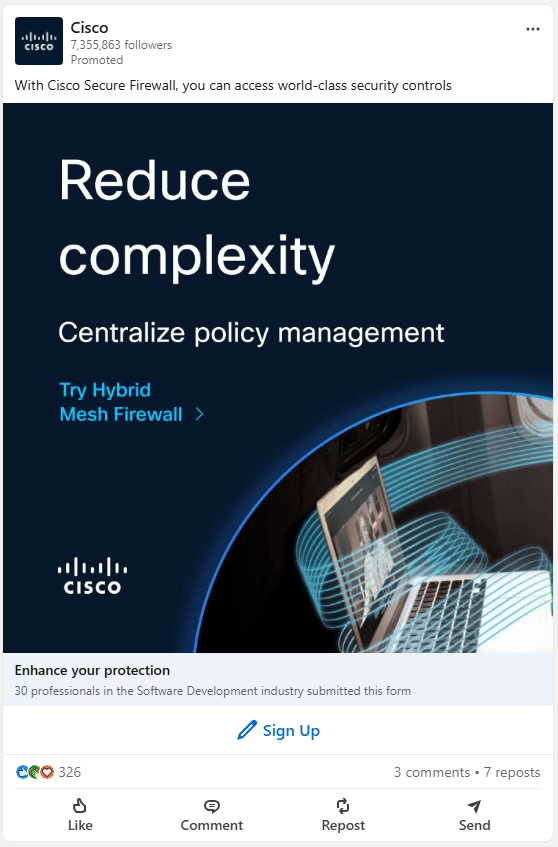
Some of the biggest social media sites to advertise on include:
- X (Twitter)
- YouTube
Given how popular social media is, advertising there is a surefire way to reach your target audience. Of course, you’ll want to consider which social media sites your audience frequents the most, and focus your advertising on those sites.
How do I set up and use Google Ads?
Start by creating your Google Ads account (just go to the Google Ads homepage and click “start now”), then research keywords to target using tools like Google Keyword Planner or KeywordsFX.
Next, bid on those keywords based on your budget, design your ads with clear headlines and simple landing pages centered around one call to action, and refine your targeting with negative keywords and custom audiences.
After launch, monitor your campaign metrics like click-through rate and conversion rate, then adjust your budget and strategy based on what’s working.
How do you advertise on Google?
Start by setting a clear goal for your campaign (like earning conversions or building brand awareness), then conduct keyword research to find long-tail keywords that will trigger your ad to appear in relevant search results.
Set your maximum budget and bid for ad placement (the average cost per click is between $1 to $2 for most companies), create a customized landing page that matches your ad content, and work to improve your quality score by ensuring your ad is relevant to the search terms.
Once you launch your campaign through Google Ads, monitor its performance using the Google Ads dashboard to track impressions, clicks, and conversions.
Where can my ads appear with Google PPC?
Your ads can appear on the Google Display Network or the Google Search Network, and each offers different placements and ad formats. The Display Network lets you use image, video, and responsive ads on YouTube, Gmail, mobile apps, and affiliate websites across desktops, laptops, tablets, and smartphones, which is ideal for remarketing and reaching shoppers at different stages of the buying funnel.
The Search Network displays text ads, dynamic search ads, call-only ads, and shopping ads on Google Search, Google Maps, Google Shopping, Google Play, and search partner sites, giving you prime real estate to target shoppers at the exact moment they’re searching for your products or services.
What does a PPC specialist do?
A PPC specialist manages your ad spend the same way a financial advisor handles your retirement money, investing it strategically to generate the best possible return on investment for your business. They build campaigns within platforms like Google Ads, target different keywords in different ways, and continuously optimize your campaigns to improve performance over time.
If your campaigns are being managed but you’re not seeing improving returns, it could mean your specialist lacks the resources or knowledge to drive results, or PPC may not be the right channel for your business.
Ad formats and types FAQs
In this section, we’ll answer some PPC questions related to different ad formats, as well as some of the different components you can include in your ads.
What are search ads in PPC?
Search ads are a type of PPC ad that appears on search engine results pages. You’ve likely seen paid search ads in Google — they usually appear at the top of search results, above organic results. These ads are targeted to specific keywords.
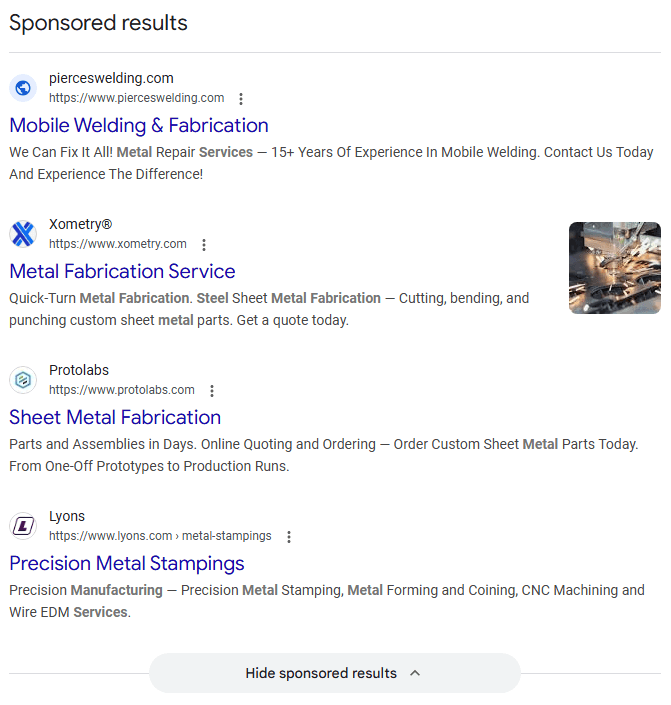
Search ads can take many different forms, from standard text ads to carousel ads to Local Services Ads (LSAs). And that’s just in Google. You can also run search ads in Bing and other search engines.
What are display ads in PPC?
Display ads are a type of PPC ad that appears on third-party websites or apps. They typically appear in a visual format, showing some kind of image, video, or graphic in the margins of the site.

Ad networks allow for various types of display ads, with different targeting options across different websites. Display ads are usually more focused on brand awareness compared to search ads.
What’s the difference between search ads and display ads?
The main difference between search and display ads is that search ads appear in search engines, while display ads appear on third-party websites and apps.
However, the intent behind these ads is different, too. Display ads are targeted to individuals who might have an interest in your products or services based on past browser activity or the websites they visit, whereas search ads are targeted to people who are directly searching for information related to your business.
That means search ads could be categorized as “pull” advertising, while display ads qualify as “push” advertising. Ultimately, using both types of ads together is a great way to reach a wide audience for your business.
What is display advertising?
Display advertising is the process of serving your company’s ads through a display network to appear on other websites, targeting specific audiences based on their browsing history and cookies. Your visually appealing ads appear on websites with available ad space, and when visitors click on them, they’re directed to your website where they can convert into paying customers.
What’s the difference between native advertising and display advertising?
Display ads are obvious promotions (like banner ads) that appear on web pages and are clearly identifiable as advertisements, while native ads blend into a website’s content by matching its tone, style, and format. Native ads include labels like “Sponsored” or “Promoted” to distinguish them from editorial content, but they’re designed to feel less intrusive and more like natural content that visitors would expect to see on that site.
Which is more effective: native advertising or display advertising?
Neither option is universally better since each works best for different campaign goals and audiences.
Display ads are better if your target market visits multiple sites with different formats, you want to use ad networks for easier placement, or your primary goal is retargeting, while native ads work better if you want a creative campaign, your audience frequents a handful of specific sites, or you want to increase brand loyalty and encourage content sharing.
What is the difference between programmatic ads and display ads?
The difference between programmatic ads and display ads is the purchase process. Programmatic advertising uses automated software to purchase ad space across multiple ad exchanges, while display advertising typically uses a single ad network like Google Ads.
The two terms refer to different aspects of digital advertising, so they can overlap. Some programmatic ads are display ads, and some display ads are programmatic, but you can also place display ads manually instead of using automation.
What are programmatic ads?
Programmatic ads are online ads that advertisers purchase and place using software instead of manual methods. This automated software allows advertisers to purchase ad space, choose ideal ad locations, target specific audiences, and place bids without negotiating with human representatives or manually requesting individual ad placements.
Programmatic advertising offers advantages like efficiency through automation, precise targeting based on demographics and interests, real-time reporting and optimization, and improved ROI.
What are dynamic search ads?
Dynamic Search Ads (DSAs) are Google Ads campaigns that use your website’s content to match searches and write headlines, instead of relying on a keyword list. Google also picks a landing page from your site that fits each search.
DSAs helped advertisers cover relevant searches their keywords missed, and they saved time on sites with lots of pages. They’re now being replaced by AI Max for Search. Google extended the DSA upgrade timeline, and automatic upgrades for DSAs will begin in February 2027.
If you run DSAs today, consider upgrading on your own schedule so you keep control of the settings. Afterward, review your search terms and landing pages, and exclude pages or queries that don’t fit your offer.
What is AI Max for Search?
AI Max for Search is a suite of AI-powered features you can turn on inside Google Ads Search campaigns. It’s not a separate campaign type.
It includes three main features:
- Search term matching: Finds relevant searches beyond your keyword list.
- Text customization: Generates ad text based on your website and existing ads.
- Final URL expansion: Can send people to a different page on your site.
Google moved AI Max out of beta in April 2026. Campaigns using automatically created assets or the campaign-level broad match setting began upgrading to it in September 2026.
AI Max works best with conversion-based bidding like Maximize Conversions or Maximize Conversion Value. Google’s AI Max FAQ says it’s limited with Manual CPC. Negative keywords still apply.
Test it in one campaign first. Compare conversions and cost per conversion against your current setup, and review the search terms report often.
What is Performance Max?
Performance Max is a goal-based Google Ads campaign type that runs ads across YouTube, Display, Search, Discover, Gmail, and Maps from a single campaign. You provide creative assets, conversion goals, and audience signals, and Google’s AI handles bidding and placement. Google’s overview covers the details.
It works best when you have reliable conversion tracking and enough creative assets. You give up some manual control, so use the available controls (negative keywords, brand exclusions, search themes) and review channel reports.
Performance Max complements keyword-based Search campaigns, and it doesn’t replace them.
Can I use images in PPC ads?
Yes! Not all PPC ad formats support images, but many do. Display ads, for example, are typically quite visual, making some kind of image or graphic essential. You can also include images in certain types of search ads, like carousel ads for specific products.
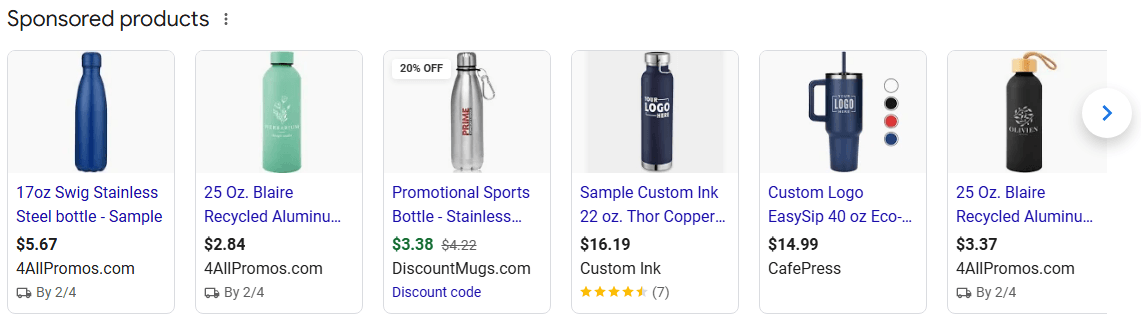
Ultimately, whether a given ad campaign can support images depends on the platform, channel, and format you choose for that campaign.
What are PPC ad extensions?
PPC ad extensions are additional snippets of information that you can include in paid search ads beyond the title tag, URL, and meta description. These snippets appear below the meta description, and may include info like:
- Links to specific pages on your site
- Contact information (like your phone number)
- Pricing for your products or services
- The address for your physical location(s)
- Ratings or reviews
- And more!
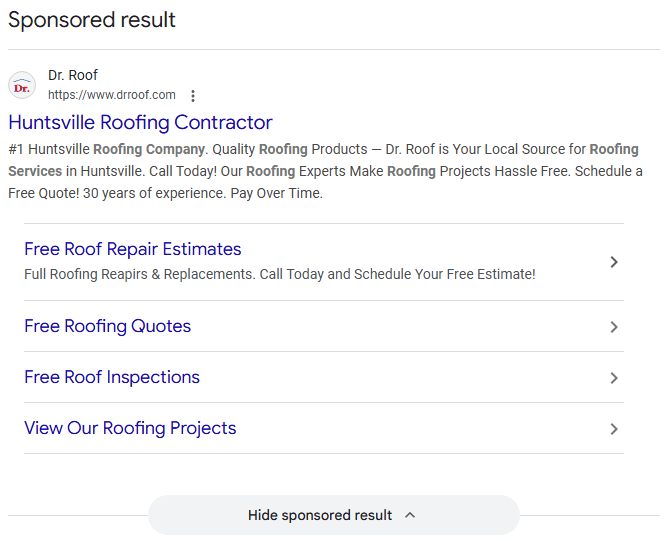
In Google Ads, you can implement some of these extensions below some of your ads, offering additional context to users. That additional context could lead some people to click where they otherwise might not.
Which is better, Google Shopping or Bing Shopping?
It depends on your business goals, target audience, and where you want your ads to appear. Google Shopping ads reach a more diverse international audience with 70% market share and availability in over 40 countries, making it best if you’re targeting multiple demographics across different regions.
Bing Shopping ads hold about 10% market share but reach a valuable niche audience, with 73% of searchers under age 45, so if you’re targeting a younger crowd in countries like the U.S., U.K., or Canada, Bing is a great option.
That being said, you don’t need to choose just one platform. Using both creates more opportunities to reach your target audience where they’re likely to search.
What do I need before I can set up Google Shopping ads?
You need to set up both a Google Merchant Center account and a Google Ads account, then link them together so you can run Shopping ads.
Create a shopping feed in the Merchant Center that includes all the products you want to promote (you’ll submit a spreadsheet with product ID, title, link, image link, and price at a minimum). Make sure your business, products, and website meet Google’s Shopping ads policy requirements, which are different from standard Google Ads policies.
How do I create Google Shopping ads?
Start by creating a new campaign in your Google Ads account, selecting Shopping as your campaign type, and choosing your objective and linked Merchant Center account.
Set your advertising preferences including your campaign name, bidding type, daily budget, and where you want your ads to show (like specific locations or devices), then create your ad group with a bid amount and name.
Your individual product ads get created automatically using the information from your Merchant Center account, so once you save your ad group settings, you can launch your campaign and start promoting your products.
Where does display advertising fit in the sales funnel?
Display advertising can fit anywhere in the sales funnel, from initial awareness at the top to final conversion at the bottom, based on your marketing goals.
For example, if you’re building brand awareness, you’d use display ads with custom segments and affinity audiences to generate impressions, but if you’re targeting users ready to purchase, you’d use remarketing audiences and customer match lists with messaging that highlights your unique selling propositions.
The key is matching your audience selection, ad messaging, and landing page strategy to the specific funnel stage you’re targeting.
What audiences should you target for bottom-of-funnel display ads?
For bottom-of-funnel display advertising, focus on remarketing audiences that target users who have previously engaged with your website or specific product pages, and customer match lists where you upload contacts who have completed micro-conversions like downloading gated content.
These users have already spent time on your website and engaged with your key service or product pages, so they’re close to purchase and need messaging that emphasizes what sets you apart from competitors. Your goal at this stage is to convert these users into leads for your sales team or purchasers in an ecommerce environment, tracking engaged users and your ultimate conversion goal.
How do I write an effective ad?
Start by researching your target audience to understand their demographics, interests, and buying decisions.
Choose an ad platform that suits that audience (like Google Ads or Pinterest), then create an ad with a strong headline containing your top keyword, emotional language, clear benefits rather than features, short sentences, and a specific call-to-action.
Test several varieties of your ad by tweaking one element at a time (like the headline, color scheme, or CTA), monitor which performs best, and continue adjusting based on performance metrics across multiple platforms.
What elements should I include in my ad copy?
Your ad should include a strong headline with your top keyword that grabs attention, emotional words that make readers feel excited or trusting, visual elements like symbols to stand out, benefits that show how your product helps the reader (not just features), short sentences that make every word count, and a clear call-to-action that tells viewers the next step like “shop our selection” or “contact us for service.”
With limited ad space, every word should impact viewers and guide them toward conversion.
What is headline pinning in Google Ads and how does it work?
Headline pinning is a feature in Google Ads that allows you to lock specific headlines to particular positions in your ads, controlling where they appear.
It works best when you have specific headlines that must appear with every display. For example, if you have three displaying headlines, you can pin the ones that include your target keywords to the top and place a call-to-action at the end.
You can also pin multiple headlines to the same position to ensure at least one appears in every ad in that spot.
Keywords and targeting FAQs
When running a PPC campaign, it’s crucial that your ads reach the right audience. You can make that happen through things like keywords and audience targeting. If you don’t know much about those, though, don’t worry — we’ve got the answers right here.
What are keywords in PPC?
Keywords refer to specific words or phrases that people look up in search results like Google. In the context of PPC, keywords are important because paid search ads are targeted to specific keywords. You bid on the keywords you want to target with your ads, and your ads should be tailored to those keywords.
How do I choose the right PPC keywords?
To identify the best keywords to target with your PPC ads, you’ll need to determine which keywords your target audience is searching for. Those keywords should be highly relevant to your target audience and to your business, helping you reach the people most in need of your services or products.
To identify the best keywords to target, one option is to look at what keywords your competitors are targeting. You can also use tools like Ahrefs to find out which keywords in your industry are driving the most traffic in search results.
Finally, branded keywords are highly beneficial to target. Those are keywords that feature your brand name directly.
What is keyword match type in PPC?
Keyword match type controls how closely a search has to relate to your keyword for your ad to be eligible. Google Ads has three: broad, phrase, and exact.
Matching is based on meaning and intent, not just the words in the query. Here’s how each works:
- Broad match: Reaches the most searches, including related ones that don’t contain your keyword’s words.
- Phrase match: Reaches searches that include the meaning of your keyword, including more specific searches.
- Exact match: Reaches searches with the same meaning or intent as your keyword.
For example, if you bid on “manufacturers in Dallas,” exact match could show for “Dallas manufacturing companies.” Phrase match could show for “sheet metal manufacturers in Dallas Texas.” Broad match could show for a related search like “contract fabrication shops near me.”
Review the search terms report regularly so you can see what each match type is actually triggering. Google’s match type guide has the full details.
What’s the difference between phrase match and broad match in Google Ads?
Phrase match keeps your ads close to your keyword’s meaning, while broad match reaches related searches that may use different words. The tradeoff is control versus reach.
Phrase match fits specific keywords where you want tighter control. Broad match fits discovery, especially when paired with Smart Bidding, which Google says is critical for broad match.
Either can match to more specific searches than your keyword. Check the search terms report and add negative keywords for anything that doesn’t fit.
When should I use broad match instead of phrase match?
Use broad match when you have reliable conversion tracking and a conversion-based Smart Bidding strategy, and you want to find relevant searches your keyword list misses. Smart Bidding evaluates each search at auction time, which helps keep broad match from spending on weak traffic.
Skip broad match if you’re using manual bidding, have no conversion tracking, or run a very small budget. In those cases it can spend on irrelevant searches.
Check search terms weekly at first, add negatives, and compare cost per conversion against your phrase and exact keywords. Also note that Google began upgrading campaigns that use the campaign-level broad match setting to AI Max in September 2026.
What are negative keywords?
Negative keywords refer to keywords you don’t want your ads to appear for. In Google Ads, for instance, you can set negative keywords to tell Google not to let your ads appear for those terms.
Negative keywords are helpful to target in situations where your target keyword could appear in multiple contexts. Say you’re targeting the keyword “printers for sale,” because you sell ink printers. If you’re using broad match or phrase match, your ad could end up appearing in a search for “3D printers for sale.”
Since you don’t sell 3D printers, that means your ad would be appearing for the wrong audience. To avoid that, you could list “3D” as a negative keyword, ensuring that your ads never appear in searches that include that term.
What keywords should I target for paid search campaigns?
Target keywords that are highly relevant to what you’re marketing and align with searcher intent.
Long-tail keywords (phrases several words long) make ideal targets because their specificity brings more relevant traffic and less competition.
Include your brand name in keyword variations, and use keyword research tools like KeywordsFX to expand your list with related terms. For example, if you sell portable speakers, target terms like “portable speaker” and “erebor portable speaker” rather than just broad terms like “speaker.
How do I choose keywords for my Google Ads campaign?
Choose keywords that are highly relevant to what you’re advertising by brainstorming search terms your customers would use, then validate them with keyword research tools.
For example, if you’re advertising a heavy-duty backpack, target keywords like “tactical backpack” or “durable backpack.” Add negative keywords too so your ads don’t appear in irrelevant searches.
If you provide workforce management services for automotive manufacturers, you might add “SMBs” or “small businesses” as negative keywords to avoid targeting users searching for small business solutions.
How many keywords per ad group should I use?
The general rule of thumb is less than 30 keywords per ad group, but there’s no precise answer since the right number depends on your ad content, target audience, and budget.
You’ll hear recommendations of 20 to 25 keywords, but those numbers aren’t accurate for every business. Quality always outweighs quantity, so you’re better off targeting 10 high-quality, long-tail keywords than 50 low-quality ones.
For example, if your daily PPC budget is $40 and your cost-per-click is $1, targeting 20 keywords gives you room for each keyword to generate clicks, but targeting 50 keywords means your budget can’t support your keyword list.
What’s the difference between branded and non-branded keywords?
Branded keywords contain your company’s name (like “WebFX SEO services” or “Zappos boots”), and they’re searched by users who already know about your brand and are typically further along in the buying process.
Non-branded keywords relate to your products or services but don’t include your company name (like “SEO services” or “running shoes”), and they’re used by people researching options who may not be familiar with your brand yet.
While branded keywords are unique to your company, non-branded keywords have far more options since the phrases your audience uses to research what you offer are almost limitless.
How do I add negative keywords to my Google Ads campaigns?
Log into Google Ads, select your campaign, click the Keywords tab, then click the Negative Keywords option where you can add your negative keywords at both the ad group level and campaign level.
This process takes just a couple of minutes and immediately optimizes your campaigns by preventing your ads from showing for irrelevant searches. Adding negative keywords at the campaign level applies them across all ad groups in that campaign, while adding them at the ad group level gives you more granular control over individual ad groups.
What are the most expensive keywords on Google?
The most expensive keywords on Google are dominated by legal and location-specific terms, with “San Antonio car wreck attorney” topping the list at $670.44 per click.
Legal keywords make up 58% of the top 100 most expensive keywords because lawyers stand to make substantial money from settlements and lawsuits, making it worth their investment to bid high for lucrative cases involving car accidents, personal injuries, and legal procedures.
Location-based keywords also make up 58% of the list, with warm-weather cities like Honolulu, Los Angeles, and Austin driving costs up as local businesses compete for limited ad space in their geographic areas.
How do you perform keyword research for PPC campaigns?
Start by brainstorming general keywords related to your products and services, then combine them with specific adjectives to create long-tail keyword variations that have less competition.
Next, analyze the search volume and competition levels for each term. The best keywords to target will have high search volume and low competition, like “totes women’s waterproof snow boots” instead of the generic “women’s cowboy boots.”
Can PPC ads target specific audiences?
Yes. Most advertising platforms let you target specific demographics in your ad campaigns, such as:
- Age
- Gender
- Occupation
- Company size (for B2B)
These enable you to hone your ad targeting to a specific audience based on the traits you most often observe among your customers.
What types of targeting methods are available for Google Ads?
Google Ads offers two main categories of targeting: audience targeting and content targeting.
Audience targeting focuses on reaching people based on demographics (like location, age, gender, and device type), interests (such as in-market targeting for users actively searching for products like yours or affinity targeting based on their web behavior), and remarketing (which targets users who already interacted with your content).
Content targeting allows you to reach people based on the content they’re viewing, using keyword targeting, topic targeting across multiple pages about a specific subject, or placement targeting where you choose specific websites where you want your ads to appear.
What are the best practices for using Google Ads targeting?
The most effective approach is to know your target audience and segment them into subgroups interested in different products or services so you can create personalized experiences for each group.
You should also utilize display targeting exclusions to filter out keywords, placements, or demographics that drive high costs but few conversions, which prevents wasted ad spend on irrelevant leads.
Make sure to focus on location targeting by targeting only people in your locations or people searching for your locations (not people who just show interest in your location), because someone 1,000 miles away searching for your business will rarely choose it.
How does location targeting work in Google Ads?
Yes, PPC ads can target specific locations. Google Ads location targeting lets you choose where your ads can show, from entire countries down to a radius around your business.
Google now offers two location options:
- Presence or interest: The default and the recommended option. It reaches people in, regularly in, or who’ve shown interest in your locations.
- Presence: Reaches only people likely in or regularly in your locations.
Google removed the old “search interest” option in 2023.
If you serve customers at a physical location, like a salon in Harrisburg, PA, choose Presence. That avoids paying for clicks from people who are interested in the area but won’t visit. Presence or interest can work better for travel, real estate, and education.
Location signals are Google’s best estimate, so check your location reports for traffic outside your market.
Why is PPC especially effective for local businesses?
Local businesses can target their most valuable customers by location, which makes PPC less expensive and more effective than it is for large nationwide companies competing with massive budgets.
While large businesses face high costs due to intense competition for industry keywords, local businesses advertise to a smaller audience and face less competition unless several other local businesses offer the same services in your community.
Platforms like Google Ads let you reach a targeted group of people within your specific location, ensuring you don’t spend money advertising to people who live nowhere near your business.
How do I use PPC for my local business?
Start by choosing your advertising platforms: Google Ads (for text ads in search results based on Ad Rank and quality score, or product ads in Google Shopping), display ads (to retarget previous visitors with ads showing products they already viewed), or social media ads on Facebook, Twitter, and Instagram (to target users by interests and career with budget caps that prevent overspending).
Once you select your platforms, make sure your landing pages have up-to-date information, accurate business details, and fast load times so visitors convert after clicking your ads. After your content is ready, launch your campaign and let it work.
Remarketing and retargeting FAQs
Have questions about remarketing and retargeting ads? Get the answers here!
What is remarketing in PPC?
Remarketing refers to marketing directed at users who have already expressed an interest in your business, typically by visiting your website. Many ad platforms let you target ads to users who have visited your site, ensuring that you’re reaching the people who are already the most interested in you.
What’s the difference between remarketing and retargeting?
Remarketing typically refers to re-engaging users through email marketing (like abandoned cart emails or product recommendations), while retargeting usually refers to showing display ads or social media ads to users who previously interacted with your brand.
The distinction isn’t really about the strategy itself but rather the channel you’re using, and in today’s digital landscape, these lines are becoming increasingly blurry as platforms like Google Ads and Facebook allow you to target email lists with paid ads.
How does email remarketing work?
Email remarketing uses automated email campaigns to bring users back to complete a purchase or make additional purchases based on their previous interactions with your site.
For example, if a user abandons an item in their shopping cart, you can automatically send them a reminder email the next day (often with a special discount to encourage completion), or you can email existing customers with product recommendations that complement their recent purchases.
Why should I use remarketing?
Remarketing helps you reconnect with the 96% of visitors who leave your site without purchasing, giving them multiple chances to convert while building brand awareness and trust through repeated exposure.
Every time someone sees your ad, they naturally gain more trust in your brand, and this repeated visibility slowly leads them down the sales funnel toward conversion. Remarketing delivers a high return on investment because it targets people who already showed interest in your business, making them more likely to come back and buy compared to cold audiences.
What are the different types of remarketing?
The main types of remarketing include display remarketing (shows ads on over 2 million sites in Google’s Display Network), dynamic remarketing (shows ads featuring the specific products or services users viewed on your site), and search remarketing (shows text ads at the top of search results to people looking for relevant information).
You can also use video remarketing on YouTube, mobile app remarketing for apps and mobile sites, social media remarketing on platforms like Facebook and Instagram, distribution list remarketing for email subscribers, and customer list remarketing to target previous customers. Each type targets users in different formats and on different platforms based on where your audience spends time online.
What is Google Ads Customer Match?
Customer Match is a Google Ads feature that lets you upload first-party customer data, like email addresses or phone numbers, to build audience segments for your campaigns. Google matches your list to signed-in Google users.
You can use these segments to reach existing customers, build upsell campaigns, or exclude customers from acquisition campaigns. For example, if you collect emails at an open house, you could upload that list and show ads to those contacts.
You can only upload data you collected directly from customers, and you need any required consent and disclosures. Google’s Customer Match policy also requires a good policy and payment history on your account, so not every account is eligible.
How do I set up Google Ads Customer Match?
To set up Customer Match, follow the steps in Google’s upload guide:
- Prepare your file. Collect data with permission and save it as a CSV. Column headers must be in English (Email, Phone, First Name, Last Name, Country, Zip).
- Open Audience manager. In Google Ads, click Tools, then Shared library, then Audience manager, then Your data segments.
- Create the list. Click the plus button, choose Customer list, name it, and upload your file.
- Confirm compliance. Check the box confirming the data was collected in line with Customer Match policies.
- Set a membership duration. The maximum is 540 days.
- Upload. Click Upload and create.
Processing can take up to 48 hours. After that, you’ll see your match rate. Lists need at least 100 active users to serve ads, so refresh them regularly to keep them eligible.
How do I create custom audiences in Google Ads?
Custom segments are audiences you build by entering search terms, URLs, or apps that signal your ideal customer’s interests. They’re different from Customer Match, which uses your own customer list.
To create one, open Audience manager under Tools and Shared library, then go to Custom segments and click the plus button. Enter the terms or URLs, name the segment, and save it.
Use custom segments to reach new prospects and Customer Match to reach people you already know.
What are the best practices for retargeting ads?
Limit ad frequency to about 20 per month so you stay memorable without being intrusive, create different ads for different customer segments (homepage visitors get general ads while landing page visitors get specific product messaging), and stop retargeting people for items they already bought.
Keep ad copy simple and action-oriented rather than text-heavy, start with one retargeting platform like Google Ads before expanding to others, and regularly A/B test new ad variations to keep content fresh and effective. Track your retargeting data consistently to identify what’s working and optimize campaign performance over time.
What are common retargeting mistakes to avoid?
The biggest mistake is showing too many ads to the same person, which comes across as intrusive. Limit each potential customer to 15 to 20 ads per month so you stay visible without overwhelming them. Another common error is continuing to show ads after customers have already made a purchase, which wastes your ad budget and annoys customers who no longer need your product.
Ad placement and visibility FAQs
One area you may have questions about is where your ads rank relative to those from other companies. Below are the answers to some common questions about PPC ad placement and visibility.
What is Quality Score in Google Ads?
Quality Score is a diagnostic rating from 1 to 10 that shows how your ad experience compares with other advertisers’ for a keyword. It’s based on three components: expected click-through rate, ad relevance, and landing page experience. Each one is rated above average, average, or below average.
Google says Quality Score isn’t an input in the ad auction and shouldn’t be treated as a KPI. So don’t chase a 10. Use the component ratings to find what to fix.
For example, a below average landing page experience usually means your page doesn’t deliver what the ad promised. Fix that, then check your conversions.
What is Ad Rank, and how does Google determine ad placement?
Ad Rank is the score Google calculates in each auction to decide whether your ad is eligible to show and where it appears relative to other ads. Your position comes from your Ad Rank, so they aren’t the same thing.
Google combines several factors:
- Auction-time ad quality (expected CTR, ad relevance, landing page experience)
- Your bid
- Ad Rank thresholds
- How competitive the auction is
- The context of the search
- The expected impact of assets and other ad formats
Google doesn’t publish the formula. Because Ad Rank is recalculated for every auction, your position can differ from search to search.
Can a lower bid outrank a higher bid?
Yes. Google’s auction uses quality as well as bid, so an advertiser with a lower bid can win a higher position if its ads and landing page are more relevant.
For example, you bid $5 with an ad that doesn’t match the landing page, and a competitor bids $3 with a closely matched ad and page. The competitor could outrank you and still pay less per click.
Ad Rank thresholds, search context, and assets can also change the outcome, so you can’t simply bid your way to the top.
Why are my ads not showing?
Ads usually don’t show because of a status problem, a budget limit, narrow targeting, or a weak position in the auction. Check these in order:
- Status. Look for paused, ended, limited, or disapproved campaigns, ad groups, and ads.
- Policy. Check for disapprovals in the Policy manager.
- Budget. Your daily budget may run out early, so check how much impression share you’re losing to budget.
- Targeting. Location, schedule, language, or audience settings may be too narrow, or your keywords may have low search volume.
- Auction. A low Ad Rank, from low bids or weak relevance, can keep you from showing.
Searching for your own ad isn’t a reliable test. Results vary by location, timing, and user. Use Google’s Ad Preview and Diagnosis tool instead.
How can I improve my Google PPC ad ranking?
Improve the factors that feed your Ad Rank: ad relevance, expected CTR, landing page experience, assets, and bids.
Start with the ad and landing page. Match your copy to the search, and send clicks to a page that delivers what the ad promised. If your ad promotes “cheap golf bags,” the landing page should show discounted golf bags, not your homepage.
Then add assets like sitelinks and callouts, since Google considers their expected impact. Raise bids only where the conversions justify the cost.
Use Quality Score components to diagnose problems. And track conversions, not just position, because the top spot isn’t always the most profitable.
Why was my Google Ad disapproved?
Your Google Ad was disapproved because it violated one of Google’s advertising policies during the automated review process. Common reasons include excessive capitalization, destination mismatches where ads in the same ad group go to different URLs, keyword stuffing that makes your ad copy appear repetitious, or inappropriate punctuation and symbols that make your ad hard to read.
How do I fix a disapproved Google Ad?
The fix depends on the specific disapproval type, but most require simple adjustments to your ad copy or landing page. For example, if your ad was disapproved for capitalization issues, remove all caps except for the first letter of each word in your title, and if it’s a destination mismatch, make sure all ads within the same ad group point to the same final URL.
Can I appeal a Google Ads disapproval?
Yes, you can appeal certain Google Ads disapprovals, especially if you believe the automated system made an error or missed important context. To appeal, verify your ad doesn’t actually violate Google’s rules, click the appeal option next to the disapproval label in your account, and contact Google support directly to explain why your ad should be approved.
How much should I bid on Google Ads keywords?
Bid an amount you can comfortably afford while staying competitive, keeping in mind that Google displays ads based on both your bid amount and your Quality Score (Google’s assessment of your campaign quality). You only pay when someone clicks your ad, so you won’t waste budget on impressions.
Monitor your campaign performance after launch and adjust bids based on results. For high-performing ads, you might increase your budget, while underperforming ads may need to be paused or reoptimized.
Should I use search advertising or display advertising?
Use search advertising if you have a small marketing budget and need precise control over who sees your ads, cater to a local market, have products with short sales cycles, or need to reach customers urgently searching for your services.
Use display advertising if you offer products with lengthy sales cycles (like cars or enterprise software) where you’re generating leads rather than immediate sales, cater to niche or luxury buyers who spend time on select sites, want to use photos and videos in your ads, or focus on building brand awareness rather than immediate conversions.
If your marketing budget allows, you can use both search and display ads together since they serve different purposes and aren’t interchangeable, with search ads capturing active shoppers and display ads building awareness and remarketing to previous visitors.
PPC landing page FAQs
Every PPC ad links to a landing page. But what are landing pages, and how should you approach yours? Find the answers to those questions below.
What is a PPC landing page?
In a PPC ad campaign, the landing page is the website page that the ad links to. When a user clicks on your ad, it will direct them to the landing page. Typically, that landing page will directly encourage users to convert.
What makes a high-converting landing page?
Successful landing pages share several qualities, including:
- Clear CTA: A call to action (CTA) that directly tells users what action you want them to take.
- No clutter: A lack of excessive information or graphics that might distract users from the CTA.
- Cohesive message: A single-minded message focused only on one CTA, rather than multiple, competing CTAs.
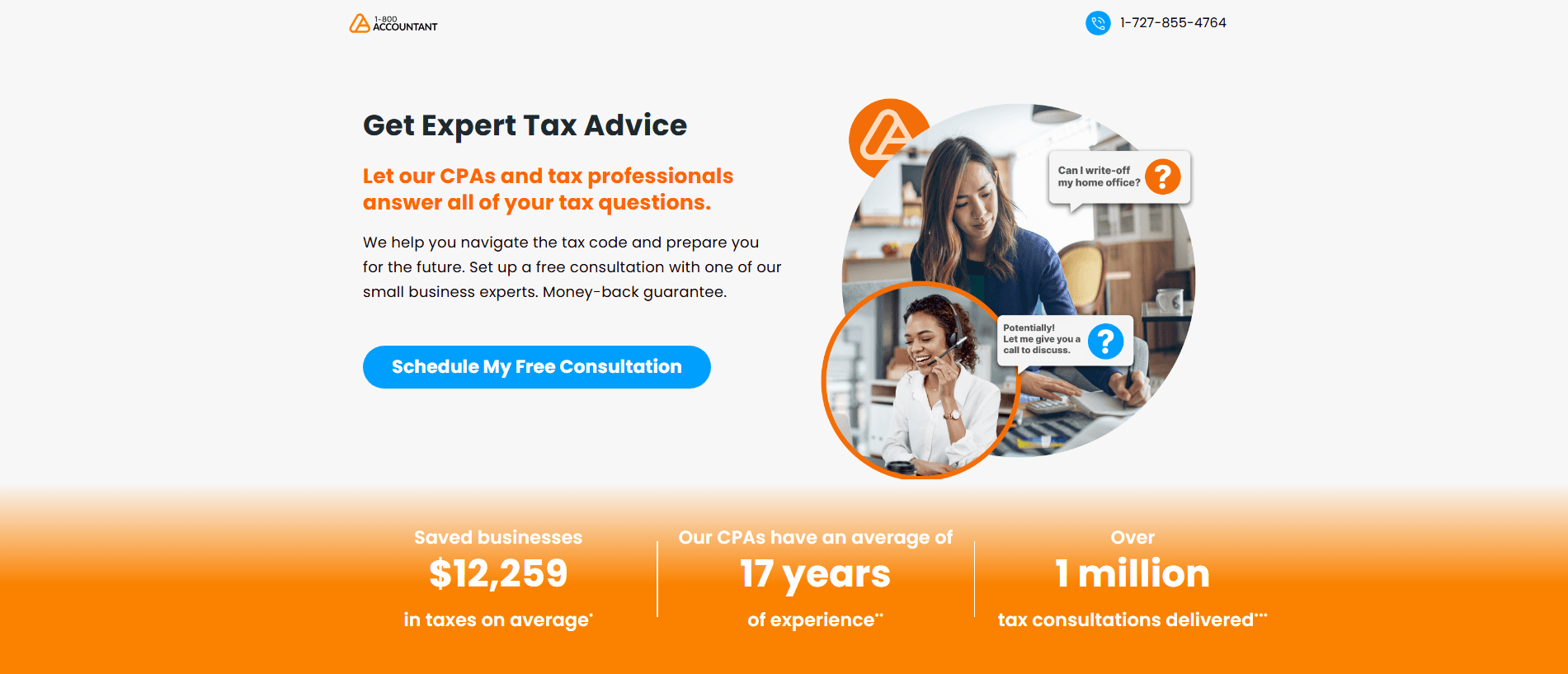
These are the best ways to ensure that visitors to your landing page take the action you want from them.
Should PPC ads lead to my homepage?
Generally speaking, it’s not a good idea to use your website’s homepage as a landing page. That’s because landing pages should be highly specific and actionable, which homepages are not. Whereas a homepage typically features general information about your business, a good landing page will highlight a specific product or service, along with a single CTA that it directs users toward.
How can I improve my Google Ads landing page to generate more leads?
Improve your landing page by making it fast (users expect two-second load times or less), relevant to your ad content, and easy to navigate without pop-ups or confusing elements.
Use PageSpeed Insights to identify technical issues like render-blocking resources, coordinate your landing page messaging with your ad copy (if you advertise red sneakers at 50 percent off, your landing page should emphasize that exact offer), and make your contact information and conversion path obvious.
Google evaluates landing page quality when determining your Ad Rank, so a better landing page can lower your cost-per-click and increase conversion rates.
PPC campaign set up and management FAQs
Learn how to set up a PPC campaign and how to manage an effective one in this section!
What are PPC goals?
PPC goals are the specific objectives you set for your pay-per-click campaigns to align with your company’s needs and overall business objectives.
For example, if you’re a new business focused on increasing brand awareness in your first three months, your PPC goals should aim to maximize visibility and reach, but after a few months, you might shift your goals toward generating leads and pushing sales for specific products. These goals are sometimes referred to as objectives and key results (OKRs).
How do you set PPC campaign goals?
Start by identifying your business needs and determining what results you want from your paid search campaigns, making sure your PPC goals align with your overall business objectives.
Next, set both short-term goals (weekly or monthly benchmarks) and long-term goals (quarterly or annual targets), then ensure all goals are results-oriented and SMART (specific, measurable, achievable, relevant, and time-bound).
According to best practice, you should continuously measure your campaign performance against these goals to identify what’s working and make strategic improvements based on data from previous campaigns.
What are the best digital advertising tips to drive results?
Start with SEO optimization (using target keywords and improving page speed) and launch PPC campaigns through Google Ads where you only pay when users click your ads.
Create compelling content like blog posts and videos, run social media ads where users spend most of their time online, and know your target audience so you can limit ads to people who fit your customer profile.
Use clear calls to action, display customer testimonials to build trust, retarget visitors who left without converting, apply consistent branding across all advertising, and track key performance indicators like conversion rate and cost per lead through Google Analytics to see what’s working.
What should I include in my PPC campaign checklist?
Start with setup tasks: research long-tail keywords (15-20 per ad group), create custom landing pages for each keyword, adjust targeting settings for location and demographics, implement tracking codes in Google Analytics, and build a negative keywords list.
Daily, check KPIs like ad spend and click-through rate, then pause underperforming keywords. Weekly, review your budget and bids, run search query reports to find irrelevant keywords, and check display ad placements.
Monthly, maintain landing pages and links, analyze visitor metrics like bounce rate, observe competitor ads, and monitor keyword trends in Google Trends to adjust your campaign as search patterns change.
How do you manage a successful PPC campaign?
Managing a PPC campaign involves four key steps: select highly targeted long-tail keywords that reflect searchers’ intent to become customers, create landing pages built around those keywords to provide in-depth information, write ads with headlines that include your target keyword and strong calls to action like “buy now” or “sign up now,” and track your results to refine your campaign over time.
For example, instead of targeting a broad term like “ladders,” use specific keywords like “ladders for sale in [your area]” to attract qualified buyers who are ready to purchase. Make sure your landing pages answer users’ questions directly instead of just linking to your homepage, which creates a poor user experience.
Should I use ad scheduling for my PPC campaigns?
Yes, implementing ad scheduling can help you avoid wasting money running ads when no one is available to answer your phones or when your target audience isn’t actively searching.
By default, your ads show 24/7, but for B2B businesses, you’ll most likely want to adjust your ad schedule to your business hours so you have someone in the office to answer calls from potential clients.
For B2C businesses, check the Day & Hour report to identify peak hours, and remember that the ad schedule is determined by your account’s time zone, so factor in time differences if you sell to consumers across multiple time zones.
What are automated rules in Google Ads?
Automated rules in Google Ads let you make changes to your account automatically based on settings and campaign performance conditions you choose. You can set automated rules at the campaign, ad group, keywords, and ad text levels to handle tasks that are usually done manually.
For example, you can schedule ads to go live at midnight for a holiday promotion, pause campaigns that spend a certain budget partway through the month, or pause low-performing ads based on metrics like CTR and impressions. Setting up automated rules takes about two minutes but can save you 1-2 hours per week in campaign optimization.
What is PPC automation and what are its benefits?
PPC automation uses technology (like artificial intelligence) to run and optimize your PPC advertising campaigns, automating tasks like research, bidding, and campaign management.
The primary benefits include significant time savings by reducing repetitive tasks, improved scalability so you can run more ads without investing significantly more time, enhanced data collection that compiles information from multiple sources into easy-to-read reports, optimized performance through more informed decisions and flexible adjustments, and access to built-in automation tools that any business can use without significant upfront investment.
What are common PPC performance issues I might not realize are hurting my campaigns?
Five common issues that may be hurting your PPC performance include:
- Incorrect conversion settings (either not set up at all or set up incorrectly)
- Keyword intent that doesn’t match your product or service
- Incorrect or outdated location targeting
- Lack of ad scheduling so your ads run 24/7 even when no one is available to answer calls
- Redirecting or broken landing pages that affect quality scores and increase cost-per-click.
For example, if you’re targeting keywords that are too generic (like “recreation” for a camping products company), you’re likely wasting budget on irrelevant clicks from searchers looking for other types of recreation.
PPC tools and technology FAQs
As with just about any digital marketing strategy, PPC works best when it’s approached with the right digital toolset. But what tools should go in that toolset? We’ll answer that question with the below FAQs about PPC tools and technology.
What tools are used for PPC?
There are several different types of tools you can use for PPC. Here are some of the main types of tools you might take advantage of:
- Paid advertising networks (e.g., Google Ads, Microsoft Ads)
- Keyword research tools (e.g., Google Keyword Planner, KeywordsFX)
- Competitor research tools (e.g., Ahrefs, SpyFu)
- Landing page design tools (e.g., Leadpages, Unbounce)
What is automated bidding in PPC?
Automated bidding lets an ad platform set your bids based on a goal, like conversions or return on ad spend. You set the goal, and the platform adjusts bids at auction time.
In Google Ads, Smart Bidding covers the conversion-focused strategies: Maximize Conversions, Maximize Conversion Value, Target CPA, and Target ROAS. Maximize Clicks is also automated, but it optimizes for traffic, not conversions.
Performance Max is a campaign type that uses Smart Bidding, but it isn’t what automated bidding means.
Automated bidding only works as well as your conversion tracking, because the platform optimizes toward whatever conversions you’ve marked as primary. Don’t hand it over without monitoring. Review your search terms, targets, and conversion volume regularly.
How much conversion data do I need for automated bidding?
Google doesn’t set a minimum. It recommends evaluating Smart Bidding over longer periods, such as a month or more, with at least 30 conversions (50 for Target ROAS). That’s guidance for judging results, not an eligibility rule.
Smart Bidding can also use data from your other campaigns, so new campaigns may still perform reasonably well.
If you have low conversion volume, Google suggests adding relevant keywords to expand targeting. Consider optimizing for an earlier action, like a form submission, if purchases are rare. Just confirm those leads are actually good.
How does AI affect PPC advertising?
AI has changed the way advertisers approach PPC in several different areas. Some of the ways it’s impacted paid advertising include:
- Automating bidding and targeting
- Predicting user search intent
- Assisting with audience segmentation
- Detecting patterns and trends in ad data
In short, it functions as a tool for improving PPC automation and data analysis.
How do I fix conversion tracking issues in Google Ads?
Start by checking each conversion action’s status in your account, then work through the usual causes:
- Tag problems. Confirm the tag fires once, on the right action. Duplicate tagging, such as a CMS plugin plus a manual tag, can double count conversions.
- Auto-tagging. Make sure it’s on, and that redirects and click trackers pass the click ID (GCLID) to your landing pages and conversion pages.
- Primary vs. secondary. Conversions created through Google Analytics are set as secondary by default. Change them to primary if you want to bid on them.
- Reporting gaps. Compare Google Ads numbers with your analytics and CRM data, and investigate big differences.
Fix tracking before you rely on automated bidding, since it optimizes toward whatever you’ve set up.
PPC metrics and analytics FAQs
Measuring your results is always important, and PPC is no exception. If you don’t know what kinds of results you’re driving, you won’t know if your PPC is working like it should. That’s why in this section, we’ll look at some FAQs related to PPC metrics and analytics.
What metrics matter most in PPC?
Some of the most important metrics to track in your PPC campaigns include:
- Conversion rate
- Click-through rate (CTR)
- Cost per click (CPC)
- Return on ad spend (ROAS)
- Customer acquisition cost (CAC)
We’ll look at some of those metrics in more detail below.
What is a conversion in PPC?
In PPC, a conversion is when someone takes the action that your ad is trying to get them to take. That means for a conversion to happen, someone has to see your ad, click on it, read the CTA on the landing page, and then do what the CTA is encouraging them to do.
A conversion could refer to a making a purchase, signing up for an email list, starting a free trial, or any other action you want your audience to take.
What is a good conversion rate for PPC?
A good conversion rate to aim for with your PPC campaigns is around 10%. The average conversion rate for PPC is 2.35%, but the top 25% of advertisers on Google Ads have an average conversion rate of 11.45%. So, 10% is a good benchmark to shoot for since it’s close to that top percentile.
What is a good click-through rate (CTR) for PPC?
The average CTR across all industries is 1.9%, so a good CTR — if we’re defining “good” as “above average” — would be anything higher than that. To some degree, the higher you can get your CTR, the better — but only if your conversion rate goes up, too. Otherwise you’re just paying for clicks that aren’t resulting in revenue.
What’s the difference between impressions, clicks, and conversions?
An impression is when someone sees your ad on their screen, a click is when someone sees your ad and clicks through to your landing page, and a conversion is when someone takes the action you want them to take on that landing page (like making a purchase or filling out a form).
Think of them as three tiers of engagement. Nearly all conversions start with a click, and every click begins with an impression, but not every impression leads to a click, and not every click leads to a conversion.
How do I track impressions and clicks for my ads?
Track impressions and clicks directly through the platform you’re using to run your ad campaigns. If you’re running Google Ads, use that platform to view engagement metrics and see how users interact with your ads.
You can also use tools like Google Analytics to view data about user behavior on your landing pages. These platforms will show you metrics like click-through rate (CTR), which measures what percentage of impressions lead to clicks, giving you insight into how compelling your ad copy is.
How do I improve low clicks or conversions on my ads?
If you’re getting impressions but not many clicks, that’s a sign your ad copy isn’t resonating with your audience or doesn’t align with search intent for the keywords you’re targeting.
Reoptimize your ad copy to be more engaging and relevant. If you’re getting clicks but not conversions, the issue is with your landing pages. Make sure your landing page content matches your ad, create a single clear call to action so users aren’t confused, and ensure the page is enticing enough to convert interested visitors.
What are offline conversions in Google Ads?
Offline conversions are conversions tied to your paid ads that happen off the Internet, where Google Ads can’t automatically track them. These include phone calls and in-store purchases that result from someone seeing your ad. Google Ads can only track online conversions automatically (like website purchases or email signups), so you need to manually import offline conversion data to get complete campaign analytics.
How do I set up offline conversions in Google Ads?
The setup method depends on whether conversions start with a click or a call. For click-based conversions, use Google Click Identification (GCLID), which assigns each ad click a unique number you can save with lead information and upload when that lead converts offline.
For call-based conversions, track which phone calls result in conversions and upload that list to Google Ads, which will match your records with its call tracking data. You can also use CRM tools like HubSpot or Salesforce to automatically import offline conversion data.
How do I set up conversion tracking in Google Ads?
To set up conversion tracking, follow these steps:
- Define your conversions. Choose actions that matter to your business, like purchases, qualified form submissions, or calls.
- Install the Google tag. Google recommends the Google tag installed site-wide with event snippets, or Google Tag Manager with the conversion linker. Turn on auto-tagging.
- Or import from Google Analytics. Only events marked as key events in GA4 can be imported, and they can take 24 to 48 hours to appear.
- Set the count. “Every” fits sales, and “One” fits leads.
- Choose attribution. Google Ads now offers data-driven attribution (the default for most conversions) and last click. First click, linear, time decay, and position-based were retired in 2023.
- Turn on enhanced conversions. This sends hashed first-party data to improve measurement. It isn’t supported for conversions imported from Google Analytics goals.
- Mark primary conversions. Only primary conversions are used for bidding.
Test the setup before you launch.
How does PPC call tracking work?
PPC call tracking works by purchasing one or more phone numbers that forward to your business line, with each unique number assigned to a specific PPC campaign or landing page.
When you set up dynamic number insertion, a simple script on your website changes the displayed phone number based on specific qualifications like a visitor’s geographic location, the landing page they’re on, the referral point, or the keyword they used to find you.
This allows you to track which campaigns, ads, and keywords drive phone calls so you can merge phone campaign data with your existing data to create more effective campaigns.
What are the benefits of PPC call tracking?
PPC call tracking provides five key benefits:
- You can track the sources of calls by seeing which campaigns and ads drive phone leads
- Conduct split testing by assigning unique numbers to different ad versions
- Obtain valuable call data like caller names and peak call hours to refine your targeting
- Identify which keywords drive the highest call volume so you can adjust your bidding strategy
- Monitor your campaign performance more accurately by tracking conversions and putting a dollar figure on every campaign.
These benefits help you make smarter choices about where to invest your advertising budget and improve your return on investment.
PPC testing and optimization FAQs
When it comes to creating effective PPC ads, it’s important to test and optimize your ads to maximize your ROI. Find how to test and optimize your ads below!
What is PPC optimization?
PPC optimization is the practice of analyzing and improving your pay-per-click campaigns at the campaign and ad group level by updating elements like landing pages, ad copy, and keyword bids. The goal is to help your ads win valuable ad space, earn more clicks from qualified audiences, and boost conversions without wasting your ad spend on underperforming elements.
What is PPC testing?
PPC testing (commonly known as A/B testing for PPC) involves taking one aspect of your advertising campaign and running different trials to see which one yields the best results.
You can experiment with various ad versions, features, and configurations to determine what best resonates with your target audience. This process helps you see trends among your most successful ads and use those as templates for future campaigns while identifying the attributes of your unsuccessful ads.
What should you test in your PPC ads?
You should test your ad copy elements (like offer delivery, sense of urgency, and calls to action), landing pages (either making changes to your current page or redirecting to different pages), and ad extensions (like sitelink extensions, structured snippets, and price extensions).
For example, when testing ad copy, you might experiment with whether “10% Off” or “$15 Off” results in more clicks, or test CTAs like “Buy Now” versus “Place Your Order.” Make sure to only test one variable at a time to get the most precise picture of what’s working and what isn’t.
What is A/B testing for responsive search ads?
A/B testing for responsive search ads is a tactic where you experiment with different ad elements (headlines, copy, images, calls-to-action) to track and identify which combinations perform best with your target audience and drive conversions. You create two or more versions of your ad and compare their performance to determine the most effective approach.
This process lets you duplicate past successes and improve upon them by repeating the test while adjusting bids and evaluating performance metrics like click-through rate and conversions per impression.
What are the best A/B testing strategies for responsive search ads?
The five most effective A/B testing strategies are:
- Segmenting by message (creating different ad groups around specific keywords and themes)
- Testing dynamic keyword insertion (comparing ads with and without DKI enabled)
- Pinning vs. mix-and-match (testing pinned headlines against freely rotating ones)
- Pseudo-ETA tests (creating pinned ads that resemble expanded text ads compared to control responsive search ads)
- Landing page testing (comparing different page versions or redirecting to different site pages)
Each strategy helps you optimize different aspects of your ad performance.
How do I conduct an A/B test on my responsive search ad headlines?
Create two identical ad versions with different headlines and track which performs better. For dynamic keyword insertion tests, enable DKI in one ad and leave it disabled in the other, then analyze which keywords are most effective.
For pinning tests, create two campaigns using the same creative with up to 15 headlines and four descriptions, pin specific headlines and descriptions in one ad while leaving the other intact, then compare their performance to determine whether pinning or mix-and-match works best for your audience.
PPC costs and budgeting FAQs
The cost of PPC is one of the largest concerns for many businesses, but we’re here to help clear up some of the confusion around it. Here are the answers to some of the most common questions about PPC costs and budgeting.
How much does PPC cost?
PPC costs between $100 and $100,000 per month, on average. If that seems like a wide range, that’s because it is. But that shouldn’t be surprising — PPC pricing depends on a ton of factors, including:
- The specific bids you set
- The number of ads you run
- The platforms you use
- The PPC tools you pay for
- The agency you partner with
Factoring in each of those things, it makes sense that PPC pricing varies wildly across different businesses.
What is the average cost per click (CPC) of paid advertising?
On average, the cost per click (CPC) of paid advertising is between $0.01 and $1. As with the average monthly cost of PPC, that number can vary greatly depending on the specific platforms you use and the bids you set.
How does PPC bidding work?
PPC bidding is a system in which you set the maximum amount that you would be willing to pay for each click on an ad. For paid search ads, you typically bid on specific keywords, while in display advertising you bid on ad space. You’re also bidding against other businesses, and outbidding them gives you a better chance of your ads appearing.
As an example, let’s say you wanted to run a paid search ad in Google for the keyword “car repair services.” You might set a bid of $0.90, which turns out to be higher than the bids your competitors set for that same keyword. As a result, your ad ends up appearing in search results for that keyword. Then, each time someone clicks on it, you pay the $0.90 that you bid.
(It’s worth noting that your bid isn’t always the only factor that contributes to your ad placement, as we’ll see in some of the other PPC FAQs on this page.)
How do I reduce wasted PPC spend?
There are many different ways to reduce wasted ad spend. Of course, which of those ways will be the most effective depends on what the specific issues are with your campaigns. Some methods you can try include:
- Sticking to a strict PPC budget
- Ensuring you’re targeting the right keywords
- Taking advantage of audience targeting
- Automating repetitive PPC tasks
How do I lower my customer acquisition cost?
Lower customer acquisition cost by adding negative keywords, removing queries that generate clicks (but no conversions), and segmenting campaigns to improve budget allocations.
How do I scale a PPC campaign?
If you’re looking to scale your PPC strategy, there are a few ways you can do so. Some of the best tactics include the following:
- Experimenting with different channels and platforms
- Investing in advertising automation tools
- Increasing your advertising budget
- Using data to evaluate and enhance your campaigns
Each of those steps helps you level up your PPC and expand the reach and impact of your campaigns.
How much do Google PPC ads cost?
You have complete control over your Google PPC budget, whether you want to spend $500 or $2,000 per month, but your industry’s competitiveness can influence how much you need to invest to secure valuable ad placements.
Most small-to-midsize businesses spend $9,000 to $10,000 per month on PPC (including other networks like Bing, not just Google), and a low budget or bid in a competitive industry could cost you top positions in search results.
Your actual cost per click depends on the ad auction process, which factors in your maximum bid (what you’re willing to pay per click) and your Ad Rank (a combination of your bid and ad quality).
What is the cost per lead formula?
The cost per lead (CPL) formula is: Total Marketing Spend / Total Number of Leads Generated, which calculates how much you spend to acquire each lead.
For example, if you spend $1,000 on a PPC campaign and generate 50 leads, your CPL is $20 ($1,000 / 50 = $20 per lead).
Whether your CPL is good or bad depends on how much your leads spend when they convert (a $20 CPL is good if leads spend an average of $100, but problematic if they only spend $20 or less since it cuts into your profits).
How do I reduce my cost per lead?
Zero in on your target audience by segmenting them into subgroups based on demographics, socioeconomic status, and shared characteristics instead of targeting one large group, which helps you create ads that resonate with specific audiences and avoid wasting money on uninterested leads.
Focus on creating relevant content that aligns with each segment’s interests (for example, a young professional woman needs different content than a married mother), which increases engagement and conversions since people interact more with tailored messages.
Use remarketing to re-engage people who showed interest but didn’t convert, which costs very little to run and often provides the final nudge leads need to become customers, lowering your overall CPL while increasing conversions.
PPC audits and lead generation FAQS
Explore PPC audits, how to conduct one, and how PPC can help you generate more leads below!
What is a PPC audit and how do I conduct one?
A PPC audit assesses the short- and long-term value of your paid advertising strategy by examining the performance, cost, and returns of your ad campaigns, and it should happen on a routine basis to maximize results. Start by choosing a date range (at least three months of data), downloading your campaign data from Google Ads or Bing, and documenting your budget and cost-per-click.
Review your ad content and landing pages for relevance and clear calls to action. Check your quality score and keyword targeting (focusing on long-tail keywords), then analyze your click-through and conversion rates together. Review your bids, location targeting, and ad schedule effectiveness.
You’ll also want to compile areas of wasted spend, like irrelevant keywords that need negative keyword blocking. Double-check your conversion tracking accuracy, conduct a competitor PPC analysis, and evaluate any automated ad campaigns to ensure they’re still driving conversions aligned with your goals.
How do I generate leads with PPC ads?
You can generate leads with PPC by targeting industry-related keywords that match your products or services, writing eye-catching headlines that include your target keywords and unique selling points like free consultations or pricing, using clear calls to action like “Sign up now” or “Get a quote today,” and incorporating ad extensions that display additional information or form fields. Each of these strategies makes it easier for potential customers to find you and take action. The key is working within your budget and testing different combinations to see which performs best for your business.
PPC services and agencies FAQs
For this final section, we’ll look at some questions related to hiring a professional agency for help with your PPC strategy.
Should I hire a PPC agency?
Whether or not it’s a good idea for you to hire a PPC agency depends on factors like your budget, time availability, and level of PPC expertise.
If you already know PPC inside and out, and have plenty of time to manage your campaigns, you might not need an agency. However, a lot of businesses lack one or both of those things, which is why so many of them choose to partner with PPC professionals for help managing their paid advertising strategy.
In short, you should partner with an agency if you feel you would benefit from their deep PPC expertise or their ability to spend more time on your campaigns than you could alone.
When is it time to hire a PPC agency?
The most common signs that it’s time to hire a pay-per-click agency is an organization not having the time, resources, or skills to manage the company’s paid advertising, which results in wasted ad spend and higher acquisition costs.
What is the difference between in-house PPC management and a PPC agency?
The difference between in-house PPC management and a PPC agency are the capabilities. PPC companies have greater capabilities, through team talent and ad network partnerships, while in-house management teams have smaller team sizes and fewer available tools.
What does a PPC agency do?
A PPC agency helps other businesses (like yours) manage their paid advertising strategy. That can include every aspect of PPC, from doing keyword research to setting bids to optimizing campaigns based on performance data.
Of course, many agencies will let you decide which specific deliverables you want from them. In some cases, you might only want a PPC consultant, while in other cases you might want someone to manage your entire paid ad strategy for you. Either way, a PPC agency can deliver.
How much do PPC services cost?
PPC services can cost anywhere from $100 to $100,000 per month, depending on which agency you partner with and which deliverables you avail yourself of. Typically, PPC agencies will charge for their services as a percentage of your total ad spend. However, some will charge a flat rate.
What should I look for in a PPC agency?
There are many qualities to look for in a PPC agency, but these are the most important ones:
- Affordability: Verify that your chosen agency is within your budget.
- Deliverables: Ensure the agency offers the specific PPC deliverables you’re looking for.
- Expertise: Look at the agency’s past record to see if they’ve driven good PPC results for other clients.
- Reviews: Look for reviews and testimonials from past clients to see if they had a good experience with the agency.
What is the most common mistake businesses make when hiring a paid advertising agency?
The most common mistake businesses make when hiring a paid advertising agency is looking for the cheapest option promising the highest returns. The most effective agencies often aren’t the cheapest because of their talent pool, tech stack, and experience.
What are some red flags when hiring a pay-per-click agency?
Red flags when hiring a pay-per-click company include the agency requiring ownership of your advertising accounts, like Google Ads, while also promoting vague deliverables and few case studies.
What should I do if my PPC company isn’t driving results?
First, communicate the issue to the PPC agency. Next, review your contract with them to understand the cancellation terms and conditions. Finally, start researching some alternative pay-per-click companies (who will often perform an audit at no cost). If your current agency fails to improve, you’ll then have an alternative ready.
How can I tell if my PPC management company is doing a good job?
You can tell if a PPC management company is doing a good job by looking at your bottom-line. Most PPC campaigns focus on lead and sale generation and have excellent attribution, so it’s easy to see if a paid advertising agency is delivering results. If you’re uncertain, connect with your account manager to discuss the performance metrics you’re using to evaluate the agency’s contributions.
Is a PPC agency worth it?
PPC agencies are often worth the investment due to their experience, advertising technology, and partnerships with advertisers like Google, Reddit, and Microsoft, which in-house teams are often missing.
Put these PPC answers to use in your own advertising strategy
Do you have questions that we didn’t feature in our PPC FAQ? Get answers with our vast PPC resource hub, which covers even more info about paid advertising. From learning about PPC basics to trying advanced PPC strategies, you can find it all in this resource library.On the other hand, maybe you now know all you need to know about PPC for the moment, and your next step is looking for a PPC agency. If so, look no further than WebFX. With over 30 years of experience with digital marketing and PPC, we have a long history of driving revenue for our clients.Interested in partnering with us for our PPC services? Just give us a call at 888-601-5359 or contact us online today to get started!
-
 Matthew Gibbons is a Senior Data & Tech Writer at WebFX, where he strives to help businesses understand niche and complex marketing topics related to SEO, martech, and more. With a B.A. in Professional and Public Writing from Auburn University, he’s written over 1,000 marketing guides and video scripts since joining the company in 2020. In addition to the WebFX blog, you can find his work on SEO.com, Nutshell, TeamAI, and the WebFX YouTube channel. When he’s not pumping out fresh blog posts and articles, he’s usually fueling his Tolkien obsession or working on his latest creative project. View full profile
 -

WebFX is a full-service digital marketing agency delivering revenue-driving strategies across online advertising, SEO and AI search optimization, and digital marketing. Backed by 1,100+ client reviews, a 4.9-star rating on Clutch, and proprietary revenue-tracking technology, our team helps businesses grow visibility and revenue across platforms, from Google to ChatGPT to LinkedIn. Discover how our expert team and revenue-accelerating tech can drive results for you. Learn more
Try our free Marketing Calculator
Craft a tailored online marketing strategy! Utilize our free Internet marketing calculator for a custom plan based on your location, reach, timeframe, and budget.
Plan Your Marketing Budget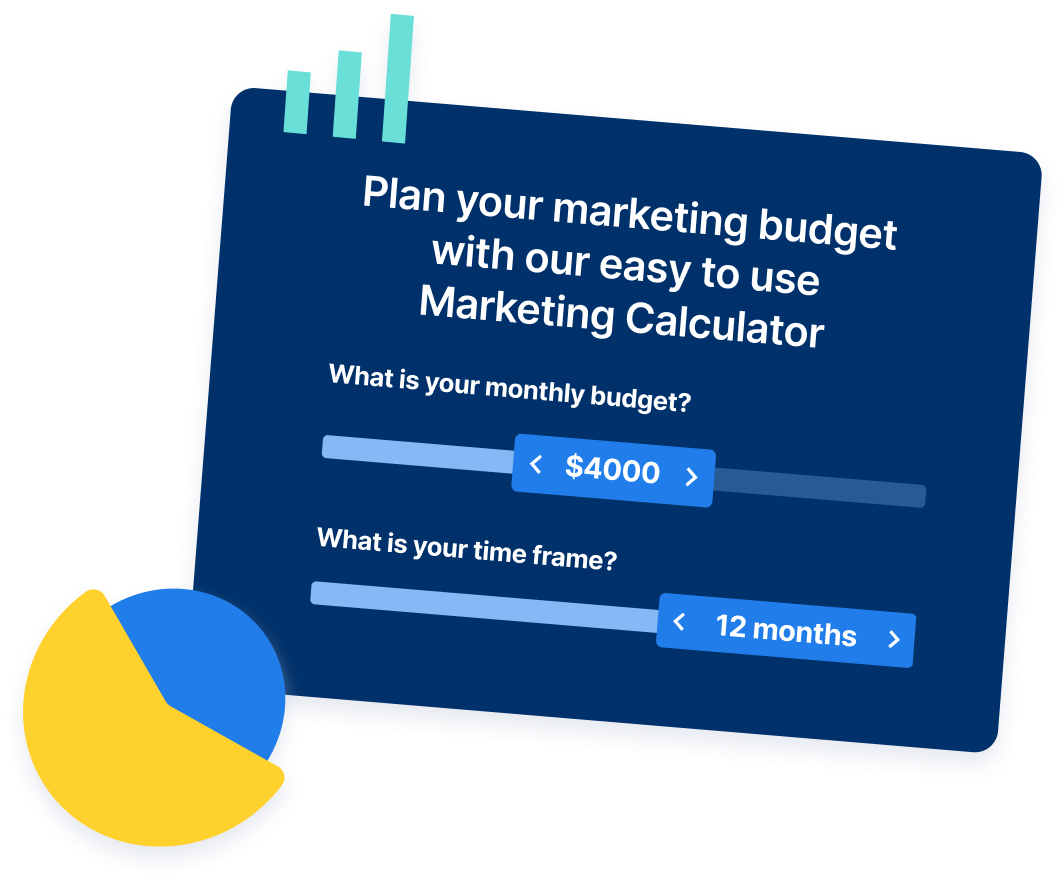
Table of Contents
- Foundations
- PPC definition and basics
- PPC platforms and channels
- How PPC works
- Ad formats and components
- Keywords and targeting
- Ad placement and visibility
- Execution
- PPC landing pages
- PPC tools and technology
- Optimization and performance
- PPC metrics and analytics
- PPC costs and budgeting
- Advanced and support
- PPC services and agencies
- Put these PPC answers to use in your own advertising strategy
Share this article



Proven Marketing Strategies
Try our free Marketing Calculator
Craft a tailored online marketing strategy! Utilize our free Internet marketing calculator for a custom plan based on your location, reach, timeframe, and budget.
Plan Your Marketing Budget